Tango: Live Stream, Video Chat
- 332.38K
- 4.3
- Installs
- 100.00M
- Price
- Free

Screenshots
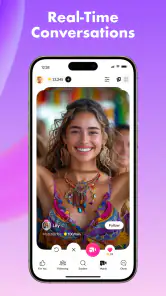
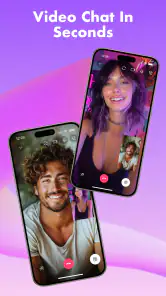
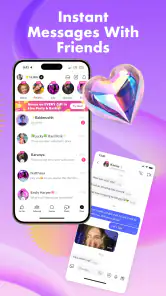
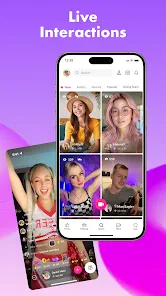
Analysis by Reviewed
I tend to judge a social app less by how many things it promises and more by what happens when I try to use it in an ordinary moment: can I find something worth watching, start a conversation without overthinking it, and leave when I’ve had enough? Tango: Live Stream, Video Chat is built around live broadcasts and real-time contact, so it feels more immediate than a feed designed mainly for posting and scrolling. That immediacy is its appeal, but it also means the experience depends heavily on who is live and how comfortable you are meeting people on camera.
Where new users can get stuck
The first hurdle is not necessarily signing up; it is deciding what to do once you arrive. Tango puts live interaction at the center, and browsing can lead you into streams that vary widely in topic and style. If you open it expecting a quiet, carefully organized library of videos, the live-first feel may seem busy. I find it works better to treat the first visit as a quick tour: watch for a little while, notice which kinds of broadcasts appeal to you, and only then decide whether you want to join a chat or start one yourself.
That distinction matters because watching and participating are different kinds of social energy. You can enjoy a stream without becoming part of it, while a video conversation asks for more attention and personal involvement. If you are trying the app during a short break, browsing is the lower-pressure choice. If you have time and feel comfortable talking, a direct conversation can be a more personal way to meet someone.
Small setup checks that save frustration
Before starting a broadcast or video chat, I would check the basics that commonly affect live communication: whether the device has a stable internet connection, whether the app is current, and whether the camera and microphone work as expected on the phone. These are simple checks, but they help separate an app problem from a weak connection or a device setting that is blocking audio or video. Tango’s current version is 9.47.6, and it supports devices running Android 8.0 or later.
It also helps to decide what you are comfortable sharing before you go live. A broadcast can feel casual, but viewers may be people you do not know. I would avoid showing identifying details in the background or giving out personal contact information in the moment. The app is rated Mature 17+, which is a useful reminder that this is not a children’s social space; age-appropriate judgment and boundaries still matter.
How I would recover from a rough session
If a stream stalls or a call feels awkward, I would not assume that the whole service is broken. First, leave the session and try another stream or conversation; a single connection can be the issue. If the problem repeats, close and reopen the app, check the connection, and try again when the network is more reliable. For a social app built around live video, even a brief interruption can make a conversation feel clumsy, so it is sensible to have a simple fallback: switch to browsing, or come back later rather than forcing a frustrating call.
There is also a social reset worth using. If someone’s behavior makes you uncomfortable, end the interaction instead of feeling obliged to explain yourself or stay polite. Explore the available privacy and contact settings before you need them, so you know where to make adjustments. I would treat live chat as a way to meet people, not as a reason to share more than I would with a stranger in any other setting.
More From Our News Desk

Weather by Xiaomi Review: Clear at a Glance, Less Clear Up Close

X Under Pressure: Can It Recover When Posting Goes Wrong?

Clash of Clans Is Won Between the Battles

Android Auto Makes the Case for Quieter Car Software

MobiOffice: Transforming Mobile Productivity with Seamless Integration

EA SPORTS FC™ Mobile Soccer: Redefining Mobile Sports Gaming
When the issue may be the format, not the app
Live platforms can feel inconsistent because their content changes with the people who happen to be online. A quiet stretch does not necessarily mean there is nothing to do, and a busy stream is not automatically a good fit. If you prefer edited clips, predictable topics, or conversations only with people you already know, a conventional video service or a familiar messaging app may suit you better. Tango makes more sense when you want discovery and spontaneous interaction, and when you are willing to choose your own level of participation.
It is also worth thinking about cost before using gifting features. Tango is free to download, but it offers in-app purchases, with items ranging from about 29 cents to around $999.00. I would browse and learn how the experience works before spending anything, and set a personal limit if you decide to buy virtual gifts. The feature can make appreciation visible, but it is optional; enjoying a stream does not require turning every interaction into a purchase.
What’s Tango All About?
First things first, Tango: Live Stream, Video Chat is a social media platform that allows you to broadcast yourself live, chat with people in real-time, and even make friends from different corners of the globe. The app is available on both Android and iOS, so you’re covered no matter what device you’re using.
The concept is pretty simple: you can go live, and anyone using the app can watch and interact with you. It's like having your own personal TV channel where you get to be the star. And if you’re more of a viewer, you can browse through countless live streams and find something that piques your interest.
Getting Started with Tango
Jumping into Tango is super easy. The app has a straightforward registration process, and you can link it to your social media accounts for quick access. Once you're in, the interface is user-friendly, with options to explore live streams, start your own broadcast, or join video chats.
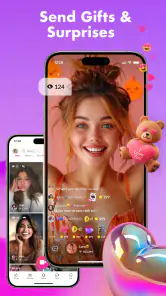
The app also offers virtual gifts that you can send to broadcasters you like. It’s a fun way to show appreciation, and who doesn’t like receiving a little virtual love? Plus, broadcasters can earn real money from these gifts, which adds a nice incentive to put on a good show.
Features That Stand Out
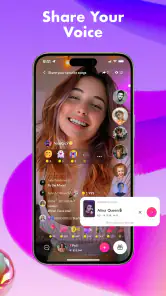
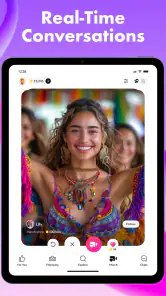
Now, let’s talk about some of the standout features of Tango. One of the coolest things is the ability to join or create live streams. Whether you’re into music, cooking, gaming, or just chatting, there’s a place for you on Tango. The live interaction feature is also a blast. You can chat with viewers, respond to questions, and even invite them to join you on screen.
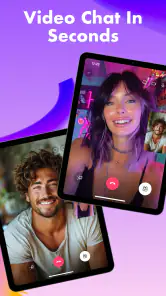
The app also includes a video chat feature that allows you to have private conversations with friends or strangers. It’s a great way to get to know people on a more personal level. And if privacy is a concern, Tango's got you covered with various settings to control who can see your broadcasts and who can contact you.
Why You Might Love It
One of the reasons I personally enjoy Tango is the sense of community it creates. It’s fascinating to see how people from different cultures come together, share experiences, and learn from each other. It’s like a global village right at your fingertips.
Another plus is the app’s performance. Streaming quality is generally smooth, and the app runs well without too many hiccups. The developers seem committed to keeping things fresh with regular updates and new features, which is always a good sign.
A Few Things to Keep in Mind
While Tango is a lot of fun, it’s important to be mindful of your privacy and safety. The app has measures in place to protect users, but it’s always wise to be cautious about the information you share and the people you interact with.
Additionally, while the app is free to use, some features may require in-app purchases. If you’re planning to send a lot of virtual gifts, keep an eye on your spending.
Who will get the most from it?
I can see Tango working especially well for someone who enjoys being part of a live moment rather than simply consuming polished posts. A musician might use a casual broadcast to play for whoever drops in; a viewer might put on a stream while winding down and contribute a comment when something catches their attention. For a realistic everyday use, imagine having twenty minutes free after dinner: you can browse a few live sessions, stay for one that feels welcoming, and leave without needing to arrange a whole event in advance.
It is less suited to someone who wants a tightly controlled circle or predictable, one-to-one messaging as the main experience. In that case, a standard messaging app is usually easier because it starts with people you already know. A conventional video platform is a better fit if you mainly want searchable, edited content. Tango’s trade-off is discovery: there is a chance of an unexpected conversation, but the live mix can also be uneven, and you have to choose carefully where to spend your attention.
A practical way to use the social features
One useful approach is to separate exploring from performing. When you first open the app, spend a session as a viewer and pay attention to the tone of different broadcasts before starting your own. If you decide to go live, choose a simple topic you can comfortably talk about even if the audience is quiet; that avoids relying on constant comments to keep the session moving. When you join someone on screen, keep the conversation light until you have a better sense of the person and the setting.
Gifting deserves the same deliberate approach. I would treat it as an optional tip of appreciation, not a ticket to attention or a measure of whether a broadcaster values the audience. Because purchases can range from very small amounts to a substantial outlay, it is wise to check the item and total before confirming anything. If you only want to chat or watch, you can do that without making gifts part of your routine.
How established is the service?
Tango is a social app from developer Tango, released in 2010. It is free, rated 4.3 on average across around 4.8 million ratings, and has passed 100 million installs; those figures suggest a large audience, though they do not guarantee that every stream will match your interests. The volume of feedback also makes it clear that this is a long-running service rather than a small, newly launched experiment. I would still judge it by the conversations and content I actually find, not by popularity alone.
If you are wondering whether it is worth trying without spending, yes: the core idea is accessible as a free app, while purchases are an optional part of the experience. If you are deciding whether it is appropriate for a younger family member, the Mature 17+ rating means I would not treat it as a general-purpose youth chat app. And if a call fails, basic connection and device checks are a sensible first move; if the issue persists across sessions, stepping away and trying later is more useful than repeatedly forcing a live conversation.
My practical verdict
Overall, Tango: Live Stream, Video Chat is a lively option when I want spontaneous broadcasts, casual discovery, or a chance to talk with people beyond my existing contacts. Its strongest point is the blend of watching and participating, while its main trade-offs are the unpredictable nature of live content, the need to manage personal boundaries, and the temptation to spend on gifts. I would recommend it to adults who are comfortable with open-ended social interaction and happy to browse until they find a good fit. If you prefer quiet, private, familiar conversations or a carefully curated viewing experience, another kind of app will probably feel more natural.
Tango: Live Stream, Video Chat Frequently Asked Questions
Does Tango require a newer phone, and what should I check for compatibility?
Before downloading, check your device’s operating system against Tango’s minimum requirement. Android users need version 8.0 or later. The app is available on both Android and iOS, and checking compatibility first can help avoid installation problems. Also make sure you are comfortable using live video and chat features on your device before creating an account.
What kind of experience does Tango offer compared with a standard messaging app?
Tango is a social app centered on live content and real-time interaction rather than only text-based messaging. Its store summary highlights live chat, matching, dating, and making friends, while the app also includes live streams and video chats. That makes it a better fit for people interested in meeting others through more immediate, participatory conversations.
Will I need to appear on camera to use Tango’s social features?
Tango includes video chat and live streaming, but users can also participate by watching broadcasts and interacting with broadcasters. You do not need to make broadcasting your main activity to explore the app. If you are unsure about appearing on camera, begin by browsing and decide for yourself whether you want to take part in video conversations or create live content.
Can I use Tango just to meet people with similar interests?
Tango is designed for social connections through live chat, video interaction, and community activity. Users can explore broadcasts and choose which conversations or creators to follow, which can be a way to discover people they enjoy interacting with. As with any social platform, approach new connections thoughtfully, keep personal boundaries in mind, and avoid sharing sensitive details too quickly.
What should I check before creating a Tango account?
Before joining, consider what you want from a social app and what information you are comfortable sharing. Tango brings people together through live chat and video interaction, so conversations can feel immediate and personal. Review the app’s permissions and privacy options during setup, choose account details carefully, and take a moment to understand the available controls before engaging with other users.
Pros
- High-quality video streaming available.
- Interactive chat with global users.
- Engaging live performance features.
- User-friendly interface design.
- Frequent updates enhance functionality.
Cons
- Consumes a lot of mobile data.
- Requires strong internet connection.
- In-app purchases can be costly.
- Notifications can be overwhelming.
- Limited features for free users.
- Category
- Social
- Version
- 9.47.6