Infinite Design
- 2.10K
- 4.2
- Installs
- 10.00M
- Price
- Free

Screenshots
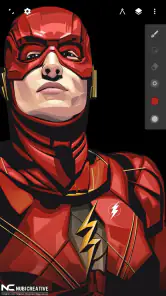
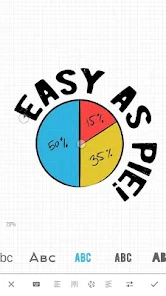
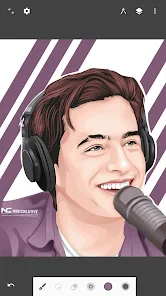
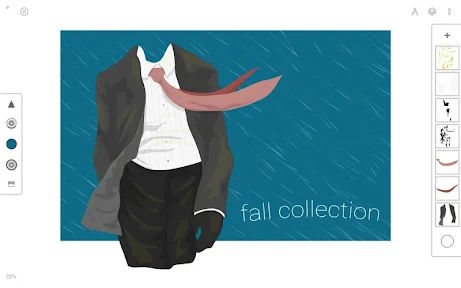
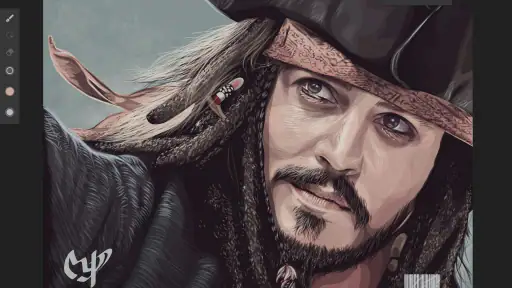
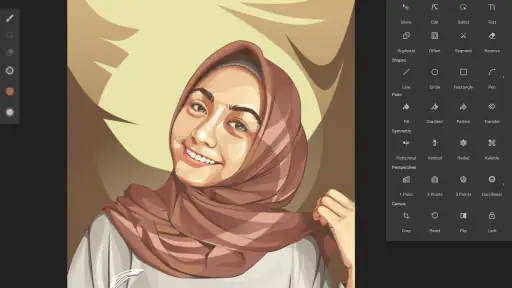
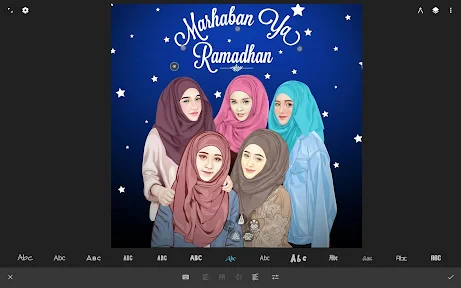
Analysis by Reviewed
I found Infinite Design most rewarding when I treated it as a place to build clean, scalable artwork rather than as a quick replacement for every kind of drawing app. If you’re opening it for the first time, there’s no need to have a finished idea ready: a simple icon, badge, or lettering sketch is enough to learn how the canvas and tools fit together. It’s a free art and design app from Infinite Studio LLC, and its focus on vector work gives it a different feel from apps built mainly around painting.
That distinction matters in everyday use. A vector illustration is made from editable shapes and paths, so you can adjust edges and proportions instead of relying only on a fixed grid of pixels. I’d reach for this approach when making a logo draft, a crisp sticker design, or a simple diagram that may need resizing later. For a loose watercolor-style study or a quick note with a pencil brush, a painting-focused app may feel more natural.
Getting Started with Infinite Design
The first thing that caught my eye about Infinite Design is its user-friendly interface. Whether you're a seasoned artist or a newbie just diving into the world of digital design, the app makes it easy to navigate through its features. The setup process is straightforward, and you'll find yourself sketching away in no time.
For a first session, I’d keep the goal deliberately small: make a two-color symbol with a few basic shapes, then change its proportions and move the pieces around. That gives you a useful feel for selection and editing before a project becomes crowded. The app is rated for Everyone, runs on Android 9 or later, and is currently at version 3.5.9, so it’s worth checking your device’s software before planning a larger project.
One of the standout features for me is the infinite canvas. Yeah, you heard that right! You can zoom in or out as much as you want without worrying about running out of space. This feature is a game-changer, especially if you love adding intricate details to your work. It’s like having a limitless piece of paper at your disposal.
Tools and Features
Infinite Design offers a plethora of tools that cater to both vector and raster graphics. It’s packed with a variety of brushes, shapes, and layers that allow you to experiment and refine your art. The symmetry tool is particularly fun to play around with, making it easier to create perfectly balanced designs.
A practical way to use symmetry is to block out a small emblem or ornamental motif, then switch back to ordinary drawing for the details that should look less mechanical. I also recommend keeping a reference image separate from the artwork you’re constructing: that makes it easier to compare proportions without accidentally treating the reference as part of the finished design. When a piece starts to feel busy, temporarily simplifying the layers can make it easier to see whether the silhouette works before you spend time polishing edges.
You May Like

Clash of Clans Is Won Between the Battles

Android Auto Makes the Case for Quieter Car Software

MobiOffice: Transforming Mobile Productivity with Seamless Integration

EA SPORTS FC™ Mobile Soccer: Redefining Mobile Sports Gaming

How Microsoft OneDrive Became a Mobile Productivity Giant

How Google Translate Breaks Language Barriers Effortlessly
Another cool feature is the ability to import images and use them as part of your design. This makes it super easy to integrate existing artwork or reference photos into your projects. Plus, the app supports high-resolution exporting, which is a must for those who want to print their designs or share them on professional platforms.
For an everyday example, I might import a photo of a hand-drawn motif, use it as a guide to build a cleaner version, and then export the result for a mock-up or a post. I’d check the artwork at both a close zoom and a smaller viewing size before exporting: details that look tidy up close can become cluttered when the design is reduced. If the destination has strict file or color requirements, I’d verify those separately rather than assuming a mobile export will match a print workflow automatically.
Performance and Usability
I was pleasantly surprised by how smoothly Infinite Design runs on my device. It doesn’t lag, even when working on complex projects with multiple layers. The app developers have clearly put a lot of effort into optimizing performance, which is something I always appreciate in a mobile app.
That said, a roomy canvas can tempt you to keep adding detail, and a growing layer stack takes more attention to manage. I’d name or organize layers as a project develops, rather than waiting until every element overlaps; it is much easier to find a background or a small accent when you can identify it quickly. On a phone, precision work can also feel cramped compared with a larger screen, so I’d save intricate path adjustments for a device and moment when you can work comfortably.
Usability-wise, the app is quite intuitive. The learning curve is gentle, and there are plenty of tutorials available if you ever find yourself in need of some guidance. I particularly love how responsive the app is to touch gestures, making it feel like a natural extension of your creativity.
The main adjustment for newcomers is learning to think in editable components instead of treating every mark as a finished brush stroke. If a curve looks slightly off, revise its shape before adding decoration; if the composition feels unbalanced, move the larger forms first. That order of work keeps a small design manageable and helps the app’s vector-oriented tools make sense without requiring you to master everything at once.
Making the First Project Feel Manageable
When I’m new to a design tool, I want to know what a successful first result actually looks like. Here, I’d aim for a badge made from a background shape, one central symbol, and a short word or initials. Start with the silhouette, choose just a couple of colors, and keep the detail modest. The point isn’t to make something portfolio-ready; it’s to learn how selection, zooming, layers, and shape adjustments work together.
One useful habit is to pause before refining every edge and view the design at a reduced size. If the symbol still reads clearly, the structure is doing its job. If it turns into a muddle, simplify or enlarge the important forms rather than adding more detail. This small check is especially helpful for icons and stickers, where a design that looks impressive close up may lose its character when used at a smaller size.
For a practical routine, I’d make a rough version first, then duplicate the idea mentally rather than committing to tiny refinements too soon: try a different proportion, move the focal shape, or test a second color arrangement. Comparing those alternatives helps me decide what the design needs before I invest time in polishing. The open canvas encourages exploration, but a clear stopping point keeps that freedom from turning into endless tweaking.
Where It Fits Among Drawing Apps
Compared with a basic sketching app, this one makes more sense when the result needs to stay crisp and adjustable. Shapes and paths suit logos, simple diagrams, lettering experiments, and repeated decorative elements better than a workflow built around painting each mark onto a fixed image. For a fast visual note or expressive brush study, though, a simpler painting app may get out of the way more quickly.
It also occupies a different middle ground from desktop design software. Working on a phone or tablet makes it convenient to sketch ideas wherever I am, and the canvas can support careful refinement. But if a job depends on a tightly specified production workflow, specialized desktop tools may be a better fit. I see this as a strong place to create and develop vector artwork, not a reason to assume every professional handoff can be handled identically on mobile.
The blend of vector and raster tools is useful, but it can also make the app feel less straightforward than a single-purpose drawing tool. If you’re unsure whether you need vector editing, ask what you expect to change later. If you’ll be reshaping outlines or resizing an illustration, editable vector work is worth learning. If you just want to paint a shaded scene, the extra structure may feel like friction rather than a benefit.
Common Points of Confusion
A large canvas can make it easy to lose your sense of where the main artwork sits. I’d zoom out regularly and keep the composition grouped visually around a clear focal area, even if there’s plenty of room to explore beyond it. Unlimited working space is freedom, not a requirement to fill every corner. A deliberate frame within the canvas makes a design easier to judge and share.
Another beginner trap is trying to perfect details before deciding how the layers relate. If an element seems to disappear, check the layer arrangement and simplify the composition before redrawing it. Keeping the background, main forms, and small accents distinct gives you room to move or revise pieces without disturbing everything else. This matters most once a project grows past a handful of shapes.
Imported imagery is best treated as a guide or ingredient, not automatically as a finished part of the artwork. When I’m tracing a hand-drawn idea, I’d compare the new vector lines against the reference at a useful zoom, then inspect the clean version without the reference competing for attention. That makes it easier to spot uneven curves and accidental clutter. Before sharing, I’d also check that the exported result looks right at the size and destination I have in mind.
Who Will Enjoy It—and Who May Not
I’d recommend it to beginners who want to move from casual doodles toward more deliberate graphic work, as well as to experienced artists who want to sketch scalable ideas away from a desktop. A small-business owner could use it to rough out a badge or social graphic; a student could build a clean diagram; and someone who enjoys ornamental drawing can use symmetry to establish a balanced base before adding personal details.
It’s less suited to someone who only wants a quick, friction-free painting surface or who finds layer-based editing distracting. A phone screen can make precise adjustments feel fiddly, especially during longer sessions, so anyone planning detailed work should consider how comfortably they can draw on their device. And if you need a very specific print-production process, choose a tool designed around those requirements rather than relying on a mobile workflow without checking the output.
For a realistic everyday use, imagine you’ve sketched a small symbol on paper during a break and want to clean it up before sharing it with a friend. Import the sketch as a reference, build the main shapes over it, use symmetry if the design is balanced, and then inspect the result at both close and reduced views. That’s a satisfying, contained project: it gives you a real reason to use the tools without demanding a long, complicated illustration.
Final Thoughts
All in all, Infinite Design is a powerhouse of an app for anyone interested in digital art. Whether you're creating intricate illustrations or just doodling for fun, this app offers a robust set of tools to bring your visions to life. It's definitely worth checking out if you're a fan of mobile design apps.
Its standing among art and design apps is strong: it has a 4.2 average from around 93,000 ratings and more than 10 million installs. Those figures suggest a well-established audience, though they don’t tell you whether its workflow will suit your hand. I’d choose it over a basic sketching app when clean, adjustable shapes are the point; I’d choose a simpler drawing tool when I mainly want to paint freely without thinking about structure.
The app is free to install, with optional in-app purchases priced from $1.99 to $7.99 per item, so I’d start with a small personal project and decide whether the tools fit before spending anything. It has been available since September 19, 2011, and has 2,100 written reviews alongside its larger rating count. For someone who enjoys building artwork piece by piece, that established history is reassuring, but it doesn’t remove the need to test the controls on your own device.
So, go ahead, give it a try and unleash your creativity. Who knows, you might just create your next masterpiece!
Infinite Design Frequently Asked Questions
Can I use Infinite Design without paying?
Infinite Design is free to download, so you can try the app without paying upfront. It also offers optional in-app purchases, with individual items ranging from $1.99 to $7.99. If you plan to rely on particular tools, review the purchase options in the app before committing to a workflow; you can first explore what is available without a purchase.
Is Infinite Design available on Android and iOS?
Infinite Design is a mobile app for Android and iOS, intended for drawing and editing on a phone or tablet. Before downloading, check the app’s compatibility with your device and operating system. The minimum operating system requirement is 9, and the current version is 3.5.9, so confirming compatibility first can help avoid installation issues.
Who develops Infinite Design, and is it a dedicated art app?
Infinite Design is an art and design app developed by Infinite Studio LLC. Its focus is creating graphics and illustrations on mobile devices, with vector editing among its central capabilities. The app’s store summary describes it as “The only serious vector graphics app on mobile,” which gives a useful sense of its intended audience: people who want to make and edit artwork rather than use a general-purpose photo viewer.
What is Infinite Design and what can I use it for?
Infinite Design is a versatile and feature-rich graphic design app tailored for artists and designers who want to create professional-grade illustrations and artworks on their mobile devices. With a wide array of tools, including vector editing, layer-based illustration, and perspective guides, it is ideal for both beginners and seasoned artists looking to craft intricate designs or simple sketches.
Is Infinite Design suitable for beginners?
Yes, Infinite Design is suitable for beginners as it offers an intuitive and user-friendly interface. The app provides helpful tutorials and guides that make it easy for newcomers to start creating artwork. Despite its simplicity for beginners, it also hosts advanced features that can cater to the needs of professional designers, making it a versatile choice for all skill levels.
Pros
- Intuitive user interface for easy navigation
- Advanced tools for professional-grade designs
- Supports vector graphics for scalability
- Layer system allows detailed editing
- Regular updates with new features
Cons
- Can be resource-intensive on older devices
- Limited tutorials for beginners
- Premium features locked behind paywall
- Occasional bugs in complex projects
- No cloud save option for projects

- Category
- Art & Design
- Version
- 3.5.9












