HP Smart
- 33.88K
- 4.2
- Installs
- 100.00M
- Price
- Free

Screenshots
Analysis by Reviewed
Printing from a phone can be wonderfully convenient, but it also means choosing an app that sits between your documents and your printer. That’s the question I’d start with before installing HP Smart: not just whether it can send a page to print, but whether its all-in-one approach suits the way you handle files. I like having setup, printing and support gathered in one place, though I’d still take a moment to review the choices shown during setup and decide which connected services I actually want to use.
Who benefits from a printer-focused app
This productivity app is most useful if an HP printer is already part of your home, school or small-work routine. It can save the detour through a computer when you need a document quickly, and it gives you a phone-based way to handle jobs when you are away from your desk. HP Inc. has kept the central idea practical: your phone becomes a companion to the printer rather than a replacement for every document tool you use.
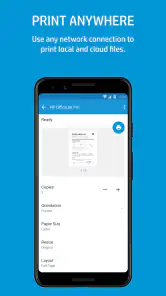
A realistic example: I might be heading out and realize I need a paper copy of a form saved in a cloud account. Opening it from the phone, checking that the right file is selected, and sending it to the printer is a more direct workflow than forwarding it to myself and finding a laptop. For a one-off print, that convenience matters. For a long report where page layout needs careful inspection, I would still prefer a computer, where it is easier to review the whole document before committing paper and ink.
Small workflow choices that make a difference
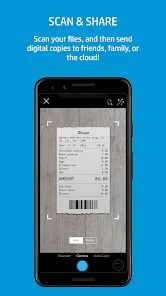
Scanning with a phone camera is handy for a receipt, a signed page or a note that needs to be shared quickly. I’d place the paper on a plain, contrasting surface, keep the phone square to the page, and inspect the crop before saving or sending the result. That quick check is worthwhile: camera scans can capture shadows, curled corners or background clutter, and automatic cleanup cannot fix every awkward original.
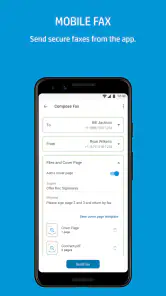
Ink monitoring is useful as a planning cue, not a guarantee that a cartridge will last through every job. If I were printing something time-sensitive, I’d check the level first and avoid assuming that a warning will arrive at exactly the right moment. The same practical mindset applies to faxing: it can help when a recipient still requires a fax, but it is unnecessary friction if both sides accept a regular digital document.
How it compares with general document tools
Compared with a basic mobile printing option or a printer’s built-in system tools, HP Smart’s appeal is having printer setup and document tasks in one HP-centered app. That can be simpler than switching among separate apps for scanning, printing and support. The trade-off is that its value is tied to using an HP printer; if you print across several brands, a broader printing utility or the manufacturers’ own apps may fit better. And if your work is mainly editing, signing or organizing documents, a dedicated document app is likely to offer a more focused experience.
Trust, choice and everyday limits
The app is free, rated for Everyone, and has a 4.2 average from around 856,000 ratings, with over 100 million installs. Those figures show that it is widely used, but popularity alone is not a reason to grant access or connect an account without thought. I’d pay attention to the permissions Android or iOS presents, connect only the services I need, and check the app’s visible account and privacy choices before adding documents or cloud storage. Those are sensible habits for any tool that handles personal files.
More From Our News Desk

Weather by Xiaomi Review: Clear at a Glance, Less Clear Up Close

X Under Pressure: Can It Recover When Posting Goes Wrong?

Clash of Clans Is Won Between the Battles

Android Auto Makes the Case for Quieter Car Software

MobiOffice: Transforming Mobile Productivity with Seamless Integration

EA SPORTS FC™ Mobile Soccer: Redefining Mobile Sports Gaming
There is also some setup friction to keep in mind. The experience depends on the printer being available and correctly connected, so the app cannot make an offline printer ready by magic. A phone-first workflow may feel less comfortable for detailed print settings, and using a camera for scans is not ideal when you need perfectly flat, repeatable results. If you rarely print or do not own an HP printer, the space and setup are hard to justify; your phone’s built-in document tools may be enough.
The current version is 20.1.2.5988, and the app has been available since November 21, 2012. I would treat it as a useful companion rather than an essential document hub: install it when its printer-specific shortcuts solve a real chore, then keep the workflow limited to the features you actually use. For an HP owner who prints or scans now and then, that balance can be worthwhile. For everyone else, choosing a tool around the printer and document habits they already have is the more sensible call.
Seamless Integration with Your Devices
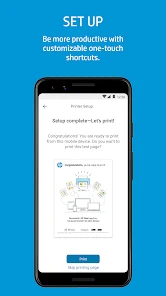
One of the best features of this app is how effortlessly it connects with your HP printer. Whether you’re using an Android or iOS device, setting up is a breeze. I remember thinking, “This is too easy, there’s gotta be a catch.” But nope, it’s genuinely straightforward. As soon as you open the app, it guides you through the setup process with clear instructions. It's like having a tech-savvy friend there to help you out.
Beyond Just Printing
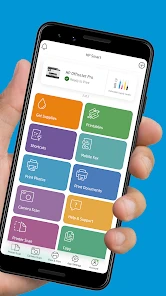
Now, let's talk about the features that go beyond just printing. First off, the app allows for easy scanning. You can scan documents and photos using your phone’s camera, and the app does a pretty solid job of cleaning up the image for a professional look. Need to make a few adjustments? No problem. The editing tools are intuitive and give you options to tweak as needed.
Another highlight is the app’s ability to send faxes. Yeah, believe it or not, faxing is still a thing, and HP Smart makes it simple. No more hunting down a fax machine or dealing with clunky interfaces; just snap a pic, enter the fax number, and off it goes. It’s all about making life easier, right?
User-Friendly and Intuitive
One of the things I appreciate most is how user-friendly the app is. The interface is clean and straightforward, not cluttered with unnecessary buttons or confusing options. Whether you’re tech-savvy or not, navigating through the app feels like second nature. Plus, it's packed with little touches that make a big difference—like the ability to monitor your ink levels. No more running out of ink mid-print job!
And let’s not forget the cloud integration. With support for Google Drive, Dropbox, and more, accessing your documents wherever you are has never been easier. This is particularly handy when you need to print something on the fly and your laptop is miles away.
Conclusion: A Must-Have for HP Users
In a world where convenience is king, HP Smart stands out as a must-have app for anyone with an HP printer. It’s not just about printing; it’s about creating a seamless experience where your phone becomes a powerful tool for managing documents. Whether you're a student, a professional, or just someone who likes to keep things organized, this app is a gem.
If you haven’t tried it yet, I’d say give it a shot. It might just change the way you think about printing and managing your documents. And trust me, once you’ve tried it, you’ll wonder how you ever managed without it.
Checking the setup before trusting a workflow
What I find useful about treating this as a printer companion is that setup is also the right moment to decide how much of the app I actually need. I would first connect the printer and test a simple page, then add any document source only when a real task calls for it. That keeps the first session focused: a printer connection does not automatically mean I need every available service or account option.
For anyone wondering whether an account is necessary, I would follow the prompts the app presents and distinguish basic printer setup from optional connected services rather than assuming they are the same thing. The practical question is whether a feature I want depends on signing in. If I only need to print a file already on my phone, I would avoid connecting an additional source just for the sake of completing every setup screen.
Handling documents with a little more care
Scanning a document is not the same as making it private or ready to share. Before sending a scan onward, I would check the visible content, crop out unrelated papers around it, and make sure the final page is legible at normal size. That matters especially for forms with addresses, signatures or account details: a quick camera capture is convenient, but a careless frame can include information I did not mean to pass along.
I would also separate the scan step from the sharing step. First create and inspect the image, then decide whether it belongs in a cloud account, should be printed, or simply needs to be sent through another service. That small pause gives me a chance to catch a bad crop or choose a more suitable destination. For a stack of documents or records that need consistent filing, a dedicated scanner workflow may be less fiddly than repeating phone captures.
Where the all-in-one approach earns its place
The clearest fit is a household or small office with one HP printer and a few recurring jobs: printing a school permission form, scanning a signed page, or checking supplies before producing a batch of handouts. Keeping those printer-related tasks together reduces the number of tools I need to open. It is less compelling for someone who mostly reads and edits PDFs, collaborates on documents, or prints from several different printer brands.
Compared with using only the phone’s built-in print controls, a printer-specific app can make setup and printer-related tasks easier to find in one place. The phone’s standard printing route may still be the better choice for an occasional page if it already discovers the printer and offers the options needed. I would not install another app merely to duplicate a workflow that is already reliable; the extra app makes sense when its scanning, supply checks or printer support solve a recurring inconvenience.
A sensible routine for occasional printing
For an everyday job, my routine would be simple: confirm the printer is online, choose the intended file, preview the result, and only then send it. If a page matters, I would print one test copy before sending a larger batch, especially when the source document has unusual formatting. This is a modest safeguard against wasting paper on a misplaced page or a layout that looked different on the phone than expected.
For a receipt or signed page, I would use the camera scan when speed matters and the document is flat, well lit and easy to frame. If the source is a book page, a fragile paper, or a multi-page set that must look uniform, I would choose a proper scanning setup instead. The phone method is a useful shortcut, not a universal replacement for a flatbed scanner or careful desktop review.
A measured recommendation
HP Smart has a 4.2 average from around 856,000 ratings and more than 100 million installs, and it is free to use. Those figures indicate that many people turn to it, but they do not tell me whether its particular printer workflow will suit yours. Its strongest case is straightforward: you own an HP printer, want to handle occasional printing or scanning from a phone, and prefer printer setup and related tasks in one place.
I would skip it if printing is rare, your printer already works smoothly through built-in phone controls, or you need a full document-management tool rather than a printer companion. I would also be cautious about sending sensitive paperwork through any connected workflow until I had reviewed the permissions and account choices shown on my own device. Used selectively, it can remove a few annoying steps; used as a universal document hub, it is easier to ask more of it than it is designed to provide.
HP Smart Frequently Asked Questions
Can I use HP Smart without owning an HP printer?
HP Smart is built around setting up and managing HP printers, so its main features are most useful when you have access to one. You can explore the app, but tasks such as connecting a printer, checking its status, and printing or scanning depend on a compatible HP device. If you are choosing an app for another printer brand, HP Smart is unlikely to be the right fit.
What should I check before installing HP Smart?
Before downloading, consider whether you use an HP printer and whether your mobile device can run the app. The Android version requires Android 10 or later, and the app is also available for iOS devices. HP Smart is free to download and is intended to bring printer setup, printing, scanning, and support together, so it is most relevant if those are tasks you expect to handle from your phone or tablet.
Is HP Smart free to download, and who is it for?
HP Smart is free to download and is intended for everyday printer tasks, including setup, printing, scanning, and support. It is a productivity app from HP Inc., and its Everyone content rating makes it suitable for a broad audience. The app is most useful if you own an HP printer and want to manage common printing tasks from a mobile device.
What is HP Smart, and what can it do for me?
HP Smart is a comprehensive app designed to enhance your printing experience by allowing you to manage, monitor, and optimize your printing tasks from your smartphone or tablet. With HP Smart, you can easily set up new HP printers, print documents and photos, scan files, and access printer information and status. The app also supports various cloud services, enabling you to print from anywhere while offering tools for printer maintenance and supplies management.
Is HP Smart compatible with all HP printers?
HP Smart is compatible with a wide range of HP printers, especially those that are Wi-Fi enabled. However, it is essential to check the specific compatibility of your printer model with the HP Smart app by visiting the HP website or consulting the app's documentation. Generally, newer models tend to have full compatibility for an optimal experience, while older models might have limited support.
Pros
- User-friendly interface
- Easy setup process
- Multiple device support
- Cloud printing available
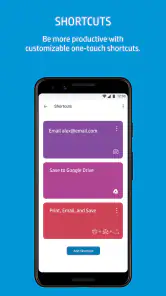
- Smart task shortcuts
Cons
- Requires HP account
- Occasional connectivity issues
- Limited free features
- Advertisements in app
- No offline mode
- Category
- Productivity
- Version
- 20.1.2.5988













