Lyft
- 150.90K
- 4.8
- Installs
- 50.00M
- Price
- Free

Screenshots
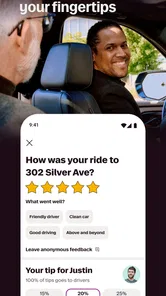
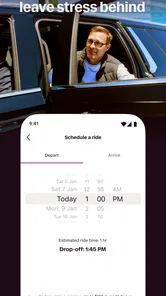
Analysis by Reviewed
When I’m deciding whether to request a ride, convenience is only part of the question. I also want to know what I can check before getting in, how much control I have over the trip, and whether the app fits the way I actually travel. Lyft is a free ride-hailing app from Lyft, Inc., in the maps and navigation category. It has a 4.3 average from around 535,000 ratings and more than 50 million installs, which makes it a well-established option, though popularity alone does not tell me whether it suits every journey.
Trust starts with the choices you can see
My cautious approach is to treat a ride request as a series of decisions rather than a single tap: check the trip details, make sure the pickup point is right, and confirm the ride only when I’m ready. That habit matters most when I’m in a busy place or arranging a ride for someone else. I would not assume any app can remove the need to pay attention to the car and driver details presented for a trip.
That is also how I think about trust in a ride service. I look for information that helps me make a decision at the moment it matters, rather than treating the app’s familiar name or large audience as a substitute for judgment. Before I get in, I want the ride I requested to make sense in the context of where I am going and where the driver has arrived. If anything looks inconsistent, I would pause and resolve it instead of rushing because a car is waiting.
Before requesting, make the pickup workable
A useful step is to choose a pickup spot that is easy for a driver to reach, not merely the closest point on the map. At a crowded venue, a nearby side street or clear landmark can be less confusing than waiting at a main entrance with several lanes of traffic. I also like to pause before confirming and check that the destination and pickup pin match what I intended; a small correction before the ride is simpler than explaining a bad location after the car arrives.
One practical wrinkle is that the pin and the place where I can safely wait are not always the same thing. A map can make a curb look accessible even when it is blocked, busy, or awkward to approach on foot. I try to choose a spot I can describe clearly and reach without crossing traffic. If I am leaving a large building, I give myself time to get outside and orient myself before requesting, rather than placing the pin while still indoors and hoping the handoff will sort itself out.
Everyday trips, and when another option wins
For a late appointment across town, a ride-hailing app can be more practical than driving, finding parking, and walking back to the car. Lyft is especially useful when I want a direct trip without planning a route through several transit connections. On the other hand, for a predictable commute with a convenient bus or train, public transit may be cheaper and more consistent. If I need to carry bulky items, travel with a group, or cover a rural route, I would compare the available choices before relying on a car being nearby.
A realistic use case is getting home after an evening plan when the last part of the trip is inconvenient by transit. I would check the pickup location while I still have a calm moment, confirm the destination, and avoid waiting at an unclear entrance. For a regular weekday commute, I would compare Lyft with a transit route or my usual local alternative instead of assuming a car is the easiest choice every day. A taxi may be more practical where street hails or local dispatch are dependable, while walking or cycling can win for short distances when the route is comfortable.
More From Our News Desk

 Gmail
GmailGmail in a Busy Inbox: Who Benefits Most?
From first account to crowded workday, Gmail earns its place through dependable search and flexible sorting—but its best fit depends on how much inbox maintenance you can tolerate.

 Prime Video
Switching to Prime Video: What Changes in Your Viewing Routine
Prime Video can make a compelling second home for streaming, but switching means learning a different catalog, rental layer, and route from browsing to playback.

 Universal TV Remote Control
Universal TV Remote Control Works Best as a Reliable Backup
A phone remote earns its place through quick setup and reliable habits. Here is how to get more from Universal TV Remote Control—and where its limits show.

 Weather - By Xiaomi
Weather by Xiaomi Review: Clear at a Glance, Less Clear Up Close
Xiaomi’s weather app makes everyday forecasts quick to scan, but its calm surface can leave useful details and recovery paths harder to find than they should be.

 X
XX Under Pressure: Can It Recover When Posting Goes Wrong?
A resilience-focused review of X, examining setup, mistaken posts, interruptions, weak connections, and the gaps that matter when recovery needs to be dependable.

 Clash of Clans
Clash of Clans Is Won Between the Battles
Its raids are quick; its community is a long-term project of coordination, teaching, rivalry, and shared responsibility—with all the friction that entails.
Latest News



What the app can and cannot settle for you
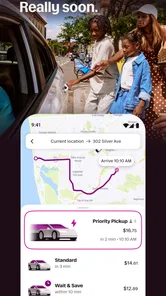
Lyft’s store information describes matching riders with nearby drivers, but the experience still depends on local availability and the circumstances of the trip. “In minutes” is not a guarantee I would plan around when timing is critical. I’d leave extra time for an airport run, a medical appointment, or an event with a fixed start, and have a backup plan if a suitable ride does not appear promptly. That is sensible for any on-demand service, not a reason to treat the app as a scheduled transport service.
For a trip where being late would create a real problem, I would decide on the fallback before I request the ride: for example, whether I can use transit, call a local taxi, or ask someone to drive. That small bit of planning keeps me from treating a nearby-driver match as certainty. It is particularly useful when travelling from a less central location, where the convenience of a direct car ride can depend more heavily on what is available at that moment.
Using Lyft with a little more confidence
The app is free, rated for Everyone, and its current version is 2025.46.3.1764141525, with Android support from OS 9. It was released on August 28, 2012, and has built a substantial audience over time. Those details make it easy to assess basic compatibility, but I’d still check that my own phone can run the current app before depending on it for an important trip.
Easy-Peasy Setup
Getting started with Lyft is as smooth as a Sunday morning. Download the app, punch in your details, and voila! You’re ready to roll. The user interface is super intuitive, even for those who aren't tech-savvy. All it takes is a couple of taps, and your ride is on its way.
For someone trying it for the first time, I would set up the account before a rushed journey rather than while standing outside in bad weather or trying to make a connection. A little preparation gives me time to enter details carefully and get familiar with the request flow. The app is aimed at making a car request accessible, but the trip still depends on the phone, account, and local driver availability working together when I need them.
Riding in Comfort
Once your ride arrives, you’ll notice how neat and clean the cars are. Honestly, I’ve been in cleaner Lyft cars than my own vehicle! Drivers are courteous, and you can even chat with them if you’re feeling sociable. Or, if you’re like me on a Monday morning, sit back and enjoy the silence.
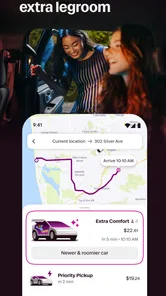
I would keep expectations flexible here: a ride-hailing app connects me with a driver, but the car and the interaction are part of an individual trip, not something I can assume will feel identical every time. If I have a particular need, such as extra room or a quiet ride, I should think about whether the available option shown for the trip actually fits before confirming. Convenience is valuable, but it does not mean every vehicle or journey will suit every passenger equally well.
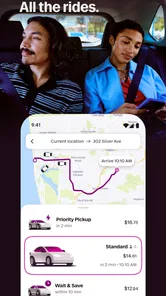
What’s really cool is the range of ride options. Whether you want to save a few bucks with a shared ride or splurge on a luxury car, there’s something for everyone. Plus, the real-time tracking feature lets you see exactly where your ride is, which is a massive stress-buster.
Tracking is most useful to me as a way to coordinate the pickup, not as a reason to stop paying attention. I can use the driver’s progress to avoid standing outside longer than necessary, then focus on the car and driver details when it arrives. When arranging a ride for somebody else, I would make sure they know the agreed pickup point and can identify the correct car themselves. That keeps the handoff clear without assuming that a moving marker alone proves everything is right.
Kicking It Green
If you’re environmentally conscious, you’ll be pleased to know that Lyft is making strides in sustainability. The app offers hybrid and electric vehicle options, and they’re big on reducing carbon footprints. It feels good to know you’re doing a bit for the planet while getting where you need to go.
For me, those options are worth considering when they are available for the trip, but I would not build a time-sensitive plan around a particular vehicle type appearing. If the environmental choice matters more than the direct ride, public transit, walking, or cycling may be a better fit for a suitable route. I see the vehicle choice as one factor in a broader travel decision, rather than a guarantee that every ride will have the same environmental impact.
Safety First
Safety is a top priority, and it shows. From the moment you book your ride, you’re in safe hands. The app features a robust safety toolkit with emergency assistance, 24/7 support, and real-time ride tracking. Plus, you can share your ride details with family or friends, so they know you’re safe and sound.
I would still treat visible controls as support for my own decisions, not as a replacement for them. I check the trip before entering, keep aware of the route and surroundings, and contact someone I trust if that would help me feel more comfortable. If I am travelling in an unfamiliar area, I also make a point of choosing a pickup location where I can wait safely and communicate clearly. That is a more useful habit than assuming that any safety feature can prevent every problem.
Data-sensitive moments and user agency
A ride request naturally involves information tied to where I am going and where I want to be picked up. Those details are sensitive in a practical, everyday sense: I would avoid sharing account access, review the trip before confirming, and be deliberate when arranging a ride for someone else. I would also look at the app’s own privacy and account settings when deciding what information I am comfortable providing. I don’t infer specific data practices from the fact that Lyft is a navigation app; I make my choices based on what the app actually presents to me.
The most useful form of control is often simple: I can decide when to request, verify the intended destination, and stop to reconsider if the details do not look right. If I am helping another person get a ride, I would tell them where to wait and make sure they are ready to identify the arriving car, rather than assuming that my request alone solves the coordination. These small choices give me more agency without relying on claims about account tools or privacy controls that I have not checked directly.
For a privacy-conscious rider, the sensible routine is to use only the information needed to arrange the journey, pay attention to what the app asks for, and review its current settings and notices personally. I would not enter sensitive details casually just because the request flow feels quick. Likewise, I would avoid leaving a trip open on a shared phone or handing over account access as a shortcut. The point is not to be alarmed; it is to make an informed choice at the moments when location and identity matter.
Ease on Your Wallet
Let’s talk money because who doesn’t love saving a buck or two? Lyft offers competitive pricing, and there are always promotions or discounts up for grabs. You can even split the fare with friends directly from the app, making it super convenient for group outings.
I would compare the displayed trip cost with the alternatives available to me rather than treating any general claim about affordability as a promise. For a solo ride that saves a long walk or several transit changes, paying for a direct car may feel worthwhile. For a routine short trip, the bus, train, or a walk can be the more sensible use of money. For a group, I would think about how many people and how much luggage need to fit, then check what the app actually offers for that particular request before deciding.
Who I’d recommend it to
Lyft makes the most sense for someone who wants a direct car ride, has the app available in the places they travel, and is comfortable making a few checks before getting in. It can be especially handy for occasional trips where parking is a hassle or transit requires awkward connections. I would be less likely to rely on it as the only option if I live outside a well-served area, need a guaranteed arrival time, or regularly travel with equipment that requires a specific amount of space.
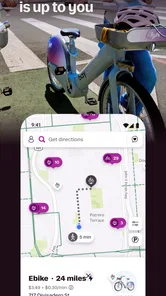
Compared with public transit, Lyft offers a more direct door-to-door trip but does not give me the same predictable route or independence from driver availability. Compared with a taxi, the app-based request can make arranging a ride feel more organized, while a local taxi service may be more familiar or easier to reach in some places. Walking and cycling remain better choices for short, safe journeys where I do not need a car. The best option depends on the route, timing, cost, and what I need to carry, not on loyalty to one app.
My cautious verdict
I’d recommend Lyft to someone who values a straightforward way to request a car and has it available where they travel. I would not make it my only plan for a time-sensitive trip, nor would I choose it automatically when transit, walking, or another local option better fits the route. My practical advice is to check the pickup and destination carefully, allow a buffer when arriving on time matters, and keep an alternative in mind. Used with those limits in mind, it can be a handy part of getting around rather than a promise that every trip will be effortless.
In conclusion, Lyft is more than just a ride-hailing app—it’s a lifestyle choice. It’s about convenience, comfort, and doing your bit for the environment. So next time you’re planning a trip across town, leave the car keys at home and give Lyft a spin. Trust me, you won’t regret it!
Lyft Frequently Asked Questions
Can I use Lyft to plan routes or navigate without booking a ride?
Lyft is a Maps & Navigation app centered on getting riders matched with nearby drivers. Its store summary describes requesting a driver and getting on the way in minutes, so it is best approached as a ride-booking app rather than a general-purpose map for planning routes or navigating on foot. If you mainly need navigation, consider whether a ride service is what you want before downloading.
Do I need an account or location access to request a Lyft ride?
To arrange a ride, you’ll need to use the app to enter pickup and drop-off locations, then follow its prompts to request a driver. Location access can help identify where you are and check whether Lyft operates nearby. You can also enter a pickup location yourself when needed. Review the app’s permission prompts and choose settings you’re comfortable with before using its location-based features.
Is Lyft free to download, and what devices can run it?
Lyft is free to download and is rated for everyone. It is a Maps & Navigation app from Lyft, Inc., and its current version is 2025.46.3.1764141525. The app requires Android 9 or later on Android devices. Before downloading, check that your device meets the minimum operating-system requirement so you can install and use the app.
What is Lyft and how does it work?
Lyft is a popular ride-sharing app that connects passengers with nearby drivers through a mobile platform. Users can easily book rides by entering their pickup and drop-off locations. Once requested, the app matches the user with a nearby driver who will transport them to their destination. Lyft offers various ride options including shared rides, luxury vehicles, and eco-friendly options.
How do I pay for my Lyft ride?
Payment for Lyft rides is handled through the app, making it convenient and cashless. Users must input their credit or debit card information during the sign-up process. After each ride, the fare is automatically charged to the selected payment method. Lyft also supports payment through PayPal, Apple Pay, and Google Wallet, providing flexibility for users.
Pros
- User-friendly interface
- easy navigation.
- Reliable ride scheduling and tracking.
- Multiple payment options available.
- Regular promotions and discounts.
- Shared rides reduce travel costs.
Cons
- Surge pricing during peak hours.
- Limited service in rural areas.
- Driver quality varies.
- App occasionally crashes.
- Customer service can be slow.