Moovit: Your Transit Tracker
- 39.37K
- 3.9
- Installs
- 100.00M
- Price
- Free

Screenshots
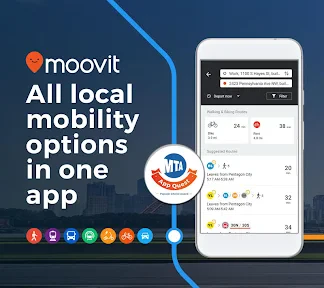
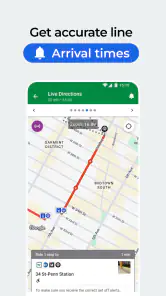
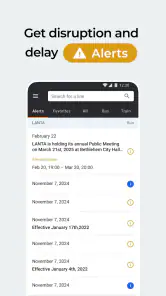
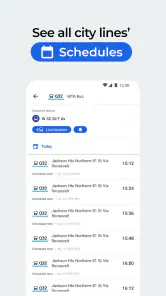


Analysis by Reviewed
Planning a trip by bus or train is easy when every part runs as expected; the uncertainty begins when a connection is close, a stop is unfamiliar, or the next arrival is unclear. I use Moovit: Your Transit Tracker as a practical companion for working out that journey, then checking what may change while I’m on the way. It is a free public-transport navigation app from Moovit, and its focus is firmly on helping people make sense of city transit rather than replacing every map or travel tool on a phone.
Starting with a destination, not a timetable
My usual workflow begins with where I need to go, not with trying to remember which route or stop might get me there. I enter a destination and compare the suggested ways to travel, which is useful when I know the neighborhood but not the local bus network. The key benefit is having a route plan and transit information brought together, instead of piecing together a journey from separate timetables and a general-purpose map.
That distinction matters most in a city I don’t know well. A familiar map can be excellent for walking directions, but it may not make public-transport steps as easy to follow. Moovit is built around buses and trains, so I’m more likely to open it when I need to understand the transit portion of a trip, especially when a journey involves more than one leg.
The Latest on Moovit: Your Transit Tracker
Following a trip from route choice to arrival
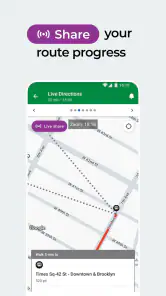
Once I have a route, I use the step-by-step guidance to keep the plan manageable: get to the stop, take the right service, and keep an eye on the next part of the journey. On a normal commute, that means checking before I leave and then using the app to stay oriented as I go. If an arrival or service update changes the picture, real-time information can help me decide whether to wait or reconsider the route rather than relying entirely on a printed timetable.
When live information helps most
The most useful time to check Moovit is not necessarily when I’m already standing on the platform. I’d look at the journey before setting out, then check again if a connection is tight or a disruption could affect the next leg. That small habit gives me a chance to spot a less convenient option while I still have room to choose, rather than discovering a change after committing to the route.
For example, imagine leaving work for an appointment across town. I can check the route before walking out, follow the instructions to the first stop, and review the next step while the journey is underway. If the usual train is delayed, current updates may help me judge whether to wait or switch plans. The app does not remove the inconvenience of a service problem, but having transit details close at hand can make the decision less stressful.
Handing off between the app and the street
Transit directions are only useful if they work in the real world, where a stop can be busy and a station can have several exits. I treat the app as a guide, not as a substitute for looking at signs or checking that I’m boarding the service shown. This is especially sensible when a route changes or when I’m unfamiliar with the stop: confirm the direction and destination on the vehicle or station information before committing.
More From Our News Desk

Clash of Clans Is Won Between the Battles

Android Auto Makes the Case for Quieter Car Software

MobiOffice: Transforming Mobile Productivity with Seamless Integration

EA SPORTS FC™ Mobile Soccer: Redefining Mobile Sports Gaming

How Microsoft OneDrive Became a Mobile Productivity Giant

How Google Translate Breaks Language Barriers Effortlessly
Saving favorite routes and stops can make repeated journeys easier to revisit, while service alerts give me another reason to check the app before a routine trip. The community reporting element also adds a useful human layer: riders can flag issues or delays, giving other users another signal to consider. I’d still use judgment rather than assuming every report or live estimate is a guarantee, because local conditions can change quickly.
Making a routine trip easier to repeat
For a regular commute, I’d use a saved route as a shortcut to a familiar plan, but I would still check the current journey rather than assuming yesterday’s conditions apply. This is a useful distinction: saved information reduces repeated searching, while a fresh check helps catch a service change before I leave. If I’m traveling with someone who does not know the area, I can also use the route steps to agree on where to meet and which leg comes next, instead of describing the trip from memory.
For a visitor, the benefit is less about shaving time and more about reducing the number of decisions made at once. I’d check the route before leaving a hotel or station, identify the first stop, and then confirm the next leg after arriving there. That staged approach is easier than trying to memorize an entire unfamiliar journey while walking through a crowded interchange.
Who will get the most from it
I’d recommend Moovit to regular bus and train riders, visitors who need help navigating an unfamiliar network, and anyone who wants transit steps in one place. It is especially handy when I’m comparing ways across town or trying to make a transfer without memorizing a complicated timetable. For a person who mainly drives, walks, or cycles, a general map may be the more natural everyday choice; Moovit earns its place when public transport is central to the trip.
It is also worth remembering that a route planner can only be as helpful as the information available for the services around you. Live guidance is valuable when it reflects the situation, but I would keep a little flexibility around a close connection and check station notices when something seems inconsistent. If precision is critical, such as reaching an appointment on time, I’d build in extra time instead of treating any app’s estimate as a promise.
What the comparison with other travel tools comes down to
Compared with opening a general map, Moovit puts the bus-and-train journey in the foreground: routes, stops, and transit updates are the reason to use it. A transit operator’s own app can be a better companion when I need information specific to one network, while a broad map is often simpler for a walking-only trip or a quick look at nearby places. I see Moovit as a useful middle ground for a journey that crosses services or requires more transit detail than a basic map view.
There is some friction in that trade-off. A route suggestion still needs a quick reality check against signs and what is happening around me, and changing conditions can make a carefully planned transfer less comfortable. I would not choose it as my only navigation tool for every kind of travel, but I would keep it ready for city trips where buses and trains are the main way to get around.
Real-Time Updates and Alerts
One of the features that really sets Moovit apart is its real-time updates. The app pulls data from local transit authorities to provide you with the most accurate and up-to-date information possible. I found the real-time alerts to be incredibly helpful, especially during rush hour when the status of my usual train line was constantly changing. No more standing around wondering if there’s been a delay; the app keeps you informed every step of the way.
Comprehensive Coverage
Another aspect where Moovit shines is its coverage. The app supports transit systems in over 3,000 cities around the globe. Whether you're in New York, London, or Tokyo, Moovit has got you covered. I took it for a spin across several cities, and the app’s performance was consistently reliable. It’s like having a local transit expert right in your pocket.
User-Friendly Features
Moovit isn’t just about getting you from point A to point B; it’s designed to make your transit experience as smooth as possible. Features like the step-by-step navigation and service alerts make it super easy to plan your journey. I appreciated the option to save favorite routes and stops, making my daily commute even more seamless. Plus, the app is equipped with accessibility features, ensuring that it caters to all users.
Moreover, the community-driven aspect of the app allows users to report issues or delays, providing an extra layer of accuracy to the app’s data. It’s pretty cool to see a community of users working together to make commuting a less stressful experience.
When the route stops matching reality
The main limitation is that live transit information can’t make an unpredictable service predictable. A delay, a missed connection, or a confusing station layout can still interrupt the plan, so I use the suggested route as a guide and leave breathing room when timing matters. If the app’s estimate clashes with an official station announcement, I’d trust the information on the ground and adjust rather than follow the screen blindly.
There is also a practical distinction between planning a trip and navigating every detail of a place. Moovit is most useful when the route depends on public transport; it is less compelling for a short walk or a trip where I only need general directions. People who want a single tool for driving, exploring places, and transit may prefer a broader map for everyday use, then open Moovit when transit is the hard part.
What to expect before relying on it
The app is free to install, with optional in-app purchases priced from $0.99 to $14.99 per item. I’d start with the free experience and see whether it handles the routes I actually travel before considering any paid extras. Its age rating is Everyone, and the average rating is 3.9 from around 1.5 million ratings, alongside about 39,000 written reviews. Those figures offer a sense of its broad use, but they cannot tell me whether a particular local service is well represented.
Moovit has been available since March 28, 2012, and has passed 100 million installs. I treat that reach as context, not as a guarantee that every stop or live estimate will be equally dependable. Before an important trip, I’d check the route and give myself a fallback: know the next stop or an alternative way to continue in case a transfer changes.
Is it worth keeping on your phone?
For me, its strongest case is simple: when I need to connect a destination to a bus or train route, it can reduce the guesswork and keep the steps together. I’d use it for commuting, visiting an unfamiliar city, or checking a route before leaving, while keeping station signs and a little schedule flexibility in mind. If public transport is only an occasional part of your travel, you may not need another navigation app; if it is how you get around, Moovit is worth trying as a focused transit companion.
Getting Started with Moovit
First things first, downloading and setting up Moovit is a breeze. Available on both Android and iOS, it requires minimal effort to get started. Once you’ve got it installed, the app’s clean and intuitive interface makes it easy to enter your destination and get personalized transit routes. I was pleasantly surprised by how quickly the app calculated the best options, taking into account the current traffic and transit conditions.
Wrapping Up
In conclusion, Moovit: Your Transit Tracker is a must-have for anyone who relies on public transportation. Its real-time updates, extensive coverage, and user-friendly features make it an invaluable tool for commuters. Whether you're a daily commuter or an occasional traveler, Moovit ensures you spend less time waiting and more time reaching your destination. So, next time you're planning a trip across town, give Moovit a try and travel with confidence!
Moovit: Your Transit Tracker Frequently Asked Questions
What information should I check before relying on Moovit for a journey?
Before setting out, make sure the app shows the stops and transit options you expect, then review the route details and any displayed timing information. This is especially helpful in an unfamiliar area or when you have a connection to make. Moovit is intended to make city transportation easier, but checking your route shortly before departure gives you a chance to adjust your plans if needed.
Who develops Moovit, and what kind of app is it?
Moovit is developed by Moovit and belongs to the Maps & Navigation category. Its focus is public transportation: the app helps users check bus and train schedules and navigate city journeys. If you are looking for an app centered on transit rather than general-purpose driving directions, Moovit is designed around that use. It is free to download, with in-app purchases also available.
Is Moovit appropriate for children?
Moovit has an Everyone content rating, so its listed age suitability is broad. Its main purpose is helping people find public transportation information and plan city journeys, which may also be useful for families discussing a route together. As with any navigation app, younger users should follow a trusted adult’s guidance when traveling and should check their journey details before setting out.
Does Moovit cover public transportation in my city?
Moovit is designed to help with city transportation, offering bus and train schedules and information about transit options. Its coverage can vary by location, so the most useful first step is to search for your city or a nearby stop in the app. That gives you a practical sense of whether the routes you rely on appear in Moovit before you plan a journey around it.
What is Moovit and how does it work?
Moovit is a transit app that provides real-time information on public transportation options in your area. It covers buses, trains, subways, and other transit modes in over 3,000 cities worldwide. By using GPS and data from transit agencies, Moovit offers users live updates, accurate arrival times, and step-by-step directions to their destinations, making commuting much easier and more efficient.
Pros
- Accurate real-time transit updates
- User-friendly interface
- Extensive coverage in major cities
- Offline maps for easy planning
- Customizable notifications
Cons
- Occasional GPS inaccuracies
- Some features require in-app purchases
- Not all cities covered equally
- Can drain battery quickly
- Advertisements can be intrusive
- Category
- Maps & Navigation
- Version
- Varies with device