Waze Navigation & Live Traffic
- 638.43K
- 4.1
- Installs
- 500.00M
- Price
- Free

Screenshots
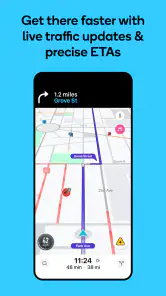
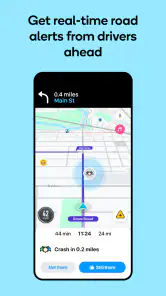
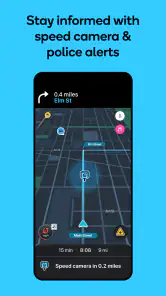
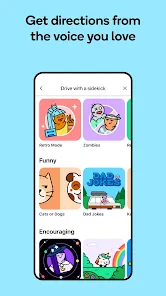
Analysis by Reviewed
I judge a navigation app less by its first clever detour than by whether I still reach for it once the novelty fades. Waze Navigation & Live Traffic makes its best case on drives where traffic can change the sensible route while I’m on the way. It is a free app from Waze, built for maps and navigation, and its broad reach gives its driver reports a chance to be useful. Still, I wouldn’t make it my automatic choice for every trip: the value depends on how often traffic uncertainty matters to you.
The first-week appeal: learning its rhythm
The first few trips are where Waze makes its strongest case. Its map is lively, reports appear as you move, and hearing about a slowdown before you reach it can make a familiar drive feel less uncertain. I found the appeal less about novelty icons and more about having a route that can respond to what drivers are seeing right now.
For a new user, I’d start with a regular commute rather than a complicated cross-town trip. That gives you a feel for the spoken guidance and rerouting without asking you to learn the app while navigating unfamiliar streets. It is also worth checking the route before setting off: a quicker-looking detour is not automatically a better one if it sends you through roads you dislike.
The Latest on Waze Navigation & Live Traffic
The Interface that Makes Navigation Fun
First impressions matter, and Waze Navigation & Live Traffic doesn't disappoint. The app sports a friendly, intuitive interface that's easy to navigate. Pun intended! With its vibrant colors and quirky icons, it feels more like a game than a navigation app. You can easily customize your map with a variety of themes, and even choose different voices for guidance – Morgan Freeman, anyone?
Real-Time Updates for Real-Life Situations
What sets Waze apart from other navigation apps is its real-time traffic updates. It's like having a buddy in the passenger seat who's constantly scanning the road ahead for hazards. Whether it's police traps, accidents, or traffic jams, Waze users, or "Wazers," are quick to report them, ensuring you always have the latest info. This community-driven approach is what makes Waze truly unique and helpful.
One morning, I was heading to a meeting across town, and Waze alerted me about an accident on my usual route. It quickly rerouted me through a series of backstreets I never knew existed, getting me to my destination right on time. It's like having a local guide who knows all the shortcuts.
When the community edge matters most
That reporting system is most valuable when conditions change during the journey: a sudden queue, a reported hazard, or a route that has stopped flowing. A useful habit is to let the app guide you while keeping your own attention on the road, rather than trying to inspect every icon. Reports are only helpful when they are timely, so I treat them as informed signals, not guarantees that every alert will still be there when I arrive.
More From Our News Desk

Weather by Xiaomi Review: Clear at a Glance, Less Clear Up Close

X Under Pressure: Can It Recover When Posting Goes Wrong?

Clash of Clans Is Won Between the Battles

Android Auto Makes the Case for Quieter Car Software

MobiOffice: Transforming Mobile Productivity with Seamless Integration

EA SPORTS FC™ Mobile Soccer: Redefining Mobile Sports Gaming
Waze is a navigation app from developer Waze, in the maps and navigation category. It is free, rated for Everyone, and has an average rating of 4.1 from around 8.8 million ratings, with over 500 million installs. That scale helps explain why its crowd-sourced approach can be useful: enough drivers need to be sharing the same roads for live reports to make a difference. The trade-off is that the experience can be less compelling on a quiet route or at a time when few people are reporting conditions.
Fuel Saver and More
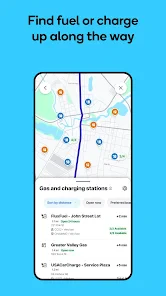
Waze isn't just about getting you from point A to B; it also helps you find the cheapest fuel along the way. This is a neat feature if you're always on the lookout to save a few bucks at the pump. The app lists fuel prices at nearby stations, so you can pick the best deal without detouring too far from your route.
For that feature to be genuinely useful, I’d compare the saving with the extra distance rather than choosing the lowest price on the map automatically. A station that looks cheaper can cost more in time or fuel if it pulls you well away from your route. On a planned drive, checking before you leave is a calmer way to decide than searching while already on the road.
Plus, Waze integrates with your calendar. It automatically syncs with upcoming events, making sure you leave on time by factoring in current traffic conditions. No more excuses for being late!
Making Waze a monthly habit
After the first-week novelty wears off, the lasting value comes down to whether you drive often enough to benefit from live route changes. For a regular commuter, the familiar map and voice guidance can become an easy routine: choose the destination, review the suggested route, then follow updates as conditions shift. For occasional trips on roads you already know well, opening another navigation app may not change much.
Compared with a more traditional map-first navigation app, Waze puts the emphasis on changing road conditions and driver reports. That can be a real advantage in busy, unpredictable traffic. A calmer alternative may suit someone who prefers a less animated screen, prioritizes a broader trip-planning experience, or simply wants directions without community alerts. I’d keep Waze for congested drives and use another map when its style or route presentation better fits the trip.
Maintenance, attention, and fatigue
The practical upkeep is modest: keep your destinations and route choices clear, and take a moment before departure to check that the app is set up for the drive you are about to make. The bigger cost is attention. A colorful map, changing route suggestions, reports, and social prompts can feel busy, especially if you are already familiar with the road. I would silence anything that is not useful before moving and avoid interacting with the screen while driving.
Another trade-off is trusting a suggested shortcut too readily. Backstreets can save time, but a driver may prefer a predictable main road, particularly in an unfamiliar area. If Waze proposes a route that feels uncomfortable or confusing, choose a route you can follow safely rather than treating the estimated arrival as an instruction. Its live view is a tool for making a decision, not a substitute for judgment.
Who should keep it installed?
I’d recommend Waze to people who drive frequently through traffic that changes from day to day, and to anyone who values timely reports more than a quiet, minimalist map. It is less suited to someone who rarely drives, dislikes frequent visual prompts, or wants navigation to work mainly as a low-distraction background guide. A passenger can help handle route decisions on a complicated trip, but the driver should not be reading reports or adjusting settings on the move.
For a realistic weekday use, imagine leaving for work when the usual road is already slowing down. Waze can flag a problem and offer another route; before accepting, I’d check whether the detour is sensible for the time saved and whether its turns are easy to follow. Once parked, sharing an ETA can save a separate message to someone waiting for you. That small workflow—check, decide, drive, then share—makes the app more useful than simply turning every alert into an automatic reroute.
Social Features That Keep You Connected
Waze has a social side too. You can connect with friends, share your ETA, and even send them a "beep beep" to let them know you're on your way. It's small touches like these that make the app feel more personal and less like a robotic GPS voice barking orders at you.
However, the social features can sometimes be a bit distracting. If you're someone who likes to keep their eyes on the road, you might want to disable notifications while driving.
Choosing the right trips for Waze
I would not make every journey a test of whether Waze can shave time off the route. It earns its place most clearly on a drive with several plausible ways through town, where traffic reports could change which one makes sense. For a short trip to a familiar shop, the simplest route may matter more than a live traffic picture. For a longer drive, I’d use its guidance to monitor the road, but still decide whether a late detour is worth the extra turns.
That distinction also helps answer whether it can replace a general-purpose map app. If I need a broad overview to compare places or plan stops, a map-first alternative may feel more comfortable. If I already know where I’m going and want help adapting the drive to current conditions, Waze is the more focused choice. I see them as useful for different jobs, not as apps where one must win every time.
A routine that keeps the screen secondary
My best workflow is to set the destination while parked, listen to the first instructions, and then leave the display alone unless I am safely stopped. Before starting, I also look at the proposed route for anything that seems needlessly complicated. This quick check can prevent the app’s confidence from nudging me into a detour I would not choose with a clear view of the streets.
People who ask whether Waze is useful without constant interaction should think about the kind of guidance they want. Spoken directions can make it practical as a background aid, but the frequent changes and reports are part of its appeal, so a driver who wants an entirely quiet experience may find the style tiring. A passenger can help assess a complicated reroute; when driving alone, I prefer to accept only decisions that are clear and safe.
Long-term value without making it a chore
Keeping Waze useful does not require turning it into a daily project. I would simply open it for drives where traffic is a meaningful uncertainty and ignore the temptation to chase every possible shortcut. That leaves its strongest benefit intact while reducing the feeling that I have to watch the map or respond to every alert. Its value is recurring, but it depends on matching the app to the journey.
After using it beyond the initial novelty, I see Waze as a useful specialist rather than a navigation app that has to be open for every journey. Its community reports, live rerouting, fuel information, and ETA sharing can earn a regular place for drivers whose routes change with traffic. Its 638,000 reviews reflect a widely used app, but the right choice still depends on how you drive. If you want quieter guidance or prefer to stick to familiar roads, another map may be a better everyday fit. For me, Waze is worth keeping when the drive is unpredictable, provided I treat its suggestions as help—not orders.
Small choices that improve the experience
One practical question is whether I need to keep the map in view to get value from it. I don’t. Setting the destination before moving and relying on spoken instructions makes the drive easier to manage, while the display is there for a safe glance when I’m stopped or approaching a confusing turn. The app works best when I decide in advance how much of its information I actually want to follow.
I’d also avoid treating every reported incident as a reason to change course. If a route is already moving and a report appears ahead, waiting for a clear reroute instruction can be less disruptive than making a turn based on a brief glance. That restraint matters most in dense streets, where a succession of small diversions can leave me following a route that is harder to understand than the traffic I hoped to avoid.
Where another navigation choice makes more sense
Waze is a strong fit for drivers who make repeated trips through busy areas and want changing conditions to influence their route. Someone planning a day around several stops may prefer a map app designed around browsing places and building a wider itinerary. Likewise, a driver who wants a quiet screen and stable directions on familiar roads may find a simpler navigation style less tiring. I would not install Waze expecting it to be the best tool for every kind of map task.
There is also a difference between a useful alert and certainty. A community report can give me an early heads-up, but it cannot promise that a hazard will still be present or that a suggested detour will feel better from behind the wheel. I use the information to prepare and make a sensible choice, not to surrender control of the trip. That attitude keeps the app helpful without making its live updates another source of pressure.
Does it earn a permanent place?
For me, the answer depends less on how impressive the first drive feels than on the roads I take each week. If a commute regularly runs through changing congestion, opening Waze becomes an easy, worthwhile habit. If most of my driving is short, familiar, and predictable, the extra activity on screen can outweigh the occasional advantage. Its Everyone age rating and availability for devices running Android 10 or later make it accessible to many Android users, while its free price makes trying it a low-commitment decision.
The strongest reason to keep it is not that it eliminates traffic; no navigation app can do that. It is that Waze can help me notice when the route I expected no longer looks like the sensible one. I’d keep it installed as a traffic-aware option, use it selectively, and let my own comfort and attention decide whether a proposed change is worth taking. That feels like a sustainable role for an app with a lively community rather than a promise to rely on it every time I leave home.
Waze Navigation & Live Traffic Frequently Asked Questions
Can Waze be useful for my regular commute?
Waze is designed for driving with GPS navigation, live traffic information, and safety alerts, so it can suit a regular commute as well as an occasional trip. Its community reports can help make changing road conditions visible during a journey. If you value active route guidance and current traffic information, those features may be useful; review your route before setting off.
Can Waze help me find an alternative when traffic builds up?
Waze uses live traffic information and community-driven reports to help drivers respond to changing road conditions. This makes it useful when traffic problems affect a journey, because current information can inform route guidance. It is intended to help drivers avoid delays, but conditions can change, so use your judgment and follow any suggested route only when it is safe to do so.
Does Waze require an internet connection to navigate?
Waze’s real-time traffic updates, safety alerts, and changing route guidance are designed for connected use. An internet connection helps the app work with current road information during a trip. If you expect to be without a connection, plan ahead rather than relying on live updates, and remember that the app is primarily built around online, active driving navigation.
Can I use Waze while driving somewhere I have never been?
Waze provides GPS navigation with turn-by-turn directions, live traffic information, and safety alerts, which can make it useful when you are driving somewhere unfamiliar. You can follow route guidance while the app helps you respond to changing road conditions. Its real-time features are designed for connected use, so plan to have an internet connection for the fullest navigation experience.
Is Waze easy to use if I have not tried it before?
Waze is centered on entering a destination and following GPS route guidance, with live traffic information and safety alerts supporting the trip. Its community-driven reports can also help make road conditions visible to drivers. Before setting off, take a moment to enter your destination and review the route while parked. That gives you a chance to get familiar with the guidance before driving.
Pros
- Real-time traffic updates
- Community-driven alerts
- Free to use
- Accurate GPS navigation
- Voice-guided directions
Cons
- Drains battery quickly
- Ads can be distracting
- Relies on user data
- Limited offline maps
- Occasional GPS signal loss
- Category
- Maps & Navigation
- Version
- Varies with device