Grab Driver: App for Partners
- 1.06K
- 3.9
- Installs
- 50.00M
- Price
- Free

Screenshots

Analysis by Reviewed
I see Grab Driver: App for Partners as a work tool rather than a general navigation app: it is built around helping drivers earn while they are on the road. Grab Holdings develops it, and its place in Maps & Navigation makes sense because getting through a trip matters as much as finding one. It is free to install, open to Everyone, and has a 3.9 average from around 1.8 million ratings, so there is a large pool of user experience behind that score—but the rating alone cannot tell you whether driving with it suits your area or routine.
Where it fits into a working day
The key question is not simply whether the app can guide you to a destination; it is whether its driver-focused workflow fits the way you want to work. I’d see it as a practical option for someone who wants to use a vehicle for passenger trips and needs trip handling and navigation in one place. It is less useful to a person who only wants turn-by-turn directions for errands, since a conventional navigation app is designed for general journeys rather than organizing paid driving sessions.
That difference becomes important when planning a shift. A standard map can help you compare routes or find an address, but it does not replace the driver-side context of accepting trips and tracking work. Conversely, a driver app should not be treated as a complete solution for every kind of route planning. I’d keep a familiar maps app available for broader planning when needed, while relying on the driver workflow for the work itself.
One useful habit is to separate the decision to go online from the decision to keep driving. Before starting, I’d think about how much time I have, whether I’m comfortable with the likely driving conditions, and what costs I’ll incur. During a session, I’d pause to reassess rather than staying out just because I have already invested time. That approach won’t make demand predictable, but it can stop a flexible schedule from quietly turning into an unplanned, uneconomic shift.
How the driver workflow feels
Hey there, fellow road warriors! If you’ve ever dreamed of turning your daily commutes into a lucrative job or just want to earn some extra cash on the side, then you might want to check out the Grab Driver: App for Partners. As someone who loves the idea of flexible work hours and meeting new people every day, I decided to give this app a whirl and see if it really lives up to the hype.
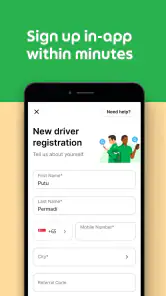
Diving into the world of ride-sharing is as easy as pie with the app. First things first, you’ll need to download the app and sign up, which is a breeze. The registration process is pretty straightforward. You just need your basic info, a valid driver's license, and a vehicle that meets their requirements. Once you’re all set, you can start accepting rides and making money.
Interface and Usability
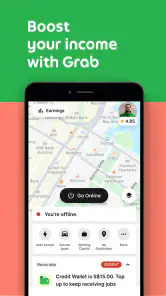
The app's interface is super user-friendly. I mean, even if you’re not tech-savvy, you’ll find it a walk in the park. The dashboard is clean and intuitive, showing your earnings, ride history, and ratings all in one place. What I love is how it gives you a real-time overview of busy areas, which means you can position yourself to get more rides and maximize your earnings. Talk about working smart, not hard!
More From Our News Desk

Weather by Xiaomi Review: Clear at a Glance, Less Clear Up Close

X Under Pressure: Can It Recover When Posting Goes Wrong?

Clash of Clans Is Won Between the Battles

Android Auto Makes the Case for Quieter Car Software

MobiOffice: Transforming Mobile Productivity with Seamless Integration

EA SPORTS FC™ Mobile Soccer: Redefining Mobile Sports Gaming
That overview is most useful when treated as a guide, not a promise. On a practical shift, I would check likely busy areas before setting off, then weigh the suggested positioning against the time and fuel needed to reach them. Chasing activity across town can erase the benefit of a possible ride, so staying near familiar streets may be the more sensible choice when demand looks uncertain. This is a useful distinction from a regular map: navigation apps help plan a route, while a driver app is meant to fit that route into a working session.
Features that Stand Out
One of the standout features for me is the in-app navigation. No need to switch between apps; everything you need is right there at your fingertips. The app integrates seamlessly with maps, providing clear and accurate directions, which is a lifesaver during peak traffic hours. Another feature worth mentioning is the passenger rating system. It lets you know what kind of client you’re picking up, which is great for ensuring your safety and comfort on the road.
For a smoother routine, I’d review the next instruction while safely stopped rather than trying to study the screen in motion. A mounted phone and a charging plan also matter on a long day: navigation keeps the display and location tools in use, and an easy-to-read setup can reduce distracting glances. If a route looks unfamiliar, I’d compare the turn guidance with road signs and local conditions instead of following it blindly. In-app directions save the hassle of jumping between tools, but no navigation system replaces attentive driving.
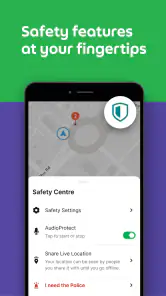
The passenger rating can be one more piece of context, not a guarantee about how a trip will go. I would use it alongside common-sense precautions and the app’s trip information, rather than treating a score as a complete safety assessment. Drivers who want the freedom to choose every fare or who dislike carrying passengers may find this model a poor fit; the app is most relevant to people willing to build their work around ride requests and changing road conditions.
Making a session work in practice
There is a difference between having free hours and having useful hours for driving. A short window between other commitments can work if the pickup area is nearby and the roads are manageable, but it may be frustrating if much of that window goes to positioning or waiting. I’d choose a starting point I can reach without a long empty drive, then set a clear time to reassess. That small boundary makes the work easier to fit around family, study, or another job.
For example, imagine finishing a daytime shift and considering a couple of hours on the road before heading home. I’d first check whether I have enough energy to drive attentively, then open the app and look at the activity overview. If the likely busy area is far away, I would compare the detour with the time I have rather than assuming the move will pay off. If the session starts slowly, keeping track of elapsed time and distance helps me decide whether to continue or call it a night.
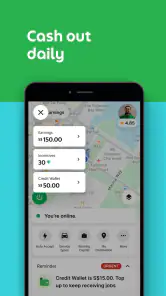
Drivers also benefit from having a simple personal routine for reviewing earnings and costs. The dashboard’s earnings and trip history can help organize that review, but I would record expenses separately so I can think about the whole shift rather than a headline amount. Fuel, vehicle use, and unpaid time between trips affect the value of the work. This is not a special trick that guarantees a better return; it is a way to make a more informed decision about whether the arrangement suits your own circumstances.
Support and Community
Being part of the Grab Driver community is like being part of one big family. The support system is top-notch. Whether you have questions about a trip or need help with the app, the customer service team is just a tap away. Plus, there’s an active online community where drivers share tips, stories, and support each other. It’s always nice to know you’re not alone out there.
In an everyday example, a driver finishing a regular job might open the app for a short evening session, check where activity appears to be concentrated, and decide whether the likely trip pattern fits the time available. That can be more convenient than signing up for a fixed shift, but flexible hours do not automatically mean predictable earnings. Traffic, waiting time, distance to a pickup, and the driver’s own costs all affect whether a session feels worthwhile. I’d keep a simple record of time on the road and expenses before deciding how often to drive.
If a trip or screen issue comes up, I’d make a note of the relevant details as soon as it is safe to do so, then use the in-app support route when I can give the problem my attention. That is more useful than trying to troubleshoot while moving. Driver communities can be handy for practical perspective, especially when learning local routines, but I would treat peer advice as experience rather than a substitute for official guidance about account or trip matters.
Who is likely to benefit—and what to keep in mind
The app is a better match for drivers who already have a suitable vehicle, want to work around other responsibilities, and are comfortable using navigation while managing passenger pickups. Someone who only needs directions for personal journeys will likely be better served by a standard maps app; this one is designed around driver work, not general trip planning. Likewise, if you need guaranteed hours or a fixed income, the flexibility may not compensate for the uncertainty of demand.
It may also be the wrong choice for someone who finds frequent screen interaction stressful, is uncomfortable driving unfamiliar routes, or wants a job with little customer contact. Those are not minor preferences in passenger work: they shape whether a typical shift feels manageable. A separate navigation app may be the better everyday tool for personal travel, while a more structured role may suit someone who needs consistent scheduling more than control over when to log on.
Before relying on it for regular work, I’d check the local driver onboarding requirements and make sure the vehicle and documents are in order. That is a more useful first step than assuming installation alone makes someone ready to take trips. It also answers a common practical question: the app can support the work, but eligibility and day-to-day opportunities depend on the driver’s circumstances and location.
Another sensible question is whether the app is suitable for a particular phone. The current Android release supports devices running Android 6.0 or later, so I’d check the operating system before planning a shift around it. The app is free, but that does not make the work cost-free: vehicle expenses and the time spent waiting remain part of the decision. I’d also make sure the phone is charged and positioned safely before setting off, rather than treating installation as the only preparation needed.
How it compares with everyday navigation apps
For a personal road trip, I would usually reach for a general maps app first. Those tools are built for broad route planning and ordinary travel, whereas Grab Driver puts the working trip at the center: driver activity, trip handling, and directions belong together. That makes it more convenient when I am actively taking passenger work, but not necessarily the best choice for planning a holiday route, exploring several stops, or finding my way around when I am not driving for the service.
The trade-off is focus. A driver-centered workflow can reduce the friction of switching between separate tools during a session, but a specialist app does not make every navigation decision for you. Road signs, closures, traffic conditions, and safe stopping places still matter. I would use its directions as a working aid and keep broader route planning separate when the task calls for it. The right comparison is not “which app is best at everything,” but “which one helps with the job I am doing right now.”
Current version and the road ahead
The app was released on January 6, 2014, and its current version is 5.413.0, with Android support beginning at version 6.0. That long-running presence and the 50 million-plus installs suggest it has become a familiar tool for many drivers, while the current version number shows that the software continues to move forward. Those facts do not tell me exactly what changed in each release, so I would judge the app by how reliably its current workflow serves a real shift rather than assume a particular new feature.
For existing users, the practical test after an update is whether the everyday tasks they depend on—checking trip details, following directions, and reviewing their activity—remain clear and dependable. I’d also take a moment to notice any changed screen layout before starting a busy drive, rather than trying to learn it mid-trip. A driver who relies heavily on the app should keep the operating system compatible and avoid leaving updates until the moment a shift begins.
Because the version number alone does not explain the contents of individual releases, I would separate the app’s visible current state from guesses about its development. What matters to me is whether familiar tasks remain easy to complete and whether a change makes a real shift more straightforward. Existing drivers can judge that from their own routine: note any change in the screens they use most, check that the phone still runs the app comfortably, and avoid discovering an unfamiliar layout while navigating traffic.
For someone considering joining, the same caution cuts both ways. A mature, widely installed app can feel reassuring, but popularity does not guarantee that local demand, onboarding, or the working pattern will suit every person. I would test the workflow in the context of my own area and schedule, and make decisions from actual time and expense records rather than assuming that a newer version or a large user base predicts personal earnings.
My main reservation is that a polished interface cannot remove the hard parts of driving work: uncertain demand, time spent waiting, and the attention required in traffic. The app’s 3.9 average across a very large audience is a useful signal that experiences vary, not a verdict on every city or driver. I would watch for whether future changes make essential trip tasks clearer and more dependable, while judging any effect on earnings from personal records rather than assumptions.
In conclusion, if you’re looking for a flexible way to earn money and enjoy driving, the app is definitely worth considering. It’s not just about the money; it’s about the freedom to choose your own hours and the chance to meet a diverse range of people. I’d say give it a try and see for yourself. Who knows? You might just find that perfect balance between work and play.
Grab Driver: App for Partners Frequently Asked Questions
Can passengers use Grab Driver to book rides?
No. Grab Driver: App for Partners is intended for people who drive with Grab, not passengers looking to book a trip. Its tools focus on driver tasks such as handling ride or delivery requests, navigation, and tracking earnings. If you are looking to request a ride as a passenger, this is not the app designed for that purpose.
What should I consider before relying on Grab Driver for work?
Grab Driver is built to support partners while they work, but using the app does not by itself guarantee earnings or approval to drive. You need to complete the registration process and meet the applicable requirements before accepting work. The app is most relevant if you intend to partner with Grab and want a mobile tool for managing driver tasks.
Is Grab Driver free to download, and what devices can run it?
Grab Driver is free to download and is intended for people who partner with Grab as drivers. It is available for Android and iOS, so you can look for it in the relevant app store for your device. On Android, the listed minimum operating system is version 6.0; check that your phone meets this requirement and has enough space before installing.
What is Grab Driver: App for Partners?
Grab Driver: App for Partners is a specialized mobile application designed for drivers who partner with Grab, a popular ride-sharing and delivery service in Southeast Asia. The app facilitates drivers in managing their bookings, tracking earnings, navigating routes, and receiving real-time updates. It’s an essential tool for drivers to efficiently handle their daily operations and maximize their income potential.
How do I register as a Grab driver using the app?
To register as a Grab driver, download the Grab Driver app, then follow the in-app instructions to create an account. You’ll need to provide personal information, upload necessary documents such as your driver’s license and vehicle registration, and undergo a background check. Once approved, you can start accepting rides and deliveries through the app.
Pros
- User-friendly interface for easy navigation.
- Real-time GPS tracking for accurate routes.
- Flexible working hours for drivers.
- Efficient customer support system.
- Comprehensive earnings tracking feature.
Cons
- Requires constant internet connection.
- High battery consumption while in use.
- Limited to certain geographical areas.
- Occasional app crashes reported.
- Frequent updates needed for smooth operation.
- Category
- Maps & Navigation
- Version
- 5.413.0