Garmin Pilot
- 894.00
- 2.7
- Installs
- 500.00K
- Price
- Free

Screenshots
Analysis by Reviewed
I’d approach Garmin Pilot as a cockpit-oriented aviation tool, not as a general weather app with a few flight-related extras. Garmin makes it for pilots who want planning and weather information in the same workflow. That focus is useful, but it also means a first-time user should take a little time to understand what the app is for before expecting it to feel as simple as a standard forecast app.
What to expect from an aviation-focused app
Garmin Pilot is a free weather app from Garmin, though in-app purchases range from $74.99 to $109.99 per item. It has an Everyone content rating, and its current version is 26.2.0 for devices running Android 11 or later. It has been available since March 27, 2012, and has over 500,000 installs. Its average rating is 2.7 from around 2,600 ratings, with 894 written reviews, so I would treat it as a specialist product to evaluate for your own workflow rather than assume it will suit every pilot.
The main distinction from everyday weather alternatives is purpose. A typical weather app is designed to answer whether it might rain near your home; Garmin Pilot is intended to support aviation planning and use. That makes its appeal strongest for pilots who already think in terms of routes, airports, and flight conditions. If you only want a quick local forecast, a simpler weather app is likely easier to learn and more appropriate.
Getting Started with Ease
First things first, downloading and setting up the app is a breeze. Available on both Android and iOS, you can find it in your respective app store. Once installed, you’re greeted with a clean and intuitive interface. It’s like Garmin took a personal vow to make flight planning as stress-free as possible. The app starts with a simple tutorial to guide you through the basics. Even if you’re a newbie to aviation apps, you’ll find yourself navigating like a pro in no time.
Make the first session a simple one
For a reassuring first run, I’d avoid trying to explore every tool at once. Start by opening the app somewhere you have time to look around, then follow its introduction and identify the main planning and weather areas before working on a real flight. A useful first success is being able to locate the information you came for and understand where it sits in your planning process. That is a better test of whether the interface works for you than tapping through unfamiliar screens in a hurry.
Before relying on any aviation app for an actual departure, I’d also check that the device and the app are ready for the way you intend to use them. In particular, a phone that works well for casual browsing may be awkward to consult in a cockpit. Consider screen size, mounting, power, and whether you can read the display without distraction. The app can support your preparation, but your device setup and flying procedures still matter.
Flight Planning at Your Fingertips
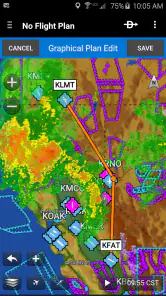
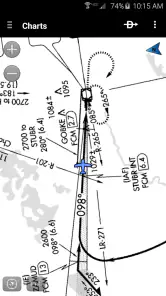
One of the standout features of Garmin Pilot is its comprehensive flight planning capabilities. You can plot your course with just a few taps, selecting waypoints and alternate routes with ease. The app integrates seamlessly with Garmin’s aviation database, ensuring you have access to the latest charts and navigation data. It’s like having a personal copilot right in your pocket, ready to assist at a moment’s notice.
A practical habit is to treat a planned route as a working draft, not as an automatic answer. I’d review each waypoint and alternate deliberately, then look at how the weather information relates to the route rather than checking it as a separate task. That small change turns the app into a more coherent planning aid: the route gives the weather context, and the weather prompts a closer look at your choices. For a short local trip, this may be more preparation than you need; for a cross-country flight, connecting those steps can be valuable.
Weather? No Problem!
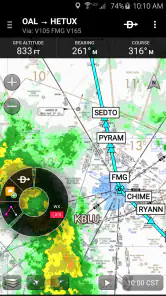
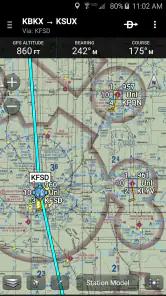
As any pilot will tell you, weather is crucial when it comes to flying. Garmin Pilot excels here with its advanced weather overlays. You can view radar, METARs, TAFs, and more, all in real-time. The app provides detailed weather briefings, so you’re never caught off guard. Planning a cross-country flight? Garmin Pilot has got you covered with its graphical weather maps that make it easy to visualize conditions along your route.
For a first-time user, the main challenge is not finding weather layers; it is interpreting them in context. I’d compare the route view with the underlying reports and briefing rather than relying on a single colorful map. A broad picture can help reveal where to investigate, while the details are what make the information useful for a specific departure or destination. This is also where expectations matter: the app can organize aviation weather information, but it cannot make a go/no-go decision for you.
In-Flight Features
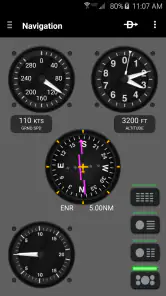
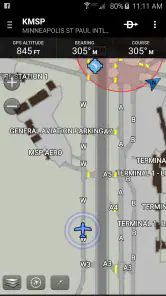
Once you’re airborne, Garmin Pilot continues to impress. With its moving map feature, you can track your flight path with precision. The app supports synthetic vision, giving you a 3D view of the terrain, which is fantastic for situational awareness. Plus, the traffic display helps you keep an eye on other aircraft in your vicinity. It’s like having a little bit of extra peace of mind right there on your device.
I’d think of these displays as helpful supplements, not substitutes for the aircraft’s approved equipment, required procedures, or a pilot’s outside scan. That distinction is especially important when a new user is tempted to explore every visual layer while flying. Learn the layout on the ground first, decide which information is genuinely useful to you, and keep attention on flying tasks. If you are still training or building confidence, ask an instructor how a personal device fits into your cockpit routine before depending on it.
Connectivity and Compatibility
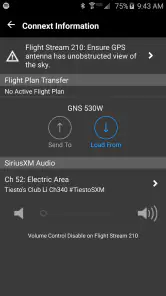
Now, let’s talk about connectivity. Garmin Pilot integrates seamlessly with a range of Garmin avionics, making it a versatile tool whether you’re flying a small single-engine or a larger aircraft. The app’s compatibility with the Garmin GDL series allows for real-time weather and traffic updates. It’s like having the full power of Garmin’s technology at your fingertips.
That integration is a reason to consider this app if Garmin equipment is already part of your flying setup, but it is not a reason to buy into an ecosystem you do not need. I’d first check whether your existing avionics and the app work together in the way you expect, then decide whether the connection would simplify a real task. If you do not use compatible equipment, the app may still be relevant for planning, but the connected experience will not be the deciding advantage.
Common points of confusion
New users may wonder whether this replaces a regular weather app, whether it is useful without Garmin avionics, or whether the phone alone is enough for flight preparation. I’d answer those questions by separating planning convenience from operational reliance. It is designed around aviation needs, and its Garmin connections can add value for compatible setups; neither fact means every pilot needs it or should use a phone as their only source of critical information.
Cost is another sensible question. The app itself is free to install, but the listed in-app purchase range is substantial, so I would check what a particular purchase includes and whether it matches your actual flying before paying. A casual aviation enthusiast may get little value from specialist purchases, while a pilot who needs a consistent planning workflow may judge them differently. The low average rating is also worth noting: I would test the current experience on my own device and avoid assuming that a specialist tool will feel polished for every person.
For a realistic day, imagine preparing for a planned cross-country flight before leaving home. I’d use the route as a starting point, review the weather along it, check the relevant reports, and consider alternates before heading to the aircraft. If conditions shift, I’d reassess using suitable aviation sources and established procedures rather than treating one app screen as a final verdict. That workflow shows where the app can save effort: it brings related planning tasks together, but sound judgement remains the pilot’s job.
Personal Experience
Using Garmin Pilot feels like a game-changer. The app’s reliability and ease of use make it a staple for both novice and experienced pilots. Personally, I love how the app simplifies complex flight planning tasks, making it accessible even on busy flying days. And the peace of mind that comes with having up-to-date weather and traffic information is invaluable.
My recommendation is therefore specific: I’d encourage a pilot who wants aviation-focused planning and already uses, or is considering, compatible Garmin equipment to try it and judge how well it fits their routine. Someone who wants only a fast neighborhood forecast, dislikes a specialist interface, or has no use for flight planning should skip it and choose a conventional weather app instead. The right choice depends less on how many tools an app offers than on whether those tools support the way you actually prepare and fly.
All in all, Garmin Pilot is more than just an app; it’s an essential tool for anyone serious about flying. Its comprehensive features and seamless integration with Garmin’s ecosystem make it stand out in the crowded field of aviation apps. So, if you haven’t tried it yet, I’d highly recommend giving it a spin. You might just find it’s the copilot you’ve always wanted.
So, what are you waiting for? Download Garmin Pilot today and take your flight planning to new heights!
Garmin Pilot Frequently Asked Questions
Is Garmin Pilot intended for professional pilots, or can recreational flyers use it too?
Garmin Pilot is an aviation app for pilots with different flying needs, from recreational trips to more demanding flight planning. Its tools are centered on planning, weather, navigation, and flight records, so it may be useful to private pilots as well as commercial users. The best fit depends on which tools you need and whether its paid options suit your flying routine.
What features does Garmin Pilot offer for aviation enthusiasts?
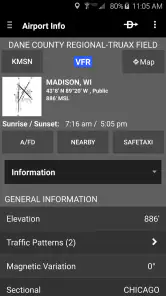
Garmin Pilot is a comprehensive app designed for both private and commercial pilots. It offers features such as flight planning, weather updates, navigation, and logging. With real-time data, pilots can access detailed airport information, interactive maps, and flight plan syncing across devices, making it an essential tool for efficient and safe flying.
Is Garmin Pilot compatible with my device?
Garmin Pilot is available for both Android and iOS platforms. On Android, it requires version 11 or later, so check your device’s operating system before installing. The app is categorized as suitable for Everyone, but its aviation tools are intended for pilots and flight planning rather than general weather browsing.
Does Garmin Pilot require an internet connection to function?
While Garmin Pilot offers many offline capabilities, such as accessing downloaded charts and maps, an internet connection is necessary for real-time weather updates, flight plan syncing, and database updates. Pilots are advised to download necessary data before the flight to ensure a seamless offline experience.
Can Garmin Pilot be used internationally?
Yes, Garmin Pilot is designed to support international flights. It provides global weather information, airspace details, and airport data. However, users should verify the availability of specific regional data and ensure they have downloaded the necessary charts for their intended areas of operation.
Articles Related to Garmin Pilot
Clash of Clans Is Won Between the Battles
Its raids are quick; its community is a long-term project of coordination, teaching, rivalry, and shared responsibility—with all the friction that entails.
Android Auto Makes the Case for Quieter Car Software
The car interface is no longer judged by how much it can do, but by how quietly it helps. Android Auto shows what drivers now expect—and what still gets in the way.
MobiOffice: Transforming Mobile Productivity with Seamless Integration
MobiOffice: Word, Sheets, PDF is redefining mobile productivity with a surprising blend of functionality and innovation.
EA SPORTS FC™ Mobile Soccer: Redefining Mobile Sports Gaming
Dive into EA SPORTS FC™ Mobile Soccer, where immersive gameplay and strategic depth transform mobile sports gaming.
Pros
- Comprehensive flight planning tools.
- Real-time weather updates.
- Easy integration with Garmin devices.
- Detailed navigation maps.
- User-friendly interface.
Cons
- Subscription required for premium features.
- Steep learning curve for beginners.
- Occasional GPS connectivity issues.
- Limited offline capabilities.
- High battery consumption.

- Category
- Weather
- Version
- 26.2.0