Navionics® Boating
- 2.48K
- 2.9
- Installs
- 5.00M
- Price
- Free

Screenshots
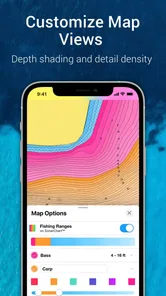
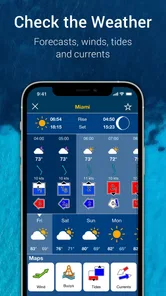
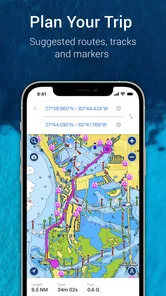
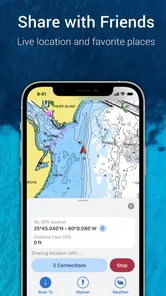
Analysis by Reviewed
I judge a boating app less by a polished map than by whether I can understand what it is doing before I trust it near a shoreline. Navionics® Boating is made by Garmin and sits firmly in the marine navigation space, not the general-purpose road-mapping world. That distinction matters: a chart app can help me plan and orient, but it should not become a reason to stop checking conditions, local notices, and the water around the boat.
Trust starts with what I can verify
The app’s store average is 2.7 from around 47,000 ratings, with about 2,400 written reviews, so I would not treat its popularity as proof that every user has a smooth experience. It has been installed over 5 million times, but that only tells me it has a broad audience. I would read recent user feedback with my own needs in mind, especially if I rely on a particular chart area or workflow.
For me, the key practical question is not whether an app sounds comprehensive; it is whether I can check the chart coverage and understand the costs before depending on it. Navionics® Boating is free to install and rated for everyone, while in-app purchases range from $49.99 to $149.99 per item. I would explore the available options before a trip rather than assume that every chart or capability I want is included at no cost.
Keep control of the trip plan
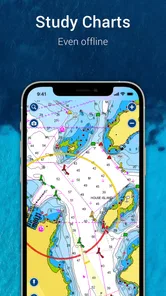
I’d also separate preparation from navigation underway. Before leaving, I would save the route and relevant chart information I expect to need, then confirm that the material is available offline. That is a useful habit with any charting app: a downloaded map can reduce dependence on a mobile connection, but it does not replace a charged device, a backup navigation method, or sound seamanship.
When considering privacy, I avoid making assumptions about permissions or data handling that I have not checked. I would review the app’s current permission prompts and privacy details on my device, allow only what I am comfortable with, and revisit those choices if the app’s behavior changes. Location access is particularly sensitive on a boat, so I would be deliberate about when I want location-based functions active.
Setting Sail with Navionics
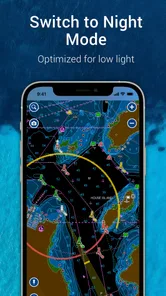
When you first download Navionics® Boating, you’re greeted with an intuitive interface that’s both aesthetically pleasing and functional. The app is designed to cater to both newbies and seasoned sailors alike, making it a versatile tool for anyone who loves the water. As someone who’s spent a fair amount of time navigating different waterways, I can say that the ease of use here is top-notch.
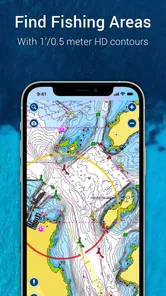
The app offers detailed nautical charts, which are crucial for safe and efficient navigation. What’s more, these charts are updated regularly, ensuring you have the latest information at your fingertips. No more outdated maps – a godsend, right?
More From Our News Desk

Weather by Xiaomi Review: Clear at a Glance, Less Clear Up Close

X Under Pressure: Can It Recover When Posting Goes Wrong?

Clash of Clans Is Won Between the Battles

Android Auto Makes the Case for Quieter Car Software

MobiOffice: Transforming Mobile Productivity with Seamless Integration

EA SPORTS FC™ Mobile Soccer: Redefining Mobile Sports Gaming
Features That Make Waves
One of the standout features of the app is its ability to create custom routes. You can plan your journey in advance, taking into account factors like weather conditions and tides, which can be a game-changer for longer trips. It’s as if you’ve got a personal navigator sitting right there with you.
On top of that, the app has a community aspect that’s worth mentioning. Users can share their experiences, tips, and even some hidden gems they’ve discovered along their routes. It’s like having a community of fellow boating enthusiasts at your disposal, ready to share advice and stories.
Riding the Waves of Technology
In terms of technology, Navionics doesn’t hold back. The integration with GPS and sonar capabilities allows for a seamless experience, making it easier to track your location and understand the underwater terrain. This is particularly helpful if you’re exploring new areas or if the visibility isn’t great.
Additionally, the app supports offline maps. Imagine being out in the middle of nowhere, with no signal, and still being able to access your charts. It’s a feature that brings peace of mind when you’re out on the water.
Making it useful on an ordinary outing
A realistic use is a short weekend run to a familiar bay. I’d check the route at home, note the turns and likely shallow sections, then confirm the chart is available offline before setting off. If the weather or tide changes, I would reassess the plan rather than treating a saved route as an instruction to follow regardless of conditions. That small distinction is important: route planning can make preparation clearer, but the skipper still has to make the decisions.
There is also a useful trade-off in how I would use community-shared knowledge. Tips from other boaters can point me toward places worth investigating, but I would treat them as leads, not current navigation authority. A suggested stop may suit one vessel or day and not another. I’d compare any such suggestion with the chart and what I can observe locally instead of assuming that a popular tip is safe for my boat.
Who benefits, and when another tool fits better
I see the strongest fit for boaters who want marine charts, route planning, and GPS orientation together, especially people who revisit waterways or explore unfamiliar ones. It can also be handy for a passenger who wants to follow the trip and understand the surrounding water. Someone who only needs directions to a lakeside café, however, will likely find a standard road map simpler; it is built around roads and destinations rather than boating decisions.
For a critical passage, I would not make any single phone app my only navigation resource. A dedicated marine plotter or another suitable backup may be the better primary choice for a boater who needs equipment designed around continuous use at the helm. Likewise, if your main need is reliable local knowledge rather than chart-based planning, asking an experienced local boater or checking official notices may be more useful than relying on a community post.
Questions I’d settle before leaving the dock
Can I use it without a signal? The offline-map capability makes that possible when the needed charts have been made available on the device beforehand, so I would test access before departure rather than discover a gap offshore. Does the free install include everything I need? I would not assume so; I’d check the in-app options and confirm the relevant chart coverage before paying for anything. Can it replace a chartplotter? I would use it as a planning and situational-awareness aid, not as my sole safety system.
For a first outing, I’d keep the plan modest, learn where the chart controls and route tools are while still ashore, and avoid making purchases in a hurry at the dock. The app was released on January 2, 2014, and its long presence does not remove the need to check that the current chart and device setup suit the trip I have in mind. Its best role is as one informed part of a broader boating routine.
Check the details before relying on it
One practical question is how much preparation the app asks of me. I would open the chart while connected, inspect the area I intend to travel, and verify that the downloaded material covers not just the destination but the route and likely detours. A chart that appears on screen at home is not automatically proof that every section I may need is ready offline. That simple check is especially worthwhile if I expect to travel beyond familiar waters.
I would also learn the route tools in stages rather than build a complicated passage on the first try. Start with a short route whose landmarks and general direction you already understand. Then check how the route appears at different zoom levels and whether it still makes sense against the chart. The useful insight is not merely that a route can be drawn; it is that zooming out can make a line look reassuringly simple while hiding details that matter at closer range.
For an everyday scenario, imagine a family outing where the plan is to reach a quiet anchoring spot and return before evening. I’d review the route before boarding, make sure the relevant chart is accessible offline, and use the phone to keep track of progress rather than continually staring at it. If the intended stop looks unsuitable once we arrive, the planned line should not persuade me to continue. A chart app is most useful when it helps me prepare and stay oriented while leaving room to change course.
What the chart view can—and cannot—settle
Charts are a way to interpret a place, not a live guarantee about every condition on the water. I would use the app to build a mental picture of the route and identify areas that deserve attention, then check local notices and observe what is actually around me. That is particularly important for unfamiliar shorelines, where a neat screen display can feel more definitive than it should.
The same caution applies to sonar-related information. The app’s GPS and sonar capabilities may help users understand position and underwater terrain, but I would not assume that a phone by itself supplies every kind of sonar reading. The usefulness depends on the equipment and setup available to the boater. If sonar is central to your decision, check compatibility and operation before planning around it, rather than treating the feature mention as a promise that your phone will reveal underwater conditions on its own.
Another small but valuable habit is to avoid treating a saved route as a fixed track. I’d use it as a reference, check my position against the chart, and revise the plan when conditions or observations call for it. For anyone new to boating apps, that distinction is worth learning before a longer trip: a route can make intentions visible, but it cannot make the judgment calls on the water.
Choosing between a phone, a plotter, and local advice
Compared with a general map app, this one is aimed at water rather than roads, so it makes more sense for route planning around nautical charts than for finding a shop or driving to a marina. Compared with a dedicated chartplotter, a phone app is easier to explore during trip preparation and can be convenient to carry, but I would not choose it as the only instrument for a demanding passage. A chartplotter built for helm use may suit that role better.
Local advice is a different kind of alternative. An experienced person who knows a harbor can offer context that a chart or user tip cannot, while the chart can help me follow the geography and plan a route. I prefer to use those sources together where possible: neither an online recommendation nor a familiar local’s memory should make me ignore current conditions. If I boat only occasionally in one well-known area, a simpler local resource may be enough; if I want to explore and plan routes across waterways, the chart-focused approach is more compelling.
For a passenger, the app can also make a trip easier to follow. I would use it to show the general route and explain where we are headed, not to turn a non-operator into the person responsible for navigation. This is a modest use, but it can help everyone aboard understand the plan and notice when it changes.
Cost, access, and personal choice
Because the app is free to install but offers in-app purchases, I would separate trying it from committing to a paid option. First, identify the area you need and the features that matter to your trip; then check what is included before buying. A high price for a chart option can be difficult to justify for someone who rarely boats, while a regular user may value having a charting workflow ready for repeated outings. The right choice depends on how often you will use it and whether the coverage fits your plans.
I also treat permissions as a decision to make in context, not as a box to tap through quickly. Before granting location access, I would consider whether I want location-based functions active at that moment and check the controls offered by my device. I would revisit those choices if I change how I use the app. That does not require assuming anything about the developer’s data practices; it simply keeps the choice in my hands.
The same principle applies to account and privacy controls: I would inspect the choices presented in the app and on the device, and use only the options I understand and want. For boating, the immediate practical concern is often location and device readiness, but it is still sensible to pause over any prompt rather than grant access automatically. My trust comes from making informed choices and checking them, not from assuming that a navigation label answers every privacy question.
Anchoring My Final Thoughts
All in all, this is a capable option for boaters who want marine charts, route planning, and GPS orientation in one place. Its most convincing role is preparation and situational awareness, particularly for people who revisit waterways or want to explore new ones with a chart at hand. The offline option and community input can be useful, provided I prepare ahead and treat shared tips as suggestions rather than authority.
I would be more cautious if I needed a sole navigation system for a serious passage, expected to rely on phone-only sonar, or had not checked chart coverage and purchase options for my area. The rating and volume of user feedback also make me want to test the specific workflow I need instead of assuming it will suit every device and trip. For casual road-style directions, a general map is simpler; for continuous helm navigation, a dedicated marine device may be a better fit.
So, next time you’re planning a trip out on the water, I’d give Navionics a try only after checking the chart area, permissions, and offline access that matter to your route. Start with a manageable outing, keep another navigation method available, and let the app support—not replace—your judgment. Used that way, it can be a helpful first mate without asking you to trust a screen more than the water.
Navionics® Boating Frequently Asked Questions
Can I use Navionics® Boating safely as my only navigation tool on the water?
It is best to treat Navionics® Boating as a navigation aid, not as a substitute for sound seamanship or independent judgment. Before setting out, learn how its charts and controls work, and keep track of your surroundings while underway. The app’s mobile GPS and nautical chart tools can support planning and navigation, but boaters should remain prepared to make decisions using their knowledge and conditions on the water.
Does Navionics® Boating include charts for the waters where I plan to boat?
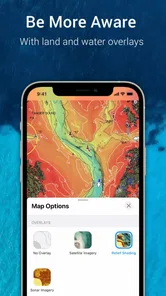
Navionics® Boating focuses on detailed nautical charts, so the most useful first step is to check the chart coverage for the waters you intend to visit in the app. Coverage matters whether you are planning a route close to home or exploring a new area. If you expect to use charts away from an internet connection, review the relevant map options ahead of time and prepare before departure.
Can I install Navionics® Boating on a phone or tablet?
Navionics® Boating is available for Android and iOS, and is designed for use on smartphones and tablets. That gives boaters the option to plan or consult navigation information on a device they already carry. Before downloading, make sure your device and operating system are supported in the relevant app store, and consider how easy the screen will be to view and operate in your intended boating environment.
Do I need an internet connection to use Navionics® Boating?
An internet connection is useful for preparing the app and downloading charts for offline use. Having the relevant maps ready before leaving connectivity can make the app more practical in remote areas. Once offline, GPS-based navigation can still be useful on a compatible device, but it is sensible to test your setup and downloaded charts before relying on them during a trip.
Is Navionics® Boating suitable for someone new to boating navigation?
Navionics® Boating is a Maps & Navigation app from Garmin, with detailed nautical charts and a boatload of useful features. Its route planning and GPS tools may appeal to boaters who want navigation information on a mobile device. New users should take time to become familiar with the charts and controls before relying on them while underway, and should treat an app as a navigation aid rather than a replacement for good seamanship.
Pros
- Comprehensive nautical charts.
- Real-time weather updates.
- User-friendly interface.
- Offline map access.
- Community edits for accuracy.
Cons
- High subscription cost.
- Limited free features.
- Battery drains quickly.
- Occasional app crashes.
- Requires internet for updates.













