Garmin Golf
- 1.88K
- 4.2
- Installs
- 1.00M
- Price
- Free

Screenshots
Analysis by Reviewed
I see Garmin Golf as a companion for golfers who want their rounds to be more than a sequence of shots and a final score. It brings tracking, course information, and friendly competition together, with the most value coming when you already use Garmin golf gear. That focus is also its main trade-off: if you want a simple scorecard or do not use Garmin devices, a lighter golf app may suit you better.
Where it fits into a golfer’s routine
Garmin Golf is a free sports app from Garmin, and it has grown into a familiar option for golfers: it has a 4.2 average from around 21,000 ratings and over 1 million installs. The audience rating is Everyone, while optional in-app purchases range from $9.99 to $99.99 per item. Those purchases are worth keeping in mind if you are comparing it with apps that stick to a basic free scorecard, particularly if you are not sure how much analysis you will actually use.
The practical question is not whether a golf app can display information, but whether you will use that information to make better choices on the course. Garmin’s approach is strongest when you want to review patterns across rounds, use compatible Garmin devices, and share scores with other players. It is less compelling if your only goal is to record a score once in a while and put your phone away.
A round that makes the app useful
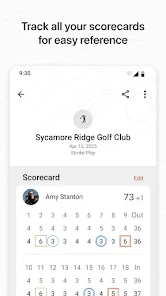
Imagine meeting friends for a Saturday round at a course you do not play often. You can use course mapping to orient yourself, keep score as the group moves through the holes, and follow the leaderboard rather than trying to remember everyone’s totals. Later, the performance information can give you something more useful than a vague sense that your putting or tee shots felt off. The app is at its best when that loop—play, record, review—fits naturally into your routine.
A small but useful habit is to decide before teeing off how much you want to interact with your phone or watch. If you are playing socially, keeping the setup simple can help you stay present with your group. If you are deliberately working on your game, taking a little more care with tracking can make the post-round review more meaningful. More recorded detail is not automatically better: it only helps if you can connect it to a decision or practice goal.
Its place among golf apps
Compared with a basic scorekeeping app, Garmin Golf puts more emphasis on analysis, course context, and competition. That can make it a better fit for a player who enjoys looking back at how a round unfolded, rather than only checking the total. Compared with a dedicated coaching service, though, it is not a substitute for a professional who can watch your swing and explain what to change. App statistics can point toward a question; they cannot, by themselves, diagnose your technique.
That distinction matters if you are new to golf. A detailed set of numbers may seem authoritative, but one round can be affected by weather, unfamiliar holes, poor contact, or simply a difficult day. I would treat trends over repeated rounds as more useful than drawing a big conclusion from one score. If you are not yet comfortable interpreting golf statistics, start with a small goal—such as noticing where you lose strokes—and ignore the rest until it becomes relevant.
First Impressions: User-Friendly Interface
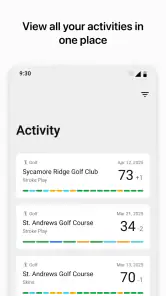
From the moment I installed Garmin Golf, I was impressed by its clean and intuitive interface. Navigating through the app was a breeze, and I appreciated how everything was laid out logically. The design is minimalistic, yet it packs a punch with all the features you could ask for in a golf app. The ability to effortlessly sync with my Garmin watch was a major plus, ensuring that I could track my progress in real-time.
Feature-Packed for Every Golfer
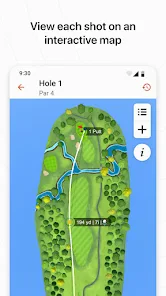
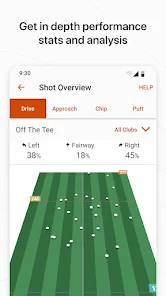
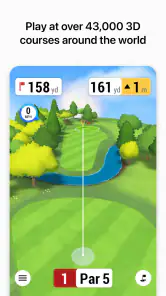
One of the standout features of Garmin Golf is its comprehensive course database. With over 41,000 courses worldwide, it’s unlikely you’ll find a course that isn’t covered. The app offers precise GPS mapping, helping you navigate each hole with ease. Whether you’re looking to improve your swing or lower your handicap, the app provides detailed statistics and analytics to help you understand your strengths and weaknesses.
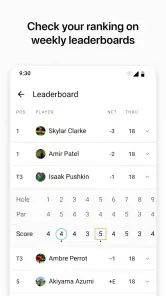
The leaderboard feature is also worth mentioning. It adds a competitive edge to the game by allowing you to compete with friends or golfers from around the world. I found this particularly exciting, as it motivated me to improve and climb up the ranks. Additionally, the app supports live scoring, making it easy to keep track of your performance during tournaments.
Making the data work for you
When I review stats, I try to turn them into one practical question for the next round instead of treating every chart as an instruction. If a recurring pattern suggests that I am missing fairways, for example, I can pay attention to course management and safer targets rather than immediately changing my swing. That is a more sensible use of a tracking app than chasing a perfect-looking dashboard after every outing.
It is also worth separating what the app records from what you remember. A quick note to yourself after a round—what felt difficult, which holes demanded a different plan, or whether you were experimenting with a club—can make later comparisons more informative. The numbers give structure, while your own context explains why a particular round went the way it did. This kind of review takes a little discipline, but it is more likely to produce a useful takeaway than browsing statistics without a goal.
Performance Tracking and Insights
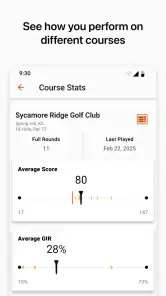
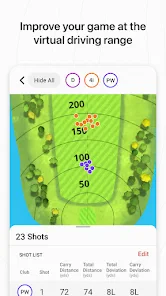
For those who love data, Garmin Golf is a treasure trove of information. From strokes gained to fairway hits, the app provides a detailed breakdown of your game. I was particularly impressed by the shot tracking feature, which records every shot and offers insights into areas for improvement. The app’s ability to sync with other Garmin devices means you can access heart rate data and other fitness metrics, providing a holistic view of your performance.
Another feature I found useful was the virtual caddie. This AI-driven tool offers club recommendations based on your past performance and current conditions, which is like having a personal coach right on your wrist. It’s a game-changer for those looking to make more informed decisions on the course.
Where the convenience has limits
The richer experience depends on how you play and what equipment you bring. If you do not own a compatible Garmin device, the app may still be useful for its social and course-related elements, but the device connection is a meaningful part of its appeal. Before choosing it as your main tool, consider whether you want a phone-based scorekeeper, a wearable companion, or both. The answer changes how much value you will get from the same app.
There is also a balance between checking information and enjoying the round. Constantly looking at a screen can interrupt conversation and concentration, while trying to enter details in a hurry can turn a relaxed game into admin. I would keep the essentials close at hand during play and save deeper analysis for afterward. Golfers who prefer to leave devices in the bag may find that a paper card or a minimal scoring app better matches their style.
For a first-time user, I would begin with a familiar course and a straightforward round rather than trying to explore every tool at once. That makes it easier to learn the scoring flow and judge whether the GPS and tracking fit your pace. If the course information or device connection does not match your expectations, check the app setup and the compatibility of your Garmin equipment before relying on it for a competition. A little preparation is more helpful than discovering a setup issue on the first tee.
Who should choose it—and who should not
I would recommend Garmin Golf to golfers who already use Garmin hardware, enjoy friendly leaderboards, or want a record they can revisit after playing. It is also a reasonable choice for a player who is trying to make practice more focused: reviewing repeated tendencies can help decide whether the next session should concentrate on accuracy, course decisions, or another specific part of the game. The current version is 3.5.1, and the app has been available since May 31, 2017, so it is an established product rather than a brand-new experiment.
I would be more cautious if you play only occasionally, dislike collecting performance data, or want personal coaching rather than self-guided analysis. In those cases, a simple scorecard, a lesson with a golf professional, or a non-Garmin option centered on basic tracking may be a better match. The right choice depends less on how many features an app advertises and more on whether you will use them consistently without letting them distract from the game.
Conclusion: A Must-Have for Golf Enthusiasts
After spending some time with Garmin Golf, I can confidently say it’s a must-have app for anyone serious about improving their golf game. The combination of user-friendly design, extensive features, and insightful data makes it a standout choice in the crowded market of golf apps. Whether you’re a weekend warrior or a seasoned pro, this app offers something for everyone. With its ability to enhance the golfing experience and provide valuable insights, Garmin Golf truly stands out as a top-tier app for golf lovers.
My final view is a little more selective: it is a strong pick for a Garmin golfer who will use the connected tracking and return to the results with a purpose, not an automatic must-have for every player. The scorekeeping, course context, and competition can make rounds more engaging, while its deeper value comes from building a useful history rather than expecting instant improvement. If that sounds like the way you want to play, it is worth trying; if you only need a quick tally, keep your setup simpler.
Garmin Golf Frequently Asked Questions
Can I use Garmin Golf to compete with friends even if we play at different times?
Garmin Golf is designed to let golfers compare results and compete with friends and fellow golfers through shared golf scoring and leaderboards. That makes it appealing if you enjoy adding a social challenge to your rounds, rather than keeping scores only for yourself. The competition features are central to the app’s focus, so they may be most useful when your playing group is interested in tracking and comparing results.
Will Garmin Golf work on my phone’s operating system?
Garmin Golf is available for Android and iOS, and the minimum operating system requirement is version 9. Before downloading, check that your phone meets that requirement so you can install and run the app. The app is developed by Garmin and focuses on golf scoring, competition, and related sports features, so it is intended for golfers who want those tools available on a smartphone.
Is Garmin Golf suitable for someone who is new to golf?
Garmin Golf is a sports app for golfers who want to follow their rounds and compete with friends and fellow golfers. Its scoring, statistics, and leaderboard features can be useful whether you are learning the game or already play regularly. You can start by entering scores manually, then explore device-connected features if you use compatible Garmin golf equipment.
Do I need to create an account to use Garmin Golf?
The app is built around tracking golf activity and sharing or comparing results, so setting up an account may be part of getting the most from its connected features. An account can help keep your golf information associated with you across sessions. Before downloading, consider whether you are comfortable using a Garmin app account, particularly if you plan to connect a Garmin device or take part in online competition.
What features does the Garmin Golf app offer to enhance my golfing experience?
The Garmin Golf app offers a range of features designed to enhance your golfing experience. These include detailed course mapping, live scoring, and analysis of your game statistics. It also provides access to weekly leaderboards and lets you participate in tournaments. Additionally, the app offers insights and tips to improve your game, making it a comprehensive tool for golfers of all skill levels.
Pros
- Intuitive user interface
- Accurate course data
- Seamless device integration
- Detailed performance metrics
- Regular updates
Cons
- Limited free features
- Requires Garmin device
- Occasional GPS glitches
- Subscription for premium
- Complex initial setup

- Category
- Sports
- Version
- 3.5.1