Preference Manager: Addon
- 10.00
- 4.2
- Installs
- 100.00K
- Price
- Free

Screenshots
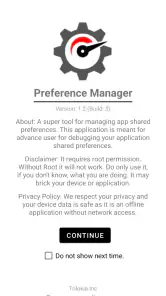
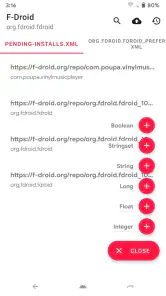
Analysis by Reviewed
Preference Manager: Addon is best understood as a focused utility for people who want to inspect and manage app preferences, not as an all-purpose phone optimizer. That distinction matters: I’d consider it when I need a more direct way to work with app settings, but I wouldn’t install it expecting automatic speed gains or broad control over every part of Android.
What this kind of tool is good for
Shared preferences are settings that an app keeps for its own use. Managing them can be useful when you’re testing an app, troubleshooting a stubborn configuration, or trying to understand how a setting behaves after a change. The practical value is less about everyday phone maintenance and more about having a dedicated place to work with app-level preferences.
For example, if I were testing an app and wanted to compare its behavior before and after changing a preference, I’d make one small change at a time and check the result before touching anything else. That careful approach is more useful than treating preference editing like a general-purpose performance switch. A change can affect how an app behaves, so I’d avoid experimenting on settings I don’t understand.
Unpacking the Interface
When I first launched Preference Manager: Addon, I was greeted with a clean, user-friendly interface. The developers clearly prioritized simplicity without sacrificing functionality. Navigating through the app is a breeze, thanks to its intuitive layout. You won't find yourself lost in a maze of complex options; everything is right where you expect it to be.
Customization at Your Fingertips
The true magic of Preference Manager: Addon lies in its customization capabilities. This app allows you to delve deep into your device's settings and tweak them to your heart's content. Whether you want to adjust app permissions, manage notifications, or even alter system settings, this app has got you covered. I particularly appreciated the ability to create and save profiles for different scenarios, such as work or travel.
For careful users, the strongest workflow is to treat each adjustment as a small test: note the original value, change only what you mean to change, then reopen the relevant app and confirm the result. That makes it easier to spot which edit caused an unexpected behavior and to undo it. I’d also keep preference management separate from permission management in my mind; they are related areas of app control, but changing a preference is not the same as granting or revoking a permission.
Performance Boost
One of the standout features is the performance enhancement tools. After using the app for a couple of weeks, I noticed a significant improvement in my phone's speed and battery life. The app intelligently optimizes background processes and resource allocation, ensuring that your device runs smoothly and efficiently.
More From Our News Desk

Clash of Clans Is Won Between the Battles

Android Auto Makes the Case for Quieter Car Software

MobiOffice: Transforming Mobile Productivity with Seamless Integration

EA SPORTS FC™ Mobile Soccer: Redefining Mobile Sports Gaming

How Microsoft OneDrive Became a Mobile Productivity Giant

How Google Translate Breaks Language Barriers Effortlessly
I’d be cautious about making that performance claim the main reason to install it. A preference-management utility is most convincing when it helps with a specific app-level task; a phone that feels slow or drains quickly may need a different kind of troubleshooting. If your goal is simply to free space or improve battery life, Android’s built-in settings are often the more sensible first stop because they focus directly on storage and battery controls.
Security Features
In today's digital age, security is paramount, and the developers of this app didn't overlook this aspect. Preference Manager: Addon offers robust security features that safeguard your personal information. The app includes tools to manage app permissions meticulously, giving you peace of mind knowing your data is protected.
For privacy-conscious users, I’d still use the platform’s own permission controls as the final checkpoint, especially before changing access to sensitive data. This tool makes more sense for someone who already understands why an app setting or permission needs attention than for someone looking for a one-tap security scan. If you’re unsure what an option does, leaving it unchanged is the safer choice.
Who should install it—and who should skip it
Trilokia Inc. places this free app in the libraries-and-demo space, and that gives a useful clue about its likely audience: curious Android users, developers, and testers who want to work more directly with app preferences. It has an Everyone age rating, a 4.2 average from around 844 ratings, and over 100,000 installs. Version 1.4 supports Android 5.0 and newer, so it is aimed at Android devices rather than iOS.
Compared with the usual alternatives, such as opening an app’s own settings or using Android’s system settings, Preference Manager: Addon is appealing when you want a dedicated preference-focused workflow. Those built-in options are better for routine tasks such as adjusting notifications or reviewing permissions, because they are familiar and less likely to invite unnecessary tinkering. I’d skip this app if you only want a basic phone-cleanup tool, or if you don’t have a clear reason to inspect app preferences.
A practical routine and its limits
In an ordinary day, I can imagine using it while testing a newly installed app: I’d check a preference, make one deliberate adjustment, and then see whether the app behaves as intended. If something goes wrong, changing one item at a time makes the cause easier to identify than altering several settings at once. The trade-off is that this kind of control asks for patience and judgment; it isn’t a substitute for understanding what a setting affects.
The free price makes it easy to consider, but I’d decide based on the task, not the download count or rating. It is also worth keeping expectations narrow: this is a specialist utility, not a universal control panel. If you’re looking for app-development or troubleshooting support, its focus may be useful; if you want straightforward device maintenance, the built-in tools are likely a better fit.
Making changes without creating extra work
A preference editor is most useful when I arrive with a question, rather than browsing through settings in search of something to improve. Before opening it, I’d identify the app I’m investigating and write down the behavior I want to change. That gives me a simple way to judge the result: did the setting affect the issue, or did the app behave the same way? Without that goal, it is easy to spend time changing values that do not matter to the problem.
I’d also keep a small record of changes outside the app, especially if I’m testing several possibilities over multiple sessions. A note with the app name, the original value, the new value, and the observed result can prevent a frustrating guessing game later. This is particularly helpful if an app has many preference entries that look similar. It isn’t glamorous, but a change log makes experimentation reversible in practice, even when I’m not sure which adjustment I made most recently.
One useful habit is to test the target app immediately after each adjustment, then leave it alone long enough to see whether the change holds during ordinary use. A setting that appears to work on the first screen may affect a later action instead. I would avoid changing several related entries together: that can make the test quicker, but it also makes it much harder to know which value helped or caused trouble. The slower, single-change method is less exciting and usually more informative.
Where this sits beside other Android tools
For common tasks, I would still start with the app’s own settings page or Android’s system controls. They are designed for things most people recognize, such as notifications, storage, and access to device features. A preference-focused utility serves a narrower purpose: it can be relevant when the setting I need to inspect is not presented as a normal user-facing toggle. That distinction is why I see it as a companion for troubleshooting, not a replacement for Android settings.
It also differs from a cleaner or optimizer. Those tools generally appeal to people who want a quick maintenance action, while preference work involves understanding what an individual app stores and checking the effect of a deliberate adjustment. I wouldn’t expect this app to diagnose a slow phone by itself, and I wouldn’t use an optimizer as a substitute when I need to investigate one app’s configuration. Choosing the right tool starts with defining the problem, not choosing whichever utility promises the broadest control.
For developers and testers, the attraction is the closer look at app-level behavior. For an everyday user who only wants to switch a notification off, the normal settings route is simpler and easier to understand. And if the issue is a broken app rather than a preference that needs adjustment, restarting it, checking its ordinary settings, or using the app’s own support route may be a more sensible next step than experimenting with stored values.
Questions worth settling before you install
One practical question is whether this is useful without technical experience. I think a cautious beginner can benefit if they have a specific task and are willing to leave unfamiliar entries alone. The interface may make navigation approachable, but a readable screen does not automatically make every preference self-explanatory. If I could not explain what I hoped a value would change, I would not edit it just to see what happens.
Another consideration is whether it is appropriate for changing permissions. I would treat those as separate controls: use Android’s own permission settings when the goal is to allow or deny access to sensitive information, and use preference management only when investigating app-specific configuration. That separation helps avoid assuming that a preference edit gives the same protection as a system permission change.
It is also worth asking whether it can help with a particular app problem. It may be a reasonable tool when the problem plausibly relates to a saved app setting and you can test changes carefully. It is a poor first move for issues caused by connectivity, a service outage, a full storage drive, or a general battery concern. In those cases, preference editing may add complexity without addressing the cause.
Finally, I would not choose it because of its rating alone. The 4.2 average and its audience suggest that it has found users, but a specialist utility can be valuable to one person and irrelevant to another. The better test is whether you regularly inspect app configuration, build or test Android apps, or have a specific troubleshooting task in mind. If none of those applies, you may have no reason to keep it installed.
Final Thoughts
In conclusion, if you're looking for an app that gives you unparalleled control over your smartphone settings, Preference Manager: Addon is a must-have. It's easy to use, packed with features, and it genuinely enhances your device's performance while keeping your data secure. Trust me; once you try it, you'll wonder how you ever managed without it!
Preference Manager: Addon Frequently Asked Questions
What kind of app is Preference Manager: Addon, and who makes it?
Preference Manager: Addon is an app in the Libraries & Demo category, developed by Trilokia Inc. Its short description is simply “Preference Manager,” while its summary presents it as a tool for managing app shared preferences. That makes it most relevant to users looking for a way to work with app preference settings, rather than a general-purpose phone cleaner or everyday productivity app.
What is Preference Manager: Addon and how does it work?
Preference Manager: Addon is a utility app designed to help users manage and customize application settings on their Android or iOS devices. It works by allowing users to access, modify, and backup preferences for various apps, providing greater control over app behavior and personalization. This can be particularly useful for power users who want to tweak app settings beyond the default options provided by the developers.
Is Preference Manager: Addon safe to use?
Yes, Preference Manager: Addon is safe to use as long as it is downloaded from a reputable source such as the Google Play Store or Apple App Store. The app itself does not contain any malware or harmful software. However, users should be cautious when modifying app preferences, as incorrect changes could potentially disrupt app functionality or cause data loss.
Do I need root access or jailbreaking for using Preference Manager: Addon?
For Android devices, some features of Preference Manager: Addon may require root access to fully function, as it needs permission to access certain system files. On iOS devices, jailbreaking might be necessary for similar reasons. Users should be aware of the risks associated with rooting or jailbreaking, such as voiding device warranties and exposing the device to potential security vulnerabilities.
Can I backup and restore app preferences with Preference Manager: Addon?
Yes, Preference Manager: Addon allows users to backup and restore app preferences, ensuring that your customized settings can be saved and reapplied if needed. This feature is particularly useful when switching devices or after a system reset, as it prevents the loss of personalized configurations and saves time in setting up apps again.
Pros
- User-friendly interface
- Highly customizable options
- Supports multiple devices
- Regular updates
- Offline mode available
Cons
- Limited free version features
- Requires in-app purchases
- Occasional sync issues
- Ads in the free version
- Can be resource-intensive
- Category
- Libraries & Demo
- Version
- 1.4











