Full Quran Audio MP3 Offline
- 15.00
- 4.6
- Installs
- 1.00M
- Price
- Free

Screenshots


Analysis by Reviewed
I would choose a Quran audio app for more than the promise of listening offline. The practical questions are whether I can settle into reading without wrestling with setup, what to try if audio does not play, and whether the app suits the way I study. Full Quran Audio MP3 Offline is aimed at people who want Quran recitation available for listening as well as reading and understanding. My view is that it is most appealing when a straightforward, Quran-focused routine matters more than the broader discovery tools found in general audio apps.
Getting oriented before you press play
This is a free app in the Libraries & Demo category, developed by AppSoNix. It is intended for an Everyone audience, so it can be considered for shared household use as well as personal listening. Its stated focus combines Quran audio with reading and understanding, which makes it different from a basic music player: the central task is engaging with the Quran, not managing a large collection of unrelated media.
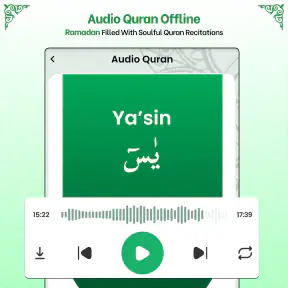
There is a small but important distinction between “offline” in the app’s name and being ready to listen without a connection. An offline audio app can still require some preparation before a commute or a trip. I would check that the material I want is available on the device while I still have a reliable connection, then briefly test playback before relying on it away from home. That simple habit is more useful than discovering at the station or in a quiet room that the selected audio is not ready.
The app has a 4.6 average from around 12,000 ratings, and it has passed one million installs. Those figures suggest that many people have found it useful, but they do not guarantee that every device, listening habit, or interpretation preference will be a perfect fit. I would treat them as context rather than a substitute for checking whether its reading and audio approach matches what I need.
When playback seems stuck
If a passage will not start, I would work through the problem in a calm order rather than immediately reinstalling the app. First, check whether the device is actually playing sound: raise the media volume, disconnect any unwanted Bluetooth output, and try the phone speaker or a known pair of headphones. A silent Bluetooth connection can make a working player appear broken, especially when the phone has connected to a car or speaker automatically.
Next, try another selection in the app. If one item fails but another plays, the issue may be limited to that selection or its readiness for offline playback. If nothing plays, close and reopen the app, then check whether the phone has enough free storage for ordinary app use. These are general troubleshooting steps, not a guarantee that every playback issue has the same cause, but they help separate an audio-routing problem from an app-wide one.
I would also avoid repeatedly tapping play while the phone is busy or the connection is unstable. Give the app a moment, then try once more. If you are preparing to go offline, test the desired listening session in advance and confirm that sound comes through the output you plan to use. This is especially helpful before a long drive, when changing settings while moving is inconvenient and unsafe.
More From Our News Desk

Weather by Xiaomi Review: Clear at a Glance, Less Clear Up Close

X Under Pressure: Can It Recover When Posting Goes Wrong?

Clash of Clans Is Won Between the Battles

Android Auto Makes the Case for Quieter Car Software

MobiOffice: Transforming Mobile Productivity with Seamless Integration

EA SPORTS FC™ Mobile Soccer: Redefining Mobile Sports Gaming
Small setup checks that save time later
Before making this part of a daily routine, I would open the app at home and decide how I expect to use it: listening while reading, listening on headphones, or using audio as a focused session on its own. Then I would test that exact arrangement. A phone speaker may be convenient for a short session, while headphones can make it easier to listen in a shared space; checking both ahead of time prevents an avoidable scramble later.
For offline use, storage is worth checking before preparing a large amount of audio. Keep enough room for normal phone operation and avoid clearing app-related data casually if you have already arranged content for offline listening. If playback stops after a device cleanup or app update, reconnect when convenient and check the app again before assuming the audio itself has disappeared permanently.
The current version is 5.6, and the minimum operating-system requirement is Android 7.0. If installation or updating is giving trouble, I would first check that the device meets that requirement and that the phone has space for the update. The app is free to install, with optional in-app purchases priced from $1.99 to $10.99 per item. I would review any purchase screen carefully and decide whether a paid item is relevant to my needs rather than assuming that every part of the experience requires payment.
A listening workflow that works in everyday life
One useful way to approach Quran audio is to make the session small and deliberate. For example, I might open the app after breakfast, choose a passage to read, listen attentively, and then spend a few minutes reflecting on its meaning. That is often more manageable than starting with an ambitious plan to listen for a long stretch every day. The app’s combination of audio, reading, and understanding makes this kind of linked routine a natural reason to try it.
For a commute, I would prepare before leaving: select what I want to hear, check playback, and avoid relying on a weak mobile connection during the journey. For a quiet study session, I would keep the phone’s other audio interruptions in mind and use a stable listening setup. These are not special app functions; they are practical ways to get more value from a Quran-focused tool without turning every session into troubleshooting.
A less obvious benefit of separating preparation from listening is that it protects attention. I can make choices while I have time and then use the actual session for recitation rather than browsing or checking settings. If I share a phone with family, I would also make a quick habit of checking which audio output is active before playing aloud. That avoids an unexpectedly public recitation when headphones were intended.
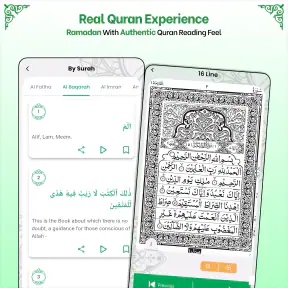
For users who want translation or explanation to guide study, it is sensible to compare what appears in the app with the reading style and language they personally need. The app is described as supporting understanding, but anyone following a particular teacher, translation, or study plan should confirm that its presentation fits that plan. A dedicated study resource may be a better companion when detailed commentary or a specific scholarly approach is the priority.
Recovering a routine when something changes
If audio worked yesterday but not today, think about what changed before resetting everything. Did the phone switch to a car system, wireless speaker, or another headset? Was the app updated, the device restarted, or storage cleaned? Retesting with the phone speaker and another selection can quickly narrow the possibilities. If the issue appears only when offline, reconnect when possible and check whether the chosen audio is still available for the intended session.
If reading feels comfortable but audio does not, or the other way around, there is no need to force one mode. Use the part that supports the moment: read when you want to move at your own pace, and listen when your eyes are occupied or you want to focus on recitation. The app’s value is in bringing those Quran-related activities together, but a user’s routine can still lean more heavily on one of them.
When the app continues to misbehave after basic checks, note the specific pattern before seeking help: whether all selections fail, whether the problem happens only without a connection, and which audio output is in use. A precise description is more useful than simply saying “it is broken.” It also helps distinguish a repeatable app issue from a one-time interruption or a device setting.
When the app is not the cause
Not every playback interruption points to the app. A phone may route sound to a device in another room, media volume may be low while call volume is high, or a car system may take control of audio. If the rest of the phone’s media behaves the same way, check the device’s sound output before changing app settings. If other audio works normally but this app does not, then focus your checks on the app and the selected Quran audio.
Likewise, an offline session can be affected by what was prepared beforehand, the phone’s available storage, or a recent cleanup. I would not erase app data as a first response, because that can remove locally retained material or settings in some apps. Start with reversible steps—reopen the app, try another selection, check the output, and reconnect when available—before taking actions that may require setup again.
Some listeners may also prefer a different kind of tool. A general-purpose audio player is better if the main need is to organize many kinds of recordings in playlists. A dedicated Quran study app may suit someone who needs extensive commentary, detailed progress tracking, or a specific teaching method. This app is a more focused choice for people who want Quran listening alongside reading and understanding, rather than a full library-management or advanced study environment.
Choosing a routine that fits your day
One practical scenario is a short session between household tasks: I would prepare the passage while connected, then listen during a quiet break when I can give it attention. If I expect interruptions, I would avoid treating a single long session as the only useful way to engage; a smaller, repeatable routine is easier to resume. Before sharing the phone, I would also check the selected output and volume so a private listening plan does not become room audio by surprise.
The app is especially suited to someone who wants a Quran-centered place to alternate between reading and listening, without turning the phone into a general media library. It may be less suitable for a learner whose routine depends on a particular reciter, language, translation, or structured lesson sequence. In that case, I would check those specific needs first, or choose a study resource built around them rather than expecting a focused audio app to provide a complete curriculum.
Compared with a regular music or podcast player, the appeal here is the Quran-focused purpose, not broad playlist management or recommendations across unrelated media. Compared with a specialized study tool, the trade-off may run the other way: a study app can be preferable when commentary, lesson structure, or detailed learning aids matter more than straightforward listening. I would choose based on the task I actually want to do, rather than trying to make one app serve every kind of study.
A practical verdict
I would recommend trying it if you want Quran audio to be part of a simple personal routine, especially if you value having listening and reading in the same Quran-centered app. It can also suit someone who wants to prepare for listening away from a dependable connection, provided they test the experience before leaving. Because it is free to download and rated for Everyone, it is easy to consider for individual or household use, while optional purchases make it sensible to check costs before buying anything.
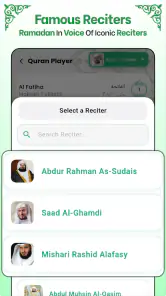
I would hesitate if your first requirement is a particular reciter, a specialized translation, advanced study notes, or elaborate audio controls. Those needs are specific enough that I would verify the app’s available choices before building a routine around it. I would also look elsewhere if managing a large collection of non-Quran audio is the main goal; this app’s focus is a strength for concentrated use, but a general library app is more flexible for mixed listening.
Overall, Full Quran Audio MP3 Offline makes the most sense as a practical, Quran-focused option rather than an all-purpose audio platform. My advice is to install it, test a short reading-and-listening session while online, and confirm your preferred sound output before depending on offline use. If that basic workflow feels natural and its presentation matches your study habits, it can earn a useful place in your day. If you need deeper scholarship tools or precise customization, a more specialized alternative will likely serve you better.
Full Quran Audio MP3 Offline Frequently Asked Questions
What is Full Quran Audio MP3 Offline?
Full Quran Audio MP3 Offline is an app designed for listening to Quran recitations, with audio files available for offline playback. Its exact reciters, translations, and organizational features can vary by app version, so check the store listing and screenshots before downloading. The name alone does not confirm which recitations or additional tools are included.
Can I listen to the Quran without an internet connection?
Offline listening is the main feature suggested by the app’s name, but audio may need to be downloaded while you are connected to the internet first. Check whether the app provides complete offline access or only selected surahs, and confirm how much storage the audio files require. Availability can also depend on the version and device.
Does the app include the complete Quran and different reciters?
The title suggests a Quran audio collection, but it does not specify whether every surah is included or how many reciters are available. Before installing, review the app description for its audio catalog, recitation options, and any translations or text features. If you are looking for a particular reciter or narration style, confirm that it is listed.
Is Full Quran Audio MP3 Offline free to download and use?
The app may be free to install, but pricing, advertisements, and optional purchases can differ between its Android and iOS listings or change over time. Check the current store page for in-app purchases and subscription details before downloading. Also review the permissions requested and the developer’s privacy information so you know what to expect.
How can I check whether the app is suitable for my phone?
Before downloading, confirm that your device meets the app’s operating-system requirements and has enough free storage for any Quran audio you plan to save offline. Read recent user reviews for reports about playback, downloads, or compatibility, and check the latest update date. If offline use matters to you, verify that downloaded files remain accessible without a connection.
Pros
- Listen to Quran recitations without an internet connection.
- MP3 audio makes it easy to play recitations on many devices.
- Useful for listening during travel or in areas with limited connectivity.
- Can support regular Quran listening as part of a daily routine.
- Audio access can be helpful for users who prefer listening to reading.
Cons
- Offline playback requires downloading audio files and storage space.
- Audio quality and file sizes may vary between recordings.
- The app may not include translations or tafsir alongside recitations.
- Reciter and playback options may be limited compared with streaming apps.
- Check that the included recitation and text follow your preferred edition.
- Category
- Libraries & Demo
- Version
- 5.6