Graphics Manager : GFX Addon
- 39.00
- 4.1
- Installs
- 500.00K
- Price
- Free
Screenshots
Analysis by Reviewed
When a mobile game feels choppy or its picture looks less clear than I’d like, I want a way to test settings without turning the process into a project. Graphics Manager: GFX Addon is aimed at that particular job: it gives players a place to adjust supported games’ graphics options and see whether a different balance suits their phone. I’d treat it as a hands-on settings manager, not a promise that every game or device will suddenly perform better.
A sensible baseline before you tweak
My best advice is to begin with the game’s existing experience as a reference. Try a familiar scene, note whether the problem is visual clarity, inconsistent motion, or heat and battery drain, and then change one setting at a time. If you alter several options together, it becomes hard to tell which one helped—or made things worse. A short test in the same kind of gameplay is more useful than judging a new setup from a menu screen.
This is especially practical for someone who returns to the same game every day. A quick check before a longer session can help you decide whether to favor a clearer image or a steadier-feeling game. I wouldn’t assume a higher setting is automatically better: a phone that struggles with extra visual load may feel less responsive, so the right choice is the one that works reliably on your own device.
Making graphics adjustments useful in everyday play
Graphics Manager: GFX Addon is a free Android app from Trilokia Inc. in the libraries and demo category. Its purpose is to give players a separate place to work with graphics options for games it supports. That makes it a practical experiment rather than a game in its own right: the benefit comes from finding a configuration that suits a particular title and phone.
That distinction matters when deciding whether to install it. A graphics manager cannot make every game compatible or remove the limits of a device. I’d approach it with a specific question—such as whether a supported game feels better with a different balance of image quality and motion—rather than expecting a universal performance fix.
Settings that deserve a careful check
Resolution, frame rate, and HDR are not interchangeable upgrades. A sharper image can make small details easier to see, while pushing for faster frame delivery may be the more noticeable change during quick movement. HDR can be appealing when a game and device support it, but it is not a sensible first adjustment if your priority is stable play. I’d test these choices separately rather than switch everything on at once.
Compatibility is the practical question to settle first. The app’s tools apply to supported games, so I’d check whether the title I actually play is available before planning around a particular setting. If it isn’t supported, the game’s own graphics menu—or its default configuration—is the more useful route. This is also why I’d avoid treating any preset as a universal recommendation: different phones can respond differently to the same workload.
More From Our News Desk

Clash of Clans Is Won Between the Battles

Android Auto Makes the Case for Quieter Car Software

MobiOffice: Transforming Mobile Productivity with Seamless Integration

EA SPORTS FC™ Mobile Soccer: Redefining Mobile Sports Gaming

How Microsoft OneDrive Became a Mobile Productivity Giant

How Google Translate Breaks Language Barriers Effortlessly
One useful habit is to decide what “better” means before opening the controls. If text and distant objects look muddy, image clarity is the thing to assess. If quick movement feels uneven, a change related to frame delivery may be more relevant. Naming the problem keeps me from turning every option up just because the controls are there, and it makes a disappointing result easier to undo.
I’d also separate a quick visual check from a longer comfort check. A setting can look promising in a brief test, then feel less pleasant after the phone has been in use for a while. Comparing the same kind of scene at similar points in a session gives a more honest impression than relying on a first glance. The goal is not to prove that a setting is technically superior; it is to choose one that remains comfortable in the way I actually play.
Faster habits for repeat sessions
For a game I play regularly, I’d make adjustments when I have a few quiet minutes rather than during a match or timed event. Change one option, launch the game, and judge it in a comparable situation; if the result is worse, return to the previous choice before testing something else. That simple routine saves time and prevents a pile of uncertain changes from becoming the new baseline.
A realistic example is a commute home: if I have a short session and the battery matters, I’d prioritize a comfortable, consistent experience over the most demanding visual options. At home, with more time to compare, I might test image quality separately. These are not magic profiles built into the app; they are sensible ways to use the controls it offers while keeping the trade-off visible.
For players who switch between several supported games, I’d avoid assuming that one favorite setup should carry over to every title. A choice that makes one game easier to read could be unnecessary or less comfortable in another. Treating each game as its own small test is slower at first, but it prevents an adjustment made for one situation from becoming a poor default elsewhere.
A simple note can make repeat testing more efficient: record the setting you changed and a short description of what you noticed. This does not require a complicated tracking system. Even remembering “clearer, but less comfortable in motion” is more useful than making another round of changes from memory. If the result is ambiguous, I’d restore the baseline and try again another time instead of stacking more tweaks on top.
The app is most useful when I can compare like with like. A quiet practice area or familiar section of a game is a better test than a chaotic encounter, where many things can affect how play feels. I’d keep the test brief and ordinary, then make a decision based on the sessions I care about, not just the most dramatic moment.
Performance and power are a balancing act
One reason people explore graphics tools is the hope of reducing lag or making play feel more responsive. That is a reasonable goal, but I would not count on every adjustment producing it. The result depends on the supported game, the phone, and the choice being tested. If a change makes visuals more demanding, it could work against smoothness rather than improve it.
Battery concerns deserve the same practical approach. When I’m away from a charger, I would avoid chasing the most ambitious visual setup and focus on the configuration that feels comfortable without demanding more than I need. The app is a place to explore graphics choices, not a guarantee of longer playtime. If battery life is the main problem, lowering expectations for visual extras may be more sensible than looking for a single setting to solve everything.
There is also a useful distinction between performance trouble and a preference issue. A game may run acceptably but simply look less crisp than I like; in that case, testing image-related options makes sense. If the phone is already struggling or becoming uncomfortable to use, a more restrained setup—or a pause—may be the wiser response. Adjustments are most valuable when they address a clear, manageable problem.
Who will get the most from it
I see the strongest case for this tool among players who enjoy experimenting, have a supported game, and can tell the difference between a visual improvement and a performance compromise. It can also be useful when a game’s own menu offers too little room to tailor the experience. By contrast, if a title already runs smoothly and looks good to you, extra tweaking may add hassle without making your sessions more enjoyable.
Compared with changing settings only inside each game, a dedicated graphics manager gives you another place to explore available adjustments. It still depends on game support, though, and it does not replace a game’s own options or fix limits imposed by the phone. I’d skip it if you want a guaranteed speed boost, don’t want to test changes, or prefer leaving graphics untouched. The app is free, from Trilokia Inc., and sits in the libraries and demo space rather than being a game itself.
It may suit someone who already knows which visual compromise they prefer and wants to test that choice in a supported title. It is less compelling for a casual player who opens a game for a few minutes and has no particular complaint. In that case, the time spent changing settings may be more noticeable than any improvement. I’d also choose the game’s own controls when they already offer the adjustment I need and I’m happy with how they work.
For someone new to graphics tuning, the safest starting point is modest: check support, make one change, and keep it only if the difference is clear in ordinary play. There is no need to chase a maximum setting simply because it is available. This approach makes the app approachable without requiring technical knowledge, while still leaving room for more experienced users to compare options deliberately.
Where the limits matter
Changing graphics settings can involve trade-offs: a more ambitious visual setup may ask more of the device, while dialing things back can mean accepting a less detailed image. I would not judge success by a single dramatic moment; a setting that looks impressive briefly but makes a longer session uncomfortable is not a win. The safest habit is to keep changes modest, compare them in ordinary play, and revert anything that causes trouble.
Nor should a graphics tool be confused with a hardware upgrade. It can help you make choices about supported settings, but the phone still sets the practical ceiling. If the game itself is the bottleneck, or the device is already running hot or struggling, a simpler configuration—or taking a break—may be wiser than chasing maximum visual options.
There is a learning curve even if the basic idea is straightforward. The app gives you options to consider, but the user still has to judge the result and decide whether a change is worthwhile. That can be frustrating if you expected a one-tap solution. I’d rather spend a few minutes testing carefully than trust an adjustment I cannot connect to a visible improvement.
Compared with relying on a game’s own settings, this tool is useful only when its supported-game adjustments offer something I want to explore. The game menu remains the simpler choice when it already solves the problem, because it avoids adding another step to the routine. A graphics manager is not automatically better just because it is separate; its value comes from having relevant options for a title I actually play.
Compatibility should shape expectations before any setup work. If the game I care about is not supported, there is little reason to build a routine around the app for that title. I would use the in-game controls or leave the default configuration alone instead. That is a real boundary, not a flaw that can be fixed by trying more combinations.
A measured verdict for curious players
So, is the Graphics Manager: GFX Addon worth your time? If you're a mobile gamer looking to enhance your experience, then absolutely. It's a tool that offers tangible improvements, making your games look and run better. While it may not turn your device into a flagship model overnight, it certainly narrows the gap.
I’d put that recommendation in context: it is worth trying when a supported game gives you a clear reason to adjust its graphics and you are willing to compare results. I would not install it expecting every title to benefit automatically, or treat a more demanding visual option as proof of better play. The practical win is a setting that suits the phone and the session, even if that means choosing restraint over spectacle.
For context, it has a 4.1 average from around 2,100 ratings, with over 500,000 installs. It is rated for Everyone, and version 1.7 requires Android 7.0 or later; it was released on September 18, 2020. Those details make it approachable for many Android users, but I’d still decide based on whether the games I care about are supported and whether I’m willing to test settings rather than expect an automatic fix.
In conclusion, Graphics Manager: GFX Addon is an app that delivers on its promises. It's easy to use, effective, and a must-have for any serious mobile gamer. Whether you're playing the latest AAA titles or enjoying indie gems, this app can help you get the most out of your device. Give it a try—you might just be surprised at what your phone can do!
My own verdict is more measured: I’d try it when a supported game gives me a specific graphics problem to solve, then keep only the changes that hold up in normal play. Experienced users may appreciate that repeatable, one-setting-at-a-time approach; casual players who are happy with their current picture can comfortably leave things alone. Used with realistic expectations, it is a free way to explore options, not a substitute for compatible games or capable hardware.
Graphics Manager : GFX Addon Frequently Asked Questions
Does Graphics Manager: GFX Addon cost anything, and what kind of app is it?
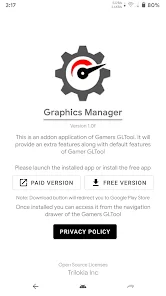
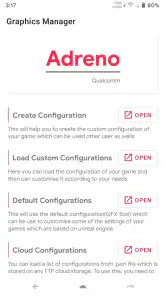
Graphics Manager: GFX Addon is a free app in the Libraries & Demo category, with a built-in GFX Tool for customizing game graphics settings. It is developed by Trilokia Inc. and has an Everyone content rating. If you are looking for a graphics utility rather than a game itself, its purpose is to help you adjust supported games’ visual settings.
What devices can install Graphics Manager: GFX Addon?
The app requires Android 7.0 or later, so check your device’s Android version before downloading. Graphics Manager: GFX Addon is currently at version 1.7 and was released on September 18, 2020. It has passed 500,000 installs, giving prospective users a sense of its reach, though whether it suits your particular device depends on its OS and the games you want to configure.
What is Graphics Manager: GFX Addon and how does it enhance gaming performance?
Graphics Manager: GFX Addon is a tool designed to optimize and enhance the graphics settings of mobile games. By adjusting various parameters like resolution, texture quality, and frame rate, it aims to provide a smoother and more visually appealing gaming experience. It's particularly useful for users with mid-range devices who want to improve game performance without investing in high-end hardware.
Is Graphics Manager: GFX Addon safe to use on my device?
Yes, Graphics Manager: GFX Addon is generally safe to use, as it does not require rooting your device or altering any system files. However, it's important to download it from reputable sources, such as the official Google Play Store or Apple App Store, to avoid potential security risks from unofficial versions that might contain malware.
Can Graphics Manager: GFX Addon be used on all mobile games?
Graphics Manager: GFX Addon supports a wide range of popular mobile games, but it may not be compatible with every title available in the app stores. It's designed to work best with games that allow modifications to their graphics settings. Users should check the app's compatibility list or test it with their favorite games to ensure it functions as expected.
Pros
- Enhances game graphics significantly
- User-friendly interface
- Compatible with many games
- Customizable settings
- Improves device performance
Cons
- May cause overheating
- Battery drains faster
- Requires high-end devices
- Frequent app updates
- May void game warranties
- Category
- Libraries & Demo
- Version
- 1.7











