Gallery - Photo Gallery, Album
- 4.26K
- 4.6
- Installs
- 50.00M
- Price
- Free

Screenshots
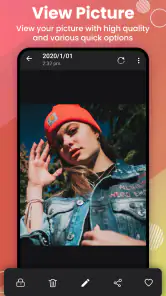
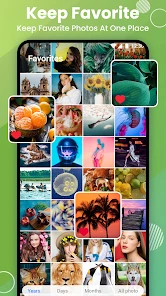
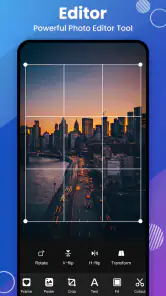
Analysis by Reviewed
I judge a gallery app less by how many tools it promises than by whether it makes everyday photo browsing calmer and quicker. Gallery - Photo Gallery, Album aims to be a straightforward home for photos, with editing, sharing, and privacy controls in the mix. That combination makes it appealing if your default camera roll has become hard to manage, though I’d be careful not to treat it as a full replacement for a dedicated photo editor or backup service.
What a separate gallery can make easier
The real value of an alternative gallery is often less about dramatic features than about reducing small bits of friction. When I want to compare a few recent pictures, find an image to send, or separate personal shots from the rest of my camera roll, having a focused place to browse can make those tasks feel less tangled. This is a practical distinction from opening a full editing suite every time I only need to look through photos.
It also helps to decide what job you want the app to do before moving a large collection into a new routine. If the goal is a cleaner way to view and handle pictures on the phone, this kind of app makes sense. If the goal is to create a complete archive that survives a device change, I’d pair it with a backup method I trust rather than expecting a gallery to cover both jobs.
A practical fit for everyday photo clutter
The app is a free photography app from AI Photo Team, and its broad appeal is reflected in an average rating of 4.6 from around 273,000 ratings, with over 50 million installs. It is rated for Everyone, and the current version is 1.3.7.0. Those figures suggest a widely used utility, but what matters in daily use is whether it fits your habits: if you mostly want to browse, tidy, make simple edits, and share pictures, a focused gallery can be more convenient than opening a heavier editing app each time.
A useful routine is to do a short cleanup after an event rather than wait until the phone is overflowing with screenshots and duplicate-looking shots. I’d review the recent images, keep the best frames, and move personal pictures into the private area if I don’t want them sitting alongside ordinary camera photos. That small habit makes later searching less frustrating and keeps sharing a little safer: before sending a picture, I can check that I’m selecting the intended image rather than tapping through a crowded camera roll.
For example, after a family get-together, I might first pick out the pictures I actually want to keep, then put invitations, menu snaps, and temporary screenshots somewhere easier to distinguish from the best moments. The useful trick is to do this while I still remember why each image was taken. Waiting weeks turns a quick review into a guessing exercise, especially when several frames look nearly identical. A few minutes of sorting right after an event can save more time than trying to impose a perfect filing system on the whole camera roll later.
That workflow is also a reminder to be selective about what I move or remove. A gallery can make browsing easier, but the app cannot decide which nearly identical photo has the expression or focus I prefer. I’d compare the candidates before deleting anything, and I’d avoid treating a private area as a second copy unless I have checked how it behaves. The most dependable approach is to keep the images I care about and use separation for convenience, not as a substitute for a deliberate backup.
More From Our News Desk

Weather by Xiaomi Review: Clear at a Glance, Less Clear Up Close

X Under Pressure: Can It Recover When Posting Goes Wrong?

Clash of Clans Is Won Between the Battles

Android Auto Makes the Case for Quieter Car Software

MobiOffice: Transforming Mobile Productivity with Seamless Integration

EA SPORTS FC™ Mobile Soccer: Redefining Mobile Sports Gaming
The privacy feature is best understood as a practical layer of separation, not a reason to assume every sensitive file is protected in every situation. I’d test how moving a picture into the private gallery affects its visibility in other apps before relying on it for anything important. Likewise, editing a photo before sharing can be handy for quick touch-ups, but I’d keep an untouched original when the image matters; a simple gallery workflow is not the same as a careful archival process.
Where it sits among gallery alternatives
Compared with a phone’s built-in gallery, a separate organizer can be worthwhile when you want one place to browse albums and handle basic edits without changing your usual camera app. Compared with cloud-photo services, though, a gallery app is a different kind of tool: I wouldn’t assume that organizing images on the device automatically gives you an off-device backup. If your main concern is protecting memories from a lost or damaged phone, choose a backup solution deliberately and check that it covers the files you care about.
There are also trade-offs around simplicity. A familiar grid is quick to scan, but it won’t replace a professional editor’s detailed controls or a photographer’s cataloging workflow. People who depend on advanced adjustments, extensive metadata management, or dependable cross-device organization may be happier with specialist tools. I’d also check the current purchase screen before committing to paid extras: the app is free to install, while optional in-app items range from $3.99 to $24.99 each.
One useful way to compare options is to ask what happens after you take a picture. A built-in gallery is usually the simplest choice if it already gives you the album view and sharing flow you like. A cloud-photo service is a better fit when syncing and recovery across devices are central to your routine. A dedicated editor makes more sense when you expect to adjust lighting, color, or composition with precision. I see this app as a middle-ground organizer for everyday handling, not a replacement for those more specialized jobs.
That middle ground can be genuinely useful for someone who takes many casual pictures but does not want to learn a complicated library system. It can also be a poor fit for a person who expects a gallery to automatically identify every subject, preserve a complete history, or behave identically across phones. I’d choose based on the task I need to solve most often, not on the assumption that one app should manage every stage from capture to long-term storage.
My First Impressions
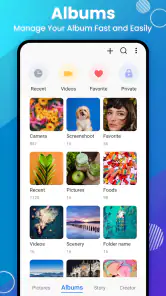
The first thing that struck me about the Gallery - Photo Gallery, Album app is its sleek and intuitive interface. Navigating through my media felt like a breeze. The developers have clearly put a lot of thought into making the user experience as smooth as possible. The app launches quickly and presents your photos and videos in a clean, aesthetically pleasing grid layout.
Features That Stand Out
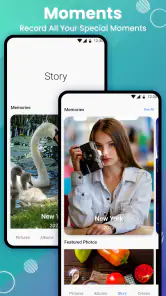
One of the standout features of this app is its ability to automatically organize your photos into albums. I was amazed at how it grouped my media by date and location, making it so much easier to find that one specific picture from last summer's beach trip. It's almost like having a personal assistant for your photos!
Another feature I loved is the powerful search function. You can search for photos by keywords, date, or even by the type of content. This feature is a lifesaver when you have thousands of photos to sift through!
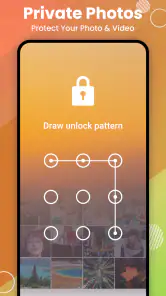
And let's not forget about the privacy features. The app allows you to create a private gallery where you can store photos you want to keep away from prying eyes. It's a small feature but incredibly useful for those sensitive or personal images.
Even with search available, I wouldn’t rely on it as a reason to stop organizing altogether. Search is most useful when I have a clue to work from, such as an approximate date or a memorable detail. For a picture I need to find quickly, I can narrow the hunt by thinking about when I took it and what album or event it belongs to, rather than typing vague terms and expecting a perfect result. Keeping album names meaningful makes that habit more effective.
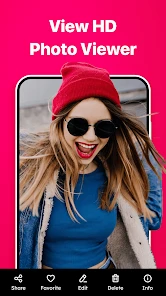
For sharing, I’d take one extra second to inspect the image at full size before sending it. A thumbnail can make two similar shots look almost identical, and that matters when one has a better expression or includes something private in the background. This is a modest step, but it is the kind of practical habit that makes a gallery’s browsing and sharing tools more dependable in real life.
Performance and Usability
In terms of performance, the app runs smoothly without any noticeable lag. Even when scrolling through large albums, it maintains its speed and responsiveness. This is crucial for those of us who are always on the go and need quick access to our media.
Usability-wise, I appreciate the customization options available in the app. You can change the theme, adjust the layout, and even set up automatic backups to ensure your memories are safe and sound. It's these little touches that make the app personal and enjoyable to use.
Customization is most useful when it helps the gallery match the way I already browse. A layout that makes dates or albums easier for me to scan is more valuable than changing settings simply because they are available. I’d start with the default presentation, then adjust one thing at a time if I find myself repeatedly struggling to spot an album or navigate the grid. That keeps the app familiar instead of turning setup into another project.
I’d also treat any backup option as a setting to verify, rather than an assurance I can forget about. Before depending on it, I would check where copies go and confirm that the images I care about are actually accessible there. A backup is only useful if it is separate from the phone and can be restored when needed. That is especially important for travel pictures, family images, or anything I would not be able to recreate.
Limits worth keeping in mind
I wouldn’t choose this as my only photo-management plan if losing a phone would mean losing irreplaceable pictures. I’d confirm that any automatic backup setting is active and reaches a place separate from the device, then periodically check that important images are actually available there. For a quick share, I’d also open the selected photo once before sending it; album names and thumbnails help, but they don’t remove the risk of choosing a near-identical shot.
The app’s minimum operating-system requirement is Android 6.0, so it can suit some older Android devices, while iPhone users should look to the iOS version and its own compatibility details. For Android users deciding whether to try it, the free entry point keeps the barrier low, but I’d treat optional purchases as something to evaluate only after the basic browsing and editing routine feels useful.
There is a practical distinction between making a photo less visible in the ordinary gallery and protecting it against every possible route of access. I would use the private area for everyday separation, such as keeping personal pictures out of the main browsing flow, but I would not use it as a vault for information that requires stronger security without first checking exactly how the feature works. That cautious approach avoids confusing convenience with a guarantee.
Likewise, the app’s editing role is best judged by the edits I actually need. If I want to make a quick adjustment before sharing, having editing close to the gallery can save a step. If I am preparing an important portrait or a set of images that need consistent treatment, I would move to a dedicated editor and keep the originals. Convenience is the strength here; specialist control is where another tool is likely to win.
Who I’d recommend it to
I’d recommend it to someone who takes plenty of everyday pictures, wants a tidier way to browse them, and values having private images separated from the main gallery. It is especially sensible for people who share photos often and want to find a specific moment without turning every small task into an editing session. If you already rely on a cloud library for backup, this can complement that habit as a more direct on-device browsing tool.
A strong everyday use case is a parent or busy traveler who takes bursts of similar pictures and later needs to send one good image to a family chat. I’d use the album view to narrow down the occasion, compare the closest candidates, and check the chosen frame before sharing. The app can make that sequence feel more manageable, while the final check remains my responsibility. For this sort of quick, repeated task, a focused gallery can be more convenient than switching between a file manager, editor, and camera roll.
It also suits someone who prefers a simple, phone-centered workflow and is comfortable keeping a separate backup plan. That person can benefit from having browsing, light editing, sharing, and private separation close together without needing a professional catalog. If you rarely take photos or your built-in gallery already feels effortless, though, installing another organizer may add little beyond one more place to learn and maintain.
I’d skip it if your priority is advanced retouching, detailed professional organization, or guaranteed backup across devices. Those needs call for tools built around editing or cloud storage rather than a lightweight gallery. The strongest reason to try this app is simple: it brings common photo tasks together in a more approachable place, while leaving room for specialist apps when the job gets more demanding.
Final Thoughts
Overall, the Gallery - Photo Gallery, Album app is a must-have for anyone looking to streamline their photo and video management. Whether you're a casual user snapping pictures of your daily life or a serious photographer needing an efficient way to organize your work, this app has got you covered.
I’d soften that recommendation for serious photographers: I think the app is more convincing as an everyday gallery than as the center of a professional photo workflow. Its strongest case is for people who want a less cluttered route from browsing to sharing and appreciate having a private area for selected images. That is a clear, useful role, even if it does not replace dedicated tools for intensive editing, cataloging, or backup.
If you're tired of scrolling endlessly through your camera roll and want an app that's both functional and user-friendly, give this one a try. You won't regretting turning your chaotic gallery into a well-organized masterpiece!
Gallery - Photo Gallery, Album Frequently Asked Questions
Does Gallery - Photo Gallery, Album work on iPhone or iPad?
Gallery - Photo Gallery, Album is an Android photography app, so it is intended for compatible Android devices rather than iPhone or iPad. If you use an iOS device, look for a gallery app made for that platform instead. On Android, check that your device meets the app’s minimum system requirement before downloading.
Who makes Gallery - Photo Gallery, Album, and how popular is it?
The app is developed by AI Photo Team and is listed in the Photography category. It has an average rating of 4.6 from around 273,000 ratings, with about 4,300 written reviews and over 50 million installs. Those figures suggest it has reached a broad audience, though your experience can still depend on your device and how you use its features.
What Android version do I need to install Gallery - Photo Gallery, Album?
The app requires Android 6.0 or later. Before downloading, check your device’s Android version in its settings and make sure you have enough available storage for the installation and your photo library. The app is free to install, while optional in-app purchases are available for users who choose to buy them.
Can I use Gallery - Photo Gallery, Album without an internet connection?
The app is described as a simple, light, and fast gallery for viewing, editing, locking, and sharing photos offline. That makes it a practical choice for browsing and managing photos when you are away from a connection. Sharing content with online services, of course, depends on having the connection those services require.
What features does the Gallery - Photo Gallery, Album app offer?
The Gallery - Photo Gallery, Album app provides a variety of features for organizing and managing your photos and videos. It includes options for creating albums, editing photos, and viewing media in different formats. The app also offers a secure vault for protecting private photos and videos, ensuring your sensitive content remains confidential.
Pros
- User-friendly interface for easy navigation.
- Supports multiple image and video formats.
- Fast performance with quick loading times.
- Integrated photo editing tools.
- Secure with privacy-focused features.
Cons
- Lacks cloud backup options.
- Limited customization for albums.
- Ads can be intrusive at times.
- No support for GIFs.
- Some features require in-app purchases.
- Category
- Photography
- Version
- 1.3.7.0












