File Manager
- 20.52K
- 4.7
- Installs
- 100.00M
- Price
- Free
Screenshots



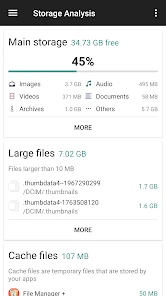
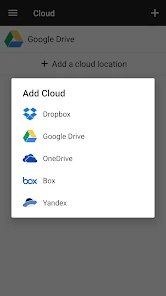
Analysis by Reviewed
Ever found yourself in a situation where you're frantically searching for a file on your phone, only to remember you forgot to organize it properly? Yeah, been there, done that. That's when I stumbled upon File Manager, and let me tell you, it's been a game-changer for my digital clutter.
When files arrive from everywhere
My mess usually starts with an ordinary day: a document arrives in a message, a photo comes from a download, and an attachment lands somewhere I don’t immediately think to check. The trouble is not that any one file is hard to find; it’s that each one can begin in a different place. A dedicated file manager gives me a way to bring those loose ends into view instead of relying on whichever app created them.
That is the role I look for from this kind of productivity app: not replacing every app on my phone, but making the handoff between them less confusing. I want to inspect what is stored, decide what should stay, and put important items somewhere I can find again. File Manager is aimed at that practical middle ground, and it is developed by File Manager Plus.
It is free to install, with optional in-app purchases ranging from $0.99 to $9.99 per item. Its age rating is Everyone, and the app has a 4.7 average from around 1.6 million ratings. More than 100 million installs suggest that this sort of everyday file access is useful to a lot of people, but popularity alone does not tell me whether its approach will suit your habits.
From a loose download to a file I can find
I like to begin with one file that has gone missing in the ordinary shuffle between downloads and other apps, rather than trying to tidy everything at once. In the next section, I’ll follow that file through the choices that matter most: finding it, checking where it belongs, and deciding what should happen before I pass it along.
First Impressions
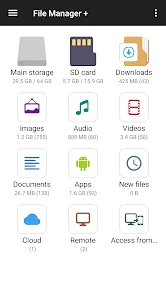
From the moment I installed File Manager, I was welcomed by a sleek and intuitive interface. It's like having a personal assistant who knows exactly where all your files are hiding. The app is lightweight, so it doesn't bog down your phone, which is a major plus for those of us who are constantly battling with storage space.
For a realistic example, imagine I download a PDF before leaving home and later need to send it to someone from a different app. I can use the manager as the checkpoint: locate the document, make sure I have the right file, and then hand it off through the phone’s sharing flow. That extra check matters when several attachments have similar names. I would open and verify the document before sending rather than trusting a vague filename, especially if the recipient is waiting.
More From Our News Desk

Weather by Xiaomi Review: Clear at a Glance, Less Clear Up Close

X Under Pressure: Can It Recover When Posting Goes Wrong?

Clash of Clans Is Won Between the Battles

Android Auto Makes the Case for Quieter Car Software

MobiOffice: Transforming Mobile Productivity with Seamless Integration

EA SPORTS FC™ Mobile Soccer: Redefining Mobile Sports Gaming
This is also where expectations matter. A file manager is not necessarily a full document editor or a replacement for the app that created a file. I use it to find, sort, and move items, then return to a suitable viewer or editor for changes. If your main need is writing reports or annotating PDFs, a dedicated office or PDF app will be a better primary tool; the file manager is useful around that work, not instead of it.
Features Galore
One of the standout features of this app is its ability to handle multiple file formats. Whether it's a PDF, an image, or a video, it handles them all with ease. You can also compress and decompress files, making it super handy for sharing large files without eating up your data plan.
Compression is particularly useful when a task involves several related files rather than one item. I can gather the pieces into a folder, create an archive, and pass along a single package instead of selecting each item separately. The trade-off is that the recipient may need an app or device that can unpack that archive, so I would use this workflow for a group of documents or photos only when the other person can open it. For one ordinary attachment, sharing the original file is usually simpler.
Another cool feature is the integrated cloud storage support. You can sync your files with Google Drive, Dropbox, and a host of other services. It's like having your very own cloud hub right at your fingertips.
Cloud access helps most when I need to move between the phone’s local storage and an online account without mentally switching tools. A useful routine is to check the destination before copying: local storage is handy for offline access, while a cloud location can make a file available across devices. I would still keep a clear distinction between the two. Seeing a file through a cloud connection does not automatically mean there is a separate offline copy, so for travel or unreliable connections I would confirm what I actually need saved locally.
Navigation and Usability
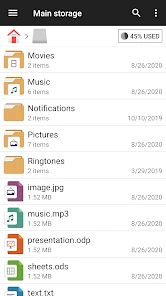
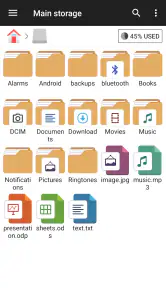
The app's navigation is as smooth as butter. With a clean layout and easy-to-understand icons, you don't need to be a tech wizard to get around. Searching for files is a breeze, thanks to the powerful search functionality that lets you locate files by name, size, or date.
When search results bring up several plausible matches, I find it safer to use the surrounding details rather than open the first result and hope. A quick check of the file’s name and location can prevent sending an old draft instead of the current one. My practical tip is to use a naming habit that includes a topic or purpose before adding a date or version marker; even a good search works better when filenames are meaningful.
And for those who like to keep things organized, the app offers customizable folders and tags. It's like having a Marie Kondo for your phone, sparking joy one file at a time.
I would keep any organization system deliberately small. A few folders that reflect how I actually retrieve things—such as active work, reference material, and items to share—are easier to maintain than a deep hierarchy designed on a quiet afternoon. Tags can help distinguish files that belong to more than one project, but they only pay off if I apply them consistently. If I stop tagging after a week, simple folders and search are likely to serve me better.
Passing files onward without losing track
The most useful part of the workflow is often the handoff. A file may begin in a download, move into a project folder, and then need to go to a person or cloud account. I try to pause at each transition and ask whether I mean to move the original, make a copy, or simply share access. Those choices affect where the file remains afterward, and confusing them can leave me with duplicate versions or an empty folder.
For a batch of photos, I would first sort the keepers into one place, then decide whether the recipient needs individual images or an archive. For a document that is still changing, I would avoid scattering copies across several folders and services; keeping one obvious working version makes it easier to know which file is current. This is less about a clever feature than a habit that keeps any file manager useful over time.
Compared with relying only on a phone’s built-in file browser, a dedicated manager can feel more purposeful when I want a single place to browse storage and connected cloud locations. The built-in option may still be the better choice for someone who only occasionally opens a download and wants to keep the number of installed apps low. Compared with a cloud provider’s own app, File Manager’s appeal is handling local files alongside cloud access, while the provider’s app may be the more natural choice for account-specific sharing and collaboration.
Security and Privacy
Security is always a concern when it comes to file management, and File Manager doesn't skimp in this department. With password protection and encryption options, you can rest easy knowing your sensitive files are safe from prying eyes.
I would treat those protections as useful safeguards, not a reason to stop thinking about where a file is copied or who receives it. A protected item can still be exposed if I share it carelessly, and an encrypted archive is only convenient when I can remember how it is meant to be opened. Before using protection for important material, I would test the process with a non-sensitive file and make sure I understand how I will access it later. That small rehearsal is a sensible way to avoid locking myself out of something I need.
Plus, the app doesn't bombard you with ads, which is a refreshing change in a world where free apps often come with a side of annoying pop-ups.
That said, I would not choose any general-purpose file browser as my only answer for highly sensitive records without first checking whether its protections match my requirements. Someone handling confidential business or legal material may need an organization-approved tool and storage process. For everyday personal documents, the available protection options can be useful, but careful sharing and sensible storage habits still matter.
Who will get the most from it
I think this app is a good fit for people who regularly download attachments, move photos, work with archives, or switch between phone storage and cloud accounts. It is also helpful if you have ever saved something and then had no idea which app or folder received it. The benefit is not that it makes every file task disappear; it gives those tasks a more visible place to happen.
I would skip it if your phone’s built-in browser already handles your occasional file needs and you do not want another app to learn. I would also look elsewhere if your priority is collaborative editing, automatic photo backup, or a polished interface for managing one cloud account: those jobs are usually better handled by the dedicated service. File Manager is most convincing when the problem is moving between sources and destinations, not when the problem is creating or sharing content within a single specialized service.
For a first-time user, I would start with one modest cleanup rather than reorganizing the entire phone. Find a recent download, confirm where it is stored, and move or copy it only if there is a clear reason. Then try a cloud handoff with a nonessential file. That gives you a feel for the difference between local and online storage before you rely on the workflow for something urgent.
File Manager, first released on Oct 19, 2015, has built a substantial audience, with more than 21,000 written reviews alongside its large rating count. I see its strongest case in the everyday tasks between apps: locating a download, grouping related files, preparing an archive, or moving something between local storage and a cloud account. Its limits are just as practical: it cannot replace a dedicated editor or collaboration service, and a tidy folder system still depends on the person using it. If you want a hands-on place to manage those handoffs, I think it is worth trying; if your current file browser already does everything you need, there is no reason to add complexity for its own sake.
Where the workflow can snag
The smooth path depends on knowing what kind of file action I am taking. Copying can preserve an original while creating another version; moving changes where the item lives; sharing hands it to another app or person. If I rush through those choices, I can end up with duplicate files, lose track of the latest copy, or assume a file is available offline when I only saw it through a cloud connection. A short pause to check the location and intended outcome is more useful than trying to clean up confusion afterward.
There is also a natural limit to a general manager’s convenience. Connected services can make browsing feel centralized, but each cloud provider still has its own account and sharing behavior. For account-level collaboration, permissions, or team workflows, I would go directly to the relevant service. For a one-off transfer between a downloaded file and a cloud folder, keeping the file manager in the middle is often more straightforward.
My final recommendation is simple: try it if files routinely get stranded between downloads, folders, and cloud storage. Keep your folder structure shallow, verify important files before sending them, and use archives only when bundling several items genuinely helps. Those habits let the app do the practical organizing work without turning file management into another project of its own.
File Manager Frequently Asked Questions
Can I use File Manager to transfer files between my phone and a computer?
File Manager is designed to help you browse and manage files, and its cloud integration can make files accessible across connected services. Before downloading, consider which transfer method you need: moving files within the app is different from connecting directly to a computer. The app’s file-management tools are useful for organizing content, while cloud access offers another way to work with files across devices.
Will File Manager help me find and organize files on my device?
Yes. File Manager includes file browsing, folder creation, and search tools, so you can locate content and arrange it in a structure that makes sense to you. You can also copy and paste files as part of everyday organization. If your device has accumulated documents or other content in different folders, these tools can make routine file handling more convenient.
Is File Manager free to download, and does it include in-app purchases?
File Manager is a free productivity app developed by File Manager Plus. It also offers in-app purchases, so some optional items may cost extra. The app has a 4.7 average rating from around 1.6 million ratings and has been installed over 100 million times, reflecting its broad use among people who want a straightforward way to manage files.
What permissions might File Manager need, and why should I review them before installing?
A file manager needs access to files and folders to browse, organize, and handle content on your device. Review the permission prompts during installation and first use, and consider whether each request fits the tasks you want to perform. Checking permissions before granting them is a sensible way to understand how an app interacts with your device and stored files.
What are the key features of the File Manager app?
The File Manager app offers a comprehensive set of features designed to enhance file organization and accessibility. Key features include file browsing, copying, and pasting capabilities, folder creation, and advanced search functions. It also supports various file formats and integrates with cloud storage services, allowing users to manage files seamlessly across devices.
Pros
- User-friendly interface for easy navigation.
- Supports multiple file formats seamlessly.
- Built-in search function for quick file access.
- Efficient file transfer between devices.
- Secure file encryption for privacy protection.
Cons
- Ad-supported version can be intrusive.
- Limited cloud integration options.
- Occasional lag with large files.
- Some features are paywalled.
- No built-in media player.
- Category
- Productivity
- Version
- Varies with device