Center Control - Stable & Easy
- 1.37K
- 4.7
- Installs
- 5.00M
- Price
- Free

Screenshots


Analysis by Reviewed
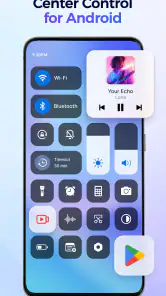
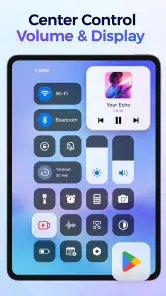
I use a control panel most when I’m moving quickly between tasks, not when I’m exploring settings for fun. That’s the appeal of Center Control - Stable & Easy: it puts shortcuts and everyday controls within easier reach. I’d consider it if I want a more personalized way to get to common actions, though it’s worth remembering that a control panel can make access quicker without making every task independent of the network.
When connectivity shapes the experience
Shortcuts for network controls are most useful when I need to respond to a changing connection: for example, switching Wi-Fi off before leaving home or checking a connection while settling into a café. The panel can make those actions easier to reach, but the result still depends on the phone, its settings, and the network itself. A convenient shortcut cannot improve a weak signal or guarantee that an app will load.
That distinction matters for music, too. A control panel can help me reach music controls, but streaming still relies on the service and connection involved. If a song pauses on a commute, I’d treat the panel as a quicker way to access a control, not as a fix for a network interruption. For trips where reception may vary, I’d prepare through the music app rather than assume a shortcut will keep playback available.
A practical fit for everyday phone use
A realistic use case is arriving at work while a map, message, and audio app are all part of the routine. Instead of opening settings and then returning to the app I was using, I can make frequently used controls easier to reach from the panel. That small reduction in navigation is most valuable when I’m carrying something, walking between places, or trying not to lose my place in a task.
The strongest fit is someone who knows which controls they reach for repeatedly and wants a more direct route to them. If I rarely change settings and already use the phone’s built-in quick settings comfortably, another control center may add little. I’d also be cautious about expecting it to replace system settings: for a less common adjustment, the phone’s own settings remain the more dependable place to understand the full options.
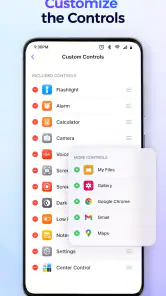
There’s a useful trade-off in customization. I’d start with only a few shortcuts I actually use, then add more only if I notice a repeated detour. A crowded panel can be harder to scan than the settings screen it was meant to simplify. Keeping network controls together can also help me avoid tapping a neighboring shortcut by mistake when I’m in a hurry.
Network trouble is where expectations need to stay realistic. If a connection drops, I would first check whether the phone itself is connected, then try the relevant network control and reopen the affected app if needed. The panel can shorten the route to an action; it cannot diagnose every router, carrier, or service issue. I find that distinction helpful because it keeps a handy interface from being mistaken for a troubleshooting tool.
More From Our News Desk

Weather by Xiaomi Review: Clear at a Glance, Less Clear Up Close

X Under Pressure: Can It Recover When Posting Goes Wrong?

Clash of Clans Is Won Between the Battles

Android Auto Makes the Case for Quieter Car Software

MobiOffice: Transforming Mobile Productivity with Seamless Integration

EA SPORTS FC™ Mobile Soccer: Redefining Mobile Sports Gaming
Getting to Know the App
The first thing that caught my attention with Center Control - Stable & Easy is its sleek and intuitive design. The developers clearly focused on making navigation a breeze. When you first open the app, you’re greeted with a clean interface that doesn’t bog you down with unnecessary options. Everything is right where you’d expect it to be, making it perfect for both tech enthusiasts and casual users.
As a free personalization app from AceTools Team, it has a 4.7 average from around 110,000 ratings and has passed five million installs. It’s rated for everyone, and version 1.2.0 requires Android 6.0 or later. Those details make it approachable to a broad range of Android users, though they don’t tell me how a particular phone will behave with an extra control panel. I’d check the initial setup on my own device before relying on it for a time-sensitive routine.
Features that Make Life Easier
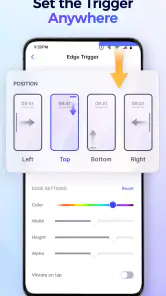
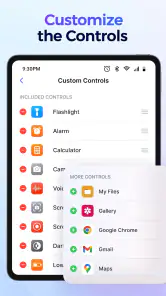
One of the standout features is the ability to customize your control center. You can add shortcuts to your most-used settings and apps, which is a huge time-saver. Whether it’s toggling Wi-Fi, adjusting brightness, or accessing your favorite app, it’s all just a swipe away. Plus, the app’s performance is impressively smooth, living up to its name by being both stable and easy to use.
Another great feature is the notification management system. It allows you to prioritize and organize your notifications efficiently. No more endless scrolling through irrelevant alerts; you can now focus on what truly matters. The app also offers a Do Not Disturb mode that can be scheduled according to your needs, ensuring you’re not bothered during crucial times.
For a data-conscious routine, I’d use a network shortcut deliberately rather than repeatedly flipping connections without a reason. A quick panel can make it tempting to toggle settings just to see whether something changes; that can interrupt an active task without saving data. When I’m trying to reduce mobile use, I’d check which app is consuming data through the phone’s own settings, then use the panel for a simple connection action if needed. It’s a useful division of labor: quick access here, detailed diagnosis in system settings.
User Experience and Performance
In terms of user experience, this app is a winner. It’s lightweight, ensuring it doesn’t hog your device’s resources, and it works flawlessly across both Android and iOS platforms. I didn’t experience any crashes or lags, which is a testament to its stability. The app also receives regular updates, so any minor bugs are swiftly addressed, and new features are often added.
Compared with relying only on the phone’s built-in quick settings, a separate control center is most worthwhile if its arrangement better matches my habits. The built-in panel has the advantage of being part of the operating system, while a personalization app can offer a different way to organize access. I’d choose the built-in option if I want the fewest layers between me and a system control; I’d try this app if the convenience of its layout is the point.
If a shortcut doesn’t appear to work, I’d avoid tapping it repeatedly. I’d check the phone’s own setting, confirm whether the connection or app is actually available, and then return to the panel. That simple recovery path is useful when a network change takes a moment or a service is temporarily unavailable. It also helps separate a panel problem from an issue with the phone or the network.
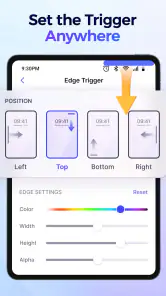
The customization options are another highlight. You can select different themes and color schemes to match your style, which is a nice touch. It’s clear the developers put a lot of thought into making the app both functional and aesthetically pleasing.
Making the panel useful without overloading it
I’d treat the first few days as a small experiment rather than trying to build a perfect panel immediately. Notice which actions you repeatedly reach for, then give those shortcuts priority. A control you use once a month probably doesn’t deserve the same visual prominence as a setting you change whenever you leave home. This keeps the panel quick to scan and makes its customization serve a real habit instead of becoming decoration.
There’s also a practical difference between a shortcut that launches an app and one that changes a phone setting. If I’m heading out and want music, I’d use a music shortcut to open the service I rely on, while keeping network controls available for deliberate connection changes. Separating those jobs makes it easier to understand what happened if playback stops: launching the app and maintaining a stream are not the same task.
For someone who shares a phone with a child or a less technical family member, I’d keep the arrangement especially simple. Familiar, clearly separated controls are easier to use than a dense collection of options, and a clean layout lowers the chance of an accidental tap. The everyone age rating makes the app broadly approachable, but I’d still set up the panel with the actual user’s habits in mind rather than assume every shortcut will be self-explanatory.
Where another option may suit you better
The usual alternative is the Android quick-settings panel, and for many people it is already enough. It is the natural choice if you want system controls in their standard location and don’t need another layer of personalization. This app makes more sense when the appeal is arranging convenient access around your own routine. I would compare the two by asking a simple question: does the new arrangement save a repeated step, or does it merely give me another place to look?
I’d skip a separate control center if I’m happy with the phone’s existing layout, rarely use shortcuts, or prefer to make every adjustment inside the relevant app or system settings. It is also not the right answer when my real problem is unreliable reception, a service outage, or confusion about mobile data use. In those cases, checking the network, account, or app directly is more useful than changing the appearance of the route to a control.
Because the app is available without a purchase, trying it is a low-commitment way to see whether a different control-panel workflow suits me. Still, “free” doesn’t mean it automatically deserves a permanent place in my routine. I’d judge it by whether I can reach the controls I need more comfortably and whether I continue using the panel after the novelty wears off.
Final Thoughts
To sum it up, Center Control - Stable & Easy is a fantastic app for anyone looking to streamline their phone usage. It combines utility with a user-friendly interface, making it a must-have tool in today’s digital age. I highly recommend giving it a try if you’re in need of a reliable control center app. Trust me, once you start using it, you’ll wonder how you ever managed without it!
My practical verdict is a little more selective: this is best for someone who wants a personalized shortcut layer and is willing to spend a little time choosing what belongs there. If you prefer a stock setup, need detailed network troubleshooting, or expect a panel to solve poor reception, the phone’s native controls and the relevant service app are better choices. I’d begin with a compact layout, use it through a normal day, and keep only the shortcuts that genuinely save a step.
Center Control - Stable & Easy Frequently Asked Questions
What can I access from Center Control - Stable & Easy’s panel?
Center Control - Stable & Easy is designed to put selected controls and app access in a control panel. Its description highlights quickly accessing apps and controlling music and network settings, which can be convenient when you want common options close at hand. The controls you find useful will depend on what you want to reach quickly and how you prefer to use your phone.
Is Center Control - Stable & Easy designed to personalize the way I use my phone?
Yes. Center Control - Stable & Easy is a personalization app focused on making selected controls and app access easier to reach from a panel. It may suit you if you want a convenient place for the app shortcuts and controls described in its summary, including music and network options. Consider whether this kind of panel fits your habits before adding it to your device.
Is Center Control - Stable & Easy free to download, and what devices can run it?
Center Control - Stable & Easy is a free personalization app for Android. It requires Android 6.0 or later, so check your device’s operating system before downloading. The app is rated for Everyone, making it suitable for a broad audience. Its purpose is to make selected controls and app access easier to reach from a control panel.
What is Center Control - Stable & Easy?
Center Control - Stable & Easy is a mobile application designed to provide users with a seamless and efficient way to manage their smart home devices. It offers a stable and user-friendly platform that integrates various smart devices into a single control interface, making it easier for users to automate and control their homes from their smartphones. Its store description also presents it as a way to quickly access apps and control music and network settings from a control panel.
Is Center Control - Stable & Easy compatible with all smart devices?
The app supports a wide range of popular smart devices, but compatibility can vary depending on the brand and model of the devices you own. It's recommended to check the app's compatibility list on the app store page or the official website to ensure your devices are supported for optimal functionality. Since the app is also described as providing access to apps, music, and network controls through a panel, consider whether those features match what you want from a control center.
Pros
- User-friendly interface.
- Seamless device integration.
- Efficient performance.
- Customizable settings.
- Quick installation process.
Cons
- Limited device compatibility.
- Occasional app crashes.
- Requires frequent updates.
- No offline mode.
- Limited customer support.
- Category
- Personalization
- Version
- 1.2.0













