Watch Sync App - BT Notifier
- 549.00
- 4.0
- Installs
- 10.00M
- Price
- Free

Screenshots
Analysis by Reviewed
At home, a smartwatch can be useful when a phone is charging in another room, tucked into a bag, or being used by someone else. I see the appeal of Watch Sync App - BT Notifier as a way to keep one person’s wrist and phone connected, rather than as a shared family inbox. That distinction matters: notifications belong to the phone’s user, so syncing them to a watch is most useful when both devices are treated as that person’s personal pair.
A practical fit for one person’s routine
Picture a busy morning: I leave my phone on the kitchen counter while getting ready, but still want a quick way to notice an incoming alert. A watch connection can make that glance easier than repeatedly checking the phone. It can also help during a walk or a hands-on task when reaching for a handset is inconvenient. The trade-off is that a wrist alert is still an interruption, so I’d keep the watch’s notification stream focused rather than mirror every buzz from a busy phone.
This is a communication app from AceTools Team, and its appeal is narrow and practical: it connects phone notifications with a smartwatch. It is free to install, with in-app purchases ranging from $9.99 to $49.99 per item. The audience rating is Everyone, and the app has a 4.0 average from around 39,000 ratings. Those figures suggest it has attracted a sizable audience, but they do not tell me whether a particular phone-and-watch combination will behave exactly as expected.
Pairing is only one part of setup
Before relying on it for an important alert, I’d test the connection with the phone and watch I plan to use, then check that the notifications I care about actually appear on the wrist. That small trial is more useful than assuming that a successful pairing means every app alert will arrive in the same way. I’d also avoid setting it up on a device that other people use casually: a watch can make private messages or work notifications visible at a glance.
For a household with several phones and watches, it helps to keep the device pairing personal and deliberate. This is not a substitute for a shared calendar, family messaging group, or a dedicated coordination app. Those tools organize information among people; Watch Sync is for carrying notifications from a phone to its connected watch. If two people need to see the same schedule, a shared calendar is the clearer choice.
Keep boundaries and expectations clear
The Everyone content rating speaks to the app’s general age classification, not to whether every notification is suitable for a child to see. I would set it up with the watch wearer present and make sure they understand whose phone is connected and what could appear on the display. That is a simple privacy habit, especially in a home where devices are passed around or used near younger family members.
Compared with checking the phone directly, a watch can make quick alerts easier to notice, but it also puts them somewhere more visible. Compared with broader smartwatch companion software, this app’s stated role is focused on notification syncing rather than managing an entire household’s devices. If you need shared access, robust family coordination, or a single place to manage multiple wearers, I’d choose tools designed for those jobs instead.
More From Our News Desk

Weather by Xiaomi Review: Clear at a Glance, Less Clear Up Close

X Under Pressure: Can It Recover When Posting Goes Wrong?

Clash of Clans Is Won Between the Battles

Android Auto Makes the Case for Quieter Car Software

MobiOffice: Transforming Mobile Productivity with Seamless Integration

EA SPORTS FC™ Mobile Soccer: Redefining Mobile Sports Gaming
Seamless Connectivity at Your Fingertips
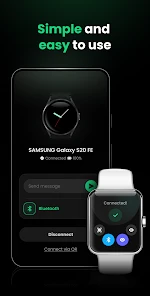
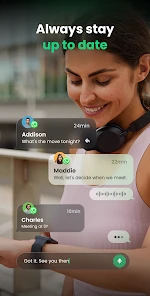
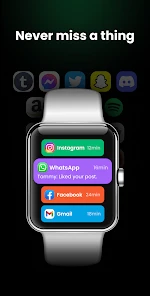
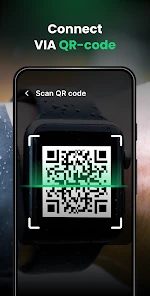
Setting up the Watch Sync App - BT Notifier is like a breeze. Just install it on your smartphone, and it does all the heavy lifting for you. The app acts as a bridge, ensuring that your smartwatch and smartphone are speaking the same language. Once paired, your notifications, calls, and messages sync effortlessly. I found this feature especially handy when I was out for a run and didn’t want to lug my phone around. A quick glance at my wrist, and I was all caught up!
User-Friendly Interface
Now, let's talk about the interface. It’s straightforward and intuitive—no need to be a tech wizard to navigate through it. The app’s design is clean and minimalistic, which I personally appreciate. You know those cluttered apps that leave you feeling like you need a manual just to get started? This isn’t one of them. Everything is laid out neatly, and within a few taps, you're good to go.
Customizable Notifications
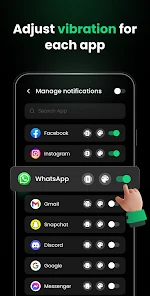
One of the standout features for me was the customization options. I could tweak which notifications I wanted to appear on my smartwatch and which ones could wait. Whether it’s work emails, social media alerts, or just important calls, the app lets you prioritize what matters most to you. This level of control is something I didn’t know I needed until I had it. It’s like being the boss of your own notification world!
Battery Life Saver
We all know how draining constant syncing can be on your device’s battery. Thankfully, the app is designed to be power efficient. I noticed a significant difference in battery life compared to some other apps I’ve tried. It’s a relief not having to charge my devices as often, especially on those long workdays or when I'm traveling.
Final Thoughts
In the grand scheme of things, the Watch Sync App - BT Notifier is a gem for anyone looking to streamline their smartwatch and smartphone experience. It’s user-friendly, efficient, and gives you the power to control what notifications matter to you. If you’re tired of missing out on important alerts or fumbling with your phone during crucial moments, give this app a try. It might just become your next favorite tool in your tech arsenal.
Where it earns a place—and where it doesn’t
I’d recommend this for someone who already wears a compatible smartwatch and wants a simple phone-to-wrist notification route, especially while walking, commuting, or doing chores. I’d skip it if I rarely miss phone alerts, dislike wrist interruptions, or expect one app to coordinate several people’s devices. In those cases, the phone’s own notification settings or a purpose-built shared planner may be less distracting and better suited to the task.
One useful habit is to start with only the alerts that need a timely glance, then add others only if they prove helpful. That keeps a watch from becoming a second copy of every phone distraction. For a shared household device, I’d also check the pairing before handing it to someone else; a quick glance at a connected watch can reveal more than its wearer intended.
What to expect from the app
Watch Sync is free to download, and its in-app purchases are listed from $9.99 to $49.99 per item, so I’d look over the purchase choices before paying for anything. It has reached over 10 million installs, and its content rating is Everyone. It was released on July 24, 2023. I would treat its 4.0 average as a useful broad signal, not a promise that every setup will be equally smooth.
The most sensible test is a low-stakes one: pair the devices, send yourself an ordinary notification, and see whether it appears as expected before depending on the connection for something time-sensitive. If notifications behave inconsistently, checking the phone remains the dependable fallback. That approach also helps answer the practical question of whether the wrist glance is genuinely more convenient for your routine.
A household verdict
For a household, the clearest way to use Watch Sync is as an individual convenience, not as a shared communication system. A parent who wants a personal watch to surface alerts from their own phone may find it helpful while cooking or moving between rooms. A teenager borrowing that watch, or a partner trying to see another person’s messages, changes the privacy situation rather than creating a useful family setup. I would keep each phone-and-watch pair attached to its intended wearer and make that arrangement explicit.
Make a small, deliberate notification plan
There is a practical way to avoid turning the watch into a noisy duplicate of the phone. I’d decide in advance which alerts deserve an interruption during the day, then use the app’s notification choices to keep the wrist feed limited to those. For example, a person who needs to notice calls while carrying groceries may value those more than social updates. The right selection depends on the wearer’s routine; what matters is reviewing it after a few days rather than accepting every alert by default.
Shared routines can still benefit indirectly. If one adult is preparing dinner while another handles a pickup, the wearer can catch a timely call without setting the phone down nearby. But this does not make the watch a shared checklist or guarantee that another household member will see the same information. For coordination, send the detail through a shared messaging or calendar tool, then let each person choose how they receive their own alerts.
What pairing does—and does not—solve
A successful initial connection is a starting point, not a reason to assume the setup will suit every situation. I’d test a few ordinary notifications from the kinds of apps I actually use, then confirm that the watch makes them easy to recognize without exposing more than I want shown in public. This is especially worthwhile before a commute, a workout, or a shift when the phone may be out of reach. It also gives me a chance to decide whether the wrist is a useful glance point or simply another screen competing for attention.
If the watch is shared temporarily, I would not treat disconnecting or changing pairings as an informal handoff. The phone owner should check which device is linked and what notifications may be displayed before someone else wears it. That small pause is more reliable than assuming a different wearer will know what the watch can reveal. If the household needs several people to receive the same alert independently, each person’s own device and chosen coordination channel are a better fit.
Choosing between a sync app and the usual alternatives
The normal alternatives serve different needs. Looking at the phone gives the owner the most direct view and avoids adding another notification surface, but it is less convenient when the handset is in a bag or across the room. A smartwatch’s usual companion setup may make sense for someone who wants broader watch management, while a shared calendar or group conversation is better when several people need to coordinate. Watch Sync is most compelling when the goal is narrower: carry selected phone alerts to one wearer’s wrist.
That narrow scope is both its strength and its limit. It keeps the idea easy to understand, but it should not be mistaken for a family dashboard, a message-sharing tool, or a replacement for the phone’s own notification controls. If I were choosing for an older relative who wants fewer distractions, I’d first ask whether a watch alert solves a real problem for them. If checking the phone is already comfortable, the extra connection may add maintenance without much benefit.
Age, trust, and a sensible trial
An Everyone rating is useful context for the app’s age classification, but the content coming through a connected phone depends on that phone’s notifications. For a child or younger teen, I would focus less on the label and more on who owns the phone, who wears the watch, and whether messages might be visible to others. The wearer should know that an alert can expose a sender or message preview, and the phone owner should be comfortable with that possibility.
For a new setup, I’d begin with a harmless test notification and check the result while the watch is being worn as it normally will be. Then I’d try one real, low-priority alert and see whether the timing and presentation are useful enough to justify keeping the connection active. That sequence answers the important practical question—whether this pairing works for this person’s routine—without making the first test depend on an urgent message.
Who will appreciate it most
This app makes the most sense for someone who already owns a smartwatch, wants selected phone notifications on the wrist, and values quick awareness over detailed replies or household-wide organization. It can suit people doing chores, walking, commuting, or working with their hands, provided a glance at the watch is welcome in those settings. It is a weaker match for anyone who wants to manage several wearers centrally, share one inbox, or eliminate notification interruptions altogether.
My recommendation is to try it only if the phone-to-watch link fills a clear gap in your day. Keep the pairing personal, choose alerts with care, and check the connection in an ordinary situation before relying on it when timing matters. Used that way, Watch Sync can be a handy extension of one person’s phone. For a household, the best verdict is simple: useful as a personal alert bridge, but not a substitute for clear boundaries or tools built for shared coordination.
Watch Sync App - BT Notifier Frequently Asked Questions
What does Watch Sync App - BT Notifier do, and is it the kind of app I need?
Watch Sync App - BT Notifier is a communication app designed to sync phone notifications to a smartwatch. It acts as a Bluetooth notifier for Wear OS smartwatches, making it useful if you want phone alerts to appear on your wearable. Its focus is notification syncing rather than general watch customization, so consider whether that specific function matches what you want before downloading.
Can I use Watch Sync App - BT Notifier on iPhone as well as Android?
Watch Sync App - BT Notifier is an app for syncing phone notifications to a smartwatch, but the experience depends on the phone and wearable working together. Before downloading, check that the app is available for your phone’s operating system and that your smartwatch supports the intended connection. This is especially worth checking if you use an iPhone with a Wear OS watch, or a watch from another platform.
What permissions or settings should I expect to review during setup?
To pass phone notifications to a smartwatch, Watch Sync App - BT Notifier needs the relevant connection and notification access to be configured on your devices. During setup, take a moment to review the permissions requested by the app and enable the settings needed for syncing. That helps you understand what access is involved and gives you a chance to decide whether you are comfortable before using it.
Does Watch Sync App - BT Notifier support calls and messages, or only other notifications?
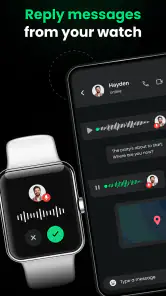
The app’s main purpose is to sync phone notifications to a smartwatch, so calls and messages may be among the alerts you want to receive on your wearable. The exact notifications available can depend on the phone’s settings, the smartwatch, and how the devices are connected. Review your notification preferences during setup and make sure the alerts you care about are enabled on your phone.
Is Watch Sync App - BT Notifier free to download, and are there in-app purchases?
Watch Sync App - BT Notifier is free to download, so you can try its phone-to-watch notification syncing without paying upfront. The app also offers in-app purchases, with listed items ranging from $9.99 to $49.99 each. Consider that distinction before installing: the basic download is free, while some optional features or content may involve a purchase.
Pros
- Seamlessly syncs notifications to smartwatch.
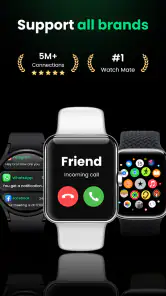
- Supports a wide range of smartwatch brands.
- User-friendly interface for easy navigation.
- Quick and simple setup process.
- Enhances productivity by minimizing phone checks.
Cons
- Requires Bluetooth connection to function.
- May drain battery faster on some devices.
- Limited customization options available.
- Occasional connectivity issues reported.
- Some features require in-app purchases.
- Category
- Communication
- Version
- Varies with device













