Music Player Offline & MP3
- 4.31K
- 4.6
- Installs
- 10.00M
- Price
- Free

Screenshots

Analysis by Reviewed
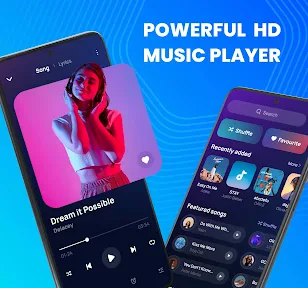
When my connection drops, I’d rather keep listening than troubleshoot a streaming app. That is the simple appeal of Music Player Offline & MP3: it focuses on music already available on your phone, with tools for shaping the sound and organizing tracks. I see it as a practical option for everyday listening, especially when mobile data is limited or unreliable, rather than a replacement for services built around finding and streaming new releases.
What to expect from playback speed
A local music player has a useful advantage over streaming: once your tracks are on the device, listening does not depend on a network connection. That makes this app a natural fit for commutes through patchy coverage, travel, or a workout playlist you want ready before leaving home. The developer is AceTools Team, and the app is free, so it is easy to try without making a purchase decision first.
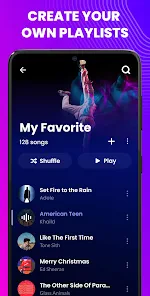
For a smoother routine, I’d organize a few playlists before heading out rather than searching through a large library at the last minute. A short commute mix, for example, is quicker to reach than a broad collection of loosely sorted songs. The equalizer also gives you a way to adjust the sound for different headphones or listening environments, though I would make small changes and compare them by ear instead of assuming one preset will suit every track.
Offline Music Enjoyment
The first thing that caught my attention with the Music Player Offline & MP3 app is its ability to deliver music without the need for Wi-Fi or data. You can load up your favorite tracks when you’re connected, and then enjoy them anywhere, anytime. Whether you’re on a plane or deep in the woods camping, your tunes are right there with you.
Seamless User Experience
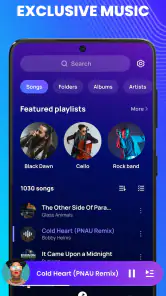
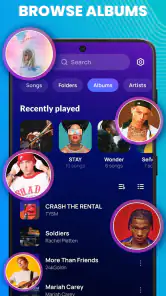
I have to say, the user interface is a breeze to navigate. It’s intuitive, making it super easy to create playlists, shuffle songs, and find your favorite tracks in a jiffy. Plus, the app supports a wide range of audio formats, so you won’t be left hanging with those obscure file types. Easy navigation is the name of the game here.
Planning a playlist around the day
To get the most from a phone-based library, I would sort music by purpose before relying on it: familiar tracks for the commute, something calmer for the evening, and a separate selection for exercise. This is more than neatness. It reduces the time spent browsing while walking, carrying bags, or trying to start a workout, and it makes shuffle less likely to jump between moods that do not fit the moment.
There is also a simple way to check whether an offline setup is ready: while still at home, start a few tracks from different parts of the playlist, then switch to another app and return. That gives you a practical sense of whether the files you intend to use are present and whether your own routine feels smooth. I would do this before travel rather than assume that a playlist title alone guarantees every song is available.
More From Our News Desk

Weather by Xiaomi Review: Clear at a Glance, Less Clear Up Close

X Under Pressure: Can It Recover When Posting Goes Wrong?

Clash of Clans Is Won Between the Battles

Android Auto Makes the Case for Quieter Car Software

MobiOffice: Transforming Mobile Productivity with Seamless Integration

EA SPORTS FC™ Mobile Soccer: Redefining Mobile Sports Gaming
Listening when you are busy
A useful everyday test is a long day that moves between home, transit, and a place with poor reception. I’d pick a playlist in advance, start playback before leaving, and use shuffle when I want variety without repeatedly handling the phone. The sleep timer is also handy for winding down at night: it can help avoid leaving music playing after you’ve drifted off. If uninterrupted access to a personal music collection matters more than discovering new artists, this kind of workflow is a better match than opening a streaming service and hoping the connection holds.
For example, I might choose a short set of familiar songs before boarding a train, then leave the phone in a pocket instead of searching during the ride. At bedtime, I would choose quieter tracks and set the sleep timer rather than letting a long playlist continue all night. These are modest conveniences, but they address two common moments when an offline player is valuable: unreliable reception and listening when I do not want to keep interacting with the screen.
There is a trade-off: an offline player can only play music you have available on the device, so it is not the right choice if you expect a large on-demand catalog or effortless recommendations. Streaming apps are more convenient for exploring unfamiliar music, while a local player is more dependable when you already know what you want to hear. I would also check that the tracks you plan to use are present and playable before relying on them for a trip; that small check is more useful than discovering a missing file after you have lost reception.
Where it fits beside streaming services
I would think of this app as a companion to a streaming service, not necessarily a replacement. Streaming is usually the easier route when I want to sample a new album, follow recommendations, or access music I have not saved locally. Music Player Offline & MP3 makes more sense for a personal collection I already know, especially when I want playback without depending on coverage or signing into a catalog during a commute.
It can also be a sensible choice for listeners who prefer a small, deliberate library. A handful of playlists for recurring activities may be easier to manage than searching through a service’s endless shelves. On the other hand, anyone who expects an app to supply music automatically will likely find a local player limiting: the useful starting point is having tracks ready on the phone. That distinction is worth considering before moving your listening routine over.
Customizable Features
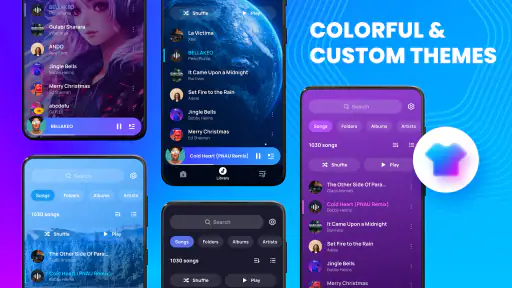
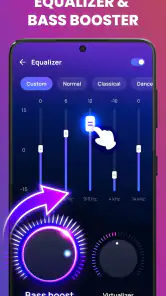
Customization is key for any music app, and this one doesn’t disappoint. You can tweak the equalizer settings to get just the right sound, and there’s even a sleep timer for those who like to drift off with some soothing tunes. The visual themes and background options let you personalize the app to match your style. It’s all about making your music experience uniquely yours.
One practical tip is to treat equalizer changes as listening preferences, not a universal sound upgrade. A stronger bass setting may suit one pair of headphones but make another track feel muddy, so I’d adjust it for the device and music I’m actually using. Lyrics can add context when you want to follow along, while playlists reduce the friction of switching between moods or activities. Those features are most useful when they support a specific listening habit rather than becoming settings to keep revisiting.
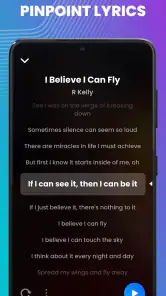
If lyrics matter to you, I would treat them as an occasional aid rather than the main reason to choose a player. They can make a familiar song more engaging when you want to sing along or check a line, but the core value here remains having local music and playback controls in one place. Likewise, themes are a pleasant personal touch, yet I would prioritize a clear library and reliable playlists over spending time changing the look of the interface.
Heavy use and battery expectations
Now, we all know that running apps can be a drain on your phone’s battery, but thankfully, this app is pretty efficient. It doesn’t gulp down your battery life like some other apps do. So, you can keep the music going for longer without worrying about finding a charger.
For a long listening day, I would still make the same sensible checks I use with any phone audio app: start with enough battery for the rest of the day, avoid repeatedly waking the screen to browse, and prepare playlists in advance. Offline playback removes the need to maintain a data connection for listening, which is useful on a trip, but it does not make the phone’s battery irrelevant. If you are already using navigation, taking calls, or running other demanding tasks, the overall device workload matters too.
When I expect to listen for hours, a carefully chosen playlist is more practical than constantly searching and changing tracks. It keeps interaction low and helps preserve the purpose of an offline setup: press play, put the phone away, and get on with the journey. I would not assume that every phone behaves identically, though; battery condition and the other apps in use can affect how long any listening session feels comfortable.
Reliability and device fit
For a dependable offline routine, I’d keep the app and the music files on the same device and test a track before leaving a familiar connection behind. If playback is interrupted, returning to the player and selecting the track again is a straightforward first step; I would not build a trip plan around assuming every app will recover identically after a phone call, restart, or system-level interruption. The app is rated for Everyone, and its minimum Android requirement is version 6.0, which makes it relevant to a broad range of Android phones, though the experience can still vary with a device’s available storage and overall condition.
Storage is the practical constraint to keep in mind. A local library needs room on the phone, so I would avoid keeping duplicate copies of tracks or building playlists without considering how much space the rest of the device needs. If a phone is nearly full, sorting the music collection first may be more helpful than installing another utility or changing playback settings. For someone with a small set of saved songs, this is unlikely to be a complicated workflow; a very large collection calls for more deliberate file organization.
It is also worth separating app reliability from the reliability of the files themselves. An offline player cannot help if a track is missing, stored somewhere unexpected, or not the version you meant to keep. I would test representative songs from the folders I plan to use, particularly before a flight or a long stretch without reception. That quick check answers the real question better than simply seeing the app open: can I reach the music I actually want?
Who should choose it—and who should not
I would recommend trying it if you already keep music on your Android phone and want playlists, lyrics, sound adjustment, and offline listening together. It is especially appealing to commuters, travelers, and people who prefer familiar albums or carefully chosen mixes over browsing a changing catalog. The app’s 4.6 average from around 183,000 ratings and more than 10 million installs suggest that many Android users have taken an interest, but those figures cannot tell me whether it will suit an individual library or device.
I would skip it as a primary music source if you want to search a huge catalog, discover new artists through recommendations, or move seamlessly between devices with a streaming account. A streaming service is the better fit for those jobs. This player is also a less natural choice if you do not want to manage local music files or spare phone storage. Its appeal depends on valuing direct access to tracks already on the device rather than expecting the app to supply them.
For anyone deciding whether to try it, the current version is 2.1.0, and it is a free music and audio app from AceTools Team. It is rated for Everyone and supports Android 6.0 or later. I would use those basics to check device compatibility, then judge it by a small real-world test: make a short playlist, listen with the screen off, try the equalizer gently, and see whether the controls suit your routine.
The choice comes down to what you want from a music app. This one suits listeners with their own saved tracks who value offline access, playlists, lyrics, and sound adjustment in one place. It is less suitable if your main goal is browsing a constantly refreshed catalog or finding unfamiliar music through recommendations. Its current version is 2.1.0; it has an average rating of 4.6 from around 183,000 ratings, with over 10 million installs. Those figures suggest broad interest, but I’d still judge it by whether it fits your library and listening habits.
Performance verdict
In conclusion, if you’re in the market for a reliable offline music player that’s packed with features and doesn’t complicate things, the Music Player Offline & MP3 is definitely worth checking out. It’s got everything you need to enjoy your music without being tethered to an internet connection. Give it a whirl and let the good times roll!
My overall take is that its strongest performance advantage is independence from a live connection, not a promise that every phone will respond identically or that a large library will organize itself. I would prepare music and playlists before a busy day, keep enough room for the files, and use the equalizer only when a particular listening setup needs adjustment. With those expectations, it is an approachable option for offline listening; if discovery and on-demand access matter more, a streaming app remains the more suitable everyday choice.
Music Player Offline & MP3 Frequently Asked Questions
Is Music Player Offline & MP3 suitable for someone who just wants a simple music player?
Yes. Music Player Offline & MP3 is designed around playing music offline, with playlists, an equalizer, and lyrics among its highlighted features. That makes it a straightforward option for people who want to listen to music stored on their device and keep tracks organized, rather than looking for a broader audio service. The app is free and has an Everyone age rating.
Who develops Music Player Offline & MP3, and how popular is it?
Music Player Offline & MP3 is developed by AceTools Team and is in the Music & Audio category. It has over 10 million installs, with an average rating of 4.6 from around 183,000 ratings. Those figures suggest that it has reached a large audience, although individual experiences can still vary depending on a person’s device and listening habits.
What should I know about Music Player Offline & MP3 before downloading it?
Music Player Offline & MP3 is a Music & Audio app from AceTools Team, designed for playing music offline. Its feature summary highlights an equalizer, lyrics, and playlists, making it a useful option if you want playback and basic music organization in one app. It is free and rated for Everyone, so it may suit listeners looking for a straightforward music player.
Which devices can install Music Player Offline & MP3?
Music Player Offline & MP3 is available for Android devices running Android 6.0 or later. Before downloading, check your device’s operating system version in its settings to make sure it meets that requirement. The app’s current version is 2.1.0, and compatibility with the minimum system version can make it a practical choice for users whose devices are not running the newest Android software.
How can I download and install Music Player Offline & MP3 on my device?
To download and install Music Player Offline & MP3, visit the Google Play Store or Apple App Store on your Android or iOS device. Search for 'Music Player Offline & MP3' in the search bar, and click on the app from the search results. Tap the 'Install' button to start downloading. Once the download is complete, the app will automatically install on your device.
Pros
- Supports various audio formats.
- User-friendly interface.
- No internet required for playback.
- Customizable equalizer settings.
- Low battery consumption.
Cons
- Contains ads.
- Limited theme options.
- No cloud storage integration.
- Occasional playback glitches.
- No lyrics feature.
- Category
- Music & Audio
- Version
- 2.1.0













