Arvin® - AI Logo Maker
- 1.26K
- 4.5
- Installs
- 1.00M
- Price
- Free
Screenshots
Analysis by Reviewed
When I need a logo for a small project, the hardest part is often deciding what it should communicate before I start drawing. Arvin® - AI Logo Maker is an Art & Design app from IdeaLabs that gives me a quick place to explore directions without opening a full desktop design tool. I’d treat it as a starting point for a visual identity, not a substitute for careful brand work.
Begin with the message, not the icon
Before opening a logo maker, I find it useful to write down the project name, who it is for, and a few words that capture its personality. That short brief gives me a way to judge the options instead of choosing whichever mark looks most polished on its own. A logo for a children’s craft club, for instance, may need a very different tone from one for a bookkeeping service, even if both need to look clear on a small phone screen.
I’d also decide where the logo will appear first. A profile image, a printed label, and a website header each place different demands on the design. Starting with the most constrained use helps me avoid falling for a detailed mark that only looks good when it is large. This is a simple preparation step, but it makes the time spent exploring ideas more purposeful.
A practical starting point for a new idea
For example, if I were setting up a weekend baking stall, I’d first settle on a name and a few words that describe its character—perhaps warm, handmade, and cheerful. That small bit of preparation makes the design process more focused: instead of picking an attractive mark at random, I can judge whether the options fit the people I want to reach. This is useful whether I’m making a first draft for a side business, a community project, or a personal portfolio.
Arvin® is free to download, and its average rating is 4.5 from around 62,000 ratings. It has been installed over a million times, which makes it a familiar option for people looking for a mobile logo-making tool. The app is rated Teen, and its current version is 2.3.4. In-app purchases range from $0.99 to $99.99 per item, so I’d check what is included before relying on a particular design or planning to use the app regularly.
Create Stunning Logos in Minutes
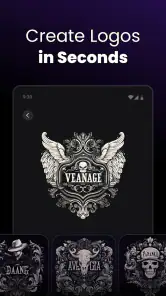
First off, let's talk about what Arvin® - AI Logo Maker is all about. This app is designed to help you create logos without needing a degree in graphic design. You know how it is—sometimes you just need something quick and professional-looking, and this app delivers. With its AI-powered features, you can whip up a logo in minutes. It’s like having a mini design team in your pocket.
Easy to Use Interface
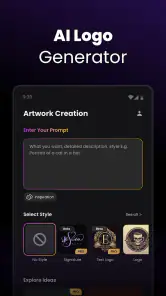
The interface is super user-friendly. Even if you’re not tech-savvy, you’ll find it easy to navigate. Everything is laid out clearly, and the design tools are intuitive. I love how it doesn’t overwhelm you with options but gives you just the right amount of features to get the job done.
You May Like

Clash of Clans Is Won Between the Battles

Android Auto Makes the Case for Quieter Car Software

MobiOffice: Transforming Mobile Productivity with Seamless Integration

EA SPORTS FC™ Mobile Soccer: Redefining Mobile Sports Gaming

How Microsoft OneDrive Became a Mobile Productivity Giant

How Google Translate Breaks Language Barriers Effortlessly
Turn suggestions into a deliberate shortlist
When the AI offers directions, I wouldn’t treat the first appealing result as the answer. I’d keep a small shortlist and compare each candidate against the brief: does the symbol suggest the right kind of work, can I read the name quickly, and does the overall tone fit the intended audience? This quick test makes the suggestions more useful because it turns a stream of ideas into a decision rather than a browsing session.
A useful trick is to compare designs without being distracted by color. If a mark still reads clearly in a plain, single-color view, it is less dependent on decoration to do its job. I’d also check whether a letterform or symbol could be mistaken for something unrelated. Those checks matter especially for a new business, where people may see the logo only briefly on a menu, post, or small label.
Customization Galore
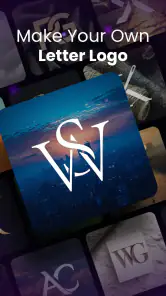
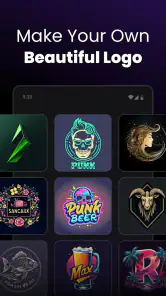
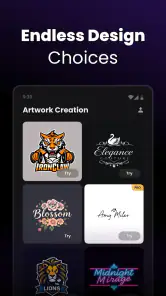
One of the standout features for me is the level of customization. Whether you’re starting from scratch or using one of their templates, you can tweak everything to your liking. Colors, fonts, icons—you name it. You can make your logo truly unique, which is great if you’re trying to build a brand or just want something that stands out.
Customization is most valuable when I use it to remove distractions, not simply to add more. If a template has a strong icon but the lettering feels wrong, I’d adjust the type and then pause before adding extra flourishes. Too many colors or competing details can make a small logo harder to recognize. For a local service or a side project, one clear symbol and readable wording may be more memorable than a busier design.
AI-Powered Suggestions
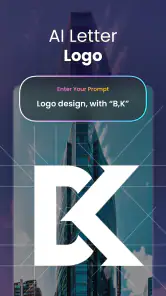
Now, this is where it gets interesting. The AI doesn’t just sit there; it actively suggests improvements and ideas. It’s like having a creative partner who’s always ready with a suggestion or two. Sometimes, it even comes up with ideas that you might not have thought of, which is pretty awesome.
I’d use those suggestions as prompts, not as a substitute for judgment. An unexpected direction can help me notice a style I had not considered, but it still needs to make sense for the project and remain legible in everyday use. If several suggestions feel close, I’d compare them side by side and choose the one that communicates the idea most directly rather than the one with the most visual extras.
From a draft to the places you use it
Once I have a promising direction, I’d make a few deliberate variations rather than endlessly polishing the first one: a compact version for a profile image, a wider arrangement for a page header, and a simplified option that remains clear when viewed small. These are practical design checks, not separate claims about export tools. Looking at the mark at different sizes can reveal whether thin details disappear or the lettering becomes hard to read.
Imagine I’m preparing the baking stall for a weekend market. I could use the app to explore a friendly name-and-symbol combination, then look at that design beside the stall menu and a small social profile image. If the words blur in the profile circle, I’d return to a simpler arrangement rather than assume the same composition will work everywhere. The useful outcome is not just a logo file; it is a clearer idea of what the stall should look like across its first few customer touchpoints.
The next handoff is often to the places where a new project actually appears: a social profile, a flyer, a menu, or a simple website. I’d keep the chosen colors and wording consistent across those materials, and save a clean copy of the version I prefer before making further edits. If another person will print or adapt the artwork, I’d confirm that the file format and usage rights suit that job rather than assuming a mobile logo is automatically ready for every professional workflow.
What to check before sharing or paying
Because the app is free to download but includes in-app purchases, I’d look carefully at what is available at no cost and what a particular purchase unlocks before building a whole project around one design. The listed purchase range runs from $0.99 to $99.99 per item, so the possible spend is broad. I would not assume every design, export option, or commercial use is included in the free experience; I’d verify the terms that appear for the specific choice I plan to use.
If the logo is only for a personal project or an early concept, a quick mobile workflow may be enough. If it will be printed on packaging, used in paid advertising, or handed to a designer for further work, I’d check the final asset at the actual destination and clarify usage rights first. That little pause can prevent a frustrating handoff: a design that looks fine in the app may still need a different file type, cleaner edges, or permission suited to its intended use.
Where quick creation has limits
Compared with building a logo manually in a full vector editor, a mobile maker is easier to approach and faster for exploring ideas, but it can offer less control over precise geometry and production details. A designer is the better choice when the identity must be distinctive, legally considered, or prepared for demanding print and signage. I’d also skip this app if I already have a strict brand system and need exact typography, spacing, or color specifications; convenience matters less than consistency in that situation.
It also helps to separate a logo draft from a complete identity. A business may eventually need rules for fonts, supporting colors, layouts, and use on different backgrounds. A logo maker can help me choose a starting direction, but I would not expect one finished mark to solve every visual decision. If consistency across a team or a large set of materials is the priority, a designer or a more controlled design workflow is likely a better fit.
For a first pass, though, the app can help turn a vague idea into something I can react to. I’d test any promising design in black and white and at a small size before calling it finished. If it only works with color or fine detail, simplifying it may be more valuable than adding another decorative element. That little check is an easy way to avoid choosing a logo that looks appealing on a phone but becomes unclear elsewhere.
One practical question is whether I need design experience: I don’t think so, since the app is aimed at making logo creation approachable, and its customization gives beginners room to adjust a starting idea. Another is whether it suits a serious business launch. It can help with early concepts or a temporary identity, but I’d seek more control and professional review before building a long-term brand around the result. The app was released on October 29, 2024, and its minimum operating-system requirement is version 7.0.
Who gets the most from this mobile workflow
I think the best fit is someone who needs a presentable direction quickly and is comfortable making practical choices on a phone: a freelancer testing a name, a club organizer putting together a simple event identity, or a small seller preparing a first social profile. It is also handy when I want a visual draft to show a collaborator and discuss before anyone spends time on a more formal design process.
I’d be more cautious if the logo will represent a company for years, needs to stand apart in a crowded market, or must meet exact production specifications. In those cases, a professional designer can ask deeper questions about audience and distinctiveness, while a vector editor gives more direct control over individual shapes and alignment. The choice is not really between “good” and “bad” tools; it is about whether speed and a guided starting point matter more than precision and ownership of every design decision.
Against the usual alternatives in Art & Design, Arvin sits between a blank canvas and hiring a designer. A general-purpose drawing app gives freedom but asks me to make more decisions from scratch. A desktop vector program is stronger for careful construction and later revisions, but has a steeper learning curve. Arvin’s appeal is that it can shorten the distance from an idea to a draft; its trade-off is that I should inspect the result and its practical terms before treating it as a finished brand asset.
So, who is this app for? Well, basically anyone who needs a logo! Whether you’re a small business owner, a freelancer, or just someone who loves dabbling in design, Arvin® - AI Logo Maker has something to offer. It’s especially handy if you’re on a tight budget and can’t afford a professional designer.
Final Thoughts
In a world where presentation matters, having a good logo can make all the difference. Arvin® - AI Logo Maker makes it easy to create something that looks polished and professional without the hassle. It’s efficient, effective, and a whole lot of fun to use. So, if you’ve got a logo to make and you want to keep it simple yet impactful, give this app a shot. I promise, you won’t be disappointed!
Arvin® - AI Logo Maker Frequently Asked Questions
Can I use Arvin® - AI Logo Maker to create a logo for a small business or personal project?
Arvin® - AI Logo Maker is focused on logo design, so it may be useful when you want a visual identity for a small business, personal project, or brand idea. Its store summary describes it as a logo maker and custom logo designer. Before relying on a design for a particular purpose, review the finished result and make sure it suits how and where you plan to use it.
What is the app’s age rating, and should I check anything before a teen downloads it?
Arvin® - AI Logo Maker has a Teen content rating. That makes it worth reviewing the rating and the app-store purchase settings before a teen downloads it, especially if the device is shared or purchases require family approval. The app is centered on logo creation and design, but families can decide what is appropriate based on their own rules.
What devices and operating systems can I use Arvin® - AI Logo Maker on?
Arvin® - AI Logo Maker is an app in the Art & Design category, made for creating logo designs. Before downloading, check that your device runs Android 7.0 or later, the stated minimum operating-system requirement. The app is free to download, while in-app purchases are available, so review the purchase details in your app store before deciding whether its optional features suit you.
Is Arvin® - AI Logo Maker free to download, and are there in-app purchases?
Arvin® - AI Logo Maker is free to download, and it also offers in-app purchases. Those purchases range from $0.99 to $99.99 per item, so the total cost depends on what you choose to buy. You can try the app without paying for the download, but it is sensible to check the purchase prompts carefully before confirming any transaction.
What is Arvin® - AI Logo Maker?
Arvin® - AI Logo Maker is a cutting-edge application that uses artificial intelligence to help users create unique and professional logos effortlessly. Whether you're a business owner, entrepreneur, or graphic designer, this app provides easy-to-use tools and templates to design logos that suit your brand's identity. It's available for both Android and iOS, offering a seamless experience for all users.
Pros
- Intuitive user interface
- Wide variety of templates
- AI-driven design suggestions
- High-quality logo export
- Quick and easy to use
Cons
- Limited free features
- Requires internet connection
- Occasional app crashes
- Some design elements are premium
- No offline mode

- Category
- Art & Design
- Version
- 2.3.4












