YayTalk: Speak & Learn English
- 165.00
- 4.7
- Installs
- 1.00M
- Price
- Free

Screenshots


Analysis by Reviewed
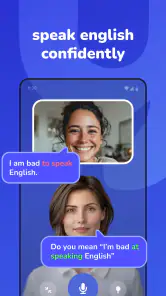
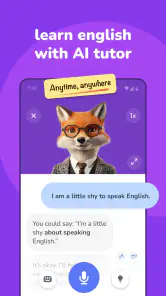
When one device serves several people, English practice can easily become either a helpful household habit or an awkward shared activity. YayTalk: Speak & Learn English is an education app from IdeaLabs centered on spoken exchanges with an AI tutor. I see its best role as a private place to rehearse before a real conversation, not as a family course everyone follows together. That distinction matters when learners have different goals, confidence levels, and expectations about privacy.
A realistic example is a parent preparing for a work call while a teenager wants to practise introducing themselves. They may take turns on the same tablet, but each session should have its own purpose. Before opening the app, it helps to agree who is practising and what the device is for; afterward, sharing a useful phrase can be optional rather than an obligation. That small bit of coordination makes shared use more comfortable without assuming the app has family profiles or household controls.
One device, separate learning goals
I would keep each turn focused on a situation the learner may actually face: explaining a delay, asking for directions, or making small talk. A specific scenario gives the conversation a practical destination and makes it easier to judge whether practice helped. For a shared device, it also creates a clean handoff: the next person begins with their own goal instead of trying to continue someone else’s topic or infer their level.
There is a useful trade-off between convenience and concentration. A tablet left in a common room makes it easy to remember a short session, but a learner may feel watched if everyone expects to hear what they said. I would let the person practising choose a quieter moment and decide what, if anything, they want to discuss afterward. Household encouragement works better when it supports the learner’s independence rather than turning practice into a performance.
For a family member with a busy schedule, an ordinary gap—before dinner or while waiting for a ride—can be enough for one small speaking task. I would not make the routine depend on everyone being available at once. A learner can choose a phrase to try, practise it, then bring it into a real interaction later. That is a more useful shared habit than asking the whole household to follow one pace.
How it fits into a shared household
Picture a family member wanting to practise a few phrases before a work call while someone else is studying English for school. Both might find an AI conversation less intimidating than speaking in front of another person, but their needs are not identical. One may want workplace confidence; the other may need help with basic vocabulary. I would treat YayTalk as an individual practice tool, not as a shared family classroom or a way to coordinate several learners in one place.
That distinction matters on a shared phone or tablet. Before anyone begins, agree whose learning session it is and what the device is being used for. If several people take turns, make the handoff clear: the next person should start their own practice rather than assume the previous learner’s conversation represents their level or goals. This is a practical boundary, not a claim about built-in profiles or family controls.
More From Our News Desk

Weather by Xiaomi Review: Clear at a Glance, Less Clear Up Close

X Under Pressure: Can It Recover When Posting Goes Wrong?

Clash of Clans Is Won Between the Battles

Android Auto Makes the Case for Quieter Car Software

MobiOffice: Transforming Mobile Productivity with Seamless Integration

EA SPORTS FC™ Mobile Soccer: Redefining Mobile Sports Gaming
For a household with one available device, short, separate turns are more sensible than trying to practise together over one conversation. Each learner can choose a personal purpose—ordering food, making small talk, or getting comfortable with everyday expressions—and then reflect on what felt difficult. That keeps the exercise useful even when the app itself is not being used as a group activity.
Setting expectations before the first session
The first thing I would clarify is what “learning English” means for the person using it. An AI tutor can offer a place to try speaking, but it should not be treated as a complete substitute for reading, listening to varied speakers, or getting human feedback when accuracy really matters. Someone preparing for a presentation, for example, can rehearse aloud here and still benefit from asking a teacher or colleague to review the final wording.
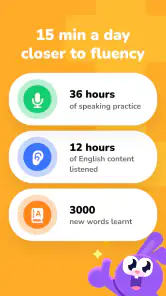
I would also set a modest routine rather than promise that a single conversation will transform anyone’s fluency. A few focused minutes on one situation can be more useful than opening the app without a goal and jumping between topics. Before starting, choose one concrete task: practise introducing yourself, explain a simple problem, or ask for directions. Afterward, note one phrase that was hard to say and revisit it later.
This approach is especially helpful for a learner who freezes when speaking. The private, low-stakes nature of AI practice may make it easier to attempt a sentence, hear how the exchange develops, and try again. But if a learner needs detailed grammar teaching, a structured syllabus, or correction from a qualified human, I would pair YayTalk with a course or tutor rather than expect it to cover every part of language study.
Keeping household practice coordinated
Shared use can work without turning practice into a competition. A parent, partner, or housemate can simply ask what the learner wanted to practise and whether they found a phrase worth remembering. That conversation helps someone stay engaged while respecting that the actual session is theirs. I would avoid treating app activity as a measure of ability: speaking confidence, comprehension, and vocabulary do not always grow at the same pace.
A useful household routine is to connect practice to a real event. Before a trip, one person could rehearse asking for help; before meeting English-speaking guests, another could practise introductions. Then, after the event, they can identify which phrases were genuinely useful and what they still found awkward. This makes the app part of a learning loop—prepare, try in real life, reflect—instead of an isolated screen habit.
There is a trade-off here. Coordinating around a shared device can make practice easier to remember, but it can also make a learner feel observed. I would give each person the option to practise privately and share only what they choose. For young learners especially, encouragement is better than demanding a recap of every exchange. The goal should be more willingness to speak, not household monitoring.
Age, trust, and realistic expectations
YayTalk is marked for everyone, which makes it broadly suitable from an age-rating perspective, but that does not mean every child will use an AI conversation product independently in the same way. I would have a parent or caregiver introduce it, help choose an appropriate practice goal, and stay available if a child is unsure about an answer or interaction. Age suitability and adult guidance are separate questions.
For adults, the main trust issue is how much weight to give an AI tutor’s responses. I find this kind of practice most useful for getting words out and building conversational ease, not for settling every question of grammar, idiom, or cultural nuance. If a phrase will be used in a sensitive work email, an exam, or an important conversation, verify it with a reliable teacher or reference. Treat suggestions as practice material, not unquestionable authority.
It is also worth discussing account boundaries when a device is passed around. Each learner should know whether they are continuing someone else’s session or beginning their own, and avoid entering personal details into practice simply because a prompt invites a realistic scenario. I would keep role-play examples generic: use a made-up restaurant order or a fictional introduction rather than private family, school, or workplace information. These are sensible habits for any AI learning tool, not a claim about a particular privacy setting.
There is a clear distinction between practising a conversation and receiving a human relationship. A patient AI exchange may reduce embarrassment, but it cannot replace the give-and-take of talking with people who have different accents, reactions, and conversational habits. I would use the app to prepare for those interactions, then look for opportunities to speak with classmates, colleagues, friends, or a language group when that is practical.
What it offers beside familiar learning methods
Compared with flashcard apps, a conversational tutor is better suited to practising how to assemble words into a response. Flashcards can be excellent for repetition and recall, especially when someone is starting from scratch, but they do not necessarily help with the nerves of answering aloud. A conventional course usually offers more structure, while a human tutor can notice confusion and adapt in a personal way. YayTalk’s natural niche is the gap between studying alone and speaking with another person.
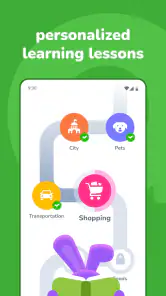
That niche will not suit everyone. If the learner enjoys a clear lesson sequence and wants to see a planned progression, a structured course may be the better starting point. If they mainly need vocabulary review, a flashcard tool may be quicker. If they already know the basics but need precise feedback for professional or academic English, a human instructor is a safer choice. I would choose YayTalk when the obstacle is actually practising conversation, not when the real need is a complete curriculum.
One practical tip is to repeat a scenario with a different purpose rather than endlessly seeking new topics. Practise asking for a recommendation once, then try asking for a cheaper option or clarifying a detail. This tests whether the learner can adapt a useful pattern instead of memorising one exchange. Another is to keep a small personal note after each session with a phrase to reuse and a question to check elsewhere. That turns a casual conversation into a more deliberate learning habit without assuming the app provides a particular tracking feature.
For someone who already studies with a book or course, I would use an AI exchange as a bridge between written knowledge and spontaneous speech. Take one expression from a lesson and build a short situation around it; afterward, check any uncertain wording against the lesson or a trusted reference. This avoids asking conversational practice to teach everything at once. It also gives a learner who dislikes open-ended chatting a simple starting point.
Cost, audience, and the household decision
The app is free to install, though it offers in-app purchases ranging from $9.99 to $59.99 per item. I would let each household member try the basic experience before paying for anything and decide what they actually need from continued use. Since the prices vary by item, check the purchase details in the app before committing. A family should also agree who is responsible for any purchase on a shared device rather than treating a free download as permission for everyone to buy extras.
Its broad audience is reflected in the Everyone content rating, while the user response is positive: it has a 4.7 average from around 12,000 ratings and more than a million installs. Those figures suggest that many people have tried it, but they do not tell me whether it will match a particular learner’s level, preferred teaching style, or household routine. I would use them as context, not as a reason to skip a personal trial.
The current version is 1.3.4, and it supports devices running Android 7.0 or later. That makes checking the household device’s software version a sensible first step before planning around it. It is an app rather than a shared family course, so I would not assume that one installation automatically provides separate learning spaces or coordinated progress for everyone.
One question I would settle before a household trial is whether each person wants the same kind of help. Someone who wants to practise speaking may appreciate an AI conversation, while another learner may find it more useful to work through vocabulary or a teacher-led lesson. There is no need to make the app the default choice for everyone just because it is installed on the common device. Let the use case decide.
My household verdict
I would recommend YayTalk to a learner who wants a private way to rehearse spoken English and to a household that can give each person a clear, separate turn. It is particularly appealing for someone who understands more than they feel comfortable saying, or who wants to prepare for ordinary situations before facing them in real life. Used with a specific goal and a quick reflection afterward, AI conversation can make practice easier to begin.
I would skip it as the sole learning resource for a child who needs close instruction, an adult seeking authoritative correction, or anyone who prefers a carefully sequenced course. I would also look elsewhere if the household expects shared profiles, family progress management, or a human teacher to respond to each learner. Those are different needs from conversational rehearsal.
Overall, my recommendation is measured but positive: try it as a conversation-practice companion, not as a promise of effortless fluency. Keep sessions personal, protect the learner’s space, and pair the app with human conversation and reliable study materials when the goal calls for them. In a household that respects those boundaries, it can be a useful nudge toward speaking more often.
YayTalk: Speak & Learn English Frequently Asked Questions
What is YayTalk: Speak & Learn English?
YayTalk is an English-learning app focused on practicing spoken English through interactive conversations and learning activities. It is designed for learners who want to build confidence using English, rather than only studying vocabulary or grammar in isolation. The exact lessons, conversation options, and available features may vary by app version, region, or subscription plan, so check the current store listing before downloading.
Is YayTalk suitable for beginners?
The app may be useful for beginners as well as learners with some English experience, particularly if it offers practice at different levels or lets you choose familiar topics. Speaking activities can feel challenging at first, so start with short sessions and simple prompts, then increase the difficulty as you become more comfortable. Review the app’s latest description to confirm which proficiency levels it currently supports.
Do I need an internet connection to use YayTalk?
You should expect to need an internet connection for at least some YayTalk features, especially if conversations, speech processing, or lesson content are provided online. Whether any lessons can be downloaded for offline use depends on the current version and the app’s settings. If offline study matters to you, check the store listing and in-app options before relying on YayTalk while traveling or away from Wi-Fi.
Is YayTalk free, and does it include in-app purchases?
The app may be available to download without an upfront charge, but some lessons, practice time, or additional features could require a subscription or an in-app purchase. Pricing and free access can change by country and over time. Before starting a trial or entering payment details, read the current app-store pricing, renewal terms, and cancellation instructions so you know what access will continue after any trial ends.
What should I know about privacy before using YayTalk?
Because YayTalk is designed around speaking practice, it may request microphone access and could process voice recordings or related data to provide its features. Check the app’s permission prompts and privacy policy to understand what information is collected, how it is used, and whether it is shared or retained. Grant only permissions you are comfortable with, and review the relevant privacy details before creating an account.
Pros
- Short speaking exercises make it easy to practise in brief sessions.
- Speaking aloud encourages active use of English rather than passive study.
- Useful for learners who want to build confidence in everyday conversations.
- A mobile format lets you practise at home or while travelling.
- Can complement lessons
- books
- and other English-learning resources.
Cons
- Speaking practice may feel awkward in shared or noisy spaces.
- A phone microphone and quiet surroundings can affect voice recognition.
- App-based practice alone may not provide enough real conversation.
- Beginners may need extra grammar support alongside speaking exercises.
- Some features or learning content may require an in-app purchase.
- Category
- Education
- Version
- 1.3.4












