AI Video Generator: 3D AI Mix
- 91.00
- 3.7
- Installs
- 5.00M
- Price
- Free

Screenshots
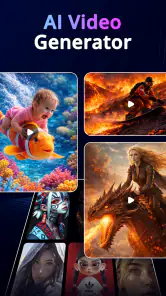
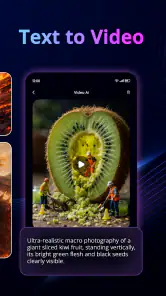
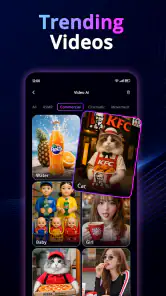
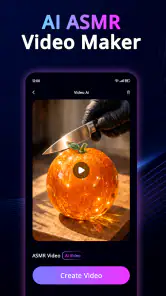
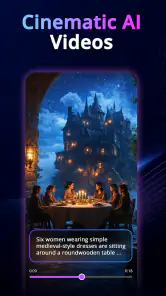
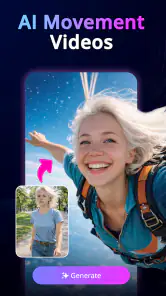
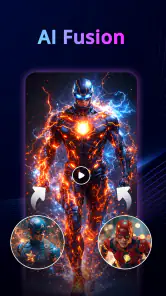
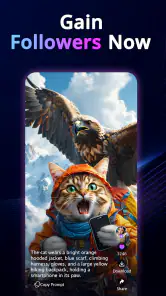
Analysis by Reviewed
I approached AI Video Generator: 3D AI Mix as a quick creative tool rather than a full video editor, and that distinction matters. Its focus is turning written prompts and images into stylized AI video, with effects and three-dimensional looks aimed at short, attention-grabbing clips. I found the idea appealing for social posts, visual experiments, mood pieces, and simple promotional concepts, especially when I wanted something more animated than a still image without building a timeline from scratch.
The app sits in the Art & Design category and is developed by AI Tech Labs. It is free to install, rated for Everyone, and available for devices running Android 7.0 or later. There are optional purchases ranging from $1.99 to $36.99 per item, so I would treat the free installation as a way to explore the workflow before deciding whether the paid side fits your habits. The current version is 1.3.9, and the app has passed five million installs, which suggests that its simple AI-video concept has attracted a sizeable audience.
How the creative workflow feels on a phone
The most natural way to use this app is to begin with a clear visual idea instead of a complicated production plan. I might start with an image of a product, a character sketch, a landscape, or a photo that has a strong subject. Then I would describe the movement or atmosphere I want: a slow camera approach, floating particles, a dramatic transformation, or a more sculpted 3D treatment. The quality of the result depends heavily on how specific that instruction is, so vague prompts can lead to clips that feel visually busy but directionless.
That makes the app approachable for people who do not want to learn keyframes, masks, transitions, and motion tracking. Traditional mobile editors are still better when I need precise control over timing, captions, audio cuts, or a sequence of several shots. This tool is more useful at the idea stage, when I want to turn one concept into a moving visual quickly. I see it as a generator that can feed a larger editing process, not necessarily replace one.
The 3D styling is particularly useful when a flat source image needs a stronger sense of depth. A poster, fantasy illustration, or fashion image can become more dramatic when the motion emphasizes layers and perspective. I would not expect every source to benefit equally, though. A crowded image with tiny subjects or unclear separation between foreground and background gives the system less visual structure to work with. Cleaner compositions tend to make a more convincing starting point.
One practical tip is to prepare the image before importing it. Cropping away irrelevant edges, choosing a clear focal point, and avoiding several competing subjects can make the generated motion easier to judge. I also prefer prompts that describe one main action and one mood rather than listing many effects. For example, a restrained camera move with soft light is easier to evaluate than a request for spinning objects, explosions, neon trails, and a 3D transformation all at once.
Where an internet connection becomes part of the experience
AI generation is the sort of task where connectivity can shape the entire session. When I am sending a prompt or image for processing, I expect the app to depend on communication with its service, so I plan creative work for a place with a stable connection. A weak signal can turn a quick experiment into repeated waiting, particularly when I am testing several variations rather than making one final clip.
More From Our News Desk

Weather by Xiaomi Review: Clear at a Glance, Less Clear Up Close

X Under Pressure: Can It Recover When Posting Goes Wrong?

Clash of Clans Is Won Between the Battles

Android Auto Makes the Case for Quieter Car Software

MobiOffice: Transforming Mobile Productivity with Seamless Integration

EA SPORTS FC™ Mobile Soccer: Redefining Mobile Sports Gaming
This changes how I use it on mobile. I would not open the app just before boarding a train and assume I can finish a complete batch of ideas without interruption. Instead, I would prepare source images and prompt notes beforehand, then run the generation when the connection is dependable. That small change makes the app feel less frustrating because I am not treating a network-sensitive process like a conventional offline drawing tool.
Connectivity also affects the kind of experimentation that makes sense. With a reliable connection, I can afford to try a conservative prompt first and then alter one element at a time. When the network is unstable, I am more likely to overpack a single request, which makes it harder to understand whether a disappointing result came from the prompt, the source image, or the interrupted process. A deliberate workflow is therefore more valuable than simply generating as many versions as possible.
For someone creating a quick social post in a café, the app can be convenient if the signal is strong and the expected output is modest. For a creator working during travel, in a crowded venue, or in an area with unreliable service, it is better viewed as a tool for producing material when conditions allow. I would keep a normal editor available for trimming and assembling content that has already been generated.
Useful mobile situations, and the ones I would avoid
One realistic everyday use is preparing a short visual for a local event. I could take a clean image of a poster or venue, ask for gentle movement and a dimensional look, and use the result as an attention-grabbing story post. The app would save time compared with manually animating the design, while a separate editor could add the final date, location, or music. I would still inspect the generated text carefully, because AI motion effects are not a substitute for dependable typography.
Another good situation is brainstorming. If I am developing a visual identity for a small project, I can use several images and prompts to test whether a concept works better as a dreamy 3D scene, a sharp product reveal, or a more energetic effect. The value here is not that every result becomes publishable. The value is seeing directions quickly and discovering which visual language deserves more attention.
It can also suit people who regularly make short-form content but do not want every post to look like a standard slideshow. A still image with carefully chosen motion can give a feed more variety. However, I would not choose it as my primary tool for a longer narrative, a multi-scene advertisement, or a project where exact continuity between shots is essential. Generated clips can vary in movement and interpretation, so a conventional editor remains the safer choice for controlled storytelling.
The phone-first nature of the experience is both a strength and a limitation. I can test an idea while away from a computer, which is useful when inspiration arrives unexpectedly. On the other hand, reviewing many generated versions on a small screen can become tiring, and detailed decisions about composition are easier on a larger display. I would use the phone for ideation and quick output, then move to a more precise workflow when the project starts to matter professionally.
What to do when a generation disappoints
AI results rarely fail in only one way. Sometimes the movement is too strong, sometimes the subject changes in an unwanted manner, and sometimes the effect overwhelms the original image. My first response would be to change one variable rather than rewriting everything. If the scene feels chaotic, I would simplify the prompt. If the subject loses its identity, I would use a cleaner source image. If the result is dull, I would adjust the requested motion or visual mood instead of adding a long list of effects.
This one-change-at-a-time method is a useful recovery strategy because it preserves what worked. It also helps me learn how the app interprets my wording. A prompt that produces a promising composition but excessive motion can be refined more intelligently than a completely new request. Keeping short notes about successful wording is worthwhile if I am developing a repeated style for a series of posts.
I would also avoid judging a concept from one rushed attempt. The app is designed for generative exploration, so the first output is better treated as a draft. That does not mean endlessly retrying until something acceptable appears. If several variations fail because the source image is unsuitable or the desired movement requires exact control, I would stop and switch to a regular editor. Knowing when not to keep generating can save both time and paid resources.
That last point matters because optional purchases are part of the product. The app itself is free, but individual in-app items cost between $1.99 and $36.99. I would test the free experience first, decide whether the visual style actually matches my needs, and only then consider spending money. If I were making occasional personal clips, I would be cautious about buying anything large. A frequent creator may find more value, but only if the generated results consistently save more time than manual editing.
Making sensible choices about images and data use
When an app works with uploaded images and written prompts, I prefer to be selective about what I use. I would begin with non-sensitive material: public artwork, a product mock-up, a landscape, or a photo created specifically for the experiment. I would avoid feeding private documents, personal identification, confidential work, or images involving other people unless I was comfortable with the relevant handling terms and had permission to use them.
This is not a reason to avoid the app; it is a practical habit for any connected creative service. Separating experimental assets from personal archives also makes the workflow easier to organize. I can keep a folder of prepared images, label the versions I like, and avoid repeatedly selecting photos that were never intended for creative processing.
Data-conscious use also means planning generation sessions. Instead of sending ten nearly identical prompts, I would create three clearly different directions first. For example, I might compare a slow cinematic movement, a playful 3D effect, and a minimal depth animation. This produces more useful feedback from each attempt and reduces the temptation to spend simply because a result was almost right.
I would pay attention to the app’s permission requests and account screens as I use it, granting only what is necessary for the task. Since the experience is centered on connected generation, I would also avoid assuming that a saved-looking project is the same as an exported, independently stored video. For anything important, I would preserve the final result in my normal device or cloud organization rather than relying on one app as the only copy.
How it compares with ordinary creative apps
Compared with a standard mobile video editor, AI Video Generator: 3D AI Mix is faster at proposing visual motion but weaker at exact control. A conventional editor lets me decide precisely where an effect begins, how long it lasts, and how multiple clips relate to one another. This app is better when I want the system to interpret an idea and surprise me. The trade-off is predictability: the more specific the final movement must be, the more attractive a manual editor becomes.
Compared with a slideshow maker, it offers a more expressive route from still image to video. A slideshow mainly depends on pans, zooms, transitions, and music choices. The AI approach can produce a more stylized result, particularly when the source image has a strong subject and the requested effect supports it. Yet a slideshow tool is usually easier for reliable announcements, family albums, and information-heavy content where legibility matters more than visual novelty.
Compared with a desktop 3D or motion-design application, this is dramatically more approachable but far less suitable for production control. I would not use it for a client job that requires repeatable camera paths, exact brand colors, consistent characters, or frame-level revisions. I would use it to create a visual reference, a rough pitch, or a first draft that helps explain the direction before investing in a more controlled process.
The app’s average rating is 3.7 from around seven thousand ratings, alongside ninety-one written reviews. I read that overall figure as a sign of a useful but not universally dependable experience: many people may enjoy the speed and novelty, while others may be more sensitive to inconsistent results, network delays, or the limits of AI interpretation. Its audience has grown beyond five million installs, but popularity does not remove the need to check whether its particular style suits the work I want to make.
Who should try it, and who should skip it
I would recommend trying it if you enjoy visual experimentation, make short social content, or need quick animated concepts from images. It is especially appealing to beginners who find traditional motion tools intimidating. The Everyone age rating also makes the app broadly approachable, although I would still supervise younger users around connected services and optional purchases.
I would be more cautious if you need dependable output on a deadline. A generator can be excellent for inspiration and still be inconvenient when a client expects a precise result at a precise time. I would also skip it as a main tool if my project depended on readable text, exact product details, consistent faces, or a carefully choreographed sequence. In those cases, manual animation or a conventional editor offers fewer surprises.
For me, the best role is a middle ground: it turns a static idea into a moving draft quickly, then lets me decide whether the concept deserves more work elsewhere. That workflow avoids expecting one mobile app to handle ideation, generation, editing, finishing, and delivery equally well.
My connectivity verdict
AI Video Generator: 3D AI Mix is an accessible Art & Design app with a clear creative purpose. I like it most when I have a strong image, a simple motion idea, and a reliable connection. Its 3D-oriented effects can make a basic visual feel more alive, and its prompt-based approach removes much of the technical setup that normally slows down experimentation.
The limitations are just as important. Network-sensitive generation is not ideal for disconnected travel or rushed production, and AI output can require several thoughtful revisions. The free entry point is welcome, but the range of optional purchases means I would explore carefully before spending. I would also keep a conventional editor nearby for captions, timing, sound, and final assembly.
My recommendation is to treat this as a connected idea generator, not a complete replacement for video editing. If that matches your expectations, it can be a fun and useful way to turn images and written concepts into short visual experiments. If you need offline certainty, exact animation control, or repeatable professional results, a traditional tool will be the better companion—or the better choice altogether.
AI Video Generator: 3D AI Mix Frequently Asked Questions
Can I create videos from text prompts as well as images?
Yes. AI Video Generator: 3D AI Mix is presented as a tool for creating AI videos from both text and images, with effects and 3D-inspired styles. That makes it possible to start with a written idea or use an image as the visual source for a clip. The result is intended for creative, stylized video-making rather than detailed control over a conventional editing timeline.
Which devices can run AI Video Generator: 3D AI Mix?
The app is available for Android devices running Android 7.0 or later. Before downloading, check your device’s operating-system version in its settings to make sure it meets that requirement. The app is categorized under Art & Design, and its focus on AI-generated visuals makes it most relevant to people who want to experiment with creative video effects on a compatible phone.
What is AI Video Generator: 3D AI Mix, and what can it do?
AI Video Generator: 3D AI Mix is designed to help users create stylized videos with artificial intelligence, including 3D-inspired visuals, animated effects, and image-to-video transformations. After testing its workflow, the main appeal is its simplicity: you generally select or upload media, choose a visual style or template, and let the app generate the result. It is best suited to short social-media clips, experiments, and creative edits rather than professional film production.
Is AI Video Generator: 3D AI Mix free to download and use?
The app is free to download, but it offers in-app purchases ranging from $1.99 to $36.99 per item. Some generation tools, premium styles, export options, or advanced features can require payment. Users should carefully review the pricing screen before making a purchase, especially any applicable renewal terms and cancellation process. Free usage may also include limits such as credits, waiting times, watermarks, or reduced export quality.
Do I need an internet connection to generate videos?
Yes, an active internet connection is normally required for the main AI generation process because visual processing is performed through online servers rather than entirely on the phone. A stable Wi-Fi or mobile-data connection helps prevent failed uploads and interrupted generations. You may be able to view saved results offline, but creating new videos, loading templates, and accessing cloud-based features generally requires connectivity.
Pros
- Quickly creates stylized 3D videos from simple text or image prompts.
- Useful templates help beginners produce content without editing experience.
- Good option for short social media clips and creative experiments.
- Automates much of the animation process
- saving time on manual keyframing.
- Easy export workflow makes sharing finished videos relatively convenient.
Cons
- Generated results may differ noticeably from the original prompt or reference image.
- Some advanced effects and exports may require a paid subscription.
- Rendering can take time
- especially for longer or more detailed videos.
- Output quality may vary between generations
- reducing consistency across scenes.
- The app may require substantial storage and a stable connection for processing.
- Category
- Art & Design
- Version
- 1.3.9












