ACE Scanner - PDF Scanner App
- 924.00
- 4.4
- Installs
- 50.00M
- Price
- Free
Screenshots

Analysis by Reviewed
Trust matters more than a polished interface when I’m using a phone to turn paperwork into a file I may later share. ACE Scanner - PDF Scanner App is a free productivity app from QR Code Scanner, and its appeal is straightforward: capture documents with a phone and work with them as PDFs. It has a 4.4 average from around 382,000 ratings and over 50 million installs, so it is widely used, though popularity alone isn’t a privacy guarantee. I’d treat any scanner as a tool that handles potentially sensitive material, and decide what to capture and share with care.
Your Mobile Scanning Buddy
First impressions matter, and the ACE Scanner - PDF Scanner App doesn’t disappoint. The app is sleek, easy to navigate, and gets straight to the point. Whether you’re tech-savvy or a bit of a novice, you'll feel right at home. Right from the get-go, the app offers a clean interface that’s not cluttered with unnecessary features, making it super intuitive.
Scanning Capabilities
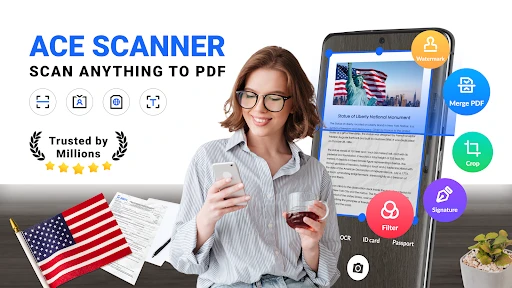
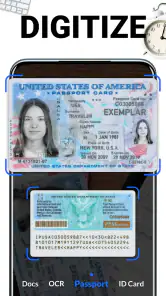
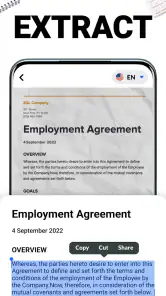
Let’s talk about the scanning capabilities. It’s like having a high-quality scanner in your pocket. You can scan anything from documents to receipts, and even business cards. The app swiftly captures your document and automatically enhances the quality, giving you crisp and clear PDFs. The OCR (Optical Character Recognition) feature is a standout, allowing you to extract text from images with surprising accuracy.
User Experience
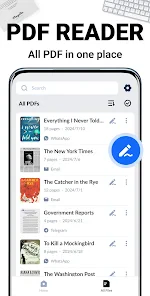
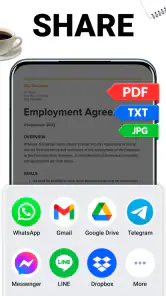
What I love about this app is its user-friendliness. You don’t need a degree in rocket science to figure it out. A few taps here and there, and you're done. Plus, it supports multiple languages, making it accessible to a broader audience. Sharing your scanned documents is a breeze, with options to send via email, cloud services, or even social media. It’s all about convenience and efficiency.
Performance and Reliability
In terms of performance, the app is pretty solid. It doesn’t lag or crash, which is a major plus for anyone who’s on the go and can’t afford to waste time. The app also saves your scans automatically, so you won’t lose any important documents. It’s reliable and fast, exactly what you’d need when scanning on the move.
Everyday Scans, With a Little Care
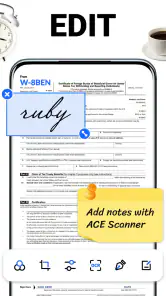
A practical use is gathering several related pages into a single handoff: for example, I might photograph a signed form and its supporting receipt before leaving an office, then check the resulting PDF while the paper is still nearby. That last check matters. Make sure every page is in frame, the text is legible, and the edges have not been cut off before sending anything. A phone camera can be convenient, but glare, shadows, curved paper, and a busy background can all undermine a scan; bright, even light and a flat surface usually make the capture more dependable.
For short, occasional jobs, a phone scanner can be quicker than finding a printer or desktop scanner. Compared with simply taking photos, a PDF workflow is more practical when pages belong together and need to be shared as one document. A dedicated scanner or office multifunction machine is still the better choice for high volumes, consistent archival quality, or repeated double-sided batches. I’d also avoid treating text recognition as a substitute for proofreading: names, totals, and dates deserve a careful check before I rely on extracted text.
You May Like

Clash of Clans Is Won Between the Battles

Android Auto Makes the Case for Quieter Car Software

MobiOffice: Transforming Mobile Productivity with Seamless Integration

EA SPORTS FC™ Mobile Soccer: Redefining Mobile Sports Gaming

How Microsoft OneDrive Became a Mobile Productivity Giant

How Google Translate Breaks Language Barriers Effortlessly
What to Consider Before Sharing
The app’s sharing options make it easy to move a file along, but that convenience is also the moment to slow down. Before sending a scan of an invoice, ID, application, or medical paperwork, I’d check that the recipient and destination are correct and that the PDF contains only the pages intended. If a document is especially sensitive, I would use a method I already trust for that material rather than assume a scanning app’s share button makes the transfer private. The app is best for quick, ordinary paperwork when I can review the output and control where it goes.
It is also worth thinking about the original paper after scanning. A scan can make a receipt easier to find, but it does not automatically replace a paper copy when an organization requires one. For a useful personal filing habit, I’d give the file a clear name and place it in a folder I can locate later, rather than relying on a camera roll full of unrelated images. That small step makes the PDF more useful weeks after the scan, especially when several receipts or forms look alike.
Who Will Get the Most From It
I’d recommend this kind of app to students, freelancers, and anyone who occasionally needs to send forms or keep receipts without sitting at a computer. It is less compelling for someone who already scans large batches at work, needs a tightly managed document archive, or depends on consistent OCR for business-critical records. In those cases, a desktop scanner or a document-management workflow may offer more control. The app is free to start, but it includes in-app purchases priced from $4.99 to $49.99 per item, so I’d check the purchase screen carefully before committing to anything; its Everyone age rating does not mean every purchase is free.
Controls and Practical Expectations
For privacy-minded use, I would review any permission prompts on the device and grant only what makes sense for the task at hand. I would also look for the app’s available settings and purchase controls before scanning confidential pages, rather than assuming a particular account, backup, or deletion option exists. The version is 1.4.3.111 and it requires Android 6.0 or later; it was released on February 12, 2022. Those details help with compatibility, but they do not answer questions about how a particular document is handled, so I’d keep my own sharing choices deliberate.
To wrap it up, the ACE Scanner - PDF Scanner App is a handy tool for anyone needing frequent document scanning. It combines ease of use with powerful features, making it a must-have app for both personal and professional use. So, next time you’re in a pinch and need to scan a doc, you know which app to reach for. Trust me, it’s a game-changer!
ACE Scanner - PDF Scanner App Frequently Asked Questions
What is ACE Scanner used for?
ACE Scanner is a productivity app for turning documents and photos into PDFs. Its central appeal is having a way to scan and share files from a mobile device, rather than needing a separate scanner for everyday paperwork. If you often need digital copies of pages or images, the app’s basic purpose may fit that routine.
What devices and operating systems can run ACE Scanner?
ACE Scanner is available for Android and iOS devices. On Android, the minimum operating system requirement is version 6.0, so check your phone or tablet’s software version before downloading. The app is rated for Everyone, making it broadly suitable for general use. You can find it through the relevant app store for your device.
Can I scan documents using my phone’s camera with ACE Scanner?
Yes. ACE Scanner is designed to use a mobile device to scan documents and photos and turn them into PDFs, which makes it useful when you need a digital copy without a separate scanner. The app is free to download and is rated for Everyone. Before installing, check that your device meets the operating system requirement.
What features does ACE Scanner offer for document scanning?
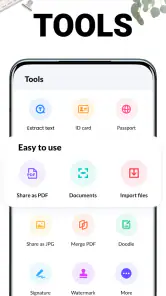
ACE Scanner provides a comprehensive suite of features for document scanning, including automatic edge detection, multi-page scanning, and high-resolution PDF creation. Users can also enjoy OCR text recognition, allowing scanned documents to be converted into editable text. The app supports various file formats and offers tools to enhance scan quality, ensuring documents are clear and professional.
Is ACE Scanner compatible with both Android and iOS devices?
Yes, ACE Scanner is designed to be compatible with both Android and iOS devices. This cross-platform compatibility ensures that users can easily download and install the app from either the Google Play Store or the Apple App Store, providing a seamless experience regardless of the device being used.
Pros
- Fast scanning speed for quick document capture.
- High-quality PDF output for professional use.
- User-friendly interface with intuitive navigation.
- Supports multiple file formats for saving scans.
- Secure cloud integration for easy document access.
Cons
- In-app ads can be disruptive during use.
- Limited free features; many require purchase.
- Occasional bugs affect app stability.
- Requires internet for cloud features.
- Large file sizes for high-quality scans.

- Category
- Productivity
- Version
- 1.4.3.111













