

BAND - App for all groups
- 7.17K
- 4.8
- Installs
- 50.00M
- Price
- Free

Screenshots
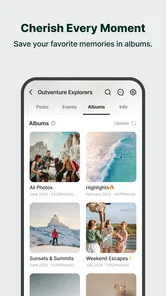
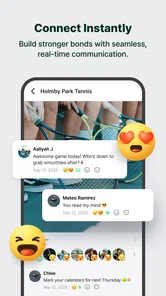
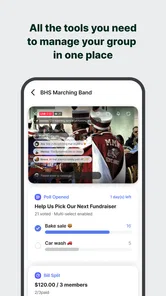

Analysis by Reviewed
What I’d decide before moving a group into BAND is not whether it has enough tools, but whether the group has a shared reason to use them. A family reunion, a team, and a book club may all benefit from a central place for plans, yet each needs a slightly different routine. If nobody knows where a confirmed date or an important change will be posted, having more options can make information harder—not easier—to track.
Agree on a simple home for each kind of update
Before inviting everyone, I’d decide what belongs in the main conversation, what should become a calendar event, and when a poll is worth using. Keep those rules short. “Dates go on the calendar; quick questions stay in chat” is easier to remember than a detailed posting policy. The point is not to make a casual group feel formal; it is to avoid having the same decision scattered across several threads.
I’d also choose one person to create the first event and show the group how it will be used. A real upcoming plan is a better test than a long welcome post: members can look for the date, respond about attendance, and see where follow-up discussion belongs. If the first test feels confusing, simplify the routine before moving more group activity over.
Small setup checks can prevent avoidable confusion
When someone says they cannot see an update, I would first check the basics rather than reposting it immediately. Are they in the intended group or sub-group? Are they using the account they joined with? Is the device connected, and are notifications allowed both in the app and in the phone’s settings? These checks help distinguish a missed alert from a post that went to the wrong place.
For a group with several organizers, it can help to keep the audience for each discussion clear. A sub-group can reduce noise when only a few people need to settle logistics, but it also creates another place members may forget to check. I’d use one only when there is a genuine smaller working group, then bring the final decision back to the main group or its calendar so everyone affected can find it.
Recover the plan without creating competing versions
If a date changes, update the agreed plan in its central place and then post a concise note pointing members there. Sending the correction in several separate messages may seem safer, but it can leave people unsure which version is current. For an important change, I’d ask the people who need to act on it to acknowledge it directly rather than assuming that a notification was seen.
This approach is especially useful for a volunteer rota or recurring practice. The organizer can use discussion to work through options, a poll to settle a choice, and the calendar to make the final arrangement easy to locate. It is a modest system, not a substitute for careful coordination: someone still needs to keep the final record accurate and tell members where to look.
More From Our News Desk

 Gmail
GmailGmail in a Busy Inbox: Who Benefits Most?
From first account to crowded workday, Gmail earns its place through dependable search and flexible sorting—but its best fit depends on how much inbox maintenance you can tolerate.

 Prime Video
Switching to Prime Video: What Changes in Your Viewing Routine
Prime Video can make a compelling second home for streaming, but switching means learning a different catalog, rental layer, and route from browsing to playback.

 Universal TV Remote Control
Universal TV Remote Control Works Best as a Reliable Backup
A phone remote earns its place through quick setup and reliable habits. Here is how to get more from Universal TV Remote Control—and where its limits show.

 Weather - By Xiaomi
Weather by Xiaomi Review: Clear at a Glance, Less Clear Up Close
Xiaomi’s weather app makes everyday forecasts quick to scan, but its calm surface can leave useful details and recovery paths harder to find than they should be.

 X
XX Under Pressure: Can It Recover When Posting Goes Wrong?
A resilience-focused review of X, examining setup, mistaken posts, interruptions, weak connections, and the gaps that matter when recovery needs to be dependable.

 Clash of Clans
Clash of Clans Is Won Between the Battles
Its raids are quick; its community is a long-term project of coordination, teaching, rivalry, and shared responsibility—with all the friction that entails.
Latest News



Where users can get stuck
The first challenge is usually not learning the app; it is getting everyone to use the same space. A group only becomes useful when members know where announcements belong, where plans are discussed, and how to find the information later. I’d set a simple expectation from the start—for example, use the calendar for confirmed dates and chat for quick questions. That small bit of coordination can prevent the group from recreating the same conversation in several places.
Notifications are another early point to get right. If every activity produces a ping, people may mute the group and miss the updates that matter. I’d adjust notification preferences after joining, then check that important event reminders still get attention. That is a practical trade-off: fewer interruptions make the app easier to live with, but overly restrictive settings can make it easier to overlook changes.
Getting to Know BAND
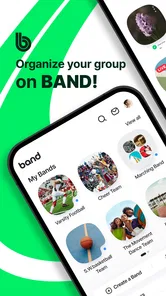
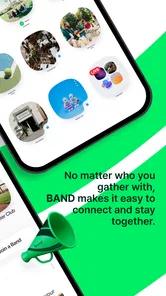
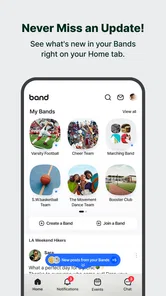
First things first, what exactly is BAND? It's essentially a one-stop-shop for managing all your group communications and activities. Whether you're part of a sports team, a school club, or just planning a big family reunion, BAND offers a seamless way to keep everyone in the loop. Setting up a group is a breeze, and you can tailor your notifications so you're not bombarded with constant pings.
Features That Stand Out
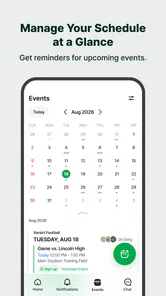
One of the features I absolutely love is the calendar integration. It’s like having a personal assistant who never forgets. You can easily schedule events, send out reminders, and even see who's coming. No more awkward moments of “Wait, was that today?”
There’s also a killer chat function. It’s smooth, intuitive, and keeps everything in one place. I’ve been able to share photos, files, and even do polls to make decisions without a hitch. It almost feels like BAND anticipated every potential hiccup and smoothed it out. Plus, the ability to create sub-groups is perfect for those times when not everyone in the main group needs to be involved.
Making a group workflow easier to follow
A useful habit is to treat the calendar as the reference point for agreed plans, rather than relying on an old chat message. For a weekly practice, for instance, I’d keep the recurring discussion in the main group but use a sub-group for a smaller set of organizers who need to settle details. Once the date is clear, a poll can help resolve a choice without making every member scroll through a long thread. These tools work best when the group decides what each one is for.
If a member says they cannot find a plan, I’d first check whether it was posted in the right place and whether the member is looking at the correct group or sub-group. Then I’d confirm that their notification settings are not hiding the prompt they expected to see. This kind of simple workflow check is more useful than reposting the same message repeatedly, which can create competing versions of the plan.
Why It’s a Game Changer
In a world where we’re juggling multiple apps for different purposes, BAND consolidates everything beautifully. It's like having WhatsApp, Google Calendar, and a bit of Facebook all rolled into one. The app’s design is user-friendly, so even the least tech-savvy among us can navigate it with ease. And for those concerned about privacy, BAND lets you control who sees what, ensuring your group's information stays within your circle.
Another highlight for me is how it encourages engagement. The app has a community board feature where members can post updates or shoutouts. It’s like having a bulletin board right in your pocket. This has been particularly handy for my book club, where we’ve been able to share recommendations and vote on our next read with ease.
Who benefits most—and who may prefer another tool
I’d recommend it to a group that needs more structure than a plain messaging thread: a volunteer team arranging shifts, a club coordinating meetups, or relatives planning a gathering. A realistic routine might be checking the calendar on Sunday, confirming attendance in the group, and using a poll to choose between two options. That keeps the practical decisions visible without forcing every detail into a separate conversation.
By contrast, if you only need quick private messages, a familiar messenger may feel lighter and require less coordination. If your group already relies on a shared calendar or workplace platform, moving everyone to another hub can create duplicate notices rather than simplify things. BAND’s advantage depends on members actually adopting it; the organizer cannot make a quiet group participate just by choosing a more organized app.
It is a free social app from NAVER Corp., with optional in-app purchases priced from $1.68 to $53.09 per item. Its average rating is 4.3 from around 502,000 ratings, and it has passed 50 million installs. The Teen age rating is worth keeping in mind when deciding whether it fits a younger group. Version 25.2.1 requires Android 10 or later, so I’d check the device’s operating system before trying to install or update it.
When a problem may be outside the app
If an invitation, update, or reminder seems to be missing, I’d avoid assuming the app itself has failed. Check that you are signed into the account and group you intended to use, that the device is online, and that notifications are allowed in both the app’s settings and the phone’s system settings. If only one person is affected, comparing their group access and notification choices with another member’s can narrow down the cause.
For a group that has trouble getting started, keep the first test small: post one clear update, add one real event, and ask members to respond to a simple poll. That reveals whether people can find the group and understand the workflow before you move every conversation there. I also would not use a group board as the only record of something urgent; for time-sensitive arrangements, make sure the people involved have seen and acknowledged the change.
Choosing the right level of structure
The useful comparison is not simply BAND versus another messenger; it is whether your group needs a shared workspace at all. A standard chat is often the better choice for spontaneous conversation among a few people, because there is less setup and fewer conventions to explain. A separate calendar can be preferable when scheduling is the only problem and everyone already checks it reliably. BAND makes more sense when conversation, group updates, and organizing activities need to sit together, and members are willing to keep that shared space current.
For a family arranging a weekend gathering, I’d use the main group to discuss transport and food, a poll to settle a choice that needs a quick decision, and the calendar for the confirmed time. If only two relatives are handling reservations, a sub-group can keep their working discussion out of the main stream. The trade-off is that anyone not included in that smaller space depends on someone to relay the result; for decisions that affect everyone, the final summary should be visible to the whole group.
One practical way to avoid a cluttered start is to resist creating a separate space for every topic. Begin with the main group and add a sub-group only when a real need appears. Likewise, a poll is most helpful when the options are already clear; using one to explore an open-ended discussion can produce votes without resolving the underlying question. The tools are most effective when they make an existing decision easier to see, rather than adding a new step to every conversation.
How I’d judge whether it is working
After the first few plans, I’d look for concrete signs that the arrangement is helping: members can find the confirmed date without asking again, organizers are not repeating announcements in multiple places, and people know where to respond. If those habits are not forming, the answer may be to simplify how the group uses the app, not to add more channels or reminders. A small group can also decide that a conventional messenger is enough, and that is a sensible outcome rather than a failed trial.
There is a human side to this choice too. Some members may be comfortable joining another social app, while others prefer the tool they already open every day. I’d explain the specific benefit—such as keeping the team schedule easy to locate—rather than asking everyone to move on principle. For a group with a mix of ages or technical confidence, a short first post explaining where to find plans can make adoption less intimidating.
The Final Word
So, is BAND - App for all groups worth the download? In my book, absolutely. It makes group organizing less of a chore and more of a collaborative experience. Whether you're coordinating a casual meet-up or managing a high-stakes project, BAND has the tools you need to keep everything running smoothly. Give it a try, and you might just find it becomes an indispensable part of your group dynamics.
My recommendation comes with one condition: choose it because your group needs a dependable shared place, not because another app promises to organize people automatically. Start with one event and a clear posting habit, then see whether members actually return to the space. If the group adopts that routine, BAND can be a useful home for plans and discussion; if it adds another inbox without changing how people coordinate, a simpler tool will probably suit you better.
BAND - App for all groups Frequently Asked Questions
Can I create a group for a specific event or short-term project?
Yes. BAND can be used to bring people together around a shared purpose, including a club activity, sports team, or work project. A dedicated group can keep conversation and planning in one place while the event or project is underway. That makes it a practical option when you want a shared space for coordination rather than scattering updates across separate conversations.
What should I check before downloading BAND?
BAND is a social app for group communication, so it is most useful when you have a group of people who are ready to use a shared space. Check that your device is compatible with the version available for your platform, and consider whether the app’s Teen content rating is appropriate for its intended user. The basic app is free, with optional in-app purchases.
Can I use BAND on both Android and iOS?
Yes. BAND is available for Android and iOS, so people in the same group can use different mobile platforms. The app is listed for devices running Android 10 or later, and its current version is 25.2.1. Before downloading, check that your device’s operating system meets the requirement and that you are choosing the version for your platform.
Who develops BAND, and what is its age rating?
BAND is developed by NAVER Corp. and is categorized as a social app for group communication. Its content rating is Teen, which is useful to consider when deciding whether it is appropriate for younger users in your household. The app is built around group interaction, so it may suit people looking for a shared space to coordinate with others rather than a standalone messaging tool.
What is BAND and how does it work?
BAND is a group communication app designed to help users create and manage groups for any purpose, such as clubs, sports teams, or work projects. The app allows users to organize activities, share updates, and communicate easily with group members through features like group chats, calendars, polls, and file sharing. It's available on both Android and iOS platforms.
Pros
- Easy group communication via chat and posts.
- Customizable notifications for each group.
- Event scheduling with RSVP feature.
- Group voting for decision making.
- Privacy settings to control group visibility.
Cons
- Limited storage for shared files.
- Occasional app crashes reported.
- Ads visible in the free version.
- Some features require in-app purchases.
- User interface can be overwhelming initially.













