ReadEra – book reader pdf epub
- 19.37K
- 4.8
- Installs
- 10.00M
- Price
- Free
Screenshots
Analysis by Reviewed
I usually judge a reading app by a practical question: can I open the files I already have, find my place again, and settle into a book without fighting the interface? ReadEra – book reader pdf epub is built around that everyday job. It is a free Books & Reference app from READERA LLC, and its appeal is less about turning reading into a social activity than about keeping a personal collection of documents and books usable on a phone or tablet.
Choose it for the books you already own
That focus matters if your reading comes from different sources. Someone who alternates between a novel, a work document, and a PDF reference file may prefer one reader over a store-centered app that mainly encourages purchases from its own catalog. ReadEra’s range of formats makes it useful as a general-purpose bookshelf, although the reading experience can still vary with the layout and quality of the original file. A reflowable ebook and a fixed-page PDF are not equally comfortable on a small screen.
A simple routine helps: keep a few current books and reference documents together, then use the app’s organization tools to separate what you are reading for pleasure from what you need for study or work. That way, a quick search for a passage does not mean scrolling through every file you have. For a long PDF, I would still check whether its page layout is legible on my device before relying on it for extended reading.
Small habits that make reading easier
One useful distinction is between adjusting the reading view and changing the source file. Font and margin controls can make suitable ebooks more comfortable, but they will not necessarily fix a scanned or tightly formatted PDF. For those files, page orientation and zoom matter more than font choice. I would test a few pages before a trip or study session rather than discover halfway through that a document requires constant pinching and panning.
Search is particularly handy when a book doubles as a reference. Instead of relying on memory, I can look for a name or phrase and jump back to the relevant passage. I would treat it as a way to locate text, not as a replacement for notes: if I need to build a structured research archive or cite passages across many projects, a dedicated note-taking workflow may suit me better.
Where another kind of reader may be better
ReadEra makes the most sense when you want to read files you already have. If you mainly borrow ebooks through a library, buy titles inside a particular bookstore, or need reading progress and highlights synchronized across several devices, I would compare those services’ own apps before switching. Their catalog and account-based features may be more important than broad file support. Likewise, readers who want a distraction-free physical e-ink screen may be happier with a dedicated device than with any phone app.
Moving an existing library is also a small but real piece of work. A reader app can display files, but it does not automatically make a messy folder structure meaningful. I would start by placing a manageable selection of books in clearly named folders, open them, and check that the titles are easy to identify. If your collection is already organized around another app’s shelves, consider whether rebuilding that arrangement is worth the convenience of reading more formats in one place.
You May Like

Clash of Clans Is Won Between the Battles

Android Auto Makes the Case for Quieter Car Software

MobiOffice: Transforming Mobile Productivity with Seamless Integration

EA SPORTS FC™ Mobile Soccer: Redefining Mobile Sports Gaming

How Microsoft OneDrive Became a Mobile Productivity Giant

How Google Translate Breaks Language Barriers Effortlessly
Diving into the Features
First things first, ReadEra supports a wide array of formats, from PDF to EPUB, MOBI, and even FB2. I mean, how cool is that? No more converting files or downloading multiple apps just to read your favorite novels. Everything is right here in one place.
Another standout feature is its offline capabilities. Imagine this: you're on a long flight, no Wi-Fi in sight, but you've got your entire library right at your fingertips. With ReadEra, that dream is a reality. It stores your books locally, so you can dive into your stories anytime, anywhere.
User Experience
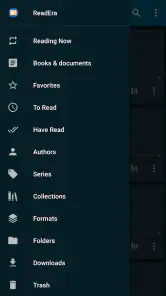
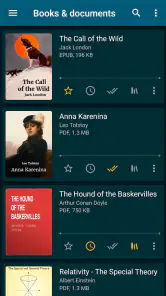
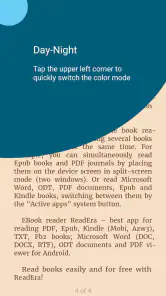
The app's interface is clean and intuitive, making navigation a breeze. I was pleasantly surprised at how easy it was to organize my collection. You can sort by authors, series, or categories, and even create your own custom collections. And let me tell you, the night mode is a game changer for those late-night reading sessions. It’s easy on the eyes and perfect for avoiding that dreaded screen glare.
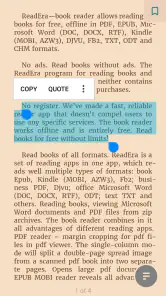
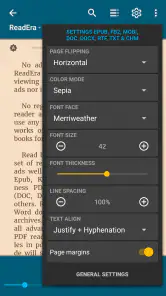
One of the things I absolutely love is the customizable reading settings. You can adjust the font size, style, and even the margins. It's like having a personalized reading experience tailored just for you! Plus, the app's quick search feature is a lifesaver when you need to find a quote or a passage in a hurry.
Performance and Stability
In terms of performance, ReadEra is as smooth as silk. I didn’t encounter any lag or crashes during my time with the app. It loads books quickly and the pages turn without a hitch. It's evident that the developers put a lot of thought into ensuring a seamless reading experience for users.
Moreover, the app doesn’t bombard you with ads, which is a rare find these days. You can focus on what truly matters – the joy of reading. And if you're worried about storage space, fear not! ReadEra is surprisingly lightweight, so it won't take up much room on your device.
Costs, compatibility, and who should try it
For a concrete decision, ReadEra is free, rated for Everyone, and has a 4.8 average from around 1.5 million ratings, with over 10 million installs. It first appeared on March 31, 2017, and the current version is 25.10.05+2200; it supports Android 4.1 and later. Those details make it accessible to many Android users, but the key question is still how you read: it is strongest as a local-file reader, not as a substitute for every bookstore or library service.
For an ordinary commute, I would download a couple of books and a PDF before leaving home, sort them into separate collections, then use offline reading when the connection drops or I want to save battery by staying disconnected. Before switching from another reader, open a few representative files and check both the page display and whether the organization you depend on carries over in a way that works for you. The app can reduce format juggling, but it cannot make every source document pleasant to read.
Make the first switch deliberately
If you are weighing this against a dedicated ebook storefront, I would separate two jobs before choosing: getting books and reading books. A store’s app can be the more convenient home for titles you purchase or borrow through that service, while ReadEra is the more natural test for files already saved on your device. Neither approach is automatically better; the trade-off is convenience within one catalog versus flexibility across a personal collection.
When trying it, I would begin with three files that represent your real routine: an EPUB novel, a PDF you consult often, and a document you need to read for work or study. Open each one, adjust the view only as needed, and see whether you can return to the right place later. This small test is more revealing than loading a huge archive at once, because it shows whether the formats you actually use feel comfortable and whether the app’s organization matches your habits.
For PDFs with columns, diagrams, or small print, I would treat the phone as a useful portable reference rather than assume it will replace a larger screen. Rotating the device and adjusting zoom can make a quick lookup practical, but constant magnification is tiring for a full chapter. If you regularly study dense page layouts, a tablet, computer, or printed copy may be the better reading surface, even if ReadEra remains handy for carrying the file.
Fit it to a real reading day
A realistic day might start with a chapter of an EPUB on the bus, move to a PDF recipe or instruction sheet while running an errand, and end with a few pages in night mode at home. The value is not that every file becomes equally pleasant; it is that one familiar reader can handle different kinds of material without making you switch between separate apps. I would keep the books I am actively using easy to find and leave older files in their existing folders until I have a reason to reorganize them.
One practical habit is to give files useful names before building a collection around them. A folder full of vague filenames can make any reader’s bookshelf feel cluttered, while clear names help you spot the right document in a hurry. For a course or a work project, grouping a small set by purpose can be more useful than trying to classify every book you own. That keeps the app’s search and collections focused on tasks you actually return to.
Offline use also changes how I would prepare for travel. I would open the books I plan to read before leaving, confirm that the files are available on the device, and avoid making the journey the first time I test an unfamiliar document. This is especially worthwhile for large PDFs or files received from other people: a quick check at home lets you discover layout problems while you still have access to another copy or a larger screen.
Know what convenience does not solve
Broad format support is helpful, but it is not the same as universal compatibility. A file can open and still be awkward because its source layout was designed for paper, its text is embedded as an image, or its formatting behaves poorly on a small display. In those cases, changing font settings may have little effect. I would keep the original file intact and, when possible, use a cleaner ebook edition or another reading device rather than spend time trying to make every page behave like a novel.
Another trade-off is that a local-file approach asks you to take responsibility for the collection. If books arrive from several places, you may need to decide where to save them and how to name them; a storefront app often makes purchased titles easier to find because it ties them to its own catalog. That added control is worthwhile for readers who value a mixed library, but it can feel like housekeeping to someone who wants one account to manage everything.
I would also avoid treating a reader as a complete study system. Finding a phrase in a book is useful for revisiting a passage, but serious research may call for separate notes, citations, or project organization. A good division of labor is to read and locate material here, then put lasting ideas and references into the tool you already use for notes. That prevents a convenient reading app from becoming a dumping ground for information you later cannot sort.
Who will get the most from it
I would recommend trying it first if you have ebooks and documents from several sources, want to read without being tied to a single shop, and are comfortable keeping files on your device. It is particularly appealing for a person who moves between leisure reading and practical reference material, such as a student carrying course PDFs alongside novels or a commuter who wants books available without relying on a connection.
On the other hand, I would not make it my first choice if your main need is borrowing through a library’s own system, keeping progress synchronized across a group of devices, or managing purchases within one retailer’s catalog. In those cases, the official service app may save effort even if it handles fewer kinds of personal files. And if most of your reading is dense PDF study, the screen and document layout may matter more than the app itself.
The audience figures suggest it has found a substantial readership: it has about 19,000 written reviews, alongside its large rating base. I see that as reassurance that the app is established, not proof that every file or device will behave perfectly. The useful test is still personal: try the formats you rely on, then judge whether reading and returning to them feels simpler than it does now.
Final Thoughts
All in all, ReadEra – book reader pdf epub is a must-have app for anyone who loves to read on their mobile device. It’s user-friendly, versatile, and packed with features that cater to every reader’s needs. Whether you're a casual reader or a book enthusiast, this app is sure to elevate your reading experience. So why not give it a try? Happy reading!
My recommendation is straightforward: try it if you have a mixed collection of ebooks and documents and want a free way to read them offline in one place. I would skip it as my main choice if borrowing, purchasing, or syncing through a specific service is central to my routine. For readers with their own files, though, the combination of format support, adjustable presentation, and straightforward organization is a sensible reason to make it the first app I test.
ReadEra – book reader pdf epub Frequently Asked Questions
What is ReadEra, and what is it designed for?
ReadEra is a Books & Reference app for reading ebooks and documents on a mobile device. Its short description is simply “ReadEra,” while its broader purpose is reflected in support for formats such as PDF, EPUB, Word, Kindle, and MOBI. It may suit readers who want one app for different kinds of digital reading material.
Who develops ReadEra, and is it suitable for a general audience?
ReadEra is developed by READERA LLC and has an Everyone content rating, so it is intended for a general audience. It focuses on opening and reading books and documents rather than serving as a social network or a general-purpose productivity tool. If you are choosing an app for a household device, its content rating is a useful point to consider.
What kinds of books and documents can I read with ReadEra?
ReadEra is designed for reading books and documents, with support for formats such as PDF, EPUB, Word, Kindle, and MOBI. That range makes it useful if your library includes both ebooks and work or study documents. You can open compatible files in the app without first converting them, so it can serve as a single reader for different kinds of material.
Is ReadEra free, and who publishes the app?
ReadEra is a free Books & Reference app published by READERA LLC. Its straightforward purpose is to let readers open supported books and documents in one place. If you are comparing ebook apps before downloading, its free availability makes it easy to try, while the Everyone content rating indicates that it is intended for a general audience.
What file formats does ReadEra support for reading?
ReadEra is highly versatile in terms of file compatibility. It supports a wide range of formats including PDF, EPUB, MOBI, FB2, DJVU, TXT, and others. This allows users to read almost any book or document they have without needing to convert files, making it a convenient choice for avid readers.
Pros
- Supports multiple formats: PDF
- EPUB
- MOBI
- DOC.
- No ads for a distraction-free reading experience.
- Customizable reading settings to suit preferences.
- Offline reading capability.
- Organizes books by categories
- authors
- series.
Cons
- Lacks integrated dictionary for word definitions.
- No text-to-speech feature for audio reading.
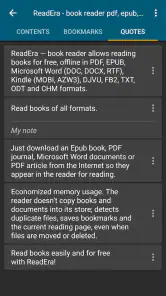
- Limited annotation options for note-taking.
- No syncing across multiple devices.
- Interface might feel outdated to some users.
- Category
- Books & Reference
- Version
- 25.10.05+2200