PRISM Live Studio: Games & IRL
- 1.34K
- 4.5
- Installs
- 5.00M
- Price
- Free

Screenshots
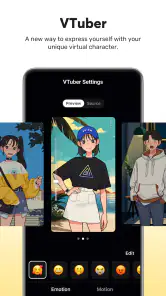
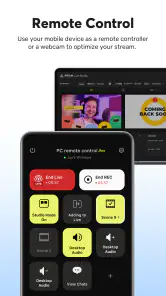
Analysis by Reviewed
I think the best way to judge a live-streaming app is not by how many effects it offers, but by whether it lets you make sensible choices before an audience sees your screen or hears your microphone. PRISM Live Studio: Games & IRL is a mobile broadcasting app from NAVER Corp. in the video-player and editing space. Its appeal is the chance to bring streaming tools and several kinds of content together on a phone; the trade-off is that a polished live setup still depends on careful preparation, a steady connection, and your own attention to what is being shared.
Trust starts with a deliberate setup
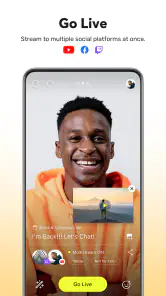
I would treat the first broadcast as a rehearsal, not a performance. Take time to look through the app’s visible choices and any prompts it presents, then decide what you want to capture and where you want to send it. The app can be used with platforms such as Facebook, YouTube, and Twitch, so the destination matters: a casual check-in for one audience may not belong in the same place as a gaming session for another.
That distinction is especially useful if you are new to going live. A stream is immediate, and mistakes can be hard to undo once viewers have seen or heard them. I would check the framing, sound, and broadcast destination before starting, and keep private conversations or notifications away from the capture area where possible. These are practical habits rather than special guarantees from an app; they put more control in your hands.
Keep control of the moments you share
Live video can expose more than the subject you mean to show. A room in the background, a name on screen, or a nearby voice can become part of a broadcast without much warning. Before using the app in a shared space, I would choose a neutral setting, let people nearby know you are streaming, and pause if the scene changes. For a spontaneous outing, a quick look at what the camera points toward is worth more than adding another effect.
If you are deciding whether to connect a platform or use a particular option, read the screen in front of you and make the choice deliberately. I would not assume that every streaming destination handles audiences or account settings in the same way. The sensible routine is to confirm the account and audience on the platform you intend to use, then review the app’s on-screen controls before each session. That makes the workflow less carefree than simply tapping “go live,” but it is a worthwhile trade when your content is public.
Setting the Stage
When you first fire up PRISM Live Studio, you’ll notice how sleek the interface is. It’s like stepping into a tech-savvy workspace that doesn’t overwhelm you with buttons and options. The app feels intuitive, which is a huge plus if you’re not a tech wizard. I mean, who needs a complicated setup when you’re itching to go live, right?
Features that Shine
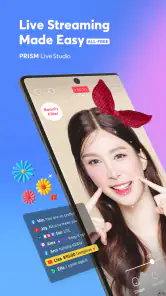
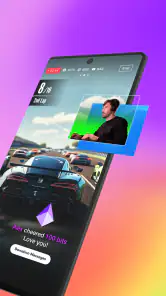
What really caught my attention is the app’s versatility. You can stream not only your gaming sessions but also those everyday moments that make life interesting. The multi-streaming feature is a game-changer. Imagine broadcasting your content to multiple platforms at once – it’s like hitting multiple birds with one stone. Plus, the video editing tools are top-notch, letting you tweak your stream on the fly. It’s like having a mini editing studio in your pocket!
More From Our News Desk

Weather by Xiaomi Review: Clear at a Glance, Less Clear Up Close

X Under Pressure: Can It Recover When Posting Goes Wrong?

Clash of Clans Is Won Between the Battles

Android Auto Makes the Case for Quieter Car Software

MobiOffice: Transforming Mobile Productivity with Seamless Integration

EA SPORTS FC™ Mobile Soccer: Redefining Mobile Sports Gaming
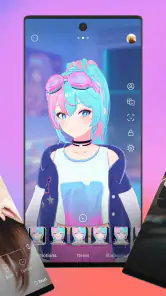
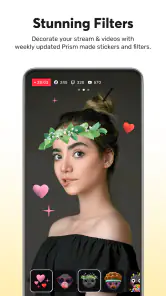
Oh, and let’s not forget about the fun stuff. You can add all sorts of effects and music to your streams. It’s like having a personal DJ and effects artist collaborating to make your stream pop. And for those moments when you want to interact with your audience, the chat integration is seamless. It's like they’re right there with you, sharing the experience in real-time.
A practical check before the red button
For a low-pressure first session, I’d use a short, familiar game or a quiet corner at home rather than trying to improvise a full show. That lets you learn how the controls feel while the stakes are small. A useful habit is to decide in advance what the audience should see during pauses: a simple view, a brief break, or an end to the broadcast. It prevents the awkward scramble of searching through controls while viewers wait.
It also helps to separate planning from performance. I would choose the destination and prepare the phone before opening the game, then avoid changing several production choices at once. If something looks or sounds wrong, changing one thing and checking again makes it easier to identify the cause. This is a modest workflow tip, but on a small screen it can save time and reduce the temptation to tap blindly while live.
Where it fits in a real routine
A realistic use is a short evening gaming stream from a phone: I would test the microphone, open the game, check the intended platform, and only then start broadcasting. Keeping a simple scene and a small set of effects ready can make that routine quicker without turning setup into a performance of its own. For a hobby creator who wants to switch between gameplay and casual live moments, having those uses under one roof is more convenient than juggling a dedicated camera app and a separate streaming tool.
That convenience has limits. A phone screen is still a cramped place to monitor a game, chat, and production choices at the same time. If you need precise scene management, layered graphics, or detailed audio routing, a desktop streaming setup is likely the better fit. And if all you want is an occasional unedited video, the platform’s own broadcast feature may be simpler than learning another app. PRISM is most compelling when you will actually use its creative options and cross-platform workflow.
Making the screen work for you
For a phone-based stream, attention is a limited resource. Chat, gameplay, and production controls all compete for it, so I would not treat every available effect or interaction as something that needs to be active. Keeping the presentation restrained can make it easier to notice a real problem, such as audio that has become hard to hear or a change in the room around you. The trade-off is less visual variety, but a calmer workflow is often more useful than a busier one.
There is another practical distinction between streaming gameplay and streaming a real-life moment. With a game, the screen is usually the subject; with a casual broadcast, the camera may reveal people, surroundings, or information you did not plan to share. I would prepare those two kinds of sessions differently rather than relying on the same setup for both. In particular, check the visible area again whenever you move from one situation to the other.
The Experience
Using PRISM Live Studio feels like embarking on an adventure. The learning curve is gentle, making it perfect for newbies, yet it packs enough punch for seasoned streamers. I found myself exploring features I didn’t even know I needed until I tried them. It's those little surprises that keep the experience fresh and engaging.
One practical trade-off is that adding more destinations, effects, and audience interaction gives you more to watch while live. I would begin with one platform and a straightforward layout, then add complexity only after a test session feels manageable. That approach also helps identify whether your phone, connection, and chosen setup can keep up before you invite an audience. Multi-streaming sounds efficient, but it is not automatically the right choice if you would rather concentrate on one community or keep the broadcast uncomplicated.
Choosing between a mobile app and familiar alternatives
Compared with a platform’s own live feature, a dedicated broadcasting app makes most sense when you want a more creative presentation or expect to move between different kinds of content. The built-in option often wins when you need to start quickly and do not want another set of controls to learn. Compared with desktop streaming software, a phone app wins on portability, but a computer gives you more room to manage a detailed production. Neither alternative is universally better; the right choice depends on whether your priority is convenience, creative control, or a more elaborate setup.
I would also think about the audience before choosing the workflow. If your viewers are already gathered on one service, adding destinations may not help you much, and it can make the session harder to supervise. If you are testing where your content fits, the ability to work with platforms such as Facebook, YouTube, and Twitch is appealing, but I would try the simplest version first. A useful test is whether you can keep your attention on the content instead of constantly managing the broadcast.
Who should take a closer look
The app is a stronger match for mobile creators who want to experiment with live video, especially gamers and people who mix gameplay with informal, real-life broadcasts. NAVER Corp.’s app is free to download, has a Teen content rating, and offers optional in-app purchases priced from $9.99 to $79.99 per item, so I would check purchase prompts carefully if I only want the basic streaming workflow. Its average rating is 4.5 from around 90,000 ratings, and it has over 5 million installs; that gives a useful sense of reach, but it does not replace checking whether its workflow suits you.
The current version is 5.0.3 and it requires Android 10 or later. It was released on November 30, 2017, and has around 1,300 written reviews. Those details matter less than the practical fit: someone using an older Android device, wanting a strictly private recording tool, or needing studio-level production controls should look at alternatives that match those needs. I would also treat any permission or account prompt as a decision point, granting access only when it makes sense for the task I am trying to do.
Permissions, accounts, and personal boundaries
For me, trust is not a feeling created by a polished interface; it is a habit of making informed choices. I would read each permission request when it appears and consider whether it fits the action I am trying to take. If I am preparing a camera-based stream, camera access makes sense for that task; if I am not using a particular function, I would pause before granting access just because a prompt appeared. The same careful approach applies to account connections: choose the destination deliberately and check its own audience settings.
Before streaming from somewhere other people use, I would also make a quick privacy pass: silence or move notifications out of view, check the room, and tell anyone nearby what is happening. These small steps matter more than a flashy layout because a live broadcast can reveal details in the background. If I were unsure whether a screen or sound should be included, I would leave it out rather than assume viewers will not notice.
When another choice is wiser
PRISM is not the right pick for everyone. I would skip it if I only want to make a private clip, if I find multitasking on a phone stressful, or if my broadcasts need precise production controls that are easier to manage on a computer. Someone who wants the fastest possible start may be happier with the streaming option already built into the platform they use. And if I am not ready to think about audience, permissions, and what the camera captures, waiting until I have time to prepare is a better choice than going live impulsively.
Likewise, a new streamer should not feel obliged to use every creative feature. Effects and music can give a broadcast personality, but each extra element is another choice to make and monitor. I would start with a clean, understandable presentation and add only what improves the experience for viewers. That keeps the tool useful without letting the production become more demanding than the content.
The Experience
Using PRISM Live Studio feels like embarking on an adventure. The learning curve is gentle, making it perfect for newbies, yet it packs enough punch for seasoned streamers. I found myself exploring features I didn’t even know I needed until I tried them. It's those little surprises that keep the experience fresh and engaging.
And let’s talk about stability – because nobody likes a stream that crashes mid-session. The app runs smoothly, handling the demands of live streaming without breaking a sweat. It’s reliable, which is crucial when you’re live and on the spot. I’ve tried a few apps before, and the peace of mind this one offers is priceless.
A cautious verdict
For a first-time streamer, I would not start with a long public broadcast. Make a short test, check how the picture and sound come across, and review what your chosen platform displays to viewers. If you are deciding between PRISM and a basic built-in streaming option, choose PRISM when you want its added creative tools and multi-platform approach; choose the simpler option when speed and minimal setup matter more. Either way, the quality of the session depends on choices made before going live as much as on the app itself.
If you are wondering whether you need an account connection or should buy an optional item before trying the app, I would take those decisions one at a time. Start by exploring the available on-screen choices and establish whether the basic workflow suits you; do not let a purchase prompt rush that judgment. When connecting a destination, check that you are using the intended account and understand who can see the broadcast there. A little preparation answers the most important practical question: can you use the setup comfortably without losing focus on what you are sharing?
Final Thoughts
In the crowded world of streaming apps, PRISM Live Studio: Games & IRL stands out like a beacon. It’s not just about the features, but how they come together to make streaming a breeze. Whether you’re a gamer looking to showcase your skills or someone who wants to share life’s moments, this app has got your back. So, if you’re ready to take your streaming game to the next level, give it a whirl. You might just find it’s the partner you didn’t know you needed.
PRISM Live Studio: Games & IRL Frequently Asked Questions
Can I stream from PRISM Live Studio to platforms such as YouTube, Facebook, and Twitch?
Yes. PRISM Live Studio is designed for live streaming to platforms such as YouTube, Facebook, and Twitch, and it supports broadcasting to multiple platforms at once. That can help creators reach viewers in different places from one app. Before starting a broadcast, make sure you have selected the platform or platforms you want to use and prepared your stream settings.
Does PRISM Live Studio support both game streaming and real-life broadcasts?
PRISM Live Studio supports a range of live content, including games and real-life events. It can suit creators who want to share gameplay as well as those who prefer interviews, talk shows, or everyday activities. The available tools, including screen sharing and real-time interaction options, can help shape a broadcast around the kind of content you plan to make.
What should I check before installing PRISM Live Studio on my phone?
PRISM Live Studio is a video streaming and editing app from NAVER Corp. Before downloading, check that your device runs Android or iOS version 10 or later, as this is the minimum operating system requirement. The app is free to install and is rated for Teen audiences. Its controls and streaming options are best explored before going live, so you can prepare your setup and choose the features you want to use.
What is PRISM Live Studio and how can it enhance my streaming experience?
PRISM Live Studio is a versatile streaming app designed for both Android and iOS platforms that allows users to broadcast live content, including games and real-life events, with ease. It offers a range of features such as multi-streaming to different platforms, real-time video effects, and professional overlays, making it an ideal choice for streamers looking to enhance their content and engage with their audience more effectively.
Is PRISM Live Studio free to use, or does it require a subscription?
PRISM Live Studio offers a free version with a robust set of features that cater to most beginner and intermediate streamers. However, there are also in-app purchases, priced from $9.99 to $79.99 per item, that may provide additional options. Users can decide whether the free features suit their needs before making a purchase.
Pros
- User-friendly interface for easy navigation
- High-quality live streaming with minimal lag
- Supports multi-platform broadcasting
- Comprehensive editing tools available
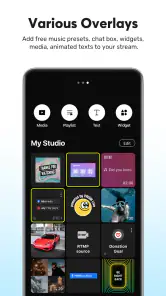
- Customizable overlays and widgets
Cons
- Requires stable internet for smooth streaming
- Limited features in the free version
- Occasional app crashes during streaming
- High battery usage on mobile devices
- Complex setup for beginners
- Category
- Video Players & Editors
- Version
- 5.0.3













