ZoomOn Home Security Camera
- 296.00
- 4.2
- Installs
- 1.00M
- Price
- Free

Screenshots
Analysis by Reviewed
I’d think of ZoomOn Home Security Camera as a way to make a spare phone useful for occasional remote check-ins, rather than as a complete replacement for a dedicated security system. Its appeal is easy to understand: one phone stays at home as the camera, while another lets me look in. The important catch is that the experience depends on both devices being ready and the internet connection holding up when I need it.
Choose the right job for a phone camera
Before setting anything up, I’d decide what I actually want to see. A spare phone aimed at a pet’s usual resting place solves a different problem from one pointed toward an entryway, and trying to cover every corner can make the view less useful. This is one of the practical trade-offs of reusing a phone: it is easy to move, but the camera’s position and angle are entirely your responsibility.
For a renter or someone unsure whether remote room checks will be useful, that low-commitment approach can be a sensible starting point. It also suits a household that already has an old phone and wants to check on a specific indoor area now and then. I would not choose it as the only answer for a property where uninterrupted coverage is essential; a dedicated camera is designed for that role and usually asks less of you in terms of managing a second phone.
Make the first test resemble a real day
A setup can look fine while both phones are beside you and still disappoint once one is left in another room. I’d test the whole routine before relying on it: put the camera phone where it will stay, leave the viewing phone in the place I’m likely to use it, and check both the image and audio. Then I’d repeat that check after the camera phone has been left alone for a while. This simple rehearsal is more useful than assuming that a successful first connection guarantees every later check-in.
It also helps to decide who will use the viewing phone. If another household member may need to check in, agree on the setup and make sure they know which phone is acting as the camera. A shared account may be convenient, but it makes account access part of the household plan; I’d avoid passing credentials around casually and would keep the camera phone somewhere it will not be picked up or used by mistake.
Where an occasional check-in fits
Picture a typical afternoon: I’m out for groceries, and my pet has been restless at home. I can use a quick remote look to see whether the animal has settled, rather than guessing from a noise or worrying through the whole trip. If motion alerts draw my attention, I can open the view and judge the situation for myself. That is useful reassurance, but it is still a check-in, not a guarantee that every movement will be captured or that I’ll always be able to connect immediately.
The same setup can help when I want to glance at a room while visiting a nearby shop or waiting for someone to arrive. But the more important the event, the less I’d want to rely on a spare phone as the sole safeguard. A home camera or alarm made for continuous monitoring is a better choice when missed activity would have serious consequences.
More From Our News Desk

Weather by Xiaomi Review: Clear at a Glance, Less Clear Up Close

X Under Pressure: Can It Recover When Posting Goes Wrong?

Clash of Clans Is Won Between the Battles

Android Auto Makes the Case for Quieter Car Software

MobiOffice: Transforming Mobile Productivity with Seamless Integration

EA SPORTS FC™ Mobile Soccer: Redefining Mobile Sports Gaming
Turning a spare phone into a home camera
Imagine turning your old smartphone into a security camera. That's exactly what the ZoomOn Home Security Camera app allows you to do. It's like giving a second life to that phone you tossed in the drawer ages ago. All you need is a stable internet connection, and you're good to go. The app lets you monitor your home's security right from your current device, whether it's Android or iOS.
Getting the two phones working together
If you're anything like me, the thought of setting up home security might sound daunting. But trust me, the app makes it super simple. Once you download the app, it guides you through a straightforward setup process. You just have to pair your devices by logging into the same account on both. Plus, you can position your old phone wherever you need surveillance, and voila, instant security camera!
That shared-account setup is convenient, but it also makes planning the camera phone worthwhile. I’d choose a stable shelf or counter near a power source, angle the lens toward the area I actually need to see, and check the view from the other phone before leaving. A wide view of a whole room may sound ideal, but pointing the camera at a doorway, pet area, or other specific spot can make alerts and check-ins easier to interpret.
What remote check-ins are good for
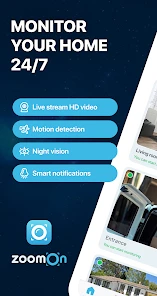
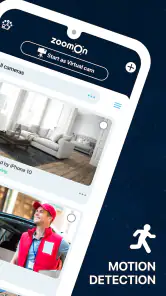
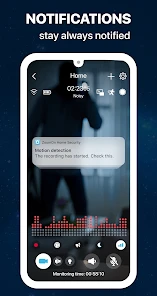
The app comes packed with features that really stand out. For starters, it offers motion detection alerts. So, if anything seems fishy, you'll know right away. The app also supports two-way audio, letting you communicate with anyone at home while you're miles away. I found this particularly handy for checking in on my pets or even just to say a quick "hello" to the family.
A realistic use is a short errand: I could leave a spare phone aimed at the living room, then check in while I’m out to see whether a pet has settled down. Motion alerts may help draw attention to activity, while two-way audio is useful when a brief spoken reminder is more practical than returning home. I’d treat either as a prompt to look and listen, not as proof that every event will be noticed or that a phone camera replaces a dedicated alarm.
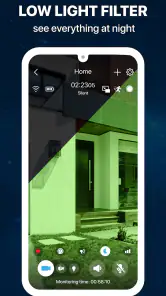
Another feature worth mentioning is the night vision capability. It's pretty impressive how the app enhances the camera's ability to capture clear images even in low-light conditions. So, you can rest easy knowing that your home is being watched over, day or night.
Connectivity shapes the experience
Because the setup relies on an internet connection, the best time to discover a weak signal is before you leave. I’d test the camera from the place I expect to view it, then repeat the check with the camera phone in its intended position. A connection that works well beside the router may not behave the same way from a back room. If the picture or sound lags, moving the camera phone closer to the router can be a more useful first step than repeatedly reopening the app.
If a check-in fails, I’d work through the basics in order: confirm both phones are connected, make sure the camera phone has not been moved or closed out of the app, and try again once the network is steady. That routine matters because a phone repurposed as a camera is still a phone; its battery, placement, and everyday use can interrupt the setup. For dependable coverage while away for long stretches, a dedicated camera may be the better fit.
Making sensible use of an always-on camera
A spare phone can be an affordable way to check a room, but it is still a device pointed into your home. I’d choose the camera’s field of view carefully, avoid aiming it at places where household members expect privacy, and tell anyone who shares the space that it is in use. These small choices make monitoring more considerate and help keep the camera focused on a practical purpose.
It also helps to decide when you genuinely need remote viewing. For a quick pet check or an occasional look at an entryway, the phone-based approach can make sense. If you need a camera to run continuously with less attention to the phone’s position, power, and connection, a purpose-built home camera is likely more convenient. If you only want to see what is happening inside while you are already home, checking directly may be simpler than maintaining a remote setup.
My Personal Take
Honestly, I was a bit skeptical at first. Could an app really provide the security I was looking for? But after using ZoomOn Home Security Camera, I must say I'm quite impressed. It's not only cost-effective but also offers flexibility that traditional security systems don't. Plus, the fact that I can use an old device for this purpose is a win-win.
Of course, like any app, it has its quirks. Occasionally, the connection might lag, especially if your internet is acting up. But overall, the benefits far outweigh these minor inconveniences. It's a solid choice for anyone looking to enhance their home's security without breaking the bank.
That trade-off is central to my recommendation: reuse a phone you already own and you avoid buying a camera just to try remote monitoring, but you take on the job of keeping that phone positioned and connected. Compared with a conventional home camera, this approach is appealing when flexibility and using spare hardware matter more than a purpose-built installation. I’d skip it if a lost connection would leave you relying on a level of coverage you cannot afford to miss.
Who I’d recommend it to
Master App Solutions makes this House & Home app for a broad audience; it is rated for Everyone. It is free to download, with in-app purchases ranging from around fifty cents to about seventy-five dollars per item, so I’d check the purchase details before paying for anything. The app has an average rating of 4.2 from around eleven thousand ratings, and it has been installed over a million times. It first appeared in 2016, and version 5.29 is listed for devices running Android 8.0 or later.
Those details make it easy to consider, but they don’t change the practical decision: you need a spare phone, a useful place to put it, and a network that supports remote viewing. I think it suits renters, pet owners, or anyone who wants to try a basic room check without immediately buying hardware. Someone seeking a dedicated, low-maintenance security installation should compare it with a standalone camera instead.
What I’d settle before relying on it
One question I’d answer early is whether the camera phone can stay put and connected for the length of time I need. If it is also the phone someone uses every day, the arrangement is likely to be inconvenient: moving it, taking it out, or using it for something else can defeat the point of leaving it as a camera. A genuinely spare device is a better match, and a place near power makes the routine easier to maintain.
I’d also think about what I expect from an alert. Motion detection can be helpful because it gives me a reason to check the view, but I wouldn’t treat an alert as a complete account of what happened in a room. Lighting, camera angle, connection quality, and the limits of a phone-based setup all shape what a remote check can tell me. If I need a clear record or dependable monitoring rather than a quick look, I’d compare dedicated options carefully before choosing.
For anyone weighing the free download against possible purchases, I’d start by trying the basic setup and deciding what it does for my actual routine before spending money. The range of in-app purchase prices is wide, so I’d read each purchase screen closely and make sure it relates to something I want. There’s no reason to pay simply because an option appears; the useful question is whether the feature solves a problem I have.
Connectivity is ultimately the deciding factor. When both phones have a steady internet connection and the camera phone is positioned thoughtfully, the app offers a convenient way to check a room from elsewhere. When the network is unreliable, the same convenience can quickly turn into uncertainty. I’d recommend it for low-stakes, occasional checks with spare hardware, while choosing a dedicated camera for coverage that needs to be more hands-off and dependable.
In conclusion, if you're in the market for a security solution that's both innovative and practical, give the ZoomOn Home Security Camera app a try. It's a nifty little tool that brings peace of mind right to your fingertips.
ZoomOn Home Security Camera Frequently Asked Questions
Is ZoomOn Home Security Camera free to download, and are there optional purchases?
ZoomOn Home Security Camera is free to download, so you can install it without paying an upfront price. The app also includes in-app purchases, with options ranging from $0.49 to $74.99 per item. Check the purchase details shown in the app before confirming anything, and consider whether any paid option suits your needs.
Which devices and operating systems can I use with ZoomOn Home Security Camera?
ZoomOn Home Security Camera is available for Android and iOS devices, and its minimum Android requirement is version 8.0. Its store summary describes turning a phone into a Wi-Fi camera, making it useful for people who want to repurpose a phone for monitoring. Check that your device meets the platform requirements before downloading.
What features does ZoomOn Home Security Camera offer?
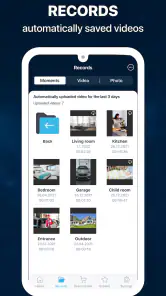
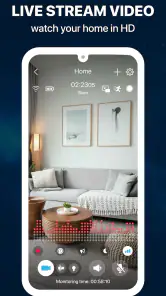
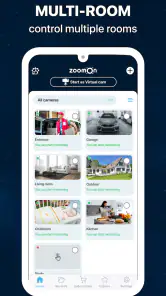
ZoomOn Home Security Camera provides a range of features designed to enhance home security. These include live HD video streaming, motion detection alerts, two-way audio communication, and night vision capabilities. The app also allows users to store video recordings in the cloud for easy access and review. Additionally, it's compatible with both Android and iOS devices, ensuring flexibility and convenience for various users.
How easy is it to set up ZoomOn Home Security Camera?
The setup process for ZoomOn Home Security Camera is straightforward and user-friendly. After downloading the app, users can follow the step-by-step guide to connect their camera to the app. The process typically involves creating an account, scanning a QR code, and configuring Wi-Fi settings. With intuitive instructions, most users can complete the setup within minutes, making it accessible even for those who are not tech-savvy.
Is ZoomOn Home Security Camera secure to use?
Yes, ZoomOn Home Security Camera prioritizes user privacy and security. The app employs end-to-end encryption to protect video streams and stored data from unauthorized access. Additionally, users can set up account authentication measures such as two-factor authentication to further secure their accounts. Regular updates also ensure the app adheres to the latest security standards, providing peace of mind for users.
Pros
- Easy setup and installation process.
- High-quality video streaming.
- Supports multiple cameras.
- Remote access via smartphone.
- Motion detection alerts.
Cons
- Requires strong internet connection.
- Limited free storage options.
- Can drain phone battery quickly.
- Paid subscription for extra features.
- Initial setup can be confusing for beginners.
- Category
- House & Home
- Version
- 5.29










