Annie Baby Monitor: Nanny Cam
- 52.00
- 4.3
- Installs
- 500.00K
- Price
- Free

Screenshots
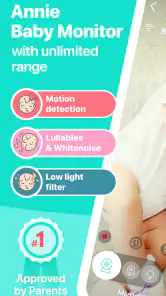

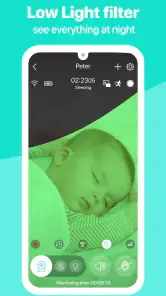


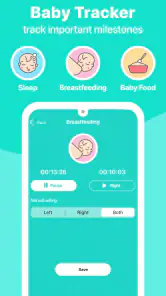
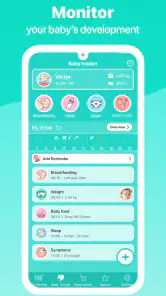
Analysis by Reviewed
During the first week with Annie Baby Monitor: Nanny Cam, the appeal is easy to understand: two phones can take on the familiar roles of nursery unit and parent monitor, so there’s no need to buy a dedicated monitor just to try the idea. I like that this can give an old smartphone a useful second life. The trade-off is immediate, though: both devices need to be available, charged and positioned sensibly whenever you want to use them.
A good fit for a flexible routine
I’d consider this app most useful for parents who already have a spare phone and want to check on a sleeping baby while moving around the home. It may also suit a household that occasionally needs a monitor in a different room or while staying with family. If you need a screen that is always ready, works independently of two phones, or is dedicated to nursery monitoring, a conventional baby monitor may be the less fiddly choice.
In an ordinary evening, I can picture setting one phone near the cot, keeping the other with me while I prepare dinner, then checking the live view or listening for a sound. That convenience depends on the connection holding up and the monitoring phone being within reach. I would treat alerts as a prompt to check, not as a substitute for listening and looking in on the baby myself.
Where the everyday trade-offs show up
Live video, night vision, two-way audio and sound or movement alerts give the app more than a simple audio-only setup. The extra options are useful when I want to see whether a noise needs attention or speak to the baby without walking into the room. But video can ask more of the phones and connection than audio alone, so I’d test the setup before relying on it for a full night. If a dropped connection would leave you uneasy, a dedicated monitor or a simpler audio setup may better match your needs.
One practical habit is to choose the nursery phone’s position before bedtime, then check the view and sound from the other device while the baby is still awake. I’d also plug in both phones and keep their screens and cables safely away from the cot. That small routine helps catch a weak signal or low battery early, rather than discovering it after settling down for the evening.
When novelty fades
The question after the first few uses is whether the arrangement stays easy enough to repeat. Reusing an old phone is a clear advantage, but charging, placement and reconnecting can become chores if the devices are also needed for daily calls or work. I would make the nursery device a dedicated monitor if possible; otherwise, remember that using it for another task can interrupt the routine. Families with more than one child may appreciate the multiple-child monitoring mentioned in the app’s feature set, though managing several rooms still calls for deliberate device placement and a dependable connection.
For context, Annie is a free parenting app from Master App Solutions, with optional in-app purchases ranging from about fifty cents to around eighty-four dollars per item. It is rated for Everyone, has an average rating of 4.3 from around 1,300 ratings, and has been installed over 500,000 times. Those figures suggest it has found an audience, but they don’t tell me whether its phone-based setup will suit your home; that comes down to your devices, signal and tolerance for overnight charging.
More From Our News Desk

Weather by Xiaomi Review: Clear at a Glance, Less Clear Up Close

X Under Pressure: Can It Recover When Posting Goes Wrong?

Clash of Clans Is Won Between the Battles

Android Auto Makes the Case for Quieter Car Software

MobiOffice: Transforming Mobile Productivity with Seamless Integration

EA SPORTS FC™ Mobile Soccer: Redefining Mobile Sports Gaming
Setting It Up
The first thing I noticed about the Annie Baby Monitor was how ridiculously easy it was to set up. Just download the app on two devices—one for the baby’s room and one for you. I used my old smartphone and my day-to-day device. In no time, they were connected, and I was ready to roll. It's like the app knew I was juggling a million things and thought, "Hey, let’s not make this complicated." Genius, right?
Features You’ll Love
Once you're in, the app offers a bunch of features that are super handy. There’s live video streaming, which means you can peek at your munchkin without disturbing their sleep. The night vision was surprisingly clear, letting me see everything even in low light. The sound quality is top-notch too, with a two-way audio feature that lets you soothe your little one without being physically present.
What’s more, the app can monitor multiple children at once. I mean, talk about a superhero app for parents of twins or more! It even sends alerts if it detects noise or movement. So, if your baby suddenly starts crying or wriggling around, you’ll know right away. It’s like having a sixth sense, but, you know, in app form.
Room for Improvement
No app is perfect, and Annie is no exception. While it works smoothly most of the time, there were a couple of instances where the connection dropped. It wasn’t a deal breaker, but it did have me checking my Wi-Fi signal like a hawk. Also, the app does drain battery life quite a bit, so make sure your devices are charged or plugged in, especially if you’re using them overnight.
Why It’s Worth It
Despite these minor hiccups, Annie Baby Monitor does exactly what it promises. It offers a sense of security and convenience that’s invaluable for new parents. Plus, the subscription plans are reasonable, and honestly, can you put a price on peace of mind?
In conclusion, if you’re in the market for a reliable baby monitoring app, give Annie Baby Monitor: Nanny Cam a shot. It’s like having an extra pair of eyes—and ears—watching over your little one. And in the unpredictable world of parenting, that’s worth its weight in gold.
Keeping it useful after the first week
For lasting value, I’d judge the app less by its first successful connection than by whether the routine stays dependable over several weeks. Keep the nursery phone in one consistent spot, check the picture and sound before leaving the room, and plug it in as part of the bedtime routine. Those habits make the setup easier to repeat and help avoid mistaking a quiet or disconnected phone for a sleeping baby.
It’s also worth deciding in advance what you want alerts to do for you. If every small movement sends you reaching for the screen, the extra notifications can become tiring rather than reassuring. I’d use them as a cue to check in, while relying on the live feed and my own judgement to decide whether anything needs attention. Parents who prefer fewer alerts, a dedicated screen or less dependence on home Wi-Fi may be happier with a simpler or purpose-built alternative.
What to check before relying on it
Before making this your regular overnight arrangement, try it during a nap when you can stay nearby. Check whether the view covers the part of the room you need, whether audio is clear from where you’ll be, and whether both phones remain connected while you move around the home. This is a useful test because the app’s convenience depends on the whole setup, not just the app opening successfully.
For families weighing the cost, it is free to download, while optional purchases are available; I’d look at the choices in the app and decide whether any paid option adds something your routine actually needs. The current version is 5.29 and it requires Android 8.0 or later, which matters if your spare phone is older. The best candidate is a device you can leave in the nursery without disrupting its usual role.
My long-term take
Annie Baby Monitor is most convincing when it turns an unused phone into a practical helper and the household can maintain a simple charging and placement routine. Its mix of video, audio and alerts gives me more context than an audio-only monitor, while avoiding the cost and extra hardware of a dedicated unit if I already own a spare device. The price of that flexibility is dependence on phones, power and a stable connection.
I’d recommend giving it a careful trial if you want a flexible, low-cost way to check on a baby and are comfortable keeping two devices ready. I’d skip it if a dropped connection would make you anxious, you have no spare phone, or you want a monitor that works as a separate, always-available piece of equipment. For me, it earns a lasting place only when the routine feels dependable rather than novel; the app can help, but good placement, charging and a backup plan are what make it genuinely useful.
Making two phones work as a household setup
The easiest way to keep this practical is to agree which device has which job before the evening gets busy. If the nursery phone is also someone’s everyday phone, a call or a decision to take it elsewhere can leave you without the view you expected. I’d choose a spare device that can stay put, label or otherwise distinguish it from the parent phone, and make the charging cable part of the room’s normal setup rather than something to hunt for at bedtime.
With more than one child, the multiple-child option sounds helpful, but I would still think through the physical layout first. A phone positioned for one cot may not give a useful view of another, and each room adds another device and charging point to remember. For siblings in separate rooms, test each view individually and decide which phone you’ll carry. If that becomes a tangle, a purpose-built system designed around several cameras may be easier to manage.
Choosing the right kind of reassurance
Compared with a basic audio monitor, Annie offers a picture as well as sound, which can help me distinguish an ordinary noise from a reason to go and check. Compared with a dedicated video monitor, its main appeal is using phones you already own instead of adding separate equipment. Neither comparison makes it universally better: audio-only is simpler if sound is all you need, while dedicated hardware is a stronger fit if you value a ready-to-use monitor that doesn’t depend on two phones being available.
I’d also be careful not to treat a phone screen as continuous supervision. The live feed and alerts can make checking easier, but they don’t replace ordinary safe-sleep practices or a parent’s direct attention. If you find yourself staring at the display instead of resting, or interpreting every alert as urgent, the extra information may be increasing stress rather than easing it. In that case, a simpler monitoring routine could be a better choice.
A sensible trial before making it permanent
A useful trial is not just opening the app and seeing an image once. I’d test it at the time and from the places I actually expect to use it: walk to the kitchen, sit in another room, and check whether sound remains easy to notice without keeping the screen in my hand. Then I’d repeat the test on another evening. That reveals whether the setup fits the household’s habits, rather than relying on a promising first connection.
For a short stay away from home, a spare phone can make the arrangement more flexible than packing a separate monitor, provided both devices can be set up and charged where you’re staying. I’d test the connection before settling the baby and keep the parent phone nearby. If the available network or room layout makes the picture unreliable, I would not force the app into the job; a familiar, dependable alternative is more useful than a feature-rich setup that leaves me uncertain.
Who should keep it in the rotation
This is a strong candidate for parents who like seeing what is happening, already have a spare phone, and don’t mind a small nightly checklist. It can also suit occasional babysitting or a grandparent’s home when the family has compatible devices and wants a familiar way to check in. The value comes from convenience and reuse, not from removing every step: someone still has to set up the devices, keep them powered and respond thoughtfully to what they show.
I would pass if buying or borrowing a second phone is necessary, if overnight battery management is already a burden, or if a connection interruption would make me unable to relax. The same goes for anyone who wants dedicated hardware with a separate screen and a routine that remains independent of personal phones. For those households, the more expensive-looking alternative may be the less demanding one over time.
Does it earn a lasting place?
Its lasting value depends on whether the phone arrangement becomes nearly automatic. A fixed nursery position, a repeatable charging habit and a quick pre-bedtime connection check are small steps, but they determine whether the app is a dependable helper or another task on a tired parent’s list. I’d revisit the choice if the nursery phone keeps being borrowed, alerts become distracting, or the connection needs frequent attention; convenience should be measured by how the setup feels after the novelty has passed.
My overall view is that Annie is worth trying for a household with two suitable devices and a real preference for video, audio and alerts in one phone-based arrangement. It is less compelling when the family needs a dedicated monitor or wants to avoid maintenance. I’d start with a nearby nap, keep a backup way to check on the baby, and let repeated, uneventful use—not the first successful setup—decide whether it deserves a permanent place in the routine.
Annie Baby Monitor: Nanny Cam Frequently Asked Questions
Is Annie Baby Monitor: Nanny Cam free to download, and are there in-app purchases?
Annie Baby Monitor: Nanny Cam is free to download, so you can try its baby-monitoring features without paying upfront. The app also offers in-app purchases, with individual items ranging from $0.49 to $83.99. Check the purchase details in the app before buying, especially if you are deciding which features or options fit your family’s needs.
What devices and operating systems does Annie Baby Monitor: Nanny Cam support?
Annie Baby Monitor: Nanny Cam works on Android and iOS, making it useful for families who use devices from both platforms. The minimum supported operating system is 8.0. Before downloading, check that your device meets this requirement and that you have another compatible device available if you plan to use one as the baby unit and another as the parent unit.
What features does Annie Baby Monitor: Nanny Cam offer?
Annie Baby Monitor: Nanny Cam is a versatile app that transforms your devices into a reliable baby monitor. It offers live audio and video streaming, motion and noise alerts, and the ability to connect multiple devices. Additionally, it supports a night mode for low-light conditions and has a lullaby feature to soothe your baby. The app ensures a secure connection and provides a user-friendly interface for ease of use.
How does the app ensure the security and privacy of my data?
Annie Baby Monitor: Nanny Cam prioritizes the security and privacy of your data by employing end-to-end encryption for all communications. This means that any audio or video streamed through the app is securely encrypted, preventing unauthorized access. The app does not store any recordings on a server, ensuring that only you have access to your data. Users can rest assured that their privacy is well-protected.
Is Annie Baby Monitor: Nanny Cam compatible with both Android and iOS devices?
Yes, Annie Baby Monitor: Nanny Cam is fully compatible with both Android and iOS devices. This cross-platform compatibility allows users to connect different types of devices seamlessly. Whether you have an Android phone and an iPad, or any other combination, the app can easily connect them, making it convenient for families with multiple devices.
Pros
- Reliable connection with minimal interruptions.
- User-friendly interface for easy navigation.
- High-quality video and audio streaming.
- Secure
- encrypted data transmission.
- Works well on both Wi-Fi and mobile data.
Cons
- Requires constant internet connection.
- Initial setup can be confusing for some.
- Consistent battery drain on mobile devices.
- Limited free trial period for new users.
- In-app purchases can be costly over time.
- Category
- Parenting
- Version
- 5.29












