Zipper Lock Screen Customizer
- 18.00
- 4.6
- Installs
- 1.00M
- Price
- Free

Screenshots
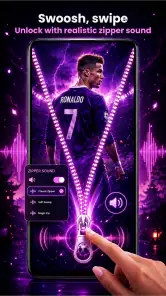
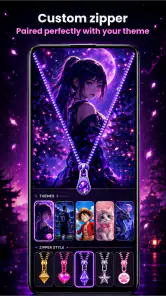
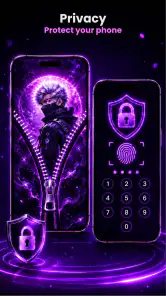
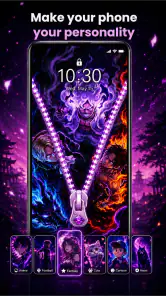
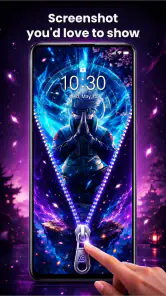
Analysis by Reviewed
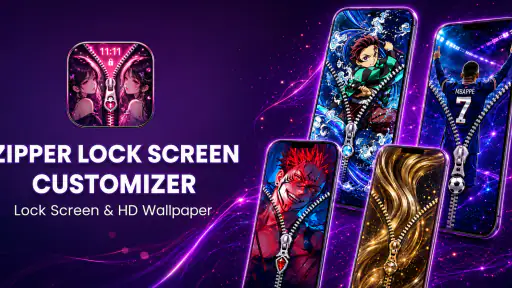
On a shared household phone, the lock screen is one of the few parts everyone sees, so a personal touch can feel fun without changing how the device works. Zipper Lock Screen Customizer is an Android art-and-design app built around that idea: it lets you decorate the lock screen with zipper-themed designs and wallpaper choices. I’d consider it for someone who enjoys customizing a phone’s appearance, but I’d be more cautious about installing it on a device that several people rely on for quick, predictable access.
A lock screen everyone notices
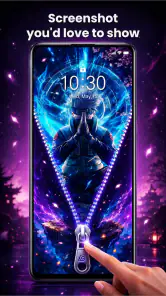
The app’s appeal is easy to understand in a family setting. One person can choose a look that feels playful, while the rest of the household still encounters it whenever they wake the phone. The zipper effect is more distinctive than simply swapping in another landscape or portrait, and that makes the customization feel like a small personal statement rather than a background change.
That visual focus is also the main trade-off. This is not a general phone organizer or a shared-family tool; it is an appearance app. I would not install it expecting shared profiles, household scheduling, or a way to coordinate different people’s access. Its useful role is narrower: making the lock screen look different.
For a device used by children and adults alike, a single design can be a lighthearted compromise. Pick something readable and unobtrusive rather than a busy image that makes notifications hard to scan. A decorative lock screen should not make the phone’s everyday purpose—checking the time or noticing an alert—feel like extra work.
Choose the look before you make it the household default
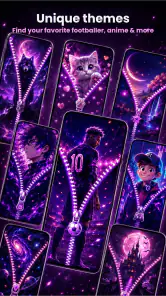
The app offers more than a thousand HD wallpaper styles alongside custom zipper designs. That range gives you room to try different moods, but a large collection can also turn a quick setup into a browsing session. I’d narrow the choice by deciding first whether the phone should look calm, colorful, or playful, then compare a few options that suit that goal.
On a shared device, it helps to treat the first selection as a trial rather than a permanent household decision. Let the main users see the result on the actual lock screen, then check whether the zipper treatment and image remain clear in ordinary use. What looks appealing while choosing a design may feel too prominent when the phone is picked up repeatedly during a busy day.
One practical tip is to consider the image and the zipper as a pair. A detailed wallpaper can compete with a strong zipper style, while a simpler background may let the custom detail stand out without clutter. This is a useful way to make the choice feel deliberate instead of selecting the most eye-catching options independently.
Keep the phone’s access routine in mind
A visual lock-screen change should fit around the way people already use the phone. If someone in the household needs to glance quickly at notifications or pass the device to another person, a clear, restrained design is usually the safer choice. I would avoid turning the lock screen into a visual puzzle simply for novelty; the best customization is still easy to live with after the first day.
It is also worth setting expectations before changing a phone used by more than one person. The app is focused on appearance, so I would not assume that installing it creates separate looks for separate users or changes who can unlock the device. Keep device access and account decisions within the phone’s existing settings, and use this app only for the decorative layer.
That distinction matters especially on a shared phone. A custom zipper may make the screen feel more personal, but it does not replace a passcode, user account, or a conversation about who is allowed to use the device. For household coordination, those boundaries belong to the device and the people using it, not to a wallpaper choice.
Try it as a small change, not a new routine
A realistic use case is a family changing the look of a phone before a trip or a school break, when several people will see and handle the same device. You could choose a cheerful design together, check that the screen remains legible, and leave the rest of the phone’s settings alone. The app works best in that kind of limited role: a visible bit of customization, not a system for managing shared use.
If the phone is mainly one person’s device, the decision is simpler. Someone who likes changing wallpapers and wants a more distinctive lock-screen look may enjoy exploring the styles. Someone who prefers a clean, familiar screen, or who gets frustrated by decorative elements, may find the zipper treatment unnecessary and prefer the phone’s standard wallpaper options.
Compared with ordinary wallpaper apps, the custom zipper is the defining difference here. A typical wallpaper picker is the more straightforward choice if all you want is a background image. This app makes more sense when you specifically want the zipper-themed treatment as part of the look; if that detail does not appeal to you, the larger wallpaper selection alone may not justify choosing it over simpler alternatives.
What to expect from the app and its costs
Zipper Lock Screen Customizer is made by Midas Studio App and is listed as a free Android app for everyone. It has a 4.6 average from around 6,500 ratings, with over a million installs. Those figures suggest that the visual idea has found an audience, though they do not tell me whether every design will suit a particular household or taste.
The current version is 1.1.8, and it requires Android 8.0 or later. That makes checking the phone’s Android version a sensible first step, especially if the device being considered is an older spare phone. The app also offers in-app purchases, with individual items priced from $1.99 to $14.99, so “free” describes the initial download rather than every possible purchase.
I’d browse carefully before spending anything. First decide whether the free experience already gives you a look you are happy to keep; only consider an optional purchase if you have a specific reason to do so. On a household device, it is particularly useful to agree who can approve purchases, rather than letting a decorative app become an unexpected source of spending.
Age, trust, and a sensible household choice
The app’s Everyone age classification makes it suitable for a broad audience, but that does not mean every household should treat installation as automatic. A parent may still want to choose the design with a child and keep any purchase decisions under adult control. The age label is useful context, not a substitute for ordinary supervision of a shared phone.
For trust and account boundaries, I would keep the review practical: this app’s stated purpose is visual customization, so judge it on whether the screen looks good and remains convenient. Do not use a wallpaper app as a way to separate personal accounts or control another person’s access. If those are your priorities, the phone’s built-in account and security settings are the more appropriate tools.
There is another small household consideration: preferences change. A design one person loves may feel too loud to someone else, and a lock screen is encountered often enough for that disagreement to become noticeable. Agreeing on one simple option—or deciding that the device should stay with its standard appearance—is more effective than treating the app as a coordination solution it was not designed to be.
My household verdict
I’d recommend this app to someone who wants a playful, zipper-centered lock-screen makeover and is happy to spend a little time comparing designs. Its strongest point is the specific visual concept paired with a broad set of wallpaper styles. Its limitation is just as clear: the appeal depends on liking that treatment, and it does not address the practical demands of a shared device.
For a household phone, try a restrained design first and make sure the screen stays easy for everyone to read. Keep security, accounts, and purchase approval separate from the decoration, and skip the app if the household values a plain, predictable lock screen more than personalization. Used with those expectations, it can be a pleasant cosmetic change; it is not a substitute for the settings or agreements that make shared-device use work.
Zipper Lock Screen Customizer Frequently Asked Questions
What does Zipper Lock Screen Customizer do?
Zipper Lock Screen Customizer lets you personalize the appearance of your phone’s lock screen with zipper-themed designs. Depending on the version, you may be able to choose backgrounds, zipper styles, colors, and related visual details, then use a zipper-pull animation to reveal the home screen. It is primarily a cosmetic customization app; it does not add meaningful security by itself.
Does Zipper Lock Screen Customizer securely protect my phone?
Do not assume that the zipper effect is a secure lock. Some apps in this category provide only a visual unlock animation, while others may offer an additional PIN or pattern option. Check the app’s current description and settings, and keep Android or iOS device-level authentication enabled for real protection. A decorative screen should not replace a strong passcode, fingerprint, or Face ID.
Is Zipper Lock Screen Customizer free, and does it include ads or in-app purchases?
Availability, pricing, advertisements, and optional purchases can vary by platform, region, and app version. Review the listing in Google Play or the App Store before installing, and check whether any advertised themes or customization options require payment. Also look at recent user reviews for reports about intrusive ads, unexpected charges, or features that differ from the screenshots.
How do I set up and customize the zipper lock screen?
After installing, open the app and explore its available themes and lock-screen settings. Choose a design, adjust any offered colors or backgrounds, and follow the on-screen instructions to preview or enable the effect. Menu names and setup steps may differ between versions. If the app requests permission to display over other apps or change system settings, review why it needs that access before allowing it.
Will Zipper Lock Screen Customizer work on every Android or iOS device?
Compatibility depends on the app’s current requirements and how your device handles lock-screen customization. Android versions, manufacturer interfaces, and battery-management settings can affect whether an overlay or animation appears reliably. iOS generally restricts third-party apps from replacing the system lock screen, so features may be limited or unavailable there. Check the official store listing for supported devices, operating-system versions, and known limitations before downloading.
Pros
- Lets you personalize the lock screen with zipper styles and backgrounds.
- Provides a distinctive alternative to a standard lock-screen appearance.
- Customization options make it easy to create a look that feels personal.
- The zipper-unlock effect adds a playful touch to unlocking your phone.
- Useful for users who enjoy frequently changing their device’s appearance.
Cons
- The visual effect may feel distracting or gimmicky over time.
- Customization choices may be limited compared with full theme apps.
- Lock-screen changes may not behave consistently across Android devices.
- It may not replace your phone’s built-in security or lock-screen settings.
- Ads or optional purchases may interrupt the customization experience.

- Category
- Art & Design
- Version
- 1.1.8