Launcher OS™
- 6.00K
- 4.4
- Installs
- 50.00M
- Price
- Free
Screenshots
Analysis by Reviewed
I judge a home-screen app not only by how it looks, but by how much control I retain while setting it up. Launcher OS™ is a free Android personalization app from Apps Genz, and its appeal is straightforward: it gives the familiar home screen a different visual style without requiring a new phone. Its 4.4 average from around 1.5 million ratings suggests that many people enjoy the idea, though popularity alone does not tell me whether it suits your habits.
Where trust begins: a launcher is part of daily use
A launcher is not just a decorative layer I open once in a while. It shapes the screen I return to throughout the day, so I pay attention to how setup feels and which choices I am making. That is a more useful way to judge trust than assuming a polished appearance says something about privacy or security. A visual makeover can make a phone feel different, but it does not replace Android’s account, lock-screen, or privacy controls.
If you are considering a switch, I would treat the first launch as a small decision point rather than rushing through every prompt. Read the wording on screen, make only choices you understand, and pause if anything feels unclear. That approach is especially sensible when changing a central part of the phone experience: a launcher can affect how you find and open things even when your underlying apps and accounts remain yours to manage.
What the makeover changes—and what it doesn’t
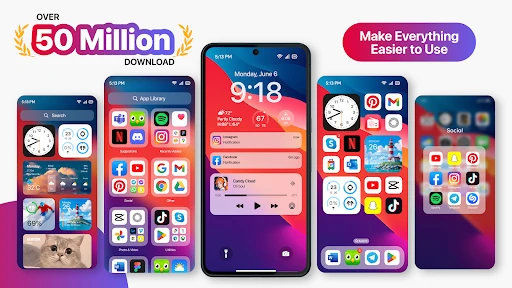
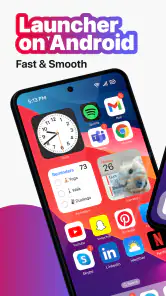
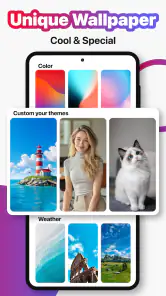
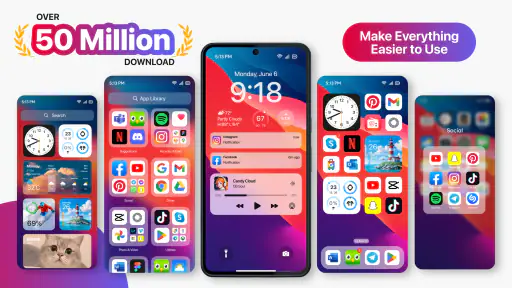
When I first installed Launcher OS™, I was greeted with a sleek and intuitive interface. It's designed to mimic the user experience of newer operating systems, which is pretty cool if you ask me. The app doesn't just change your wallpaper or icons; it revamps your entire home screen layout, making your phone feel brand new.
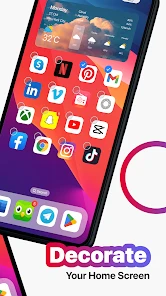
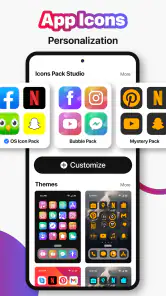
One of the standout features is its customization options. I spent a good chunk of my afternoon tinkering with themes, icon packs, and widgets. The level of personalization is impressive, allowing you to create a setup that's uniquely yours. Plus, it's incredibly easy to navigate, so you won't find yourself stuck in endless menus trying to figure out how to change a setting.
That flexibility is most useful when you want a clear visual reset but don’t want to rebuild your routines from scratch. I’d start with one change at a time: adjust the overall look, then decide whether the icon treatment and widget arrangement actually make everyday tasks easier. Changing everything at once can look exciting, but it also makes it harder to tell which choices improved the experience and which merely added clutter.
Make a useful layout before making a pretty one
One practical trick is to design the first screen around the moments when you reach for your phone most. If you usually open messaging and maps before leaving home, put those familiar destinations where your thumb can find them, then use the visual options to make the arrangement feel cohesive. The point is not to fill every open space; it is to reduce hesitation. A restrained layout is often easier to scan than a screen where every icon and widget competes for attention.
More From Our News Desk

Weather by Xiaomi Review: Clear at a Glance, Less Clear Up Close

X Under Pressure: Can It Recover When Posting Goes Wrong?

Clash of Clans Is Won Between the Battles

Android Auto Makes the Case for Quieter Car Software

MobiOffice: Transforming Mobile Productivity with Seamless Integration

EA SPORTS FC™ Mobile Soccer: Redefining Mobile Sports Gaming
I would also make changes in a reversible order. Keep track of the original arrangement in your mind—or take a private screenshot if that suits you—before moving icons around. Then test one theme or icon treatment for a day before layering on more changes. This small step makes it easier to return to a familiar setup if the new look makes app recognition harder. It is a particularly helpful trade-off for people who like experimenting but rely on muscle memory when they are in a hurry.
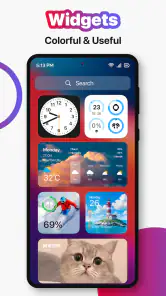
Widgets deserve a similar test. I’d choose one that saves a real step, place it where it is easy to glance at, and check whether it remains useful after the novelty wears off. A widget that looks attractive but forces me to hunt for the app underneath can make a home screen less efficient. When deciding what to keep, I ask whether I actually use the information without opening another screen; if not, the space may be better used for an app I reach for often.
Trust, choices, and practical boundaries
A launcher sits close to the parts of a phone people use constantly, so I recommend taking a moment to review any prompts and choices shown during setup. I would not treat a new visual style as proof that the phone’s underlying system or privacy settings have changed. Keep sensitive account and device decisions in Android’s own settings, and make choices based on the controls presented to you rather than assumptions about what a launcher can access.
For a data-sensitive moment, such as handing your phone to someone to find a contact or open an app, the useful question is whether your home screen is arranged in a way you are comfortable showing. A tidy layout can make that interaction simpler, but it is not a substitute for the phone’s lock screen or account protections. I’d also avoid putting sensitive information in a widget unless I understand what it displays at a glance.
This distinction matters in ordinary situations, not only when sharing a phone. A notification preview or glanceable widget can reveal information to someone standing nearby, depending on what you choose to show and how your device is configured. I would review those choices in the relevant Android settings rather than expecting a launcher’s visual controls to manage them. If you share your device with family, a clean home screen may make navigation easier, but it should not be confused with a separate private space or account.
Performance and everyday use
Now, you might be wondering, "Does all this customization slow down my phone?" Surprisingly, it doesn't. Launcher OS™ is optimized for performance, ensuring your device runs smoothly. I didn't notice any lag or stuttering while switching between apps or navigating the home screen. It feels light, like a feather on your phone's memory.
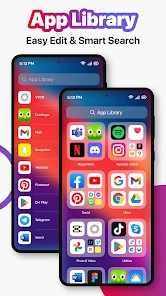
The app also brought some nifty features to my fingertips, like smart widgets that adapt to my usage patterns and a handy search function that made finding apps a breeze. It's clear the developers put a lot of thought into making the user experience as seamless as possible.
In a realistic morning routine, I’d use the search option when I’m rushing and can’t remember where I placed an app, then rely on a carefully chosen widget for information I want visible without opening another screen. The trade-off is that a busy home screen can undermine the calm, simple look a launcher is meant to create. I’d keep only the widgets I genuinely check and remove the rest after a few days if they don’t earn their space.
That search workflow is useful when your app collection has grown beyond what you can comfortably scan by sight. Rather than spending time reshuffling every icon to make a perfect grid, I’d leave less-used apps out of the prime spots and use search when needed. The choice is between a home screen optimized for visual order and one optimized for quick retrieval; this launcher’s search gives you a reason not to treat every app as something that must be visible at once.
For a busy day, I’d keep the first screen deliberately predictable and use a secondary screen for less frequent tools, if that arrangement suits me. This limits the chance that a theme experiment disrupts the apps I need while commuting or handling errands. It also gives me a simple way to judge the change: if I can reach the essentials without thinking, the redesign is helping; if I keep pausing to remember where things moved, the old layout may have served me better.
Choosing between a new launcher and familiar defaults
If you're like me and love experimenting with your phone's interface, Launcher OS™ is definitely worth a try. It's perfect for those who want to refresh their device without spending a dime on a new phone. Plus, with its user-friendly design and smooth performance, it's a no-brainer.
Compared with sticking to the phone’s default launcher, this app is the more interesting choice if you want a different visual language and enjoy tuning the home screen. The default option is usually the safer fit if you value the manufacturer’s familiar layout or prefer not to adjust a working setup. I’d skip a launcher change if consistency matters more to you than appearance, or if you dislike spending time choosing themes and arranging icons.
There is also a middle ground between changing everything and leaving the manufacturer’s screen untouched: try a limited makeover and see whether the visual style alone is enough. If you mainly want a different wallpaper, changing the wallpaper through the phone’s built-in settings may be simpler. If you want the home screen itself to feel more like a new environment, a launcher is the more relevant option. I’d choose based on the scale of change I actually want, not on the assumption that more customization automatically means a better phone.
People who depend on a familiar layout for accessibility or fast, reliable habits should be especially deliberate. A change in icon appearance or placement can make a routine task less obvious, even when the phone still works as expected. I would first test the new arrangement with the apps I use most and keep the setup simple until I am confident I can navigate it comfortably. If that small trial creates more friction than enjoyment, returning to the default launcher is a sensible choice, not a failure to make the app work.
It has reached over 50 million installs, is rated for Everyone, and supports Android 8.0 and later. The current version is 6.2.8. The app is free to install, with optional in-app purchases ranging from $0.99 to $79.99 per item, so I’d check the purchase details before confirming anything. Its release date is May 19, 2020, and the listing shows around 6,000 written reviews alongside the ratings.
The optional purchases are worth keeping in mind if you prefer a completely no-cost setup. I’d explore the free experience first and decide whether any paid choice solves a specific problem I have, rather than buying something simply because it appears during customization. Before confirming a purchase, I’d read its on-screen description and price carefully. That is a practical way to keep a personalization app within the budget I intended, especially when the basic reason for trying it is to change the feel of the home screen.
A cautious recommendation
Overall, Launcher OS™ is a fantastic app for anyone looking to breathe new life into their Android device. Whether you're a tech enthusiast or just someone who loves a bit of change now and then, this app delivers on all fronts. So, go ahead and give it a whirl. Your phone will thank you!
My recommendation is a little more specific: try it if you want a hands-on visual refresh, and take time to decide whether the new layout makes your phone more comfortable to use. Apps Genz’s launcher is not the right choice for someone who wants their phone to remain exactly as it came, but it can be a pleasant alternative for people who like to shape their own home screen. Start modestly, pay attention to setup choices, and keep the arrangement only if it genuinely helps your day.
A good fit when experimentation has a purpose
I would recommend giving it a try if you enjoy changing your phone’s look and are willing to spend a little time testing the result. It is especially appealing when you want your device to feel less familiar without replacing it, or when you would like the home screen to better reflect how you use your apps. The strongest reason to keep it is not simply that it looks different; it is that the search, chosen widgets, and revised layout make common tasks feel more natural to you.
I would be more cautious if you need a phone that behaves exactly as it did yesterday, have no interest in rearranging icons, or would rather avoid evaluating setup prompts and optional purchases. The manufacturer’s default launcher is a better fit for those priorities. And if your main goal is privacy or account protection, I would focus on Android’s built-in controls rather than expect a home-screen makeover to solve that separate need.
My practical test would be to live with a modest setup through a normal day, including the rushed moments when I use the phone without thinking. If I can find essentials quickly, the screen feels easier to read, and I am comfortable with what appears at a glance, I would keep the change. If I spend the day searching for moved icons or clearing visual clutter, I would simplify it or switch back. That gives the app a fair trial without turning personalization into another chore.
In the end, I see this as a personal choice about everyday comfort, not a necessary upgrade for every Android phone. Launcher OS™ offers a recognizable visual direction and room to adjust the screen, while leaving the user responsible for deciding what to show, what to buy, and which device settings to manage elsewhere. With a restrained setup and a careful look at each on-screen choice, it can be an enjoyable refresh; if you value predictability above all, staying with the default remains the more sensible decision.
Launcher OS™ Frequently Asked Questions
Will Launcher OS™ replace my phone’s operating system?
No. Launcher OS™ is an app in the Personalization category that changes the appearance and organization of your phone’s interface; it is not a replacement for Android itself. You can use it to give the home screen a different look while continuing to use your device and its underlying system. The app’s summary describes its aim as helping make your phone simple and pretty.
Can I try Launcher OS™ before deciding whether its look suits me?
Launcher OS™ is free to download, so you can install it and explore its appearance before deciding whether you want to keep using it. A launcher changes the way you interact with parts of your phone’s interface, and personal preferences matter: a layout that feels simple to one person may not suit another. Consider trying its available options at your own pace.
Is Launcher OS™ available for iPhone?
Launcher OS™ is designed for Android devices, with compatibility starting at Android version 8.0. It is not an iPhone launcher, since iOS does not use Android-style launcher apps to replace the home-screen experience. If you are considering a download, check that your phone runs a compatible version of Android and that the app is available for your device.
How widely used is Launcher OS™?
Launcher OS™ has been installed more than 50 million times. That gives a sense of how widely it has reached Android users interested in changing their phone’s appearance, though popularity alone cannot tell you whether you will enjoy its style. If you are unsure, consider your own preferences and explore the app’s options after installing it.
Is Launcher OS™ free to download, and are there any optional purchases?
Launcher OS™ is free to download and belongs to the Personalization category. It also offers in-app purchases, with items ranging from $0.99 to $79.99. You can try the app without paying upfront, then decide whether any paid options are worthwhile for your needs. Check the purchase details shown in the app before confirming a transaction.
Pros
- Customizable home screen layout.
- Efficient app drawer organization.
- Smooth and fast performance.
- Intuitive gesture controls.
- Support for icon packs.
Cons
- Limited widget options.
- Occasional ads in free version.
- Some features require premium.
- Compatibility issues on older devices.
- Limited customer support.
- Category
- Personalization
- Version
- 6.2.8













