Yahoo Weather
- 108.44K
- 4.4
- Installs
- 10.00M
- Price
- Free

Screenshots
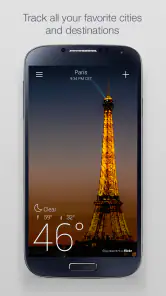
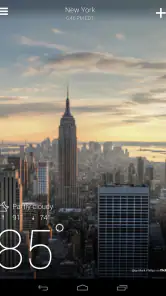
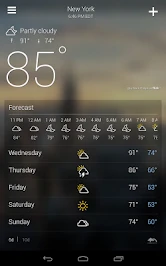
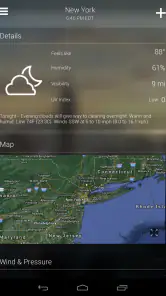
Analysis by Reviewed
I like to judge a weather app by what happens after the first few days: does it become a useful habit, or do I stop opening it once the fresh look wears off? Yahoo Weather makes a strong first impression with polished location photography, but its lasting value depends on whether its forecast layout and practical details fit the way you plan your day.
A memorable first week, with useful details underneath
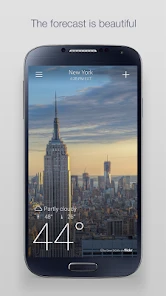
Yahoo Weather is a free weather app from Yahoo, rated for Everyone. Its appeal is easy to understand on first opening: the changing background gives the forecast a sense of place, while the main conditions are presented in a clean, approachable way. The visual treatment feels more personal than a screen of numbers, though I see it as a pleasant frame for the forecast rather than evidence that the forecast itself is more accurate.
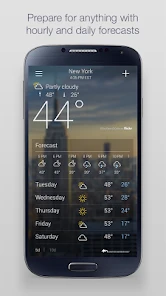
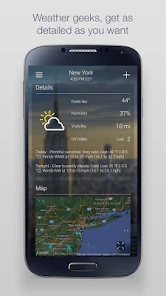
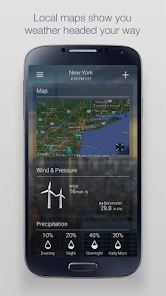
The basic routine is quick: check the current conditions, then scroll for more context instead of jumping between separate screens. Hourly and 10-day forecasts help answer different planning questions, while radar is useful when I want to see how precipitation is moving rather than rely only on a single icon. Wind, pressure and UV information add value when temperature alone would not tell the whole story.
Who will appreciate that first impression
I think the visual approach works especially well for someone who checks the weather casually but still wants more than a temperature and a sun-or-cloud symbol. It gives a quick sense of the day, then lets me dig into practical details if I need them. If I am choosing clothes, deciding whether to carry a light layer, or wondering whether a short errand will be wet, that balance feels approachable rather than technical.
It is less compelling for people who want the smallest possible glance at the forecast. A photo-led screen takes up visual attention that a stripped-down widget or a plain text forecast might use for more numbers. If your habit is to check one temperature and close the app immediately, the photography may feel decorative rather than useful. I would choose a simpler alternative if speed and information density matter more to me than visual character.
Where it earns a place in a daily routine
The app is most useful when I treat it as a planning aid, not a promise about exactly what the weather will do. For a commute, the hourly view can help me decide whether to leave earlier or bring a layer; before a walk, radar offers another check if showers look possible. Sunrise and sunset times are a small but practical bonus for arranging an evening outdoors or knowing how much daylight remains.
For a realistic morning, I might check the forecast before getting dressed, look at the hourly outlook for the trip to work, and glance at radar before deciding whether to cycle. That workflow keeps the app focused: I am checking a few details to make a choice, not browsing weather screens for their own sake. Its 10-day outlook is better for spotting broad patterns than making firm plans far in advance, when conditions can change.
More From Our News Desk

Weather by Xiaomi Review: Clear at a Glance, Less Clear Up Close

X Under Pressure: Can It Recover When Posting Goes Wrong?

Clash of Clans Is Won Between the Battles

Android Auto Makes the Case for Quieter Car Software

MobiOffice: Transforming Mobile Productivity with Seamless Integration

EA SPORTS FC™ Mobile Soccer: Redefining Mobile Sports Gaming
Small habits that make the forecast more useful
One useful habit is to compare the hourly forecast with the actual time I expect to be outside, rather than reading the day’s high as if it described the whole day. A warm afternoon does not tell me whether the school run or commute will feel chilly. I also find it helpful to look at wind when deciding whether a light jacket will be enough; temperature by itself can give an incomplete impression of comfort.
Radar is most useful to me as a second look, not as a guarantee that a particular street will stay dry. I would check it shortly before leaving if rain matters, then allow for the fact that precipitation can change direction or timing. For longer plans, I use the 10-day forecast to notice a likely shift in the general pattern and wait to make detailed choices until the date is closer. That keeps a distant forecast from becoming false certainty.
Trade-offs that become clearer with regular use
The visual style is also the main source of potential fatigue. A location-matched photo can make checking the weather enjoyable, but people who want a compact, information-dense display may prefer a plainer forecast app. The images should not distract from checking the actual conditions, especially when timing matters. I would compare the radar and forecast with a local meteorological service when a serious weather decision calls for extra confidence.
Yahoo Weather has a 4.4 average from around 1.5 million ratings, and it has been installed over 10 million times. That broad audience makes it a familiar choice, but popularity does not settle whether it suits your routine. The app is a good fit if you want a readable forecast with visual character and several useful layers of information. If you mainly need specialist tools, a bare-bones glance, or a source tailored to a particular local authority, another option may serve you better.
How it compares with other weather apps
In everyday use, the main choice is often between an app that makes the forecast quick to scan and one that offers a denser set of charts and controls. Yahoo Weather leans toward the first approach while still providing radar and extra weather details. That middle ground suits me when I want a useful overview but do not want every check to feel like studying a dashboard.
A minimalist alternative may be better for a home screen glance, especially if I only need the current temperature and a simple outlook. A more technical or locally focused service may be preferable for outdoor work, travel in uncertain conditions, or decisions where region-specific alerts matter most. I would not expect one app to be best for every situation: Yahoo Weather is appealing for regular personal planning, while a specialist source can be a sensible companion when the stakes are higher.
Visual Appeal That Captivates
One of the first things you'll notice about Yahoo Weather is its breathtaking design. The app integrates gorgeous Flickr photos that match your location, time of day, and current weather conditions. Imagine waking up to a vibrant sunrise over the cityscape or seeing the fluffy clouds roll by as you check the afternoon forecast. It's like having a little piece of art accompany your weather updates, making the mundane task of checking the weather a visually pleasing experience.
Simplicity Meets Functionality
The design isn't just about looks; it's also incredibly functional. The interface is clean and intuitive, with everything you need right at your fingertips. Swipe through different locations with ease or scroll down to see detailed weather information, including hourly forecasts, 10-day predictions, and interactive radar maps. Everything is laid out in a way that feels natural, so you won't find yourself fumbling around trying to find the information you need.
What's more, Yahoo Weather provides a comprehensive set of data that goes beyond just temperature and precipitation. You get wind speed, atmospheric pressure, and even UV index. It's like having a mini meteorologist in your pocket!
Little Extras That Make a Big Difference
While the core of the app is undeniably its weather updates, there are a few extras that really enhance the experience. For instance, the app sends notifications for severe weather alerts, which is a handy feature if you live in an area prone to sudden weather changes. Plus, you can customize these notifications to suit your needs, ensuring you're always prepared for whatever Mother Nature throws your way.
Another nifty feature is the sunrise and sunset times, complete with a beautiful visual representation. It's perfect for those who love planning their day around these magical moments or simply enjoy knowing when to catch the next sunset.
Alerts and decisions that need extra care
Notifications can make a weather app more useful, but I would treat them as prompts to check conditions rather than as a complete safety plan. A severe-weather alert is most valuable when it is relevant to where I will actually be, so it is worth reviewing the settings and avoiding alerts that do not match my needs. If I am planning a long drive or an outdoor event, I would still check an authoritative local source for current warnings and any instructions that affect safety.
That distinction matters because a general forecast and an official warning serve different purposes. The app can help me notice changing conditions and decide when to look more closely; it should not replace local emergency guidance. For an ordinary walk or commute, a quick check may be enough. For a decision involving exposure, travel disruption, or vulnerable family members, I would use more than one source and reassess closer to the time.
What changes after the novelty fades
Once the initial appeal settles, the best reason to keep the app is the combination of a quick overview and details that are easy to reach. I would save the locations I check regularly and swipe between them rather than repeatedly searching, then use the hourly forecast for near-term decisions and the longer outlook only to notice trends. That small habit makes the screen more useful without turning a routine check into a research session.
Compared with the usual alternatives, Yahoo Weather sits between minimalist apps that prioritize a glanceable temperature and more technical tools built around dense charts or specialist controls. It is the middle-ground choice for someone who wants radar and extra conditions without making every check feel like a weather briefing. The trade-off is that people who rely on highly localized warnings or need detailed decision-support tools may be better served by a regional weather service or a more specialized app.
Maintenance, compatibility and everyday friction
The app’s current version is 1.61.0, and it requires Android 7.0 or later. The practical maintenance question is less about a complicated setup than whether you will keep the places and alert preferences you care about organized. I would start with home and work, then add a destination only when I have a real reason to compare conditions; a crowded list slows down a quick check. Notifications are worth tailoring rather than leaving every alert enabled, so the ones that matter are less likely to blend into ordinary phone noise.
The app has been around since October 5, 2010, and that longevity gives it the feel of an established everyday utility rather than a novelty built around a single visual trick. Still, no forecast screen removes uncertainty. If a trip, outdoor event, or safety decision depends on exact timing, I would use the radar and near-term outlook as guidance and check a trusted local source as well. For casual planning, the more convenient routine is simply to check conditions before leaving and adjust clothing or timing accordingly.
Who should keep it—and who should move on
I can see Yahoo Weather earning lasting space on a phone for someone who likes a visually engaging forecast, checks the weather most days, and uses a mix of hourly details, radar and basic conditions to plan. It is also a reasonable choice for people who compare a few familiar locations, such as home and work or home and a regular weekend destination. In that routine, its quick overview can save time without requiring a lot of upkeep.
I would skip it if I wanted a highly specialized forecasting tool, a strictly minimal screen, or a single authoritative source for local warnings. It is also not a substitute for paying attention to changing conditions when an outdoor plan is important. The best test is simple: after the first week, ask whether the app is helping you make a decision you actually face. If the photos are the only reason you open it, the novelty may fade; if the forecast layers shape your daily choices, it has a more durable role.
Final Thoughts
In a world where weather apps often feel like an afterthought, Yahoo Weather stands out by delivering both form and function. It's more than just a tool—it's an experience. Whether you're a weather aficionado or just someone who wants to know if you need an umbrella today, this app has something for everyone. So, why settle for a dull weather forecast when you can have one that's as beautiful as it is informative? Give Yahoo Weather a try, and you might just find yourself looking forward to checking the weather each day.
Yahoo Weather Frequently Asked Questions
Can I use Yahoo Weather to check the weather in more than one place?
Yahoo Weather lets you add multiple locations, which is useful if you want to keep an eye on conditions in your hometown, a travel destination, or another city. You can switch between the places you have added and check their weather information in the app. This makes it practical for planning ahead without relying on a single location.
Does Yahoo Weather provide maps as well as forecasts?
Yes. Yahoo Weather includes interactive maps, with radar, satellite, and heat map views for exploring weather conditions. These map options complement the app’s hourly, 5-day, and 10-day forecasts, giving you more than a simple temperature display. If you like to view conditions visually as well as read forecast details, the maps are a useful part of the experience.
Can Yahoo Weather show severe-weather alerts?
Yahoo Weather supports notifications, including alerts for severe weather conditions in your area. You can enable or disable certain types of notifications to suit your preferences, so alerts can be part of how you keep up with changing conditions. Notification settings are worth checking after installation to make sure they match the kinds of updates you want to receive.
Does Yahoo Weather include widgets for quick weather checks?
Yes. Yahoo Weather offers widgets that you can add to your device’s home screen to see current weather information without opening the app. This can make routine checks quicker, especially if you prefer to glance at conditions before heading out. Widget availability and setup can depend on your device and operating system, so check the options on your device after installing.
Can I change temperature and wind-speed units in Yahoo Weather?
Yahoo Weather lets you choose the units used for temperature and wind speed. This is helpful if you are more comfortable with a particular measurement system or want weather details presented in familiar terms. The app also allows multiple locations and some notification preferences, though its customization options are limited compared with some other weather apps.
Pros
- Beautiful and intuitive design.
- Accurate and detailed weather forecasts.
- Includes interactive radar maps.
- Displays weather-related news.
- Offers widgets for quick access.
Cons
- Contains ads in free version.
- Limited customization options.
- Requires internet for updates.
- No offline mode available.
- Occasional sync issues.
- Category
- Weather
- Version
- 1.61.0













