Yahoo News: Daily News For You
- 44.57K
- 4.3
- Installs
- 10.00M
- Price
- Free

Screenshots
Analysis by Reviewed
When I decide whether to keep a news app, I look beyond the number of headlines it can put on a screen. I want to know whether it helps me find a story worth my time, whether I can tune down the subjects I do not follow, and whether I can leave without feeling that I have missed something urgent. Yahoo News is a free news and magazines app from Yahoo, built around a broad feed and personal interests. I see its main appeal as convenient discovery: it can bring different subjects together, though I would not treat a recommendation feed as a complete account of what is happening.
Decide what kind of news routine you want
Before installing it, I would ask whether I want a daily reading destination or a tool for checking a few specific sources. Yahoo News makes more sense for the first job. It gives casual readers a place to browse across interests, follow topics, and use alerts as prompts to check developing stories. If I already know which publication I want to read, its own app may be a better fit; if I want to discover what is being covered across subjects, Yahoo’s wider approach is more convenient.
That difference matters because convenience and depth are not the same thing. A personalized feed can help me notice a story I might otherwise miss, but it also makes editorial choices about what appears prominently. I treat it as a starting shelf, not as a neutral map of every important viewpoint. For a consequential issue, I would open more than one account and read beyond the summary or headline.
A good fit for quick, varied reading
The app makes the most sense for someone who likes to scan headlines in spare moments and then choose a story to read in more depth. For example, I might check it over breakfast, follow a topic I care about, and return later to see what has changed. Its personalized feed can make that routine feel more relevant than a single general headline page, though I would still browse beyond the first screen when a story matters: recommendations are a shortcut, not a complete picture of the news.
It is also a practical option if you want news across several interests without building a collection of separate apps. The trade-off is that a broad feed can feel busy, and a story selected for you is not necessarily the only perspective worth reading. When I need to understand a complicated issue, I treat the feed as a starting point and look for more context rather than relying on one item or notification.
Popularity is context, not a promise
Yahoo News has a 4.3 average from around 245,000 ratings and has passed 10 million installs. That level of use makes it a familiar choice, but popularity is not a guarantee that its mix will suit every reader. Its Everyone 10+ content rating is another reason to think about who may use it at home; I would not assume every news item is intended for young children simply because the app is widely used.
For a household, I would treat the age guidance as a prompt to make a decision rather than as a description of every article. News can include serious or upsetting subjects, and what feels suitable depends on the child and the story. If a younger reader shares a device, I would check what appears in the feed with them instead of assuming a general news app will act like a child-focused reading service.
More From Our News Desk

Weather by Xiaomi Review: Clear at a Glance, Less Clear Up Close

X Under Pressure: Can It Recover When Posting Goes Wrong?

Clash of Clans Is Won Between the Battles

Android Auto Makes the Case for Quieter Car Software

MobiOffice: Transforming Mobile Productivity with Seamless Integration

EA SPORTS FC™ Mobile Soccer: Redefining Mobile Sports Gaming
How Yahoo News Fits into Everyday Reading
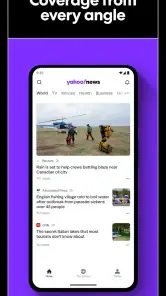
From the moment I opened Yahoo News, I was welcomed by a sleek and easy-to-navigate interface. The layout is intuitive, with categories neatly organized and accessible with just a tap. It's like the app knows exactly what you want to see, saving you from endless scrolling. I found the design pleasing, with just the right amount of visuals to keep things engaging without overwhelming you.
Where a broad feed earns its place
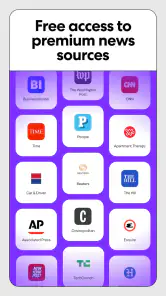
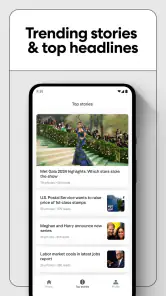
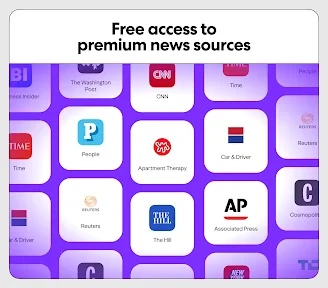
What really sets this app apart is the variety of news sources it pulls from. You get a mix of top headlines, local news, and even personalized content based on your interests. I was particularly impressed by the diverse perspectives it offers, ensuring I'm not stuck in an echo chamber. Plus, the app updates in real-time, so you're always on top of the latest developments. It's like having a personal dashboard for everything happening around the world.
The practical value is strongest when I have a few minutes and no particular destination in mind. On a weekday morning, for instance, I can scan the feed while coffee is brewing, open one story that affects my plans, and leave the rest for later. If a local disruption or a developing public story catches my eye, the app gives me a quick route into coverage without requiring me to remember which site might have reported it. That convenience is useful, but for decisions that depend on exact details, I would still open the full article and check its context.
Personalization works best with a light touch
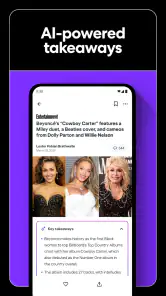
One of my favorite features is the "For You" section, which curates news based on your reading habits. It's like the app is learning and evolving with you. I also appreciated the option to save articles for offline reading – perfect for those moments when you're stuck without Wi-Fi or data. The push notifications are timely but not intrusive, keeping you informed without being annoying.
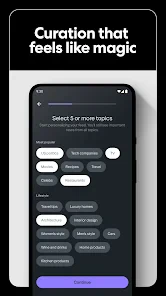
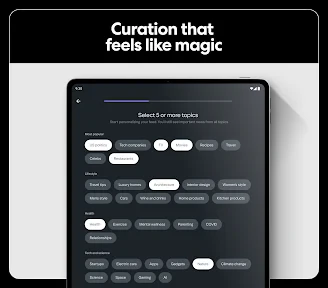
Another cool aspect is the personalization options. You can follow specific topics or even set notifications for particular categories. This level of customization ensures that you're getting news that matters to you. Whether you're into politics, sports, or entertainment, Yahoo News has got you covered. It's like crafting your own news experience, tailored just for you.
My advice is to begin with a short list of interests rather than trying to make the feed cover every part of your life. A narrow starting point makes it easier to notice what the recommendations are doing well and what keeps crowding the page. After a few visits, I would adjust the topics based on the stories I actually open, not just the subjects I think I ought to follow. That small distinction can keep the feed useful instead of turning it into a wall of loosely relevant headlines.
Alerts and saved stories need different jobs
Notifications work best when I reserve them for subjects where timeliness matters to me. If every category is allowed to interrupt, the alert becomes another stream to clear rather than a useful signal. I would let lower-priority interests wait for the next time I open the app. This is especially helpful if I check news during work or family time: I can choose when to browse instead of letting every update set the pace.
Saving an article is a different kind of commitment. I use that option for something I genuinely intend to finish later, such as a longer report I open while waiting for an appointment. On a commute with unreliable connectivity, saving first can make the reading plan more dependable. I would not save every interesting headline, though; a long saved list can become a second inbox and make it harder to find the one piece I wanted. For breaking developments, an alert is a prompt to check in, while a saved article is a way to return to a particular read.
What it does better than familiar alternatives
Compared with reading one newspaper app, Yahoo News feels more like a mixed reading desk: the range can help me move between subjects without changing apps. A single publisher's app may be a better fit if I want one publication's consistent voice or a focused subscription experience. A general web search is useful when I already know what I am looking for, but it is less convenient for casual browsing. I would choose Yahoo News for discovery and variety, not as my only route to a full account of a major story.
There is a useful middle ground between relying on one publication and trying to follow every news source individually. I can use Yahoo News to spot themes and identify stories, then go directly to a publication or reporting source when I want to examine a particular account more carefully. That two-step habit keeps discovery convenient without asking the feed to do the work of verification. Readers who already have a carefully chosen set of sources may find that this extra layer adds little; those who are unsure where to begin may appreciate having a broader starting point.
When another reading style is a better match
If you prefer a quiet, tightly controlled reading experience, a single publication or a reader built around sources you choose may suit you better than a broad personalized feed. Likewise, readers who want to investigate a topic deeply may prefer to compare direct reporting from several outlets rather than rely on what a recommendation stream brings forward. Yahoo News is strongest when convenience and discovery matter more than having a deliberately narrow set of sources.
It may also be the wrong choice if you dislike algorithmically arranged feeds or find it difficult to stop scrolling once a stream offers one more headline. In that case, a publication with a more defined daily edition, or a deliberately limited set of direct sources, can make reading feel more intentional. The trade-off is that a narrower setup asks you to choose those sources yourself and may be less useful when you simply want to see what topics are attracting attention.
Switching is mostly a matter of building a habit
There is also a small switching cost if you move from a routine built around one publisher: you will need to decide which subjects and alerts deserve space in your day, and give the feed time to reflect your choices. I would not expect personalization to replace that judgment. If you try it, start with a simple setup, notice which stories are genuinely useful, and refine from there. That makes it easier to tell whether the app is improving your routine or merely giving you more headlines to scroll past.
If you are moving from several separate apps, I would not uninstall them all on day one. Keep the sources you rely on for specialist coverage, and use Yahoo News for general browsing while you see whether its selection fills a real gap. After a little use, ask yourself whether you are opening more worthwhile stories or simply seeing more headlines. That is a better test than how full the feed looks, and it helps you decide whether the app should become a main reading stop, a secondary discovery tool, or not part of your routine at all.
A sensible recommendation for the right reader
The app is free, which makes trying it an easy decision for anyone curious about a broad, customizable news feed. It is currently version 82.1 and supports Android 7.0 and later. I would recommend it to casual readers who want a convenient mix of headlines, topic-based browsing, and alerts they can tune to their interests. I would skip it if I wanted a single publication's distinct editorial voice, or if I found personalized feeds distracting. Yahoo News has been available since October 5, 2010, and its long-running presence is useful context, but the real test is whether its selection earns a place in your daily reading habit.
Personalization should not narrow your curiosity
One final habit I find helpful is to occasionally browse outside the subjects I follow. A tailored feed is convenient precisely because it emphasizes what seems relevant, but that strength can also make unfamiliar topics easier to miss. I would use the categories as doors into wider coverage rather than as boundaries around what deserves attention. This is not a reason to turn every visit into research; it is simply a way to stop personalization from making a convenient feed feel like the whole news landscape.
My final take
In a world where information is power, having an app like Yahoo News can make a huge difference. It's reliable, easy to use, and packed with features that cater to both casual readers and news aficionados. If you're looking for a comprehensive, user-friendly news app, this might just be the one for you. Give it a shot, and you might find yourself checking the news more often than you ever thought you would!
Yahoo News: Daily News For You Frequently Asked Questions
Is Yahoo News suitable for someone who wants a quick overview of current events?
Yahoo News is built around helping readers follow developing stories and explore coverage in one app. Its breaking news alerts can flag major updates, while the personalized news feed helps bring topics you care about into view. It can suit someone who wants a convenient starting point for catching up, though the range of stories may make it worth browsing beyond the first items in the feed.
Can I read in-depth coverage as well as breaking news in Yahoo News?
Yes. Yahoo News is intended to combine breaking news updates with more detailed coverage, so it can serve readers who want both timely headlines and context. The app’s store description highlights in-depth coverage tailored to your interests, while alerts can draw attention to important developments. You can use it to follow stories as they unfold and explore articles related to subjects you choose.
Is Yahoo News suitable for younger readers?
Yahoo News has an Everyone 10+ age rating, which makes it worth considering when choosing an app for a child or younger teen. It focuses on current events, and news coverage can include serious or complex subjects. Parents may want to browse the app together and decide whether its content and notifications fit the reader’s age and preferences.
Does Yahoo News help me follow topics I care about?
Yahoo News is designed to tailor coverage to your interests, making it easier to find stories related to subjects you want to follow. You can explore its news experience and use topic preferences to shape the feed. This can make everyday browsing feel more relevant, while breaking news alerts provide another way to keep major developments on your radar.
Can I use Yahoo News without creating an account?
Yahoo News is designed to make it easy to browse news and discover stories matched to your interests. You can explore its news experience and decide which features suit you as you use the app. If you prefer a personalized feed, choosing topics helps the app tailor what you see, while breaking news alerts can help keep important developments on your radar.
Pros
- Comprehensive news coverage
- User-friendly interface
- Customizable news feed
- Frequent updates
- Live news alerts
Cons
- Ads can be intrusive
- Limited offline access
- Some biased news sources
- Occasional app crashes
- Login required for some features
- Category
- News & Magazines
- Version
- 82.1













