

3D Live Wallpapers 4D video 4K
- 2.39K
- 4.5
- Installs
- 10.00M
- Price
- Free

Screenshots


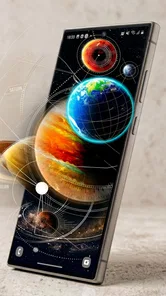

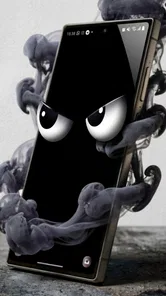
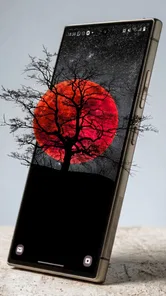
Analysis by Reviewed
I like live wallpaper most when it changes the feel of a phone without making the screen harder to use. 3D Live Wallpapers 4D video 4K takes a more animated, depth-focused approach than a simple gallery of still images, so it suits people who enjoy seeing their background move when they interact with the device. It is a free personalization app from Nebuchadnezzar DOO, rated for Everyone, and its current version is 1.24.01. The appeal is clear, though I’d treat a lively screen as an aesthetic choice rather than an essential phone feature.
Who benefits most from a moving screen
I’d recommend trying it if you already enjoy customizing your phone and want the background itself to contribute to the look, rather than relying only on icon arrangements or widgets. The app has passed ten million installs and holds a 4.5 average from around 410,000 ratings, so plenty of people are drawn to this kind of personalization. Those figures are a helpful sign of broad interest, but the useful test is still whether a moving design feels good on your own device.
It is a weaker match for someone who deliberately keeps a phone visually quiet, uses a lot of small widgets, or wants a background that never shifts. Motion can make a home screen feel more expressive, but it can also make the most-used screen less restful. If your priority is a photograph, a simple color, or a carefully cropped static image, your phone’s built-in wallpaper picker is likely the quicker choice. This app makes most sense when animation and depth are part of what you want.
How I’d test a design before committing
Rather than browsing endlessly, I’d decide first what job the wallpaper needs to do. For a work phone, I’d look for a restrained image with open space where icons and widgets sit. For a personal device, I might choose something more colorful, provided the movement does not pull my eyes away every time I unlock the screen. This approach turns browsing into a practical choice instead of a hunt for the most dramatic preview.
There is also a useful distinction between choosing a wallpaper for its preview and choosing one for daily use. A preview invites you to focus on the artwork; an actual home screen adds labels, widgets, and the habit of tapping familiar places. I’d check whether the design leaves enough contrast around those elements and whether its brightest area sits beneath an icon-heavy part of the screen. A visually impressive scene may be a poor fit if it makes common shortcuts harder to spot.
A realistic routine might be to try a calmer background during a busy week, when you need to glance at reminders and open apps quickly, and switch to a bolder one when you want a more playful look. I would keep the change simple: select a scene, use the phone normally, and notice whether the movement still feels pleasant after repeated unlocks. If it becomes something you stop noticing, that may be a sign it works well; if it keeps competing for attention, a quieter design is the better result.
What the moving backgrounds add
First off, the visuals. Oh my! This app doesn’t just offer your run-of-the-mill 2D wallpapers. It takes it up a notch with 3D and 4D effects that make your screen pop with vibrant colors and dynamic movements. Imagine having a live aquarium or a bustling city skyline right on your phone’s home screen. The level of detail is insane, and the quality is crisp, thanks to the 4K resolution. It feels like you're peeking through a window rather than looking at a screen.
More From Our News Desk

 Gmail
GmailGmail in a Busy Inbox: Who Benefits Most?
From first account to crowded workday, Gmail earns its place through dependable search and flexible sorting—but its best fit depends on how much inbox maintenance you can tolerate.

 Prime Video
Switching to Prime Video: What Changes in Your Viewing Routine
Prime Video can make a compelling second home for streaming, but switching means learning a different catalog, rental layer, and route from browsing to playback.

 Universal TV Remote Control
Universal TV Remote Control Works Best as a Reliable Backup
A phone remote earns its place through quick setup and reliable habits. Here is how to get more from Universal TV Remote Control—and where its limits show.

 Weather - By Xiaomi
Weather by Xiaomi Review: Clear at a Glance, Less Clear Up Close
Xiaomi’s weather app makes everyday forecasts quick to scan, but its calm surface can leave useful details and recovery paths harder to find than they should be.

 X
XX Under Pressure: Can It Recover When Posting Goes Wrong?
A resilience-focused review of X, examining setup, mistaken posts, interruptions, weak connections, and the gaps that matter when recovery needs to be dependable.

 Clash of Clans
Clash of Clans Is Won Between the Battles
Its raids are quick; its community is a long-term project of coordination, teaching, rivalry, and shared responsibility—with all the friction that entails.
Latest News



Choosing a wallpaper that works day to day
Now, I know what you might be thinking. "All these features must be a pain to navigate, right?" Surprisingly, no! The app sports a slick and user-friendly interface that even the least tech-savvy person can handle. You can easily browse through various categories like nature, space, abstract, and more. Plus, the app allows you to customize the wallpapers to suit your taste. Want more depth or a different color scheme? Just a few taps, and voila!
For a practical first try, I’d pick a design with a clear focal point and check how it looks behind your usual home-screen icons. A striking scene can feel immersive on its own, but busy motion and bright detail may compete with widgets or make app labels harder to scan. Try it on the home screen before settling on it; the wallpaper that looks best in a preview may not be the one that feels easiest to live with all day.
That makes the app a natural fit for someone who enjoys changing their phone’s look, likes animated art, or wants a more personal home screen without building a layout from scratch. It is less suited to anyone who prefers a clean, static background, needs the screen to stay visually quiet, or avoids motion effects. If you only want a still photograph, the built-in wallpaper picker or a standard image gallery is simpler; this app’s point is the sense of movement and depth.
Battery, performance, and the useful trade-offs
One of my initial concerns was, "Is this going to drain my battery?" But the app developers have thought of everything. The app is optimized to ensure it doesn’t gobble up your battery life. It smartly adjusts the wallpaper activity based on your phone’s usage, so you won’t find yourself scrambling for a charger midday. Pretty neat, huh?
Even with an animated background, I’d still judge battery impact on your own device rather than assume it is invisible. A useful way to decide is to try one wallpaper through a normal day, then switch back to a still background if you notice a difference you dislike. That also helps separate the wallpaper’s visual appeal from other battery use. If you’re already trying to stretch a low charge, a static image is the more predictable choice.
Resolution is another practical trade-off. A high-detail image can look especially good on a sharp display, but elaborate scenes may draw attention away from the icons you need to tap. I’d favor darker or less crowded designs if readability matters, and save the more dramatic choices for a home screen with fewer widgets. This small bit of curation makes a live wallpaper feel intentional instead of turning the whole screen into competing motion.
What to expect from its catalogue over time
The team behind 3D Live Wallpapers 4D video 4K doesn’t slack off when it comes to keeping things fresh. They regularly update the app with new content, so there’s always something new to look forward to. Whether you're into seasonal themes or want to keep up with the latest trends, they’ve got you covered. The variety is pretty impressive, and it keeps the app feeling new every time you open it.
The app has been available since July 14, 2022, and its current version is 1.24.01. Those details tell me where the product stands now, but they don’t establish a particular feature history, so I wouldn’t assume that a specific effect or control was added in a recent release. For someone who already uses it, the sensible approach is to look at what the current version offers and decide whether its selection still matches their taste, rather than updating in expectation of a particular change.
There is a large audience for this style of personalization: it has passed ten million installs and has an average rating of 4.5 from around 410,000 ratings. That’s useful context if you’re deciding whether it is worth trying, but it won’t tell you whether a particular wallpaper suits your screen or habits. I’d browse with a specific mood in mind—calm nature, vivid space, or abstract color—then test one design before spending time exploring the entire collection.
Price, access, and who should give it a try
The app is free to install, with optional in-app purchases priced from $0.99 to $3.99 per item. I’d start by exploring the free experience and only consider a purchase if a particular item is worth it to you; there’s no need to pay simply to find out whether animated backgrounds fit your routine. The Everyone age rating also makes it broadly accessible, while the paid-item range is worth keeping in mind if you prefer to avoid extra spending.
One practical question is whether you need to buy anything to decide if the app suits you. You can begin with the free install and judge the available experience before considering any optional item. If you do spend, I’d make that decision around a specific design you genuinely want, not the general promise of having more choices. That keeps the purchase tied to a clear preference and makes it easier to avoid paying for content you may not use.
Another question is whether the 4K label alone should determine your choice. I wouldn’t use resolution as the only measure. The image still needs to sit comfortably behind your icons, and a detailed scene can be less practical than a simpler one even when it looks sharp. On a phone, composition and contrast matter as much as detail: check the area where your most-used apps sit and choose a design that leaves them legible.
Compared with ordinary static-wallpaper apps, this one is aimed at people who want the background to feel active rather than simply provide a picture. Compared with the wallpaper options already built into a phone, it offers a more animation-centered browsing experience, while the built-in picker remains the straightforward route for a still image. Neither approach is automatically better. I’d choose this app for visual movement and variety, and choose a static collection when simplicity, predictability, or a quiet screen matters more.
For existing users, the release information is useful mainly as a way to identify the current state of the app: version 1.24.01, after a release on July 14, 2022. It is not enough on its own to say which controls or wallpaper types have changed over time. I’d focus on whether the current selection still gives you a design that works with your device and habits. If it does, there may be no reason to replace a wallpaper you already like; if it does not, exploring alternatives is more useful than expecting a version number to promise a particular improvement.
What I’d watch for as a user is whether the available designs continue to suit different moods without making the app feel like a chore to browse. For an animated wallpaper, useful improvement is not just more striking imagery; it is also making it easy to find a scene that stays readable and comfortable after the novelty wears off. That is the standard I’d use when deciding whether to keep it installed: not how impressive a preview looks, but whether I still enjoy seeing it in the middle of an ordinary day.
A realistic use case is changing the background when you want a small refresh without rearranging your apps: choose a calmer design for a work-heavy week, then switch to something more colorful when you feel like making the phone look less ordinary. The key is not to keep changing settings until the screen becomes distracting. Pick a scene, live with it through a few unlocks and app launches, and judge it by how it looks behind the things you actually use.
All in all, if you’re looking to add some flair to your device and showcase your unique style, this app is a must-try. It's like having a tiny art gallery in your pocket, ready to dazzle you at any moment. So go ahead, give 3D Live Wallpapers 4D video 4K a spin, and watch your phone come to life with stunning visuals!
3D Live Wallpapers 4D video 4K Frequently Asked Questions
Does 3D Live Wallpapers 4D video 4K offer both static and animated backgrounds?
The app focuses on 3D, live, and moving wallpapers, with themes in 4K and HD. It is aimed at people who want more visual movement and depth on their device than a standard background provides. If you prefer a simple, still image, you may want to consider whether animated wallpaper is the kind of personalization you are looking for before downloading.
What Android version do I need to install 3D Live Wallpapers 4D video 4K?
The app requires Android 7.1 or later. Before downloading, check the Android version shown in your device settings to make sure it meets that requirement. Compatibility also depends on the device itself, so a phone or tablet that meets the minimum version may not deliver the same smooth experience as a newer device when displaying animated backgrounds.
What is 3D Live Wallpapers 4D video 4K, and how does it work?
3D Live Wallpapers 4D video 4K is an application designed to enhance your mobile device's appearance with dynamic and visually stunning wallpapers. The app provides a wide range of high-quality 3D and 4D wallpapers, including mesmerizing video backgrounds in 4K resolution. These wallpapers use advanced visual effects to create an immersive experience, allowing users to personalize their device with dynamic images that respond to motion and touch.
Who develops the app, and what kind of app is it?
3D Live Wallpapers 4D video 4K is a personalization app from Nebuchadnezzar DOO. Its focus is on helping you change the look of your device with 3D, live, and moving wallpapers, as well as themes in 4K and HD. If you enjoy giving your screen a more animated appearance than a standard static background, its purpose is easy to understand before you install it.
Is 3D Live Wallpapers 4D video 4K compatible with all devices?
While 3D Live Wallpapers 4D video 4K is designed to work on most modern Android and iOS devices, it may not be compatible with older models or those with limited processing power. To ensure optimal performance, it's recommended to check the app's requirements on the Google Play Store or Apple App Store. Devices with higher RAM and GPU capabilities will provide a smoother experience.
Pros
- Stunning 4K visuals enhance device aesthetics.
- Wide variety of dynamic 3D wallpapers.
- Interactive features respond to touch.
- Low battery consumption for continuous use.
- Regular updates with fresh content.
Cons
- May slow down older devices.
- Limited free wallpapers available.
- In-app purchases can be frequent.
- Requires internet for full functionality.
- Occasional app crashes reported.












