WalletPasses | Passbook Wallet
- 3.00K
- 4.6
- Installs
- 10.00M
- Price
- Free
Screenshots

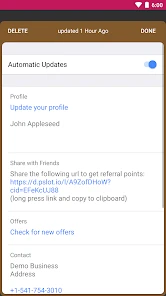
Analysis by Reviewed
When it comes to managing your digital passes on your smartphone, WalletPasses is a name that keeps popping up. I decided to dive in and see what all the fuss is about, and boy, was I pleasantly surprised! Whether you’re juggling boarding passes, event tickets, or loyalty cards, this app promises to streamline your life. But does it deliver? Let’s find out.
First Impressions and Ease of Use
Right off the bat, installing WalletPasses was a breeze. Available for both Android and iOS, the app is pretty lightweight, so you won’t need to worry about it hogging your phone’s memory. Once it was up and running, I was greeted by a clean and intuitive interface. Everything felt right where it should be, and I didn’t have to fumble around to find what I needed.
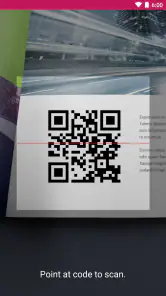
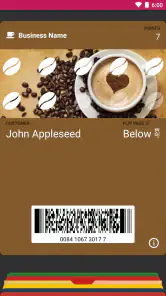
Setting up my passes was straightforward. All I had to do was scan the QR codes, and voila! My passes were neatly stored and ready for whenever I needed them. No more digging through emails or printing out paper tickets!
Features That Stand Out
One of the features that really caught my eye was the real-time updates. Let’s say you have a flight, and there’s a change in the gate number or boarding time. WalletPasses will notify you immediately, so you’re always in the loop. It’s like having a personal assistant keeping tabs on all your tickets.
Another cool feature is the location-based notifications. The app can remind you of your pass when you’re near a relevant location, which is super handy. Imagine arriving at the airport and getting a prompt with your boarding pass ready to go. It’s these little things that make life so much easier.
Security and Reliability
In today’s digital age, security is paramount. Thankfully, WalletPasses doesn’t skimp on this. The app ensures that all your passes are stored securely, and I had peace of mind knowing that my information was safe from prying eyes.
Reliability is another biggie. I’ve used apps in the past that crash at the most inconvenient times. But with WalletPasses, I didn’t experience any such issues. It ran smoothly, and the passes were always accessible, even offline. This is a huge plus if you’re somewhere without internet access.
All in all, WalletPasses has proven itself to be a worthy companion for anyone looking to declutter their digital life. From its intuitive design to its nifty features, it ticks all the right boxes for me. If you’re someone who frequently deals with digital passes, give this app a shot. You might just find it becomes one of your must-have tools.
Pros
- Supports a wide range of pass types.
- Easy to organize and access passes.
- User-friendly interface design.
- Quick integration with existing apps.
- Secure
- with strong privacy measures.
Cons
- Limited customization options.
- Occasional syncing issues.
- Ads can be intrusive at times.
- No offline access to passes.
- Requires frequent updates.
- Category
- Travel & Local
- Version
- 2.7.1