Visual Voicemail
- 14.70K
- 3.8
- Installs
- 50.00M
- Price
- Free

Screenshots





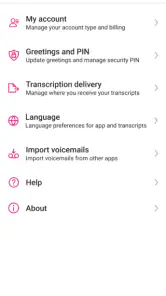

Analysis by Reviewed
Have you ever missed an important voicemail because you just didn’t feel like dialing in and listening to them all? Well, you're in for a treat! Visual Voicemail is about to revolutionize the way you handle voicemails. Let’s dive into what makes this app a must-have.
What Exactly is Visual Voicemail?
Alright, picture this: instead of dialing a number, punching in your password, and listening through a slew of messages, you get a neat, organized list of your voicemails right on your screen. Yes, that’s what Visual Voicemail does! You can see who called, when they called, and even read a transcription of their message. No more guessing games or wasted time.
Easy Navigation and User-Friendly Interface
The app interface is as intuitive as it gets. Upon opening the app, you're greeted with a clean and simple layout. A list of voicemails is presented, each with the caller's name and a snippet of the message. It’s like having your emails and voicemails combined into one slick platform.
From this list, you can tap on any voicemail to listen, read the transcription, or even call back. The app also allows you to organize your messages, so if you’re someone who loves tidiness, you’ll appreciate the ability to sort and categorize voicemails.
Features That Make Life Easier
One of the standout features of Visual Voicemail is its transcription service. For those of us who love multitasking, being able to read a voicemail as a text is a game-changer. Imagine being in a meeting and discreetly catching up on messages without the need for headphones!
The app also supports multiple languages, making it accessible for a diverse range of users. Plus, it syncs seamlessly across devices, so you can access your voicemails whether you’re on your phone or tablet. Sweet, right?
My Personal Take
After using Visual Voicemail for a few weeks, I can confidently say it's a keeper. The convenience it offers is unmatched, especially for someone like me who is always on the go. I love how it unclutters the voicemail process, turning what used to be a chore into a quick and easy task.
However, bear in mind that the transcription accuracy can vary depending on the clarity of the caller’s voice. But hey, nobody’s perfect! Overall, this app is a solid tool for anyone looking to streamline their communication.
So, if you're tired of the old-school voicemail system, give Visual Voicemail a shot. It’s a refreshing change and makes managing voicemails a breeze. You might just wonder how you ever got along without it!
Pros
- Easy to access voicemail messages.
- No need to dial voicemail number.
- Save and archive voicemails.
- Visual interface is user-friendly.
- Quickly identify important messages.
Cons
- Requires internet connection.
- Limited support for older phones.
- Can be buggy at times.
- Not available with all carriers.
- Privacy concerns with message storage.

- Category
- Business
- Version
- 11.5.0.684478











