Metro
- 126.86K
- 4.7
- Installs
- 100.00M
- Price
- Free

Screenshots
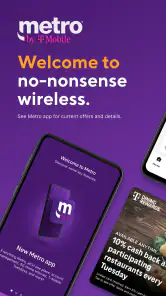
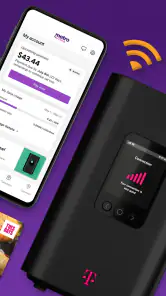
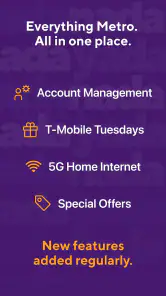
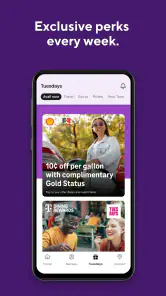
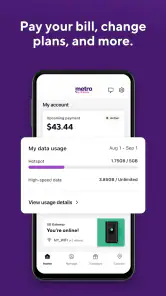
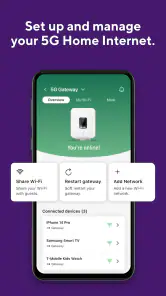
Analysis by Reviewed
For a phone-service app, speed matters most when I’m trying to check something quickly between other tasks. Metro is designed for Metro by T-Mobile customers, and its role is different from a general messaging or calling app: it is a place to manage the relationship with your wireless provider. I’d treat it as a practical account companion rather than something that replaces the communication apps I use to talk with friends.
Who gets the most from a carrier app
I’d start with the question of whether I already use Metro by T-Mobile. That matters more than the app’s name or its place in the Communication category: this is for managing a wireless-service relationship, not for sending messages to people or finding routes around town. If my phone service is with another provider, I would not install it expecting it to work as a general-purpose communications tool.
For an existing customer, the appeal is having a phone-based place to begin when an account question comes up away from a computer. It may be more convenient than searching through browser tabs or trying to remember where a carrier’s account pages are. I’d still check that the specific action I need is available after signing in rather than assuming every service task can be completed in the app.
What a quick visit is good for
When I open a carrier app, I want to find the useful account information without having to navigate a maze. The app’s short store description does not promise a long list of particular tools, so I wouldn’t assume it can handle every account task before checking what is available for my line. The sensible approach is to install it, sign in, and see whether the actions I need are there. That makes it most appealing to people who already use Metro by T-Mobile and want a mobile way to deal with routine service needs.
That distinction also helps set expectations about speed. A simple account check should feel different from a task that depends on a network response or account verification. If something takes a moment, I would first consider whether the phone has a solid connection and whether the task itself needs information from the carrier, rather than assuming the app has frozen. For anything urgent, keeping the carrier’s usual support options in mind is a sensible backup.
Where it fits among communication apps
Compared with a typical communication app, this one serves a narrower purpose. Messaging apps help me reach another person; Metro is tied to managing wireless service. That focus is useful if I want a carrier-specific place to start, but it is not a reason to replace my usual text, voice, or video tools. If I’m not a Metro customer, the app is unlikely to be useful as a general communications option.
For a realistic everyday example, I might remember while heading out that I need to check something about my service. Rather than wait until I’m at a computer, I can try the app from my phone, provided I have enough connection to sign in and load the relevant account screen. I’d avoid leaving that check until the last second if it affects an important call or trip; a phone app is convenient, but convenience is not the same as a guarantee that every account action will finish instantly.
More From Our News Desk

Weather by Xiaomi Review: Clear at a Glance, Less Clear Up Close

X Under Pressure: Can It Recover When Posting Goes Wrong?

Clash of Clans Is Won Between the Battles

Android Auto Makes the Case for Quieter Car Software

MobiOffice: Transforming Mobile Productivity with Seamless Integration

EA SPORTS FC™ Mobile Soccer: Redefining Mobile Sports Gaming
A practical routine for account checks
One useful habit is to open the app before a moment when I expect to need the information, rather than waiting until I am already in a rush. That gives me time to sign in and confirm that I can reach the relevant account area while I have a dependable connection. It also helps separate a temporary loading issue from a more persistent access problem.
I would avoid treating a single slow screen as a reason to tap repeatedly. When an account action is still processing, repeated attempts can make it harder to tell which one completed. I’d pause, check the connection, and reload or revisit the screen only after giving it a little time. This is a simple way to keep a routine check from turning into a confusing sequence of duplicate attempts.
Getting Started: The Basics
First things first, downloading the app is a piece of cake. It's available for both Android and iOS, so no one's left out. Once you have it on your device, the interface welcomes you with a sleek, modern design that feels like a breath of fresh air compared to other clunky transit apps. It's intuitive, which means you won't be spending ages figuring out how to get from point A to point B.
Features That Stand Out
One of the standout features of the app is its real-time updates. I can't tell you how many times I've been saved by knowing exactly when the next train is arriving. No more standing on a cold platform wondering if you should have taken that coffee break. The live tracking is not just accurate but also refreshingly fast.
Another cool feature is the offline maps. Yes, you heard it right! You can download maps and access them even when you’re underground with no signal. This is a lifesaver when you're in a rush and can't afford to wait for the app to load. Plus, the app covers a wide range of cities globally, so it’s perfect if you’re a frequent traveler.
My Personal Experience
Using Metro has genuinely made my commuting experience smoother. I remember the first time I used it; I was late for a meeting in a city I wasn't too familiar with. The app guided me seamlessly, and I managed to get there on time. It's like having a knowledgeable local in your pocket. The estimated travel times are also very accurate, which means you can plan your day without any last-minute surprises.
There is one important catch: Metro by T-Mobile is a wireless-service app, so those transit directions, train arrivals, and offline city maps do not describe what this app is for. I would not install it expecting help planning a subway journey. The name can easily create that confusion, and it is worth checking the developer before downloading so you land on the carrier app you actually want.
Speed, reliability, and device fit
Metro has a 4.7 average from around 545,000 ratings, and it has been downloaded over 100 million times. Those figures suggest it has a broad audience, but they do not guarantee that every account task will feel equally smooth on every device or connection. The current version is 11.2.0, and the minimum operating system is 11. If your phone runs an older system, check compatibility before planning to rely on it.
Heavy-use moments are usually the ones where a carrier app matters most: when I’m trying to sort out an account question while away from home, or when I need to confirm something before depending on my phone. In those situations, I’d use a stable connection, allow time for sign-in or account information to load, and avoid repeatedly tapping the same action if the screen seems slow. That is a practical way to reduce confusion, not a promise that every delay can be fixed locally. If the app does not recover after a connection change or restart, the provider’s regular support route is the better fallback.
Resource demands are difficult to judge from a description alone, so I wouldn’t claim that Metro is especially light or heavy on battery, storage, or memory. On a device with limited space, it still makes sense to keep only the apps I use; on an older phone, compatibility comes first. The app is free and rated for Everyone, which makes trying it straightforward for an eligible Metro customer, while the actual usefulness depends on having an account and a reason to manage service from a phone.
What reliability looks like in everyday use
For me, reliability is less about expecting every screen to load instantly and more about knowing what to do when it doesn’t. A carrier account check can involve a network connection and account-specific information, so a delay is not automatically proof that the app has failed. I’d try again after checking reception or switching to a better connection, then use another support route if I still cannot get the task done.
This is also why I would not make the app my only plan for an urgent account issue. It can be a convenient first stop for routine checks, but when timing is critical, I’d leave room for a slower sign-in or a connection interruption. Keeping the provider’s usual support options available gives me a practical fallback without expecting a mobile app to solve every situation.
When a different tool makes more sense
If what I need is a conversation, I would open my normal messaging or calling app. If I need transit directions, I would use a dedicated navigation or public-transport app instead. Those alternatives are built around reaching people or planning a journey; Metro’s narrower value is its connection to Metro by T-Mobile service. Picking the tool that matches the task is more useful than judging this app by features it is not meant to provide.
That distinction matters particularly for someone choosing an app from a search result. The short name can make the product sound like a city travel guide, and the old transit-oriented description above is a poor fit for the actual carrier app. I’d verify that Metro by T-Mobile is the developer before installing, especially if I was searching for subway maps or live arrival times.
What Could Be Better?
Even though the app is pretty amazing, there's always room for improvement. Sometimes, the notifications can be a bit too frequent, especially during peak hours. It would be great if there was a way to customize them more to your personal preferences. Also, while the app is generally fast, there can be occasional lags, particularly in areas with poor connectivity.
For someone deciding whether to install it, the key question is simple: do you want a mobile way to deal with Metro by T-Mobile service, or are you looking for help with everyday conversations and transit? Existing customers are the natural audience; people on another carrier, or anyone seeking a city-navigation tool, should choose an app built for that purpose instead. The developer is Metro by T-Mobile, and its long-standing presence—released on March 3, 2014—fits its role as a carrier companion rather than a new general-purpose communications platform.
My recommendation
I’d recommend it to a Metro by T-Mobile customer who wants a convenient mobile starting point for routine service-related checks and is comfortable using an account app. I’d skip it if I use another carrier, or if my main goal is messaging, calling, or finding my way around a city. The app is free, but its usefulness still depends on whether its account tools match what I actually need.
Before relying on it for an important task, I’d install it on a compatible device, sign in when I have time, and make sure I can reach the account area I expect to use. That small check answers the practical questions that matter: whether my phone can run it, whether I can access my account, and whether a mobile workflow suits me better than the provider’s other support options. If those pieces fit, it can earn a place on my phone; if not, there is little reason to keep it just because it is popular.
All in all, the Metro app is a fantastic tool for anyone who uses public transit. It’s reliable, user-friendly, and packed with features that make navigating through the city a breeze. So, the next time you find yourself staring at a complicated transit map, remember that there's an app for that!
Metro Frequently Asked Questions
What kind of app is Metro, and who is it designed for?
Metro is a communication app from Metro by T-Mobile, built around the provider’s wireless service. It is most relevant to people who use Metro or are considering its service and want a mobile way to engage with it. The store summary promises a simpler wireless-app experience: “We’re taking the yada yada out of wireless—now we’ve taken it out of your app.”
What is Metro’s current version, and what operating system does it require?
Metro’s current version is 11.2.0, and the stated minimum operating-system requirement is Android 11. Check your device’s Android version before downloading so you can judge whether it meets that requirement. The version number is useful when comparing the app on your device with a newer release, while the operating-system requirement helps avoid installing an app your device cannot support.
Is Metro by T-Mobile free to download, and what should I know before installing it?
Metro by T-Mobile is a free communication app. Before downloading, check that your device runs Android 11 or later, as this is the stated minimum operating-system requirement. The app is intended for Metro by T-Mobile customers who want to use its mobile-service tools, so it may be most useful if you already use or are considering Metro wireless service.
Who develops the Metro app, and is it suitable for all ages?
The app is developed by Metro by T-Mobile and has an Everyone content rating, making it suitable for a general audience. Its store summary describes a simpler wireless-app experience, with the line, “We’re taking the yada yada out of wireless—now we’ve taken it out of your app.” That gives a sense of its straightforward approach to managing Metro service.
What is the main purpose of the Metro app?
The Metro app is designed to provide users with comprehensive public transportation information, including real-time schedules, route planning, and service alerts. Whether you're a daily commuter or a tourist exploring the city, the app helps you navigate the metro system efficiently, ensuring you get to your destination on time.
Pros
- User-friendly interface
- Real-time updates
- Customizable alerts
- Detailed maps
- Offline access
Cons
- Ads in free version
- Limited route options
- Occasional bugs
- Requires GPS
- High battery usage
- Category
- Communication
- Version
- 11.2.0












