Trulia Rent Apartments & Homes
- 20.30K
- 4.7
- Installs
- 5.00M
- Price
- Free

Screenshots
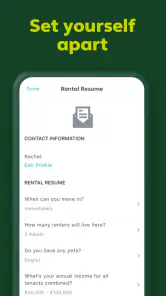
Analysis by Reviewed
Apartment hunting gets stressful when every promising listing is in a different part of town and you cannot tell what daily life there might feel like. I find the strongest idea behind Trulia Rent Apartments & Homes is bringing the search and neighborhood context together: a home is not just a price and a floor plan, but also the streets and services around it. That makes this free House & Home app most useful when I am comparing areas as much as individual rentals.
Start with the surroundings, not just the listing
The map-led approach matters most when you have several possible locations and do not yet know which one fits your routine. A rental can look ideal in a photo and still create awkward everyday trade-offs: a longer walk for groceries, a less convenient route to work, or a location that simply feels disconnected from the places you visit. Seeing homes alongside neighborhood context helps bring those questions forward before you spend time arranging viewings.
I would treat this as an early-stage decision aid rather than a final verdict on a property. It is useful for narrowing a broad search into a few areas worth exploring, especially if you are moving somewhere unfamiliar. Once a location makes the shortlist, the next step is still to check the specific address and building for yourself.
Exploring the Features
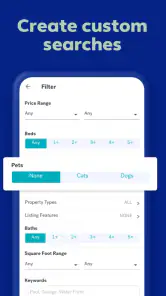
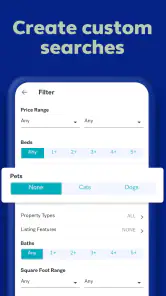
Let's dive into what makes Trulia Rent Apartments & Homes stand out in the crowded marketplace of real estate apps. The app offers a plethora of features designed to cater to every renter's needs. With its detailed listings, you can filter properties based on location, price range, number of bedrooms, and more. It's like having a real estate agent in your pocket!
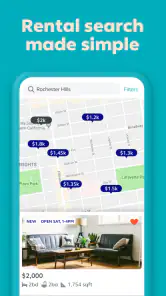
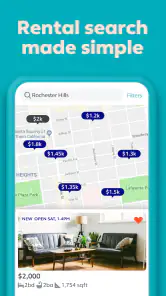
One of the most impressive features is the interactive map that not only shows available properties but also highlights local amenities such as schools, grocery stores, and public transport links. Imagine being able to visualize your morning commute or check out the local coffee scene before even stepping foot in the neighborhood. It's features like these that make house hunting not just easier, but genuinely enjoyable.
Using the map to judge a location
That map is more than a convenient way to browse pins. I use it to compare the practical shape of a search: whether a rental sits near the services I rely on, and whether several suitable homes cluster around one area or are scattered across town. This can help me avoid choosing a place based only on attractive listing photos. It is still a screening tool, not a substitute for visiting the street or checking a commute at the time I would actually travel.
One useful way to make the map work harder is to compare areas by the errands you repeat, not by a vague idea of what counts as a “good neighborhood.” If you shop on foot, nearby groceries may matter more than a cluster of restaurants; if you rely on transit, the route and walk to a stop deserve attention. I would look at the same few needs for each area so the comparison stays fair instead of being swayed by whichever map happens to look busier.
More From Our News Desk

Weather by Xiaomi Review: Clear at a Glance, Less Clear Up Close

X Under Pressure: Can It Recover When Posting Goes Wrong?

Clash of Clans Is Won Between the Battles

Android Auto Makes the Case for Quieter Car Software

MobiOffice: Transforming Mobile Productivity with Seamless Integration

EA SPORTS FC™ Mobile Soccer: Redefining Mobile Sports Gaming
There is also a practical reason to keep the map in view while browsing: it can expose how scattered your requirements are. If the listings that meet your room and budget needs are far apart, that is a sign to revisit one constraint or decide which neighborhood trade-off is acceptable. The map does not make that choice for you, but it can make the conflict visible sooner than a long list of addresses.
A User-Friendly Experience
Using the app is as intuitive as scrolling through your favorite social media feed. The interface is clean and straightforward, allowing you to easily switch between map and list views. The search function is robust, and the filters are incredibly detailed, ensuring you find exactly what you're looking for without wading through irrelevant listings.
For a more useful first pass, I would set a realistic location and budget, then narrow by the rooms I need before browsing the map. After that, I would loosen one constraint at a time. A strict search can hide workable options just outside a preferred boundary, while changing several filters together makes it hard to tell why results have changed. This small habit turns browsing into a comparison rather than an endless scroll.
For example, if the first results are too limited, I would test a slightly wider area before lowering a bedroom requirement. That preserves the basics of what makes a home workable while showing whether the location boundary is the real bottleneck. If the wider search brings in places that would make daily errands difficult, I would restore the boundary and reconsider a less essential filter instead. Making one adjustment at a time keeps the search intentional.
When comparing two promising listings, I would also separate deal-breakers from preferences before deciding what to view. A must-have room count or a workable route is different from a nice-to-have nearby café. This simple distinction prevents the app’s filters from doing too much of the decision-making: filters can organize possibilities, but you still need to rank what matters in your own life.
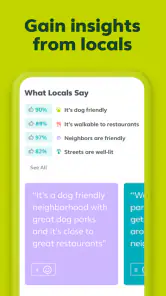
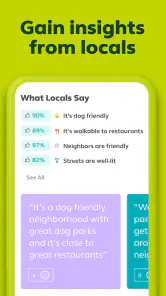
What’s more, the app offers neighborhood insights that go beyond the basics. Ever wondered what the crime rate is like in a potential new neighborhood or how noisy it might be? Trulia's got you covered with its honest and transparent neighborhood reviews from actual residents. It's like having a candid chat with a local before you decide to make the big move.
Where context helps—and where it doesn’t
Neighborhood information is most valuable when it prompts better questions, not when it makes the decision for me. I would use resident perspectives to create a short list of things to check in person, such as street activity or the feel of nearby blocks, and then verify details that matter to my routine. A broad neighborhood impression may not describe every building or block equally, so I would not treat it as a guarantee about a specific address.
That distinction is especially important when a neighborhood has mixed character from one street to the next. A general impression can be useful for deciding where to investigate, but it cannot tell me what a particular entrance, apartment, or late-evening walk will be like. If safety, accessibility, noise, or a particular service is central to your choice, I would use the context to guide an in-person check and confirm the detail with a reliable source rather than assuming the map settles it.
Resident comments can also reflect different routines and expectations. Someone who drives may judge an area differently from a renter who walks or uses transit, and a comment about noise may describe a time of day that does not match yours. I read such perspectives as clues to follow up on, not as a vote that determines whether a place is right. That approach keeps neighborhood context useful without letting a generalization replace your own needs.
A realistic search routine
For example, someone moving for work could check rentals near a few plausible routes, compare nearby groceries and transit, and save the most promising areas for a viewing day. A renter sharing with another person might use the map to find a compromise between two daily destinations, rather than choosing whichever listing looks best in isolation. These are the moments when location context saves effort: it helps decide what is worth seeing before arranging visits.
Imagine you have a free evening to plan a move and only enough time to visit a handful of places over the weekend. I would first set the areas that seem plausible, filter for the rooms and budget I need, then use the map to group viable listings by location. Rather than booking viewings across the whole city, I could focus on one cluster and check whether its nearby services fit my routine. If one candidate sits apart from everything else, I would ask whether its listing merits the extra trip before adding it to the schedule.
For two people searching together, this workflow can make disagreements more concrete. Instead of arguing over which listing looks nicer, each person can identify the daily destinations they need to reach and compare the areas around the available options. The result may not be a perfect midpoint, but it gives both renters a clearer basis for discussing the trade-off. It is particularly helpful when one person knows the city and the other is new to it.
Before a viewing, I would make a brief checklist from what the app helped me notice: the route I want to test, the nearby errand that matters, and any neighborhood question raised by resident comments. That turns browsing into preparation rather than a substitute for checking the place. It also helps keep a viewing focused, since there is a difference between liking a listing online and confirming that its location works on an ordinary weekday.
How it compares with other ways to search
Compared with a property portal that focuses mainly on listing details, Trulia’s map-and-neighborhood approach gives more attention to the surroundings. A general maps app can help with routes, but it does not replace rental search filters and property listings in one place. I would still check other rental sources when coverage or fresh availability is crucial, then confirm key details directly before making plans; listings and neighborhood impressions are starting points, not a lease decision.
The trade-off is that a location-rich search is not automatically the best tool for every stage. If you already know the building or have a direct contact for a particular property, a property manager’s own process may be more useful for confirming availability and arranging an application. Likewise, checking more than one rental source is sensible when you are searching in a narrow area or working to a tight deadline. I see Trulia as strongest for comparing options and surroundings, not as a reason to stop looking elsewhere.
A conventional listings-first portal may suit a renter who wants to compare property details rapidly and already understands the neighborhoods. A standalone map is better for checking a route once you have an address, but it does not bring the rental search into that same view. Trulia sits between those approaches: it connects finding a listing with assessing the area around it. That combination is the point, though it does not remove the need to verify the property itself.
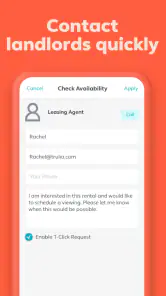
One limitation of any broad search is that a result can look like a lead without answering the questions that matter before you apply. I would contact the person or company responsible for a listing to confirm whether it is still available and to ask about details that affect my decision. A map pin, photo, or neighborhood impression cannot confirm the current status or terms of a rental, so I would avoid making commitments based only on what I see while browsing.
Final Thoughts
If you're on the hunt for a new place to call home, Trulia Rent Apartments & Homes is a must-have tool in your real estate arsenal. Its comprehensive features, combined with a user-friendly design, make it a top choice for anyone serious about finding the perfect rental. It's not just an app; it's your partner in the sometimes daunting world of real estate. So why not give it a try and see how it can streamline your home-hunting experience?
In the end, whether you're relocating to a new city or just looking for a change of scenery, Trulia offers everything you need to make an informed decision. Download it today and take the first step towards finding your dream home!
Who benefits most from it
I would recommend it to renters who are flexible about exact blocks, are new to an area, or need to weigh neighborhood convenience alongside bedroom count and budget. It is less suited to someone who already has a specific building in mind and only needs a direct application process, or to a renter who wants one app to guarantee complete, current inventory. In those cases, contacting a property manager or checking multiple sources is the more dependable next step.
It can also be a good fit for someone who is still deciding between a few parts of town and wants to make that choice before committing to a viewing schedule. People with a specific accessibility need or a non-negotiable commute should use the map to narrow the field, then verify the exact route and property conditions themselves. Those details can vary too much from one address to another to rely on a neighborhood-level impression alone.
I would skip it as my only search method if I needed a guaranteed complete picture of rentals or had already identified one exact property and simply wanted to apply. In that situation, a direct conversation with the property manager and a check of other sources would be more useful than broad exploration. It is also not a replacement for visiting: if the feel of a block, the building entrance, or the journey at a particular time matters to you, those are things to assess outside the app.
Trulia is developed by Trulia and has a 4.7 average from around 99,000 ratings, with over 5 million installs. It is rated for Everyone, and version 11.33.1 supports Android 9 and later. For me, its value is not that it can choose a home on my behalf; it is that it makes the neighborhood part of the comparison early enough to ask smarter questions before I commit time to a viewing.
Trulia Rent Apartments & Homes Frequently Asked Questions
Can I browse rentals in different locations with Trulia Rent Apartments & Homes?
Trulia Rent Apartments & Homes is designed for exploring rental options, including apartments, houses, and individual rooms. You can enter a location in the search bar to look for listings in the area you have in mind, then compare available options. If you are considering more than one neighborhood or city, searching each location can help you get a clearer picture of what is available.
Do I need to be ready to rent before using Trulia Rent Apartments & Homes?
No. You can use the app while you are still exploring and comparing possibilities, rather than only when you are ready to contact a landlord. Browsing listings can help you understand which rental options suit your needs and what details you may want to ask about. When you find a property that interests you, the app also offers ways to contact the landlord or property manager.
Can I save rental listings and keep track of new properties?
Yes. Trulia Rent Apartments & Homes lets users save favorite listings and receive notifications about new properties. These tools can make it easier to return to options you are considering and notice additional rentals as you continue your search. They are particularly useful when you are comparing several apartments, houses, or rooms and want to keep your search organized.
Can Trulia Rent Apartments & Homes help me find a room as well as a whole property?
Yes. Trulia is a real estate app for finding apartments, houses, or individual rooms for rent, so it can be useful whether you are looking for a place of your own or a room in a shared home. You can browse available rental listings and compare the options that fit your search before contacting a landlord or property manager.
Is Trulia Rent Apartments & Homes available for my phone, and is it suitable for everyone?
Trulia Rent Apartments & Homes is available for Android and iOS devices, and it is rated for everyone. The Android version requires Android 9 or later, so it is worth checking your device’s operating system before downloading. The app is free to download, making it straightforward to try its rental search tools and see whether they suit your needs.
Pros
- User-friendly interface.
- Comprehensive property listings.
- Detailed neighborhood insights.
- Customizable search filters.
- Instant alerts for new listings.
Cons
- Limited international listings.
- Occasional app glitches.
- In-app ads can be intrusive.
- Some data may be outdated.
- Limited offline functionality.
- Category
- House & Home
- Version
- 11.33.1