tinyCam Monitor
- 3.72K
- 3.9
- Installs
- 10.00M
- Price
- Free

Screenshots
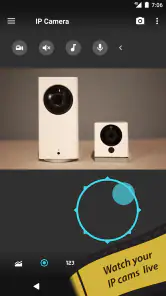
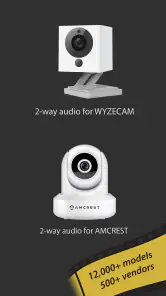

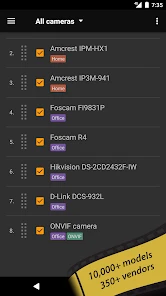
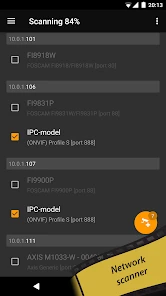
Analysis by Reviewed
If you're like me, always on the lookout for ways to enhance home security, then you're in for a treat with tinyCam Monitor. This app is like having your personal security guard right in your pocket. Let me walk you through why this app is a game-changer for anyone interested in keeping an eye on things when they're not home.
A sensible first routine
I get the most from a multi-camera viewer when I keep the first check simple: open the app, look at the cameras I actually need, and confirm the view is current before relying on it. tinyCam Monitor is made for ONVIF, Wyze, P2P, CamHi and Neos IP cameras, so it can be useful if your home already has cameras from different systems. It is not a camera itself; you still need compatible cameras and a connection that lets the app reach them.
A practical habit is to give each feed a recognizable name and arrange the views around a real routine, such as checking the entrance before looking at a shared room. That makes a quick glance more useful than opening a crowded wall of feeds and trying to remember which angle is which. If one camera is temporarily unavailable, I would treat that as a prompt to check the camera or network rather than assume the room is clear.
Seamless Integration with Your Cameras
One of the standout features of tinyCam Monitor is its ability to integrate seamlessly with a wide variety of IP cameras. Whether you're using a high-end camera setup or a basic model, this app has you covered. Setting it up is a breeze, and trust me, if I can do it, anyone can! The app supports ONVIF, which means it can automatically detect your cameras in a snap.
Remote Access Like Never Before
Imagine being able to check in on your home from anywhere in the world. With tinyCam Monitor, that's not just a dream. The app allows you to view live feeds from your cameras remotely. So whether you're at the grocery store or on a beach vacation, you can always tap into your live camera footage. This is perfect for peace of mind when you're away from home.
But wait, there's more! The app also supports audio monitoring. This means you can hear what's going on in real time, adding an extra layer of security. I found this particularly helpful for monitoring my front door when packages are being delivered.
Settings that matter in daily use
When adding a camera, I would start with the connection method the camera already supports instead of changing several settings at once. Automatic discovery can save effort on a compatible local network, while cameras reached remotely may require their own connection details. The useful lesson is to test one feed at home first, then try the same camera away from home; a successful local view does not by itself prove remote access is configured.
More From Our News Desk

Weather by Xiaomi Review: Clear at a Glance, Less Clear Up Close

X Under Pressure: Can It Recover When Posting Goes Wrong?

Clash of Clans Is Won Between the Battles

Android Auto Makes the Case for Quieter Car Software

MobiOffice: Transforming Mobile Productivity with Seamless Integration

EA SPORTS FC™ Mobile Soccer: Redefining Mobile Sports Gaming
It is also worth checking the image and audio behavior in the place where you plan to use the app. A clear view in daylight may not tell you whether a doorway is visible at night, and sound can be helpful for context without being a substitute for seeing what happened. I would avoid turning every alert on immediately. Start with the event or schedule you genuinely need, then adjust if notifications become distracting or miss something important.
User-Friendly Interface
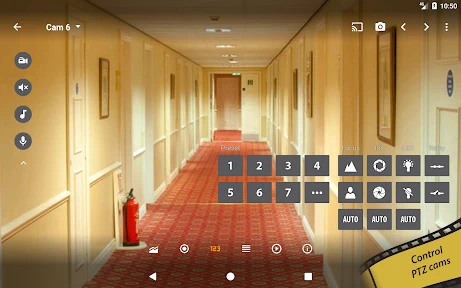
One of the things I love about tinyCam Monitor is its user-friendly interface. It's designed with the average user in mind, so you don't need to be a tech wizard to navigate it. The controls are intuitive, and the layout is clean and straightforward. This makes it easy to switch between camera feeds or adjust settings on the go.
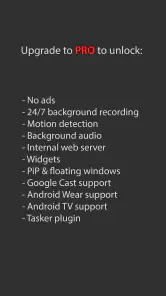
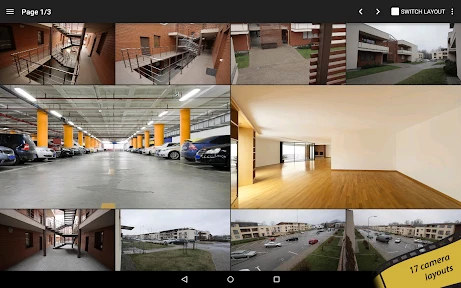
The app also offers a range of customization options. You can set motion detection alerts, choose different layouts for viewing multiple cameras at once, and even set schedules for recording. It's like having a professional-grade security system without the hefty price tag.
Faster checks, with realistic expectations
For a busy household, I would make a compact multi-camera layout the default and use it for routine checks, then open an individual feed when a detail needs closer attention. That is often quicker than switching between separate manufacturer apps, especially when the cameras come from more than one compatible system. For example, while walking home with groceries, I could check the entrance feed first to see whether a delivery is there, then move on rather than leaving several feeds open for no reason.
The trade-off is that a third-party viewer depends on the camera’s compatibility and the way its connection is configured. If a camera’s own app is needed for setup, firmware management, or a feature unique to that brand, I would keep that app available rather than expect one viewer to replace every manufacturer tool. Likewise, someone with a single camera who wants the simplest possible setup may prefer the camera maker’s app, while a mixed-camera household has a stronger reason to try a shared viewer.
Who will get the most from it
Tiny Solutions LLC makes this free house-and-home app for general audiences; it is rated Everyone. Its long-running presence, dating back to February 6, 2010, and its reach of over 10 million installs suggest that many people use it, though popularity alone cannot guarantee that a particular camera will work smoothly. Its average rating is 3.9 from around 77,000 ratings, with about 3,700 written reviews. I would read that as a reason to check compatibility and setup expectations rather than as a promise of a flawless experience.
I think it suits people who already own supported IP cameras and want one place to view several feeds, especially if their cameras do not all come from one brand. It is less compelling if you have not chosen a camera yet and want an all-in-one security service, or if you expect an app to provide monitoring without any camera or network setup. Before relying on it during a trip, I would test the exact cameras and remote connection you plan to use and confirm that the views load when you are away from your home network.
Final Thoughts
In a world where security is paramount, having an app like tinyCam Monitor is invaluable. It's packed with features that make home monitoring easy and efficient. The ability to access your cameras remotely, combined with a user-friendly interface, makes this app a must-have for anyone serious about home security. So go ahead, give it a try, and enjoy the peace of mind that comes with knowing your home is always under watchful eyes.
My recommendation comes with one qualification: a camera viewer is a way to check feeds, not a guarantee that a home is secure or that every alert will tell the whole story. If you want to manage a compatible mix of cameras from one screen, this is a practical option to explore. If your priority is a guided, single-brand setup with every camera feature in its maker’s app, that route may feel more straightforward. I would begin with one camera, learn how its feed behaves on and off the home network, and only then build a routine around it.
tinyCam Monitor Frequently Asked Questions
Can I use tinyCam Monitor with my existing home Wi-Fi network?
tinyCam Monitor is a viewer for ONVIF, Wyze, P2P, CamHi, and Neos IP cameras, so its usefulness depends on whether your camera can connect through one of those options. The camera and phone also need a suitable network connection for viewing. Before downloading, check your camera’s connection method and have its setup details ready; network configuration can affect how smoothly the feed opens.
Who develops tinyCam Monitor, and what kind of app is it?
tinyCam Monitor is an app from Tiny Solutions LLC in the House & Home category. It is intended for viewing feeds from compatible IP cameras, including ONVIF, Wyze, P2P, CamHi, and Neos cameras. That makes it most relevant to people who already have a supported camera and want to view it through an app, rather than users looking for a standalone camera or a general home-management tool.
Is tinyCam Monitor easy to set up with an existing camera?
Setup depends on the camera and how it connects to your network. tinyCam Monitor is a viewer for ONVIF, Wyze, P2P, CamHi, and Neos IP cameras, so start by checking whether your camera uses one of these options and have its connection details ready. Once configured, the app is intended to let you view camera feeds remotely.
What is tinyCam Monitor and what are its main features?
tinyCam Monitor is a versatile surveillance app designed for remote monitoring of your security cameras. It supports a wide range of IP cameras, including MJPEG, H.264, and other formats. Key features include real-time video, audio listening, cloud recording, and motion detection. The app offers both Wi-Fi and cellular connectivity, allowing you to keep an eye on your home or business from anywhere.
Is tinyCam Monitor compatible with all camera brands?
tinyCam Monitor is known for its broad compatibility with various camera brands. It supports thousands of models from major manufacturers like Foscam, Amcrest, Wyze, and more. However, it's advisable to check the app’s official compatibility list or contact support to ensure your specific camera model is supported before downloading the app.
Pros
- User-friendly interface
- Supports multiple camera brands
- High video quality
- Customizable alerts
- Remote access
Cons
- Requires constant internet connection
- Limited free version features
- Occasional app crashes
- Complex setup for beginners
- High battery consumption
- Category
- House & Home
- Version
- Varies with device