Thumbnail Maker - Channel art
- 5.34K
- 4.2
- Installs
- 10.00M
- Price
- Free
Screenshots

Analysis by Reviewed
When I need a quick visual for a video or social post, I want to get from a rough idea to a readable design without opening a desktop editor. Thumbnail Maker - Channel art is aimed at that kind of work: it puts templates and basic design tools on a phone, so I can build a thumbnail or banner without starting with a blank canvas. It is a free art and design app from CA Publishing, and its broad appeal is reflected in an average rating of 4.2 from around 223,000 ratings. I find it most useful when speed and convenience matter more than precise, professional control.
Choosing it for the right kind of project
The app makes most sense when the design has one clear job: identify a video, make a channel look more coherent, or give a small promotion a finished appearance. A creator who posts occasionally can get a lot from being able to begin with a layout rather than deciding every margin, color, and text position from scratch. I’d also consider it for someone who is comfortable taking photos on a phone but does not want to learn a full graphics package just to make a cover image.
It is a less natural fit when a project depends on strict brand rules. If a business needs the same exact spacing, carefully matched type, and multiple versions for different placements, I would choose a more controllable editor and keep a reference file for the brand. A template can help a design feel complete, but it can also nudge several creators toward similar-looking results. I would use the templates as scaffolding, then make a few deliberate choices that make the image feel like mine.
What a useful comparison looks like
Compared with a general-purpose design app, this one is appealing when the immediate goal is a thumbnail or channel graphic rather than a flyer, document, or presentation. The narrower purpose can reduce the number of decisions I have to make before getting started. A broader design app may be better if I need one place to produce many unrelated formats, while a desktop graphics editor is the stronger choice for intricate selection work, exact alignment, or detailed typography.
That difference is not simply about whether one option is “better.” It is about where I want to spend my time. For a straightforward cover, a template-led mobile workflow can be quicker than opening a complex editor and rebuilding a familiar layout. For a carefully art-directed campaign, the speed advantage matters less than being able to inspect every detail. I would choose based on the number of revisions and how exact the final asset needs to be, not on the assumption that a larger tool is always necessary.
Getting Started with Thumbnail Maker
Let's dive right into how easy it is to get started with Thumbnail Maker - Channel art. First things first, downloading and installing the app is a breeze. Whether you're on Android or iOS, it's just a few taps away in the app store. Once you open it, you're greeted with a user-friendly interface that even a newbie can navigate without a hitch.
A practical first design
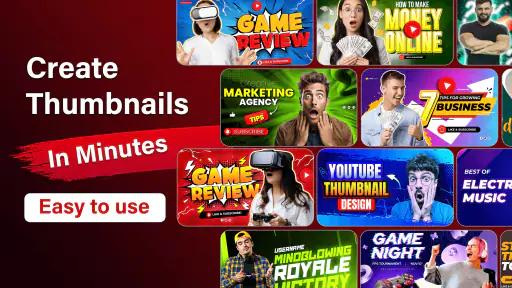
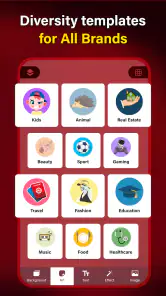
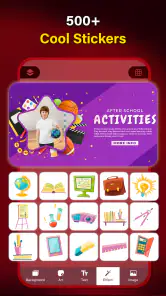
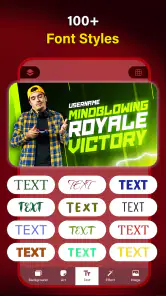
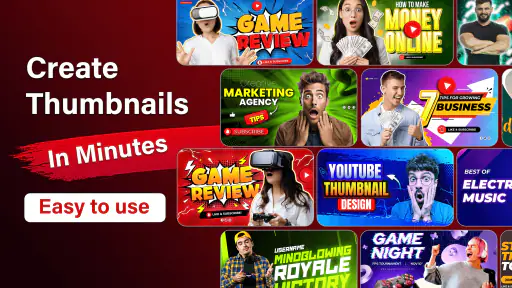
Creating a thumbnail with this app is as simple as pie. You start by picking a template from an extensive library. Trust me, they have templates for every niche you can think of – gaming, beauty, tech reviews, you name it. Once you’ve chosen your template, you can customize it to your heart’s content. The app offers a wide array of fonts, stickers, and backgrounds to choose from, so you can really let your creativity shine.
More From Our News Desk

Weather by Xiaomi Review: Clear at a Glance, Less Clear Up Close

X Under Pressure: Can It Recover When Posting Goes Wrong?

Clash of Clans Is Won Between the Battles

Android Auto Makes the Case for Quieter Car Software

MobiOffice: Transforming Mobile Productivity with Seamless Integration

EA SPORTS FC™ Mobile Soccer: Redefining Mobile Sports Gaming
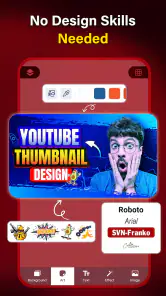
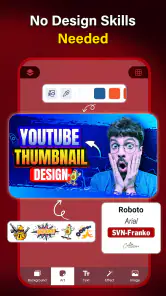
One feature I found particularly handy is the drag-and-drop functionality. It's super intuitive and lets you position your elements just right. Plus, you can add your own images, adjust the brightness, contrast, and saturation to make sure your thumbnail is perfect. And if you mess up, no worries – there's an undo button that will save the day.
Making a repeatable workflow
For a weekly creator, I would treat the template as a starting layout rather than a finished design. Keep the same general placement for a face, product, or title across a series, then change the image and a small number of visual details for each upload. That habit makes a channel look more consistent and also cuts down on last-minute choices. On a small phone screen, I’d zoom out to check whether the main subject and words still read clearly before exporting; details that look attractive up close can disappear at thumbnail size.
If I were making a video after work, I’d choose a layout, drop in a photo taken during filming, adjust its brightness if it competes with the background, then shorten the title until it can be read at a glance. I would leave a little breathing room around the edges rather than filling every corner with stickers. That restraint matters more than adding another effect: a thumbnail has to communicate quickly, especially when someone is scrolling past it.
A realistic weekly routine
For a creator posting a few related videos, I’d set aside a short block of time to prepare a small group of designs instead of starting each one in a rush. I would pick one visual direction, gather the photos first, and decide on a short title for each video before opening the editor. That preparation makes it easier to keep the series recognizable without forcing every image to be identical.
I’d also keep a simple naming habit for the exported files, using the video subject and intended placement rather than a vague label. That is not a special app feature; it is a practical way to avoid choosing the wrong image when it is time to upload. The same source photo may be useful for more than one graphic, but I would make a separate crop for each shape instead of assuming one composition will work everywhere.
Where the phone format has limits
What’s great about this app is that it caters to both newbies and seasoned designers. If you’re just starting out, you’ll appreciate the simplicity and guidance the app offers. On the flip side, if you’re a pro, you’ll love the advanced features like layer editing and blending modes. It’s like having a mini Photoshop right in your pocket.
Another thing worth mentioning is the app’s versatility. It’s not just for YouTube thumbnails; you can create channel art, banners, and even social media posts. It’s a one-stop-shop for all your digital art needs.
That range is convenient, but I would not treat a phone editor as a replacement for a full desktop design setup. For precise alignment across several assets, detailed typography, or a carefully controlled brand system, a desktop graphics editor gives me more room to inspect and refine. This app makes more sense for quick, repeatable pieces than for complex campaigns. It is free to install, with in-app purchases ranging from $1.99 to $49.99 per item, so I’d check what is included before building a workflow around paid choices.
Settings and export decisions
Before settling on a finished image, I’d check the crop and contrast on the actual photo rather than relying only on the template preview. A bright background can wash out text, while a dark image may need a restrained adjustment instead of several competing effects. I’d also keep an untouched copy of the source photo on my device; edits made for one thumbnail may not suit a banner or a post with a different shape.
Export quality is useful, but a crisp file alone cannot fix crowded composition or tiny lettering. I’d make the key words short, place the subject where it remains visible after cropping, and review the saved result before posting. If the image looks unclear at a reduced size, I’d simplify the design rather than add more decoration. That quick final check is a practical safeguard when working on a phone.
Small checks that prevent rework
When I adapt a thumbnail design for a banner or social post, I would not just stretch the finished image to fill the new space. A wider canvas changes the balance: an element that looked centered in a compact graphic may feel stranded, and text near an edge may be clipped or become awkwardly placed. I’d go back to the composition and reposition the important parts for the new shape.
I would also make one change at a time when adjusting a photo. If I raise brightness, contrast, and saturation together, it becomes harder to tell which adjustment actually helped. A restrained edit usually keeps faces and products believable, and it leaves the text as the strongest visual cue. This is especially useful when the template already has strong colors or decorative elements.
Who should choose it
I’d recommend this app to a new creator, a small shop owner preparing occasional promotions, or anyone who needs a quick visual without learning a heavyweight editor. It is less suitable for someone who needs exact brand specifications, detailed photo retouching, or a coordinated set of graphics with tightly controlled typography. Compared with general-purpose design apps, its appeal is the direct focus on thumbnails and channel artwork; compared with desktop software, the trade-off is less room for fine adjustments.
The app is free, rated for Everyone, and has been available since September 3, 2018. Its current version is 12.12.132, and it requires Android 6.0 or later. The catalog shows more than 10 million installs and around 5,300 reviews. Those figures suggest a well-established audience, but I’d still judge it by whether its workflow fits the way you make graphics. If you only need a thumbnail now and then, the template-led approach is approachable; if you create polished assets for a business every day, a more exacting editor may be worth the extra effort.
Questions to consider before settling on it
If you are wondering whether it is only useful for video covers, the practical answer is no: the same kind of design work can serve channel artwork, banners, and social posts. The important caveat is that each placement has its own shape and viewing context, so I would adapt the layout rather than reuse an unchanged export. That extra check matters more than choosing a new decorative element.
If you are deciding whether the free version is enough, I would begin with a real project and see whether the available choices let you finish it comfortably. The app is free to install, while individual in-app purchases fall within a range from $1.99 to $49.99. I would not pay just because a design feels unfinished; first check whether the issue is the layout, the source photo, or the amount of text. Buying something only makes sense if a specific paid option solves a recurring need.
And if you are concerned about needing design experience, I would say the template-first approach is a reasonable way to learn the basics. It still helps to understand a few fundamentals: keep the main subject prominent, use short wording, and avoid placing important details where a crop could remove them. The app can make arranging elements accessible, but it cannot decide what the viewer should notice first. That judgment is still the creator’s job.
A grounded verdict
And let's not forget about the export options. You can save your creations in high resolution, so they’ll look crisp and professional no matter where you post them.
In conclusion, Thumbnail Maker - Channel art is a fantastic tool for anyone looking to boost their online presence with stunning visuals. Whether you’re a content creator, a small business owner, or just someone who loves to dabble in graphic design, this app is definitely worth checking out. It’s easy to use, packed with features, and most importantly, it helps your content get the attention it deserves. So why wait? Give it a try and watch your engagement soar!
Thumbnail Maker - Channel art Frequently Asked Questions
Can I make artwork for platforms other than YouTube?
The app is presented as a tool for thumbnails, YouTube banners, templates, and covers, so its main focus is creating visual assets for channel and content design. You may be able to adapt a design for other uses, but the listed purpose centers on this kind of artwork. If you need a dedicated tool for a different platform or format, consider whether its available templates fit your project.
Is Thumbnail Maker - Channel Art suitable for occasional use as well as regular content creation?
It may work for both occasional projects and recurring channel artwork, since it brings thumbnail and banner design into one app. People who publish regularly may appreciate having a place to prepare visual assets, while someone making a single cover can use it for that one task. The usefulness for your routine will depend on whether its design tools suit the work you want to create.
Does Thumbnail Maker - Channel Art work on my Android device?
Thumbnail Maker - Channel Art is an Art & Design app for Android devices running Android 6.0 or later. Before downloading, check your device’s operating system version to make sure it meets that requirement. The app is free to download, and its content rating is Everyone, so it is intended for a general audience.
What is Thumbnail Maker - Channel Art used for?
Thumbnail Maker - Channel Art is designed for creating visual assets such as video thumbnails, YouTube banners, templates, and covers. It may suit creators who want to prepare channel artwork in one app, as well as people looking for a straightforward way to make graphics for their content. Its focus is on design and customization rather than video editing or publishing.
What features does Thumbnail Maker - Channel Art offer?
Thumbnail Maker - Channel Art offers a variety of features that allow users to create stunning thumbnails, banners, and channel art with ease. Users can choose from a wide range of templates, fonts, and graphics to customize their designs. The app also provides tools for adjusting colors, adding text, and incorporating images to make your thumbnails stand out. Whether you're a YouTuber, blogger, or social media influencer, this app is packed with features to enhance your visual content.
Pros
- User-friendly interface
- High-quality design templates
- Easy to customize
- Variety of fonts and graphics
- Quick export options
Cons
- Limited free features
- Requires internet connection
- Occasional ads
- Some features behind paywall
- Limited stock image options
- Category
- Art & Design
- Version
- 12.12.132