Tattoo Simulator Tattoo Maker
- 319.00
- 4.5
- Installs
- 5.00M
- Price
- Free

Screenshots
Analysis by Reviewed
I like tattoo apps most when they help answer a practical question: does this design feel right on me, in this spot, at this scale? Tattoo Simulator Tattoo Maker is built around that kind of low-stakes experimenting. It’s an art and design app from Cards, and the appeal is easy to understand: you can explore a tattoo look on a photo rather than making a permanent decision based on a picture in someone else’s portfolio.
What the free download gives you
The app is free to download, which makes it simple to try before deciding whether it fits your needs. In-app purchases are listed from $0.99 to $99.99 per item, so the free starting point should not be confused with a promise that every option is included at no cost. I’d explore the available tools first and only consider a purchase if I knew exactly what I wanted from it. The listed age rating is Everyone, and the current version is 2.9.3.
Useful for imagining, not choosing for you
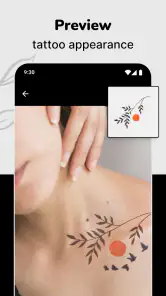
A photo preview can make an abstract idea much easier to discuss. If I were considering a small tattoo, I’d try it in more than one position and compare how the size feels against the surrounding area. That doesn’t tell me how a real tattoo will look on skin, but it can help me arrive at a clearer reference before speaking with an artist. For a playful experiment, the same process is simply a way to test a different look without committing to it.
Diving into the World of Virtual Ink
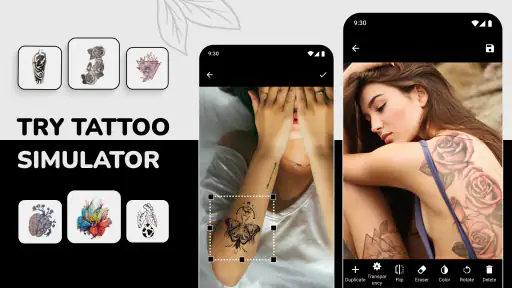
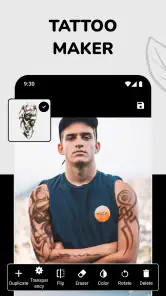
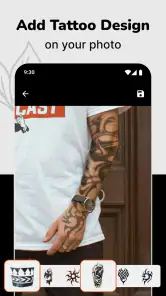
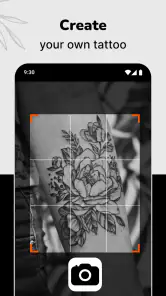
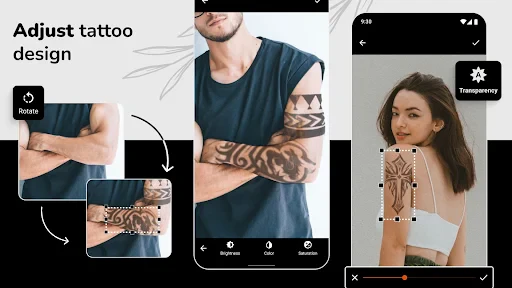
The first thing that caught my eye was how user-friendly the interface is. I mean, who wants to fuss around with complicated menus when you're just trying to see how a dragon tattoo looks on your arm? With an easy-to-navigate design, Tattoo Simulator Tattoo Maker makes it a breeze to upload a photo of yourself and start adding tattoos to your virtual body.
Customization Galore
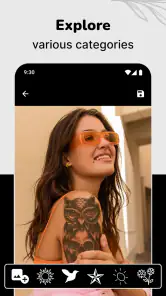
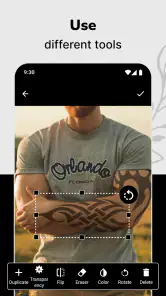
Now, let’s talk about the customization options. This app is loaded with a plethora of tattoo designs. From tribal motifs to delicate florals, there’s something for everyone. I was particularly impressed with the ability to adjust the size, color, and placement of each design. It’s almost like having a tattoo artist on speed dial! What’s more, the app allows you to layer tattoos, letting your creative juices really flow.
One feature that I found absolutely cool is the real-time preview. As you adjust your chosen design, the app updates instantly, giving you a sneak peek of your potential new look. This is perfect if you’re indecisive like me and want to see every possible version before settling on "the one."
Making a preview more useful
For a comparison that actually helps, I’d keep the photo, angle, and lighting consistent while trying different designs. Changing all three at once makes it harder to judge whether the tattoo itself works or whether the picture is doing the convincing. I’d also save a few restrained variations rather than making one elaborate mock-up: a smaller design, a larger one, and a different placement can reveal what I’m responding to. That’s a more useful starting point for a conversation with a tattoo artist than treating the most polished-looking preview as a final plan.
More From Our News Desk

Weather by Xiaomi Review: Clear at a Glance, Less Clear Up Close

X Under Pressure: Can It Recover When Posting Goes Wrong?

Clash of Clans Is Won Between the Battles

Android Auto Makes the Case for Quieter Car Software

MobiOffice: Transforming Mobile Productivity with Seamless Integration

EA SPORTS FC™ Mobile Soccer: Redefining Mobile Sports Gaming
Compared with browsing tattoo images or sketching an idea on paper, a photo-based simulator gives a more personal sense of scale and placement. The trade-off is that a phone image is still only a visual mock-up; it can’t reproduce the real texture of skin or replace an artist’s advice about what will work as a tattoo. I’d use it to narrow down a direction, not to make a final technical decision.
Sharing Your Inked Creations
Once you’ve created your masterpiece, sharing your virtual ink with friends is a cinch. The app offers seamless integration with social media platforms, so you can easily post your new look on Instagram or Facebook. Who knows, maybe you’ll inspire others to try out some virtual ink themselves!
But that’s not all. There’s an option to save your designs to revisit later. Whether you’re contemplating a real tattoo or just having fun, it’s great to have a gallery of your creations at your fingertips.
Where it fits—and where it doesn’t
A realistic everyday use would be testing a design during a quiet break, saving a couple of placements, then looking again later before taking the idea to an artist. That pause matters: a design that seems exciting in the moment may feel too large or too prominent once I compare it calmly. Keeping alternatives gives me something concrete to discuss without pretending the app can settle questions of tattoo technique or permanence.
I’d recommend it to curious first-timers, people collecting visual ideas, and anyone who wants a quick way to play with body-art concepts. I’d skip it if I wanted professional tattoo design software, precise body mapping, or a substitute for an in-person consultation. It’s also not the right choice if I’m only interested in browsing inspiration and have no use for placing designs on a personal photo; ordinary image galleries may be simpler for that.
Getting a more dependable comparison
There’s a small but useful discipline to using a simulator well: treat each test as a comparison, not a search for the single perfect-looking image. I’d begin with one clear photo, then change only one thing at a time—first the position, then the scale, then the color. That helps separate my reaction to the artwork from my reaction to the photograph. If a design only looks convincing when enlarged dramatically or placed at an awkward angle, that is useful information too; it may be a sign to rethink the design rather than keep adjusting the mock-up.
I’d also avoid comparing a crisp, brightly lit selfie with a darker photo taken from a different angle. It’s easy to mistake better lighting or a more flattering pose for a better tattoo placement. For a fair test, I’d keep the original image and make a few modest alternatives from it. If I want feedback from a friend, I’d show the options together and ask which placement reads naturally, rather than asking which one looks most dramatic. That keeps the conversation focused on the decision I’m actually trying to make.
Using it before an appointment
For someone planning a consultation, the practical payoff is not arriving with a finished design that an artist must copy. It’s arriving with clearer preferences: roughly where I’m drawn to placing it, whether I prefer a compact or more noticeable look, and which visual direction feels closest. I’d keep the saved versions as references and explain what I like about each one. A tattoo artist can then discuss how to adapt the idea for the body and the realities of tattooing, rather than treating the phone preview as a technical blueprint.
This distinction matters especially if I’m experimenting with a design that has fine detail or an unusual shape. The preview may help me notice that I like the overall silhouette, but it cannot establish whether every detail will translate well into a real tattoo. If the mock-up makes me more certain about the concept but raises questions about execution, that’s a good reason to bring those questions to an artist—not a reason to assume the image has answered them.
What the preview can and cannot settle
A common question is whether a photo mock-up can predict exactly how a tattoo will look. I wouldn’t rely on it for that. It’s useful for considering visual placement and relative size in a particular image, but a photograph and a real body are not the same viewing experience. A pose, camera angle, and lighting can all affect how the mock-up reads. I’d use the result as a conversation aid and a way to explore taste, not as a promise about the finished tattoo.
Another practical question is whether it makes sense to use this instead of a tattoo artist or a dedicated design tool. That depends on the job. For quick personal experimentation, a photo-based app is more direct than browsing unrelated examples or trying to imagine scale from a flat sketch. For custom artwork, careful body placement, or professional preparation, an artist or a purpose-built design workflow is the better choice. The app’s strength is helping me think, not replacing the person who will advise on and create the tattoo.
Keeping the fun separate from the decision
There’s room to use the app purely for entertainment, and I don’t think every mock-up needs to lead to an appointment. Trying a bold look on a photo can be a lighthearted way to see how a different style changes the impression of an outfit or portrait. In that setting, I’d worry less about perfect realism and more about whether the experiment is enjoyable. The boundary is simply remembering that a playful image is not evidence that I should get the same design permanently.
On the other hand, someone who already knows exactly what they want may find the exploration less valuable. If the main need is a custom drawing, detailed stencil preparation, or dependable guidance about what will work on a particular part of the body, this is not the tool I’d choose first. Its appeal is the quick visual test; its limits become more obvious as soon as the task moves from imagining a look to planning professional tattoo work.
My buy-or-skip take
The app has an average rating of 4.5 from around 37,000 ratings, with over 5 million installs, which suggests it has found a broad audience, though those figures don’t tell me whether its paid options suit any particular person. My value judgment is straightforward: start with the free access, see whether the preview workflow is useful, and don’t spend unless a specific paid item is worth it to you. If you just want to experiment, the free entry point is appealing; if you need dependable design guidance for a real tattoo, put your time and money toward a qualified artist instead.
In conclusion, Tattoo Simulator Tattoo Maker is more than just a fun app. It’s a gateway to exploring self-expression without the needle. Whether you’re a tattoo enthusiast or a newbie, this app offers a unique way to play with the idea of body art. So, why not give it a whirl and see where your creativity takes you?
Tattoo Simulator Tattoo Maker Frequently Asked Questions
Can Tattoo Simulator Tattoo Maker help me choose a design before visiting a tattoo artist?
Yes. The app is intended to help you picture tattoo artwork on your body before deciding what you may want in real life. Trying ideas in a preview can make it easier to compare styles and placements, then take a clearer sense of your preferences to a tattoo artist. Treat the result as a visual reference rather than a substitute for professional advice.
Can I use Tattoo Simulator Tattoo Maker on an iPhone or iPad?
Tattoo Simulator Tattoo Maker is an Android app, so it is not designed to run directly on an iPhone or iPad. If you are choosing a device for this app, check that it is an Android phone or tablet and meets the minimum system requirement. iOS users should look for an iOS-compatible alternative if they want to try tattoo previews on an Apple device.
Do I need to provide a photo to try a tattoo design?
The app’s main idea is to let you choose a tattoo and see how it looks on your body, so trying a design with a photo is central to the experience. You can use a picture of the area you are considering and compare how different artwork and placements appear. This can help you narrow down ideas before discussing a permanent tattoo with an artist.
What is Tattoo Simulator Tattoo Maker and how does it work?
Tattoo Simulator Tattoo Maker is a creative app that allows users to design and preview tattoos on their bodies before committing to the real thing. Using augmented reality technology, the app lets users upload a photo of their skin and apply various tattoo designs. With a wide range of templates and customization options, users can experiment with different styles, colors, and placements, providing a realistic preview of how a tattoo would look.
Is Tattoo Simulator Tattoo Maker suitable for professional tattoo artists?
Yes, Tattoo Simulator Tattoo Maker can be a valuable tool for professional tattoo artists. It allows artists to collaborate with clients by visualizing potential tattoo designs directly on the client's skin. This facilitates better communication and ensures clients are satisfied with the design, placement, and size before the inking process begins. Moreover, the app’s vast library of designs can inspire both artists and clients during consultations.
Pros
- Realistic tattoo designs
- Wide range of styles
- User-friendly interface
- High-quality graphics
- Offline mode available
Cons
- Limited free features
- In-app purchases required
- Ads can be intrusive
- No option to save progress
- Limited customization options
- Category
- Art & Design
- Version
- 2.9.3