Touch Lock Screen Touch Photo
- 114.00
- 4.4
- Installs
- 10.00M
- Price
- Free
Screenshots

Analysis by Reviewed
I see the appeal of Touch Lock Screen Touch Photo as a practical idea with a personal twist: it aims to keep stray screen touches from causing trouble while making the lock feel less ordinary. That could be handy when a phone is tucked into a bag or pocket, though I would treat it as an extra layer of convenience rather than a replacement for the security options built into a phone.
Where a photo-based lock can fit into daily use
Picture using your phone to follow a recipe while your hands are messy, then setting it down near the counter. An accidental tap could change the screen or open something else; a touch-locking app is meant to help prevent that kind of interruption. It may also suit someone who hands a phone to a child to look at a picture and wants to reduce unintended screen activity. In both cases, the useful question is whether the locking step feels simple enough to remember when you need it.
The photo idea gives the setup a more personal feel than a plain numeric passcode, but it also asks you to learn a particular unlocking gesture or pattern. I would choose an image with clear visual landmarks and a touch sequence that is easy for me to repeat. A busy picture may look attractive yet make the unlock action harder to remember, especially when I am in a hurry.
How it compares with familiar phone locks
Compared with a phone’s built-in PIN, password, or biometric unlock, a photo-based approach is more about personalization and managing touches than offering the same straightforward security routine. The built-in options are usually the better choice when I need a dependable primary lock or want quick access without learning a separate method. This app makes more sense for someone who values its distinctive photo interaction and has a specific nuisance it can address.
There is a small trade-off in adding any extra lock workflow: I have to remember how to activate it and how to get back to normal use. Before relying on it during a busy day, I would try the chosen pattern several times and check that I can unlock the screen comfortably with one hand. That quick practice can reveal whether the photo-based approach suits my habits or becomes an extra step I would rather avoid.
A useful check before making it part of a routine
I would also test the chosen image in the situations where I expect to use the lock, rather than judging it only while sitting at home. A photo that is easy to read in bright light may be harder to use when the screen is dim or I am moving around. That is not a reason to avoid the app; it is a reminder to choose a simple image and a repeatable touch sequence instead of making the setup elaborate just because customization is available.
For a quick trial, I would lock and unlock the phone several times, then leave it for a while and see whether I still remember the sequence without thinking. I would also check whether the lock is practical when I am holding something in my other hand. If the method feels awkward during this small test, it is better to learn that before depending on it while cooking, carrying groceries, or trying to answer a call.
More From Our News Desk

Clash of Clans Is Won Between the Battles

Android Auto Makes the Case for Quieter Car Software

MobiOffice: Transforming Mobile Productivity with Seamless Integration

EA SPORTS FC™ Mobile Soccer: Redefining Mobile Sports Gaming

How Microsoft OneDrive Became a Mobile Productivity Giant

How Google Translate Breaks Language Barriers Effortlessly
What is Touch Lock Screen Touch Photo?
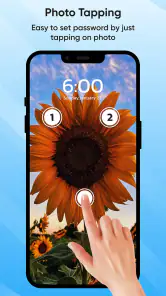
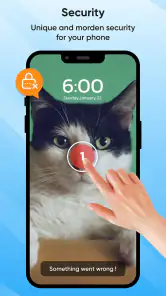
So, what exactly does this app do? In simple terms, Touch Lock Screen Touch Photo provides a creative way to lock your screen, preventing any accidental touches or taps. But what makes it stand out is how it integrates your personal photos into the locking mechanism, adding a dash of personalization to the utility.
Setting Up the App
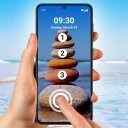
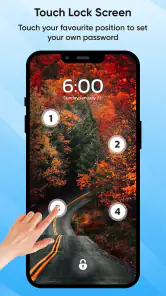
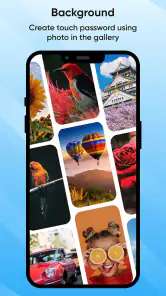
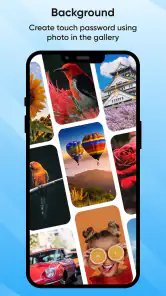
Installing and setting up the app is a breeze. Once you’ve downloaded it from the app store, you can dive straight into customizing your lock screen. The app allows you to select any photo from your gallery, which then becomes the touch pattern for unlocking your screen. It’s like having a puzzle that only you know how to solve!
Now, let’s talk about usability. The interface is pretty intuitive. Even if you’re not tech-savvy, you’ll find it easy to navigate through the settings. Plus, there’s a handy tutorial that guides you through each step.
Features That Stand Out
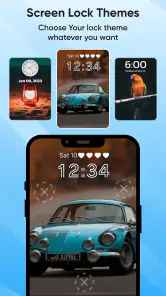
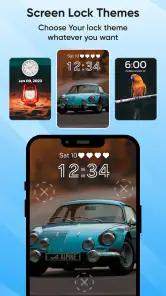
One of the coolest features is the ability to use different photos for different lock patterns. Imagine having a unique touch pattern for work and another for personal use. Not only does this add a layer of security, but it also makes unlocking your phone a fun experience. Another feature worth mentioning is the app’s ability to secure your phone without needing a passcode, which can be a lifesaver if you’re someone who tends to forget passwords.
Moreover, the app’s performance is commendable. It doesn’t slow down your phone or drain your battery, which is often a concern with security apps. You can rest assured that your phone will remain as responsive as ever.
Where it fits—and where it does not
The most convincing use case is a temporary one: I want to let someone view a photo, or keep the display from reacting to incidental taps while I am occupied, without changing how I normally unlock the phone. That is different from protecting private messages or financial information. I would keep the phone’s built-in screen security in place for that job and treat this app as a situational convenience, not as a substitute for the lock settings the device already provides.
That distinction matters if you are choosing between this and the usual alternatives. A standard PIN or biometric method is designed for ordinary access control; a touch-locking approach is appealing when the problem is unintended interaction or when a photo-based action feels more enjoyable. If all I want is to stop a child from tapping around while looking at one picture, the app’s idea may be relevant. If I need strong, familiar protection every time I leave my phone unattended, I would choose the phone’s own security controls first.
A practical habit can make the extra step less frustrating: keep the image visually uncomplicated and avoid changing the pattern casually. If I use different photos for different situations, I would make sure each one has a distinct, memorable touch route rather than relying on subtle details that look alike. The point is not to create a puzzle that is difficult for its own sake. It is to make the interaction personally recognizable without making my own access unreliable.
Small trade-offs worth considering
Any additional screen-lock workflow can create friction when I need to act quickly. A call, a timer, or a message may arrive at exactly the moment I do not want to stop and recall a separate gesture. I would therefore avoid using a complicated pattern for routine situations and would keep the phone’s normal access method familiar. If the added interaction repeatedly delays something important, the convenience has stopped being convenient.
There is also a difference between personalizing a lock and improving security. A photo can make the process feel distinctive, but a memorable image or gesture should not lead me to assume that the phone is protected in the same way as it is by its standard lock. I would not use the app as my only safeguard for sensitive information, and I would not hand over an unlocked phone on the assumption that this extra layer makes every action impossible.
Who should skip it? Anyone who wants a single, fast, dependable lock routine with no extra setup is likely better served by the built-in PIN, password, or biometric option. It is also a poor fit if I know I will forget a separate gesture or find touch-based unlocking awkward. For someone who enjoys customization and has a recurring accidental-touch problem, though, trying the free version is a reasonable way to see whether its particular approach suits their habits.
Why You Should Try It
In a world where digital security is paramount, having an app like Touch Lock Screen Touch Photo is a no-brainer. It not only secures your device but also adds a personal touch to your phone. If you’re someone who values both security and personalization, this app strikes the perfect balance.
Cards develops this free personalization app, which is rated for Everyone and requires Android 6.0 or later. Version 3.9 is the current release. Its 4.4 average from around 78,000 ratings and more than 10 million installs suggest that many people have tried it, although those figures alone cannot tell me whether its lock method will suit my routine. Optional in-app purchases range from $0.99 to $99.99 per item, so I would check the purchase screen carefully and stick to the free experience unless a paid option clearly matters to me.
Questions I would settle during a trial
Before relying on it, I would want to know whether the selected photo and unlocking action feel clear on my particular phone, and whether I can repeat the gesture when I am in a hurry. The simplest way to answer that is to try the setup in the places where I actually expect to use it: at the kitchen counter, in a bag, or while showing someone a picture. A short real-world test is more useful than assuming that a method will feel natural because its setup looks straightforward.
I would also consider what happens if I change my mind. If I decide the extra lock is not for me, I need to be comfortable returning to my usual phone routine rather than feeling committed to a method I dislike. I would learn the app’s basic activation and unlocking steps before using it as part of a busy day. That small bit of preparation is especially worthwhile for anyone who relies on their phone for time-sensitive tasks.
The purchase range is another reason to make a deliberate choice rather than tapping through prompts automatically. The app is free to try, but optional purchases can be substantially more than a small impulse add-on. I would first decide whether the core photo-based interaction solves a real problem for me, then consider a paid option only if its specific value is clear. There is no need to spend simply because a customization screen offers extra choices.
My recommendation is fairly specific: it is worth considering if you want a photo-centered way to reduce accidental taps and enjoy a more personal interaction, and you are comfortable testing a separate unlocking routine. I would skip it if my main priority were the simplest possible screen lock, or if I expected an app to replace the phone’s standard security settings. Touch Lock Screen Touch Photo is most compelling as a convenience and customization choice; the best fit depends on whether that distinctive approach saves more hassle than it adds.
To sum it up, if you’re tired of accidental screen touches and want to give your phone a personal touch, this app is definitely worth a try. The blend of functionality and customization makes it a unique tool to have in your digital arsenal. So go ahead, give it a whirl, and let your photos do the unlocking!
Touch Lock Screen Touch Photo Frequently Asked Questions
Is Touch Lock Screen Touch Photo suitable for personalizing my phone?
Touch Lock Screen Touch Photo is a personalization app centered on securing your phone with a password. Its focus makes it worth considering if you want a lock-screen-related change rather than a general-purpose utility. Before downloading, think about whether password-based access fits the way you prefer to use your phone.
Who develops Touch Lock Screen Touch Photo, and what is its age rating?
Touch Lock Screen Touch Photo is developed by Cards and is rated for Everyone. That broad age rating may help families assess whether the app is appropriate for their household, while its password-based lock-screen purpose remains the main consideration for any user. It is sensible to review the app’s purchase options and setup choices before handing a device to someone else.
Is Touch Lock Screen Touch Photo free to download, and are there in-app purchases?
Touch Lock Screen Touch Photo is free to download, so you can try its lock-screen personalization features without an upfront purchase. It also offers in-app purchases, ranging from $0.99 to $99.99 per item, so check the purchase options before confirming anything. The app is rated for Everyone, making it suitable for a broad audience.
What minimum Android version does Touch Lock Screen Touch Photo require?
The app requires Android 6.0 or later. Before downloading, check the Android version shown in your device settings to make sure it meets that requirement. Touch Lock Screen Touch Photo is a personalization app, so its main appeal is changing the look and feel of your phone’s lock screen rather than adding general-purpose phone tools.
What is Touch Lock Screen Touch Photo and how does it work?
Touch Lock Screen Touch Photo is an innovative app that allows users to personalize their lock screen with interactive touch-enabled photos. The app enables you to choose any photo from your gallery and set it as a lock screen, where certain areas can be configured to perform actions upon touch, enhancing your phone's security and user interaction. It combines functionality with aesthetic appeal, making your phone both secure and visually pleasing.
Pros
- User-friendly interface
- Customizable themes
- High security features
- Quick access settings
- Offline functionality
Cons
- Limited free features
- Occasional ads
- May drain battery quickly
- Requires frequent updates
- Not compatible with all devices
- Category
- Personalization
- Version
- 3.9













