Sketchbook Lite - Artbook
- 2.11K
- 4.5
- Installs
- 10.00M
- Price
- Free

Screenshots


Analysis by Reviewed
When several people share a tablet, a drawing app can become both a handy creative corner and a source of small mix-ups: one person’s unfinished sketch may be the next person’s starting screen. I find Sketchbook Lite - Artbook most appealing as a casual place to draw, experiment, and capture ideas, provided everyone in the household agrees on a simple way to take turns and look after their work. It is a free art and design app from Cards, with a 4.5 average from around 69,000 ratings and over 10 million installs.
A practical way to share one device
A family tablet could pass from a child drawing an imaginary animal after school to an adult sketching a birthday-card layout later that evening. The app can suit both activities, but shared use works best when people pause to check what is open before drawing. I would also agree on a handoff habit: finish the session, leave the device in a predictable state, and tell the next person whether the visible sketch is yours or ready to use.
That routine matters more than it might seem. When people are excited to draw, it is easy to add marks to the first canvas they see. If an idea is worth keeping, take a moment to make a separate drawing rather than treating the shared workspace like a personal gallery. This is a useful distinction for households with children, too: a drawing can be a temporary experiment without becoming something everyone must preserve.
Keeping projects and expectations clear
The app is intended for sketching and painting, making it a natural fit for low-pressure activities such as studying a leaf, planning a greeting card, or playing with shapes and colors. For a shared drawing session, I like the idea of choosing one prompt together and taking turns adding a detail. It gives everyone a role without requiring the same skill level, and the result can be playful rather than polished.
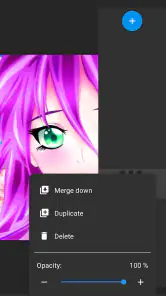
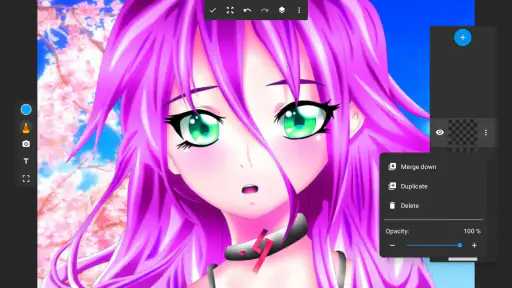
There is no need to treat every mark as a commitment. I find it helpful to use one session for loose experiments and begin a fresh sketch when I have an idea I want to develop. Layers can keep a rough outline separate from later details, which means I can revise one part without rebuilding the whole image. In a shared session, a separate layer can also make it easier to try a variation while leaving the original drawing intact.
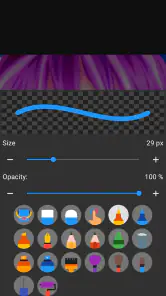
Brush adjustments invite experimentation, but they can interrupt a quick doodle if you change settings without knowing what you want to achieve. I’d test a couple of sizes and opacity levels on a disposable sketch, then stick with the setting that feels right for the drawing itself. The trade-off is straightforward: adjustable tools offer more control, while beginners may find it easier to start with a simple mark and explore settings gradually.
Age, purchases, and household trust
The content rating is Everyone, so the app is intended for a broad audience. That does not replace a household’s own decisions about screen time, supervision, or device use. The app is free, with in-app purchases ranging from $0.99 to $99.99 per item. If a child uses the device, I would check the device’s purchase controls and agree on the rules before handing it over. That is a sensible precaution for an app with optional purchases, without assuming when or how a purchase prompt might appear.
More From Our News Desk

Clash of Clans Is Won Between the Battles

Android Auto Makes the Case for Quieter Car Software

MobiOffice: Transforming Mobile Productivity with Seamless Integration

EA SPORTS FC™ Mobile Soccer: Redefining Mobile Sports Gaming

How Microsoft OneDrive Became a Mobile Productivity Giant

How Google Translate Breaks Language Barriers Effortlessly
Age also affects the kind of help that is useful. An older child may enjoy exploring brushes and colors independently, while a younger one might need an adult nearby to help manage the drawing session or find a previous sketch. If more than one person uses the tablet, agree on a simple way to identify who made each drawing. A spoken handoff or a consistent naming habit outside the app can reduce confusion without pretending that the app provides separate family accounts.
When a sketching app is the right fit
Against a basic phone doodle tool, this app offers a more art-focused space, including layers and adjustable brushes. Against a full-featured professional illustration program, its approachable feel is better suited to getting an idea down than managing a specialized production workflow. I would use it for rough concepts, practice, or casual painting; an artist with demanding requirements for a complex commission may be better served by a more advanced tool.
It can be useful away from a desk, too. While waiting for an appointment, I might notice an unusual shape or color combination and make a quick study instead of hoping I remember it later. If the idea develops, I can use that first sketch to settle the composition and put later details on separate layers. That makes revision less disruptive and keeps the early exploration from feeling like a final commitment.
For household use, the choice is less about finding one perfect app for every person and more about matching the tool to the job. Someone who wants a quick place to practice may value a focused drawing space more than a long list of specialized options. Someone who needs carefully separated personal projects, a shared team workflow, or more advanced production tools should compare alternatives against those specific needs before settling on a casual sketching app.
Making room for different hands and habits
A shared screen, separate creative time
On a family tablet, the simplest way to use a drawing app is often to agree on turns rather than assume the app will organize everyone’s projects for them. A child might sketch a creature after school, while an adult uses the same device later to plan a card or test a design. I would decide in advance whether everyone is comfortable sharing the app’s workspace, and make a habit of checking which drawing is open before starting something new. That small routine helps prevent accidental edits and avoids confusion over whose work is on screen.
The app is intended for sketching and painting, so it suits low-pressure activities particularly well: copying a leaf from the garden, roughing out a birthday-card idea, or letting a child experiment with shapes and color. For a household activity, I’d suggest choosing a prompt together and taking turns adding one detail. It gives the shared device a purpose without turning drawing into a competition, and it lets people with different confidence levels contribute in their own way.
Choosing the right boundaries
There is no need to treat every drawing as a finished piece. I find it useful to separate practice from work I want to keep: use one session for loose experiments, then start a fresh sketch when the idea matters. Layers can help with that second kind of drawing. For example, I can keep a rough outline apart from later details, so a change to one part does not require rebuilding the entire image. On a shared device, that is also a useful way to let someone try a variation without altering the underlying sketch.
Brush adjustments reward a little experimentation, but they can slow down a quick doodle if you keep changing settings without a goal. I’d try a couple of brush sizes and opacity levels on a throwaway sketch first, then reuse the setting that feels comfortable for the actual drawing. This is a practical trade-off: a customizable tool can feel more personal, yet beginners may prefer to start drawing immediately instead of tuning every mark.
Age, expectations, and trust
The content rating is Everyone, which makes the app suitable for a broad age range, but that rating is not a substitute for household rules about screen time or sharing. The app is free to download and offers in-app purchases priced from $0.99 to $99.99 per item. If a child uses the device, I’d review the purchase controls on the device itself and agree on whether purchases are allowed before handing it over. That is a sensible boundary for any app with optional purchases, not a reason to assume a child will encounter a particular prompt.
There is also a useful distinction between trust and supervision. I would let an older child explore brushes and colors independently, while a younger child may appreciate an adult nearby to help save or revisit a drawing. If several people use one device, agree on a simple naming or handoff routine outside the app so nobody mistakes another person’s sketch for their own. Those habits do more to reduce mix-ups than expecting a drawing tool to manage family accounts.
Where it fits among art apps
Compared with a basic phone doodle tool, this app offers a more art-focused workspace, including layers and adjustable brushes. Compared with a larger professional illustration program, its straightforward layout is less intimidating for a first sketch, though an experienced artist who needs a highly specialized production workflow may prefer a more advanced tool. I’d choose it for rough concepts, practice, and casual painting rather than assume a lightweight sketching setup will cover every stage of a complex commission.
It can also work well away from a desk: if I’m waiting for an appointment and notice an interesting shape or color combination, I can make a quick study rather than rely on memory later. For a more deliberate piece, I’d use the first drawing to settle the composition, then build details on separate layers. That keeps exploration inexpensive in time and makes it easier to revise a small area without disrupting the rest.
Unleashing creativity on your own terms
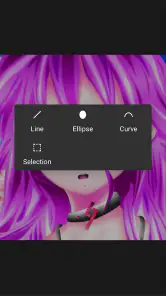
The first thing I noticed when I opened the app was its clean and intuitive interface. It's designed to get you sketching in no time. No complicated menus or overwhelming options, just a simple layout that focuses on what's important - your art. With a variety of brushes, pencils, and tools, you can mimic almost any traditional art medium. From watercolor effects to smooth pencil strokes, it's all at your fingertips.
Features that stand out
One of the standout features is the layer functionality. If you're familiar with digital art, you know how crucial layers can be for creating complex artworks. This app supports multiple layers, allowing you to work on different elements of your piece without messing up the rest. It's like having your own digital canvas, with the ability to undo and redo your mistakes without any hassle.
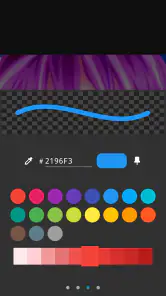
Another feature I loved is the customizable brush settings. You can tweak the size, opacity, and texture to suit your style. Whether you're into bold, expressive strokes or delicate, intricate details, there's a setting just for you. The color palette is also versatile, offering a wide range of hues to bring your creations to life.
My take for everyday sketching
Using Sketchbook Lite - Artbook is like having a mini art studio in your pocket. It’s perfect for quick sketches on the go or more detailed work when you have the time. The app runs smoothly on both Android and iOS, and I never experienced any lag or glitches during my time with it. Plus, the ability to export your work in high resolution means you can easily share your masterpieces with friends or even print them out.
The app is rated for Everyone, runs on Android 6.0 and up, and its current version is 2.5.8.3. It was released on November 30, 2021. I’d recommend checking that your device meets the minimum system requirement before installing, especially if you plan to use an older phone or tablet. With a 4.5 average across around 69,000 ratings and 2,100 reviews, it has a substantial audience, but ratings cannot tell you whether its drawing approach will suit your own habits.
Who should pick it up
I’d point beginners, casual doodlers, and artists who want a portable place for rough ideas toward this app. It is also a reasonable choice for a shared household tablet when everyone understands how to take turns and preserve their own work. If you need account separation, a structured family workspace, or a specialist tool for a demanding professional pipeline, I’d look at alternatives that explicitly fit those needs instead of expecting a sketching app to provide them.
For someone wondering whether it is useful without a stylus, I’d start with a short finger-drawn sketch and see whether the controls feel comfortable on their screen. A stylus can make careful marks easier, but the best test is whether you enjoy the feel of drawing on your own device. And if you are asking whether it is only for experts, the low-friction layout makes casual use approachable; the layers and brush settings can then grow with you as your projects become more involved.
In conclusion, if you're looking for a user-friendly art app that offers powerful features without overwhelming you, Sketchbook Lite - Artbook is definitely worth a try. It's a fantastic tool for anyone who enjoys digital art, whether you're a beginner or a seasoned pro. So go ahead, download it, and let your creativity flow!
Sketchbook Lite - Artbook Frequently Asked Questions
Can Sketchbook Lite - Artbook be used for casual drawing as well as finished artwork?
Yes. Sketchbook Lite - Artbook is presented as a place to start sketching, with tools for drawing and painting. That makes it suitable for quick creative sessions as well as working on more detailed digital pieces. If you are choosing an app for a particular workflow, consider whether its available tools and export options match how you want to create and share your artwork.
Who develops Sketchbook Lite - Artbook, and how widely is it used?
Sketchbook Lite - Artbook is developed by Cards and belongs to the Art & Design category. It has more than 10 million installs, with an average rating of 4.5 from around 69,000 ratings. Those figures suggest that many people have tried it, but your own experience will depend on the features and drawing workflow you prefer.
Does Sketchbook Lite - Artbook work on older Android devices?
Sketchbook Lite - Artbook is an art and design app for Android, and it requires Android 6.0 or later. If your device meets that requirement, you can install it and try sketching and painting. Checking your Android version before downloading is a practical first step, particularly if you use an older phone or tablet.
Is Sketchbook Lite - Artbook free to download?
Yes, Sketchbook Lite - Artbook is free to download, so you can try its sketching and painting experience without paying upfront. The app also offers in-app purchases, with items priced from $0.99 to $99.99. Consider those optional purchases when deciding whether the free experience is right for you, and review purchase details before confirming anything.
What features does Sketchbook Lite - Artbook offer for digital artists?
Sketchbook Lite - Artbook provides a comprehensive suite of tools designed for digital artists. These include a variety of brushes, customizable color palettes, and layers to help artists create detailed artwork. The app also offers zooming capabilities, symmetry tools, and a user-friendly interface, making it suitable for both beginners and advanced users looking to refine their digital art skills.
Pros
- User-friendly interface for beginners.
- Wide range of brushes available.
- Supports layer-based editing.
- Smooth and responsive performance.
- Regular updates with new features.
Cons
- Limited features in the free version.
- No text tool for annotations.
- Requires internet for some features.
- Occasional ads disrupt workflow.
- Lacks advanced photo editing tools.
- Category
- Art & Design
- Version
- 2.5.8.3