Surveillance Camera: Visory
- 2.17K
- 4.4
- Installs
- 10.00M
- Price
- Free

Screenshots

Analysis by Reviewed
I judge a home-monitoring app not just by how quickly I can open a camera view, but by whether I can understand what I’m seeing and act on it without extra fuss. Surveillance Camera: Visory is aimed at turning a phone into a way to check on a space, which makes it appealing for everyday moments: seeing whether a room is occupied, checking in while away, or keeping an eye on a quiet area at home. I’d treat it as a practical tool, not a complete security system; the value depends on the camera setup and connection around it.
Readability and navigation in everyday use
The clean, straightforward interface described in my experience is a useful starting point for people who find crowded screens tiring. A simple layout can make it easier to locate a live view or a setting, especially when you only open the app briefly. The developer is Saby Baby monitor Ltd, and the app is listed in the House & Home category. It is free to install, with in-app purchases ranging from $2.99 to $79.99 per item, so I’d check what a paid option covers before relying on it for a particular routine.
When someone is setting it up for a parent, housemate, or colleague, I’d take a few minutes to let that person try the key actions themselves: open the feed, find the alert settings, and return to the main screen. That small handover is more useful than assuming a tidy interface will feel obvious to everyone. It also helps reveal whether labels and controls are comfortable for that person to read and use on their own device.
For a household with more than one person checking in, I’d agree on a simple routine before anyone starts relying on the feed. Decide who is responsible for checking it and what an alert should prompt them to do. That avoids the awkward situation where several people assume someone else has already looked. It is a small coordination step, but it can matter more than adding another notification to a phone.
Motor and sensory considerations
Motion and sensory needs affect whether a monitoring app feels helpful. Someone who has difficulty making precise taps may prefer to use the phone on a stable surface and adjust the camera view before leaving it in place, rather than repeatedly handling the device. A person sensitive to repeated notifications may want to think carefully about alert settings and when they check them, so monitoring does not become a constant interruption. The practical point is to fit the app into a person’s routine rather than let every alert dictate it.
Live video also has limits as a form of access. A person with low vision may find a small phone image difficult to inspect, while someone who is Deaf or hard of hearing may not benefit from sound-based information in the same way as another user. I would test the actual camera feed and the phone’s display and alert behavior in the intended room before depending on them. A reliable routine should include another way to check in if the screen is hard to see or the notification is missed.
One useful test is to check the view from the position where the person will actually use it, rather than only while standing beside the camera during setup. A doorway, chair, or counter can change the angle and make details harder to interpret. If the feed is only useful when someone leans close or holds the phone at an uncomfortable angle, that is a real access barrier, not a minor setup annoyance.
More From Our News Desk

Weather by Xiaomi Review: Clear at a Glance, Less Clear Up Close

X Under Pressure: Can It Recover When Posting Goes Wrong?

Clash of Clans Is Won Between the Battles

Android Auto Makes the Case for Quieter Car Software

MobiOffice: Transforming Mobile Productivity with Seamless Integration

EA SPORTS FC™ Mobile Soccer: Redefining Mobile Sports Gaming
Getting Started with Visory
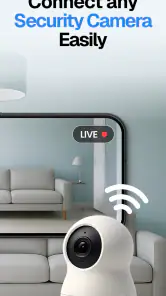
First things first, setting up Visory Surveillance Camera is a breeze. Once you download the app from the Play Store or App Store, the installation process guides you through connecting your camera to your device seamlessly. No need to be a tech wizard here; the user-friendly interface makes everything intuitive. I was up and running in no time, which was a relief because who has time to fiddle with complicated setups?
Even with a simple start, I’d avoid treating “connected” as the same thing as “ready for daily use.” After setup, check the view from the places you normally sit or stand, then leave the app and return to it as you would during a real check-in. This helps expose practical snags early: a camera aimed at the wrong part of a room, a phone that is difficult to read in that light, or a connection that behaves differently away from the router.
Features that Stand Out
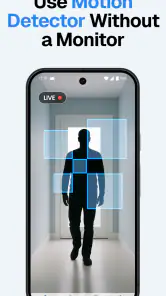
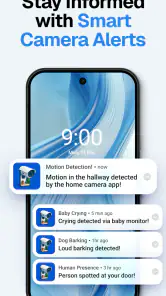
Now, let's talk about what makes Visory so special. The app offers real-time streaming, allowing you to monitor your space from anywhere in the world. I found this particularly useful when I'm away on a trip and want to make sure everything is alright back home. Plus, the motion detection feature is a lifesaver. It sends you instant alerts if any movement is detected, so you're always in the loop.
For a more measured routine, I’d avoid treating every movement notification as proof that something needs attention. A pet, a passing shadow, or ordinary household activity can all make an alert less useful if the camera is pointed at a busy spot. I’d aim the camera at the specific area I care about, then try the setup during a normal day so I can see whether the alerts are worth acting on. That placement test can save time and prevent a stream of interruptions.
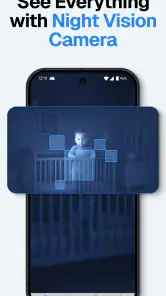
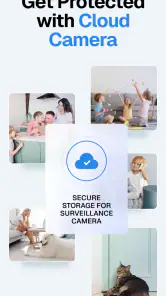
Another feature worth mentioning is the night vision capability. I was genuinely impressed by the clarity of the footage, even in low-light conditions. It's like having a night-vision goggle for your camera! And for those who love to keep things organized, the app allows you to store recordings in the cloud or locally on your device.
For night checks, I’d make the first test before there is anything urgent to see. Look at the room with its usual lights off and confirm that the part you care about is visible enough to be useful. A camera view can look reassuring at a glance while still failing to show the detail that matters. If the room’s layout changes, or furniture blocks the view, it is worth repeating that check.
Situational access: where a phone-based check helps
A realistic use for Visory is checking a hallway or living area while running a nearby errand: I can open the feed, see whether anything needs attention, and close it rather than watching continuously. That is a different habit from using a dedicated security system with a purpose-built monitor or a camera’s own branded app. A dedicated system may be a better fit if you need a coordinated set of devices or a dependable monitoring workflow; Visory is more attractive when the priority is a phone-based way to check a camera without building a more elaborate setup.
The same approach can help someone who wants a quick look at a quiet room while working elsewhere at home. I would keep the check purposeful: open the feed, confirm what I need to know, and close it. That makes the app a light-touch option rather than a reason to keep a video stream running in the background all day. If a person needs continuous observation or a response to an emergency, a phone check should not be treated as a substitute for appropriate care or a dedicated system.
The choice between cloud and local recording is also a practical trade-off, not just a storage preference. I’d consider who needs to view clips, how I want to retrieve them, and whether I’m comfortable keeping footage on the phone or using cloud storage. Before depending on saved recordings, I’d make a short test recording and confirm that I can find it again. That simple check matters more than assuming a recording option will suit a particular household automatically.
That test is also a good way to decide whether recording is needed at all. If the main purpose is an occasional live check, saved footage may add a privacy or storage concern without changing the routine. If clips are important, agree in advance who can access them and how they will be reviewed. A monitoring setup is easier to live with when its recording habits are deliberate rather than automatic by default.
Using the app when conditions change
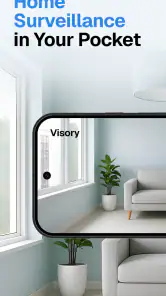
Using Visory is a smooth experience overall. The app interface is clean and straightforward, which is a huge plus for me. I can't stand cluttered screens with too many options. Here, everything is laid out neatly, making it easy to navigate. Whether it's accessing live feeds or adjusting settings, everything is just a tap away.
However, one thing to keep in mind is that the app does require a stable internet connection to function optimally. I did notice a slight lag when the connection was spotty, but this is pretty standard for most surveillance apps.
That dependence changes how I’d use it during a busy day. If a live image takes time to appear, I would not repeatedly tap controls or assume a frozen view is current; I’d check the connection and use another way to confirm anything time-sensitive. A phone app is convenient when the network cooperates, but a delay can make it unsuitable for decisions that require an immediate, reliable response.
Remaining barriers and privacy choices
The phone-based format can be convenient, but it also means the person checking the camera needs access to a compatible device and a usable connection. If you need monitoring that remains straightforward when the internet is unreliable, or a system that multiple household members can manage with minimal coordination, I’d compare alternatives before settling on this approach. A camera’s own app or a dedicated home-monitoring setup may make more sense when its controls and support match the household’s needs better.
There is also a privacy consideration whenever a camera records shared spaces. I’d agree with everyone in the household about which rooms are monitored, who can view footage, and how recordings are handled. That conversation is especially important in homes where visitors, caregivers, or people with different comfort levels use the same space. Convenience is not a good reason to skip clear boundaries.
I would also be cautious about positioning a camera where a passing person could be recorded unexpectedly. A narrow view of the area that needs checking is usually easier to explain and manage than filming a whole shared room. If the people who live in or regularly visit the home are uncomfortable with the arrangement, changing the camera’s placement or choosing another way to check in is a better answer than trying to make the app fit at any cost.
Who is likely to find it worthwhile?
In my opinion, Visory Surveillance Camera is definitely worth considering if you're in the market for a reliable surveillance app. It combines functionality with ease of use, making it suitable for both beginners and seasoned users. While there are many options out there, the real-time alerts, motion detection, and night vision features set Visory apart from the rest.
For context, the app has a 4.4 average from around 431,000 ratings and more than 10 million installs. It is rated for Everyone, and its current version is 1.23.52, with Android 8.0 as the minimum requirement. Those figures suggest it has reached a broad audience, but they don’t tell me whether the controls work well for a particular person; I’d still test the screen, alerts, and connection in the room where it will be used.
It is most appealing to someone who already has a clear, modest job for a camera: checking whether a particular area is occupied, taking a quick look while away, or reviewing a recording after an ordinary household event. I would not choose it as the sole answer for a person who needs a large, always-visible display, hands-free operation, dependable access during an internet outage, or a coordinated alarm-and-camera arrangement. In those cases, a purpose-built monitor or a camera’s own ecosystem may be easier to manage.
Before paying for an in-app option, I’d identify the exact task I expect it to solve and check whether the free experience already handles the essential routine. The in-app purchase range is broad, so it is sensible to review the purchase details in the app rather than assuming every feature is included or that a particular payment matches your needs. I’d also try the camera at the time of day I expect to use it most; a setup that is clear in daylight may not be useful in a dim room.
My inclusive verdict is that Visory can suit someone who wants a simple phone-based camera check and is comfortable with the device and network involved. It is less compelling for anyone who needs hands-free controls, a larger always-on display, or a monitoring method that does not depend on internet access. If you’re unsure, try the key tasks during an ordinary day before relying on alerts or recordings for something important. The app was released on January 7, 2022, and has 2.2 thousand reviews; I’d use those as context, while making the final call based on whether its everyday workflow actually works for you.
So, if you're looking to enhance your security setup without breaking the bank, give Visory a try. It's like having your very own security guard, minus the uniform. Trust me, you'll feel more at ease knowing that Visory has got your back, day and night.
Surveillance Camera: Visory Frequently Asked Questions
Can I use Surveillance Camera Visory on an older Android phone?
Compatibility is worth checking before you download Surveillance Camera Visory, especially if your phone has not been updated recently. The app requires Android 8.0 or later, so a device running an earlier version will not meet that requirement. If your phone is compatible, consider testing the camera and remote-viewing setup before depending on it for home monitoring.
Who develops Surveillance Camera Visory?
Surveillance Camera Visory is developed by Saby Baby monitor Ltd. Knowing the developer can help you distinguish this app from other camera or home-monitoring apps with similar names. It is a House & Home app intended to make your phone a surveillance camera remote, so think about whether that approach fits the devices and spaces you want to monitor.
Can Surveillance Camera Visory replace a dedicated home security camera?
The app’s stated purpose is to make your phone a surveillance camera remote, which offers a way to use a smartphone for monitoring rather than immediately buying a dedicated camera. Whether it can replace one depends on your needs, device placement, and connection reliability. Try the setup in the room you plan to monitor before relying on it as your main security arrangement.
Is Surveillance Camera Visory suitable for children or families?
Surveillance Camera Visory has an Everyone content rating, so it is listed for a general audience. Families may find a phone-based camera setup useful for checking on a room or household space, but it is still important to handle monitoring responsibly. Make sure people who may be recorded understand how the camera is being used and who can view it.
Can I use Surveillance Camera Visory while away from home?
Surveillance Camera Visory is described as a way to make your phone a surveillance camera remote, so remote access is central to its purpose. You can use a phone as the camera and another device to check the view, provided the setup and internet access are working. Before relying on it for an important situation, test the arrangement from outside your home and make sure both devices stay connected.
Pros
- Easy to set up and use.
- Provides real-time alerts.
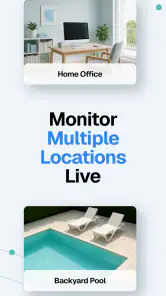
- Supports multiple camera connections.
- High-quality video streaming.
- User-friendly interface.
Cons
- Limited free features.
- Requires a stable internet connection.
- Occasional app crashes.
- Subscription can be pricey.
- Limited device compatibility.
- Category
- House & Home
- Version
- 1.23.52










