Baby Monitor Saby - 3G Babycam
- 526.00
- 4.3
- Installs
- 1.00M
- Price
- Free

Screenshots

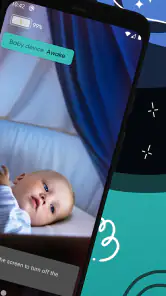
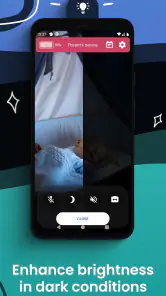
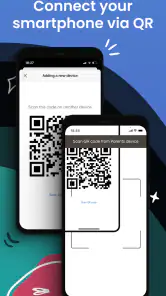
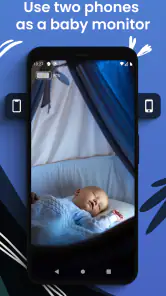
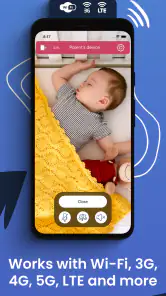

Analysis by Reviewed
When I’m choosing a baby monitor, I want something that fits the way my family actually moves through the house, not another gadget that creates extra work. Baby Monitor Saby - 3G Babycam is a parenting app that uses two devices to help me keep an eye and ear on a sleeping or playing baby while I’m elsewhere. It’s a practical idea for caregivers who already have spare phones, though it does ask a little more of the household than a dedicated monitor.
Choosing a phone-based monitor for your routine
The two-phone approach is especially handy when the caregiver is moving between rooms rather than sitting beside a conventional receiver. I can imagine using it while putting away groceries, working at a desk, or visiting family, provided the baby-side phone can stay safely positioned and the receiving device remains close enough to notice. The useful question is not simply whether remote monitoring sounds appealing; it is whether giving one phone a fixed job fits your household every day.
Before making it part of a bedtime routine, I’d decide where each phone will live and who may need the receiving device. If another caregiver might take over, agree on which phone is monitoring and make sure the person knows how to check the session. That small bit of coordination can prevent the awkward moment when one adult assumes someone else is listening.
Where the app fits today
Saby Baby monitor Ltd makes the app, which is free to install and has an average rating of 4.3 from around 50,000 ratings, with over a million installs. It is rated for everyone and runs on Android 8.0 or later; the current version is 2.205. Those details make it easy to consider as a general-purpose option, but I’d still check that both devices you plan to use are supported before relying on them for a routine.
The key appeal is flexibility: one phone stays near the baby, while the other stays with the caregiver. That can suit a parent folding laundry in another room, or someone visiting relatives who wants to keep a familiar setup without carrying a separate monitor. If you are comparing it with a basic audio-only monitor, the app’s remote viewing approach may be more useful when a quick visual check matters. If you already own a dedicated monitor that works reliably, however, there may be little reason to replace it.
Setup and User Experience
First off, setting up the Baby Monitor Saby - 3G Babycam is a breeze. I was surprised at how quickly I could transform my phone into a reliable baby monitor. You just need two devices – one stays with the baby, and the other stays with you. Whether you’re using an Android or iOS device, the app smoothly connects them through WiFi, 3G, or LTE. The process is straightforward, and the app guides you through every step of the way.
Once you’re set up, the user interface is super intuitive. I didn’t have to fumble around to find the features I needed. Everything is right where you’d expect it to be, which is a huge relief when you’re juggling parenting duties. Plus, the app’s design is sleek and modern; it doesn’t feel clunky or outdated.
More From Our News Desk

Weather by Xiaomi Review: Clear at a Glance, Less Clear Up Close

X Under Pressure: Can It Recover When Posting Goes Wrong?

Clash of Clans Is Won Between the Battles

Android Auto Makes the Case for Quieter Car Software

MobiOffice: Transforming Mobile Productivity with Seamless Integration

EA SPORTS FC™ Mobile Soccer: Redefining Mobile Sports Gaming
Making two phones work as one monitor
The two-device setup is also the main trade-off. Before bedtime, I’d put the baby-side phone on a stable surface, connect it to power if needed, and make sure it can’t be reached or pulled down. I’d keep the parent-side device where I can hear or see alerts without leaving it under cushions or in another room. A quick check of the connection before settling in is more useful than discovering a problem after the baby is asleep.
For a realistic evening routine, imagine preparing dinner while a baby naps in a bedroom nearby. The receiving phone can stay on the kitchen counter, letting you check in without repeatedly opening the door. That convenience depends on a dependable connection and a place to position the camera phone safely. A phone is not purpose-built nursery equipment, so I would avoid placing it in a cot or somewhere a child could grab it.
There is also a practical battery and availability question: the nursery phone is occupied while it is monitoring, and the caregiver’s phone needs to remain useful for receiving the feed. I would start with both devices charged and avoid relying on the setup if either phone is needed for something more urgent. If you have only two phones and one must be available for work calls or another caregiver, that limitation may matter more than the app’s convenience.
Features that Stand Out
One of the standout features is the live audio and video streaming. The video quality is top-notch, even in low-light conditions, so you can clearly see what your baby is up to. The audio is also crystal clear, allowing you to hear even the softest coos or cries. This feature is pivotal because it lets you respond promptly to your baby’s needs.
Another cool feature is the noise and motion alerts. The app sends notifications to your device if your baby is stirring or making noise. This is perfect for those moments when you’re busy with chores or resting in another room. It’s like having an extra set of ears!
In practice, I’d treat alerts as prompts to check in, not as a substitute for listening or looking myself. Household sounds and a moving baby can make notifications less decisive than a direct view, so I’d adjust my expectations during the first few uses and learn how the alerts behave in my own room. Keeping the receiving phone’s sound on and within reach also matters; a notification cannot help if it is easy to miss.
A useful way to get comfortable with alerts is to test them while you are still nearby and awake. Notice whether ordinary room noise prompts you to check the phone, and whether the alert arrives in a way you can hear from the places you normally spend time. This is not about treating the app as a diagnostic tool; it is about learning how its notifications fit your own environment before you depend on them during a busy evening.
Let’s not forget about the lullabies feature. You can soothe your baby remotely by playing calming sounds or lullabies through the device in the baby’s room. It’s a small touch, but it makes a big difference in keeping your little one relaxed and happy.
That remote playback is most useful as a gentle option when a baby is settling, rather than a promise that a song will solve every wake-up. I’d use it sparingly and pay attention to whether my child finds it comforting. It also gives the caregiver a choice between checking the feed and trying a small intervention from another room, instead of immediately interrupting a quiet moment.
Privacy, costs, and practical limits
Now, I know what you’re thinking: is my baby’s video feed secure? Well, rest easy because the app uses encryption to ensure your data is safe from prying eyes. It’s reassuring to know that the developers have taken privacy seriously.
Moreover, the app doesn’t require you to create an account or provide personal information, which is a huge plus in today’s security-conscious world. You can use the app without worrying about data breaches or privacy invasions.
Even so, I’d treat any camera pointed into a private room thoughtfully: keep access to the devices limited to trusted caregivers, and close the monitoring session when it is no longer needed. The app’s no-account approach may feel convenient, but it does not remove the need to secure the phones themselves with sensible device access habits.
One trade-off of using existing phones is that convenience depends on more than the app: the devices must be available, charged, positioned well, and connected. A dedicated monitor keeps its monitoring role separate from everyday phone use, which may be less fiddly for a household that wants a predictable, always-ready setup. Saby is more appealing when flexibility outweighs that separation, not when you want to forget the equipment is there.
The app is free to download, while in-app purchases range from $1.99 to $109.99 per item. I’d look at the purchase details inside the app before paying, and start with the free experience to see whether its routine suits you. That matters especially if you are comparing it with a dedicated monitor, where the cost and setup are different: here you are using phones you already own, but giving up one device while it serves as the nursery unit.
If you are deciding whether to spend anything, I’d first try the ordinary routine you expect to use: connect the devices, place the nursery phone safely, and see whether audio, video, and alerts are convenient from the rooms where you spend time. Then check what any optional purchase actually adds before deciding. The in-app purchase range is broad enough that I would not assume every paid item is relevant to every family.
Who will get the most from it
I see this working best for parents and caregivers who have two compatible devices, want remote audio and video, and are comfortable checking a phone connection as part of bedtime. It can also help when you are away from home and prefer a flexible setup over carrying a separate monitor. The app is less suitable if you need a standalone unit that works without tying up a phone, or if your home’s network and mobile connection are unreliable where the baby sleeps.
It is also a sensible option for occasional monitoring rather than a permanent nursery installation: for example, when a baby naps at a relative’s home and you can bring two phones instead of packing another piece of equipment. The same flexibility may appeal to caregivers who already have an older spare device. On the other hand, if you need several people to monitor at once, or expect the nursery unit to remain dedicated and ready without planning, I’d compare purpose-built alternatives before settling on a phone-based arrangement.
Compared with a simple audio monitor, Saby offers a visual check and notification-based monitoring; compared with dedicated video hardware, it relies on your phones and their placement. That distinction is the decision I’d focus on. If uninterrupted, purpose-built monitoring is your priority, a dedicated device may be a better fit. If flexibility and making use of existing phones matter more, this approach is worth trying.
For someone choosing between the usual options, I’d frame it this way: audio-only equipment is simpler when hearing is enough, while dedicated video hardware avoids turning a phone into nursery equipment. Saby sits between those approaches by making a phone the camera and giving the caregiver a mobile receiver. It makes the most sense when remote viewing is valuable and the household accepts the extra device checks; it is not automatically an upgrade for every family.
What I’d keep an eye on
The app was released in 2018 and has reached version 2.205, which gives existing users a clear current version to compare with what is installed on their devices. I would not assume that a version number alone tells the whole story of what has changed; before updating, I’d read the app’s current notes and check that the update still suits the devices I rely on. For anyone already using it, testing the connection and alerts after an update is a sensible part of the next bedtime setup.
For existing users, the practical test after an update is not just whether the app opens. I’d confirm that the two devices still pair as expected, that the receiving phone presents alerts in a noticeable way, and that the feed is usable from the spots where I normally spend the evening. That quick routine check is especially worthwhile if the app is part of a regular sleep setup, because a change that seems minor on a phone can affect how confidently you use it.
What I’d watch over time is whether the current version continues to work smoothly with the devices a household already owns and whether the app’s update notes explain changes that affect everyday use. The release history tells me this is an established app rather than a brand-new experiment, but it does not by itself promise a particular future feature or improvement. I’d judge any future change by whether it makes setup, alerts, or routine checking more dependable.
My overall view is that this is a convenient phone-based monitor with a useful mix of live checking, alerts, and remote soothing, balanced by the need for two devices and a dependable connection. I’d recommend trying it if those trade-offs fit your home, while keeping a backup plan for nights when a phone, battery, or connection is not dependable. All in all, if you’re on the hunt for a reliable, easy-to-use baby monitor app, the Baby Monitor Saby - 3G Babycam is definitely worth checking out. It combines convenience, efficiency, and security into one neat package. So go ahead, give it a try, and enjoy the peace of mind it brings knowing your baby is just a glance away.
Baby Monitor Saby - 3G Babycam Frequently Asked Questions
Can Baby Monitor Saby replace an adult staying nearby while the baby sleeps?
No app should be treated as a substitute for appropriate adult supervision or safe sleep practices. Baby Monitor Saby is intended to help parents keep an eye on a baby remotely while they sleep or play, and its smart notifications can provide an additional way to stay informed. Use it as a monitoring aid, not as a guarantee that every situation will be detected.
Is Baby Monitor Saby free to download, and are there optional purchases?
Baby Monitor Saby is free to download, with in-app purchases available for users who want to access paid options. You can start with the free app and decide whether its available features suit your needs before making a purchase. In-app purchase prices range from $1.99 to $109.99 per item, so review the purchase details shown in the app before confirming.
What devices and setup do I need to use Baby Monitor Saby?
Baby Monitor Saby is a parenting app designed for remote baby monitoring, so you will need compatible mobile devices and a connection between them to use it as a monitor. Before downloading, check that your device runs Android 8.0 or later if you are using Android. A stable internet connection helps support remote monitoring while your baby sleeps or plays.
What are the main features of Baby Monitor Saby?
Baby Monitor Saby offers a comprehensive set of features, including real-time audio and video streaming, motion and sound detection alerts, and cross-platform compatibility. It allows parents to monitor their baby’s sleep and activities remotely using 3G, 4G, or Wi-Fi connections. The app also includes a night vision mode, two-way audio communication, and a secure connection to ensure your baby’s safety.
Is Baby Monitor Saby compatible with both Android and iOS devices?
Yes, Baby Monitor Saby is designed to be compatible with both Android and iOS devices. This means you can use it across different smartphones and tablets, making it a versatile option for parents who may use different operating systems. The app supports seamless streaming and reliable alerts on both platforms, ensuring you stay connected with your baby at all times.
Pros
- Easy setup and user-friendly interface.
- Secure connection ensures privacy.
- Supports background audio monitoring.
- Multi-parent access for shared monitoring.
- High-quality video streaming.
Cons
- Requires stable internet connection.
- Consumes battery quickly on mobile devices.
- Some features locked behind a paywall.
- Occasional connectivity issues reported.
- Limited features in free version.
- Category
- Parenting
- Version
- 2.205












