Super Hearing from Distance
- 439.00
- 4.6
- Installs
- 500.00K
- Price
- Free

Screenshots
Analysis by Reviewed
Before trying a listening amplifier, I think it helps to ask a practical question: will it fit the moment when I need it? Super Hearing from Distance turns that into a phone-based experiment, but the experience depends on more than sound settings. Your surroundings, how you position the phone, and whether you can listen comfortably all matter. I’d treat it as a situational aid for hearing nearby sound more clearly, not as a way to listen through walls or a replacement for professional hearing support.
When the connection matters
Sound amplification is the main point, yet a phone app can also involve network-dependent moments, such as installing or updating it. Once I’m using a listening tool, I don’t want a weak connection to become another thing to troubleshoot. I’d set it up before heading somewhere noisy, rather than waiting until I’m already trying to follow a conversation. That simple preparation is useful for any phone-based audio tool, especially when the moment is brief and I need my attention on the person speaking.
For a short trial, I’d check that the phone has enough battery and that my headphones are connected before opening the app. I’d also keep the phone within reach: the microphone can only capture what it can pick up from its physical position, so leaving it in a bag or pointing it away from the sound is likely to undermine the benefit. That is a more important limitation than any clever setting; amplification cannot make a poorly placed microphone hear clearly.
Choosing the right place and purpose
This kind of app is most appealing when I can control the setup a little: listening to a TV at a comfortable distance, following a lecture from a seat, or hearing someone nearby in a room. If I were helping a family member at home, I’d place the phone near the sound source, use headphones, and adjust the level gradually. I would not leave it recording or listening unattended, and I’d ask people nearby before using it in a way that could capture their conversation.
It is less suitable for fast-moving situations, outdoor traffic, or a crowded room where several voices compete. In those settings, raising sensitivity may bring up more noise along with the voice I want. A dedicated hearing aid is a better option for regular hearing support because it is designed around that need; a phone amplifier is more of a flexible, occasional tool. Anyone with ongoing difficulty hearing should talk with a qualified health professional rather than relying on an app to assess or treat it.
Trying adjustments without making things worse
I’d make one change at a time instead of pushing every control upward. First I’d choose a quiet test environment, then move the phone closer to the speaker or TV, and only then adjust the listening level. This makes it easier to tell whether a clearer result comes from better positioning or a setting change. It also reduces the chance of sudden loud audio in headphones, which can be uncomfortable or unsafe.
If the sound becomes harsh, starts feeding back, or grows tiring, I’d lower the level and take the headphones off before trying again. If the app stops responding, I’d close and reopen it, check the headphone connection, and test the phone’s ordinary audio before assuming the app is the problem. These are simple recovery steps, but they matter when the phone is being used as part of a real conversation rather than as a gadget to play with.
More From Our News Desk

 Block Blast!
 Makes Every Clear Feel Like One More Turn
A clean little block puzzle becomes a study in space, risk, and self-control. Its best moments come from one satisfying clear; its toughest test is knowing when to stop.

 Super Stylist Fashion Makeover
Super Stylist Turns Dress-Up into a Runway Career
Its makeover-to-client loop turns quick outfit decisions into shareable style theater. The question is whether the closet keeps giving players a reason to return.

 Block Craft 3D:Building Game
Block Craft 3D Under Pressure: How Well Does It Recover When Building Goes Wrong?
A failure-focused look at Block Craft 3D’s forgiving building loop, its uncertain recovery edges, and the moments that demand more than a cheerful village.

 Woodturning
 Trades Creative Freedom for a Satisfying Carving Loop
If your usual creative game is about building, decorating, or styling, Woodturning trades open-ended projects for a tactile, tightly guided carving loop. Here is what that switch really costs.

 PUBG MOBILE
 Shows What Battle Royale Must Get Right
PUBG MOBILE shows how battle royale has matured: bigger systems matter less than meaningful choices, readable fights, and a reason to return after every loss.

 Braindom: Brain Games Test
Braindom’s Social Life Happens Between Puzzles
Braindom turns quick logic traps into a personal ritual, but its community value is more about comparing answers than building together.
Latest News



Getting Started with Super Hearing
The first thing I noticed about the Super Hearing from Distance app is how easy it is to set up. Downloading and installing it took just a few minutes. Once installed, the interface greets you with a straightforward layout that even your tech-challenged uncle could navigate. It’s all about the basics here, folks.
Before you get started, you might want to grab a pair of headphones. The app works best when you plug in your earbuds, allowing the microphone to pick up distant sounds and relay them directly to your ears. It’s like having a superpower, minus the cape and tights.
The Real Deal: Features
So, what can Super Hearing from Distance actually do? The app claims to enhance sound quality, allowing you to hear whispers and other subtle noises from afar. I decided to test it out in a busy coffee shop, where ambient noise typically drowns out most conversations. To my surprise, the app managed to filter through the background buzz, bringing nearby chatter into sharper focus.
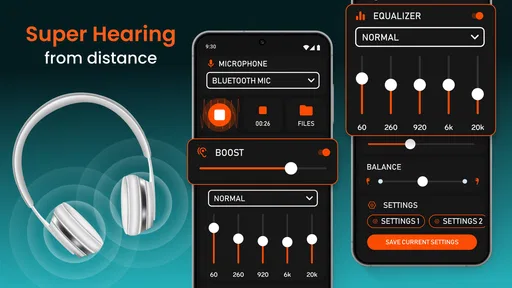
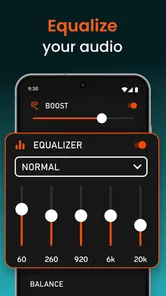
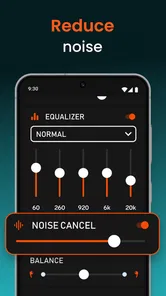
The app offers several settings to tweak your listening experience. You can adjust the microphone sensitivity and apply different sound filters to suit your environment. Whether you’re in a quiet library or a bustling street, there’s a setting to help you tune in effectively.
Tuning In: Performance
Let’s talk performance. Once I got the hang of the settings, I was genuinely impressed by how well the app performed. It didn’t turn me into a superhero, but it certainly made me feel like one. The app does a decent job at amplifying sound without distorting it too much. The voice clarity is surprisingly good, although it can pick up unwanted noise if you’re not careful with your settings.
One thing to keep in mind is battery usage. The app can be a bit of a power hog, so it’s wise to keep an eye on your battery life if you plan to use it for extended periods. But hey, that’s a small price to pay for temporarily having superhuman hearing, right?
Everyday Use and Practicality
So, is the Super Hearing from Distance app practical for everyday use? It depends. If you’re someone who needs a little extra help hearing in certain situations, this app could be a game-changer. It’s also fun for those of us who are just curious or like to experiment with tech gadgets.
However, it’s crucial to remember the ethical implications of using such a tool. Respecting privacy is key. You don’t want to end up in hot water for eavesdropping on conversations that aren’t meant for your ears. Use it wisely and responsibly, folks!
Final Thoughts
DOSA Apps’ free medical app has earned a 4.7 average from around 13 thousand ratings, and it has more than 500 thousand installs. It is rated Everyone, was released on July 31, 2020, and its current version is 1.1.6.5, which supports Android 5.0 and newer. Optional in-app purchases range from $0.99 to $99.99 per item, so I’d check the purchase details before choosing anything beyond the free experience.
That makes it easy to try, but “free” does not mean it should be used without thought. I’d use it in a quiet, familiar place first, keep the volume conservative, and decide whether the improvement is actually comfortable. If you need consistent support every day, a hearing aid or a clinician’s advice is a more appropriate path than repeatedly improvising with a phone and earbuds.
What to expect from a phone-based listening aid
Compared with simply turning up a television or asking someone to speak louder, this app gives me another way to route nearby sound to headphones. That can be handy when raising the room volume would bother someone else. But it is not equivalent to a dedicated assistive listening device: the phone’s microphone position, room acoustics, headphone fit, and surrounding noise all shape what reaches my ears. For a lecture, sitting closer to the speaker may help more than changing settings; at home, moving the phone nearer the TV can be more useful than increasing sensitivity from across the room.
One trade-off is that headphones can make it harder to notice what is happening around me. I would not use them while crossing streets, cycling, or doing anything that requires awareness of nearby sounds. In a conversation, I’d also keep the phone visible and explain what I’m doing rather than placing it secretly near other people. The app’s usefulness does not override ordinary privacy or safety judgment.
Small habits that make a trial more useful
If I were testing it for a family member, I’d compare the same short spoken sentence with and without amplification, at a comfortable volume and in the same seat. That gives a more meaningful answer than trying different settings in several noisy places at once. I’d also note whether the sound is clearer or merely louder: those are not the same thing, and louder audio can become fatiguing without improving understanding.
For travel or a day out, I’d avoid relying on the app as the only plan for an important announcement. Public spaces can be echoey, and a phone microphone cannot guarantee that a distant voice will be intelligible. If it does not help quickly, I’d move closer, ask the speaker to repeat themselves, or use another accommodation rather than spending the whole moment adjusting controls.
My connectivity verdict
My view is that this is worth considering as a free, occasional listening aid if you are comfortable using a phone and headphones and can test it safely in advance. The developer, DOSA Apps, places it in the medical-app space, but I would not mistake that category for a diagnosis or treatment. Network access is most relevant when getting or updating the app; for the listening situation itself, the practical priorities are phone placement, a stable headphone connection, sensible volume, and a setting that suits the room.
All in all, the Super Hearing from Distance app is a neat addition to your smartphone’s arsenal. It’s not perfect, and it won’t replace a good set of hearing aids, but it offers a unique way to enhance your listening capabilities on the go. Whether you’re using it for practical reasons or just for fun, it’s worth a download. Just remember to keep those ethical considerations in mind, and you’ll be all set to explore the world of amplified sound.
A realistic test at home
One useful way to judge whether the app suits you is to try it during a familiar, low-pressure moment rather than when you are already struggling. For example, while watching television with someone else in the room, I’d leave the TV at its usual volume, place the phone near the speaker, and listen briefly through headphones. If speech becomes easier to follow without making the room louder, that is a practical benefit. If the result is only louder, or the sound is tiring, I would not keep increasing the level in hopes of forcing clarity.
I’d also compare the phone’s position before changing filters. A small move closer to the television or conversational partner may improve the signal more than an adjustment made from the sofa. This is a simple but easily missed trade-off: the app can make an available sound more prominent, while placement determines what the microphone receives in the first place.
Who will get the most from it
I see the strongest fit for someone who wants occasional help in a controlled setting and is already comfortable with a smartphone and headphones. A student in a lecture room, for instance, could test it before class from a seat where using the phone is acceptable, then decide whether the amplified sound helps. At home, it may be worth trying when one person wants clearer TV audio without asking everyone else to tolerate a higher speaker volume.
It is a weaker fit if you need reliable hearing support throughout the day, want to hear while moving around, or cannot comfortably wear headphones. It is also not a good answer to sudden or persistent changes in hearing. In those cases, a hearing professional can help identify the cause and discuss suitable support; an amplifier app cannot do that work. For a single important conversation in a noisy place, asking to move somewhere quieter may be more effective than attempting to tune out competing voices.
Costs, expectations, and sensible boundaries
The free starting point makes experimentation accessible, but I would treat optional purchases cautiously and decide whether they solve a need before paying. Try the basic listening workflow first, in more than one quiet setting, and keep track of whether it genuinely improves understanding. A purchase is not worthwhile just because the sound is louder or because a difficult environment makes the app feel tempting in the moment.
Super Hearing from Distance Frequently Asked Questions
Who develops Super Hearing from Distance, and what is its age rating?
Super Hearing from Distance is developed by DOSA Apps and is a medical app rated for Everyone. That rating may help families decide whether its intended audience suits them, but it does not replace sensible supervision when a child uses a phone or headphones. As with any sound-amplification tool, listening at a comfortable volume is important.
Is Super Hearing from Distance free to download, and are there in-app purchases?
The app is free to download, so you can try its basic offering without paying an upfront price. It also includes optional in-app purchases, with items ranging from $0.99 to $99.99 each. Before confirming a purchase, review the displayed price and purchase details on your device, especially if you share the device or its app-store account with someone else.
What is Super Hearing from Distance and how does it work?
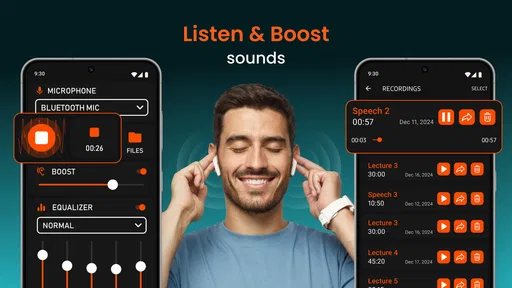
Super Hearing from Distance is an app designed to amplify sound, allowing users to hear distant conversations or subtle noises more clearly. It works by using your device’s microphone to capture audio, which is then processed and amplified through headphones. The app is ideal for enhancing hearing in various environments, such as lectures or crowded spaces.
Is Super Hearing from Distance safe to use?
Yes, Super Hearing from Distance is safe to use when used responsibly. However, it’s important to be mindful of privacy and legal considerations, such as not using the app to listen in on private conversations without consent. Additionally, prolonged exposure to amplified sounds can potentially damage hearing, so users should monitor volume levels.
What are the main features of Super Hearing from Distance?
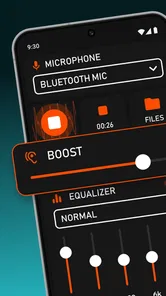
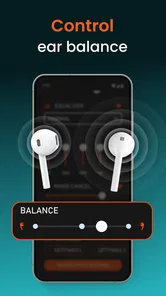
Super Hearing from Distance offers features like sound amplification, noise reduction, and customizable frequency settings. Users can adjust the amplification level to suit their needs and filter out background noise for clearer sound. The app also includes an equalizer to enhance specific sound frequencies, making it versatile for different hearing environments.
Pros
- Enhances sound clarity effectively.
- User-friendly interface and navigation.
- Customizable settings for various needs.
- Works with multiple Bluetooth devices.
- Increases volume without distortion.
Cons
- May drain battery quickly.
- Limited functionality without headphones.
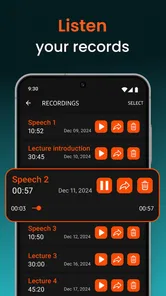
- Potential privacy concerns with recording.
- Requires stable internet for updates.
- Ads can be intrusive in free version.