Smart Launcher 6 ‧ Home Screen
- 30.69K
- 4.6
- Installs
- 10.00M
- Price
- Free

Screenshots
Analysis by Reviewed
I like launchers most when they make everyday phone use feel more personal without turning setup into a project. Smart Launcher 6 ‧ Home Screen sits in that appealing middle ground: it offers plenty of ways to reshape the home screen, while its categorized app drawer gives you a practical way to find things. I’d consider it if the default Android layout feels plain or cluttered, but I’d also think about how much time I really want to spend tuning a screen I use dozens of times a day.
Where connectivity enters the picture
A launcher is part of the phone’s everyday interface, so I judge it differently from an app I open only when I need a specific task. The core experience here is about arranging and reaching apps, choosing a look, and placing widgets; those choices are personal and ongoing rather than a one-off setup. Network conditions can still matter when you’re browsing for themes or other online content, so I wouldn’t expect every customization step to feel equally immediate in every situation.
For a smoother first setup, I’d make the main layout choices when I have a little time and a stable connection, then leave smaller adjustments for later. That’s especially useful if you’re comparing several themes or icon styles: decide on the overall mood first, then fine-tune the details. It keeps customization from becoming a string of distracting taps when you’re trying to get out the door.
A fit for commutes, workdays, and shared routines
The practical benefit becomes clearer during a busy day. Imagine unlocking your phone on the way to work to check a calendar widget, then opening a messaging app without searching through a long, mixed app list. A home screen that reflects your habits can make that routine feel more direct. Categorization is helpful when you remember what kind of app you need but not exactly where you left its icon.
I’d recommend this approach to someone who likes a considered layout and enjoys matching icons, widgets, and wallpaper. It can also suit people who install many apps and want a more orderly drawer than a single long grid. If you prefer your phone to look exactly as it did out of the box, or dislike adjusting layouts and learning a different launcher’s conventions, the standard home screen may be less work.
Making changes without losing your bearings
One useful habit is to change one layer at a time: start with the wallpaper and broad theme, then assess whether the icon treatment and widgets still look right. This makes it easier to spot which choice improves readability and which one merely looks attractive in a preview. I’d keep frequently used apps easy to reach and avoid filling every open space with widgets; a calmer screen is often faster to scan.
There is a trade-off in choosing a third-party launcher: your home screen becomes more adaptable, but it may not behave exactly like the phone maker’s default interface. After changing launchers, take a moment to check your everyday gestures and where familiar controls now sit. If something feels awkward, simplify the layout rather than assuming that more customization automatically means a better experience.
A Fresh Take on Home Screens
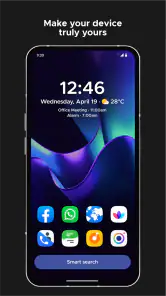
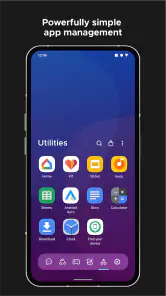
First things first, Smart Launcher 6 ‧ Home Screen isn’t just your average launcher. It’s like the cool kid who moved into town and suddenly made your neighborhood a lot more interesting. The moment I installed it, I was greeted with a sleek, intuitive interface that felt like a breath of fresh air. The app categorically organizes your apps, making navigation a breeze. I mean, who wants to scroll endlessly just to find Instagram, right?
Customization Galore
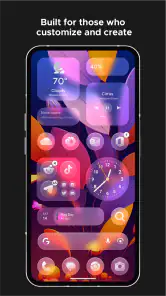
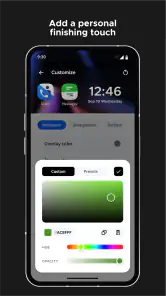
Now, if you’re one of those people who loves tinkering with every aspect of your phone’s appearance, you’re in for a treat. This app offers a plethora of customization options. From themes to icon packs, and even the layout, you can tweak it all to match your vibe. I spent a good hour just playing around with the different themes, and trust me, it was time well spent.
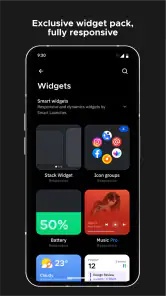
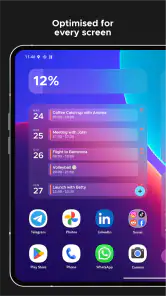
What caught my eye was the app’s ability to adapt to the wallpaper colors, making everything feel cohesive and aesthetically pleasing. It’s like your phone suddenly developed a sense of style. Plus, the widgets! Oh boy, they’re not just functional but also add that extra flair to your home screen.
Performance and Usability
Alright, let’s talk performance. A pretty interface is great and all, but if it slows down your phone, it’s a no-go for me. Thankfully, Smart Launcher 6 doesn’t disappoint. It’s optimized to be lightweight and fast, ensuring that your phone runs smoothly. I didn’t notice any lag, which is a huge win in my book.
Another thing I appreciated was the user-friendly design. Even if you’re not tech-savvy, you’ll find it easy to navigate. The app drawer is smartly designed, categorizing apps by type, so everything is exactly where you expect it to be.
Choosing it with realistic expectations
In the personalization category, the usual alternative is to stick with the manufacturer’s launcher, which tends to ask less of you because it’s already familiar. I’d choose Smart Launcher when I want a more tailored layout and a drawer that sorts apps by type; I’d stay with the default if consistency with the phone’s built-in gestures matters more than appearance. Neither choice is automatically better—the right one depends on whether customization solves a real annoyance for you.
Smart Launcher is a free app from Smart Launcher Team, rated for Everyone, and it has a 4.6 average from around 652,000 ratings, with over 10 million installs. It first appeared on July 11, 2012, and version 6.5 build 053 requires Android 7.0 or later. I like that it’s accessible without an upfront price, though in-app purchases range from $0.49 to $27.99 per item, so I’d check what a particular extra costs before buying. You can start with the free experience and decide whether any paid option is worth it for your own setup.
When the connection is unreliable—and when to keep things lean
If a theme search or other online-facing part of setup stalls, I wouldn’t keep tapping and changing several things at once. I’d return to the last layout that felt comfortable, wait until the connection is steadier, and make one adjustment at a time. That simple recovery approach helps separate a temporary network hiccup from a layout choice that genuinely isn’t working. For travel or a low-data routine, I’d also avoid repeatedly browsing for new visual options; settle on a look you like and keep the home screen focused on the apps and widgets you already use.
Small choices that make the layout work harder
I’d treat the first screen as a quick-access surface, not a showcase for every customization option. Put only the apps you reach for without thinking in the easiest spots, then use the categorized drawer for less frequent tools. That division gives the drawer a job instead of making it another place to decorate. It also makes the visual choices easier to judge: if a widget pushes an everyday app out of reach, the widget may not be earning its space.
For someone who changes phones or rearranges apps often, categories can be more useful than memorizing a fixed grid. The trade-off is that automatic organization may not match the personal grouping you already use, so I’d spend a little time checking where familiar apps land before relying on the drawer in a hurry. If the category view doesn’t fit your mental map, keeping essential shortcuts on the home screen can reduce that friction without requiring a full redesign.
How it fits different Android habits
The main comparison is not simply between a plain screen and a prettier one. A manufacturer’s launcher is usually the easiest choice when you value its established gestures and want to leave the phone’s interface alone. A more customizable launcher makes sense when the stock arrangement is actively getting in your way—perhaps you have many apps, want a more coherent visual style, or prefer to organize around how you use the phone rather than how it arrived. Smart Launcher’s appeal is that it combines appearance changes with a sorted drawer, so it can address both looks and everyday retrieval.
I wouldn’t recommend switching just because customization sounds fun if you’re already happy with your current setup. A new launcher introduces a small learning curve, and a change in familiar gestures or navigation can outweigh a fresh theme. People who need the manufacturer’s exact home-screen behavior should stay with it; people who want to shape their layout and are comfortable adjusting should find the switch more worthwhile.
A practical routine for setup and recovery
On a normal workday, I’d set up the screen at home rather than trying to redesign it between errands. I’d choose a readable wallpaper, place a calendar or another genuinely useful widget, and keep the apps I use before work within easy reach. Once that basic arrangement feels right, I’d leave it alone for a few days. That short trial reveals whether a choice helps in real use or only looked good while I was experimenting.
If the layout starts feeling crowded, I’d remove one item at a time instead of starting over. If an online theme or visual option takes a while to load, I’d pause rather than repeatedly requesting it, then return to the familiar arrangement and try again when conditions are better. This is a sensible way to avoid confusing a temporary delay with a problem in the home-screen setup itself.
Final Thoughts
The app has a strong case for people who enjoy a personal, organized Android home screen, but it isn’t the right pick for everyone. If you want a set-and-forget interface, rely heavily on a phone maker’s familiar behavior, or don’t care about themes and icon styling, a default launcher is the simpler choice. If you do try it, my advice is to begin with a tidy app drawer and a small number of useful widgets, then add visual details only when they improve your daily routine.
In a nutshell, Smart Launcher 6 ‧ Home Screen is a fantastic choice for anyone looking to spruce up their phone’s interface without sacrificing performance. It’s stylish, highly customizable, and most importantly, user-friendly. Whether you’re a customization enthusiast or just someone looking to freshen up your phone’s look, this app is definitely worth a try. Go ahead, give your home screen the makeover it deserves!
Smart Launcher 6 ‧ Home Screen Frequently Asked Questions
Will Smart Launcher 6 replace my phone’s current home screen?
Smart Launcher 6 is a home screen replacement, so setting it up means using it in place of your phone’s existing launcher when you return to the home screen. You can explore its layout and personalization tools, then decide whether it suits the way you use your device. If you prefer your original setup, your phone’s launcher settings can be used to switch back.
Can I use Smart Launcher 6 with widgets and app icons from my device?
Yes. Widgets and icons are among the ways Smart Launcher 6 lets you shape your home screen. The app’s focus on themes, blur, widgets, and icons gives you room to create a look that feels personal, while its home-screen layout can help keep everyday items accessible. The precise options you see may depend on your device and the features you choose to use.
Does Smart Launcher 6 organize apps, or do I need to arrange everything myself?
Smart Launcher 6 is designed to organize apps into categories, helping reduce clutter and make navigation more intuitive. You can also personalize the layout and app categories to suit how you prefer to find things. This gives you a starting point rather than requiring every part of the home screen to be arranged from scratch, while still leaving room to make the experience your own.
Can I try Smart Launcher 6 for free before paying for extra features?
Yes. Smart Launcher 6 is free to download, so you can try its home-screen experience and basic personalization before deciding whether to buy anything. Optional in-app purchases range from $0.49 to $27.99 per item, so check the purchase details shown in the app before confirming a transaction. You can continue using the free version if its available features meet your needs.
What is Smart Launcher 6 and how does it enhance my home screen experience?
Smart Launcher 6 is a customizable home screen replacement app designed to improve the functionality and aesthetics of your Android device. By organizing apps into categories and providing a sleek, minimalist design, it enhances user experience by making navigation more intuitive and reducing clutter. Users can enjoy a more efficient and visually pleasing interface, tailored to their personal preferences. Its focus on themes, blur, widgets, and icons makes it an option for anyone who wants a more personalized home screen.
Pros
- User-friendly interface enhances accessibility.
- Highly customizable themes and widgets.
- Efficient app search saves time.
- Smooth performance with minimal lag.
- Supports gesture controls for quick access.
Cons
- Limited free version features.
- Occasional ads in free version.
- Some themes require in-app purchases.
- May drain battery faster on older devices.
- Limited integration with third-party apps.

- Category
- Personalization
- Version
- 6.5 build 053












