Skype for Business for Android
- 5.51K
- 3.8
- Installs
- 10.00M
- Price
- Free

Screenshots







Analysis by Reviewed
So, you've probably heard about Skype for Business if you're in the professional world, right? I decided to take it for a spin on my Android device, and let me tell you, it was quite the ride! Whether you're working from home or traveling, staying connected with your team is crucial, and this app claims to make it easy. But does it really deliver? Let’s dive into my experience.
A Seamless Integration
First off, setting up Skype for Business was a breeze. I was worried it might be a hassle, but the integration with my existing Skype account was smooth. The app pulls in all your contacts effortlessly, which means you can get started without any fuss. The interface is pretty intuitive. I didn’t have to spend hours figuring out where things were, which is a huge plus in my book. Everything from chats to calls is just a tap away.
Feature-Packed for Professionals
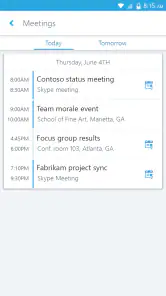
One of the standout features for me was the ability to schedule and join meetings directly from the app. This is particularly handy when you're on the go. No more missing meetings because you're stuck in traffic or away from your desk. I also loved the instant messaging feature, which feels just like texting, but better because it’s integrated with all your business contacts. And, if you’re worried about security, rest assured, Microsoft has got you covered with enterprise-grade security measures.
Audio and video quality were generally impressive. I did experience a couple of hiccups during a video call, but nothing major. It seemed to adjust well to network fluctuations, which is crucial when you’re relying on mobile data. Plus, the screen sharing feature is just a lifesaver when you need to present something on the fly.
Room for Improvement?
Now, while it’s a solid app, it’s not without its quirks. Occasionally, I noticed that the app would lag or freeze, particularly when multitasking with other apps. It’s not a dealbreaker, but it can be annoying when you’re in the middle of an important call. Also, it does feel like it drains the battery a bit faster than other apps, so you might want to keep your charger handy if you’re planning long calls.
Another thing worth noting is that while the app is great for internal communications, connecting with external clients who aren’t using Skype for Business can be a bit of a hassle. It requires them to download the app, which not everyone is keen on doing.
Final Thoughts
In conclusion, Skype for Business for Android is a robust tool for anyone who needs to stay connected with their team while on the move. It’s packed with features that make professional communication seamless and efficient. While it has a few areas that could use some polishing, like performance optimization and battery usage, it’s definitely a reliable companion for business professionals. So, if you’re looking for a way to keep your work conversations flowing no matter where you are, give it a try!
Pros
- Seamless integration with Office apps.
- High-quality video and audio calls.
- Efficient collaboration tools.
- Easy scheduling for meetings.
- Secure communication features.
Cons
- Limited free features.
- Occasional connectivity issues.
- Complex setup for new users.
- Heavy on battery usage.
- Requires strong internet connection.

- Category
- Business
- Version
- Varies with device











