Simple Calendar
- 4.95K
- 4.6
- Installs
- 10.00M
- Price
- Free
Screenshots
Analysis by Reviewed
When I want to check a plan quickly, I don’t want to fight through layers of menus or decode a crowded screen. A calendar needs to make dates and commitments easy to scan, especially when I’m tired, in a hurry, or looking at my phone in an awkward setting. That is the standard I use for Simple Calendar: a practical Android productivity app from Simple Mobile Tool that aims to keep everyday scheduling clear without turning it into a larger planning system.
Choosing a calendar that fits the way you plan
I find this app easiest to judge by asking one simple question: do I need a place to keep personal dates visible, or do I need a complete system for coordinating work and other people? Simple Calendar is aimed at the first situation. Its value is not that it replaces every planning tool, but that it gives everyday appointments, recurring plans, and reminders a more direct home than scattered notes or memory.
That distinction matters if you are choosing between it and the calendar already on your phone. A built-in calendar may be the more convenient option if you want to keep everything inside the tools you already use. Simple Calendar makes more sense if its home-screen widget and uncluttered approach suit you better. If your day revolves around shared projects, assigning tasks, or coordinating a group, I would look for a planner built around those jobs instead of expecting this app to become a team workspace.
Readability and everyday navigation
Hey there! So, I’ve been playing around with this app called Simple Calendar, and let me tell you, it’s quite the gem if you’re on the lookout for a no-frills, straightforward calendar app. You know how some apps just try to do too much and end up overwhelming you? Well, Simple Calendar is the opposite of that, and it’s a breath of fresh air.
That restrained approach is useful if you mainly need to see what is coming up, add an appointment, and move on. The app has been around since June 5, 2016, and its current version is 6.1.1. It is free to download, with in-app purchases ranging from $0.99 to $99.99 per item, so I’d check which options matter to me rather than assume every capability is included at no cost. It is rated for Everyone, and it needs Android 6.0 or later.
First impressions and visual clarity
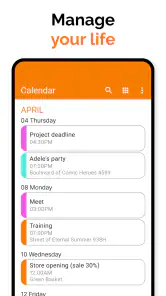
Right off the bat, the installation was smooth sailing. The app is lightweight, so it won’t be hogging your phone’s precious storage space. Once you open it, you’re greeted with a clean, uncluttered interface that’s super easy to navigate. It’s like the developers read my mind and knew I was tired of overly complicated apps.
For readability, the practical question is not whether a calendar looks minimal, but whether its information remains comfortable to distinguish on your own screen. I’d spend a moment choosing a color theme and checking the widget at the size I actually plan to use. A small home-screen widget can be convenient, but it also gives less room to read event details than opening the calendar itself. If you rely on larger text, strong contrast, or a screen reader, test those needs on your device before making this your only calendar; a simple layout alone does not guarantee that every access preference is covered.
You May Like

Clash of Clans Is Won Between the Battles

Android Auto Makes the Case for Quieter Car Software

MobiOffice: Transforming Mobile Productivity with Seamless Integration

EA SPORTS FC™ Mobile Soccer: Redefining Mobile Sports Gaming

How Microsoft OneDrive Became a Mobile Productivity Giant

How Google Translate Breaks Language Barriers Effortlessly
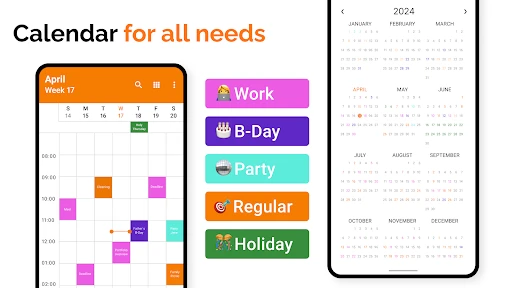
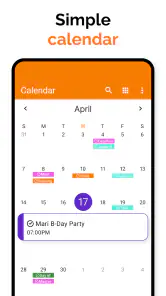
I would also consider how I personally scan a busy stretch of dates. A month view can reveal that several commitments are close together, while a day view is better when I need to check the sequence of one particular date. Rather than treating one view as the best for every situation, I’d use the calendar’s different views to answer different questions: “How full is this week?” is not the same as “What time do I need to leave?” That small distinction makes a simple calendar more useful without adding a complicated planning routine.
Reminders, recurring plans, and useful routines
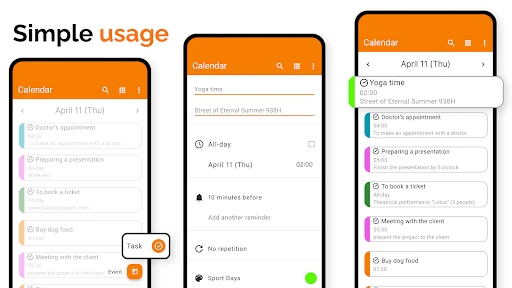
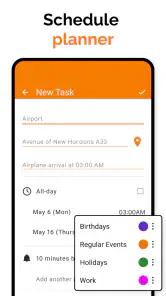
Now, don’t let the name fool you. While it’s called Simple Calendar, it does pack a punch with its features. One of my favorites is the customizable reminders. You can set them to recur daily, weekly, or however you like, which is perfect for keeping track of those pesky recurring tasks.
A helpful way to use recurring reminders is to reserve them for commitments that really repeat, such as a weekly class or a regular appointment, rather than turning every small chore into an alert. That keeps notifications meaningful and makes it easier to notice the ones that need action. For a changing routine, I’d review the next occurrence after editing a repeating event; it is a small habit that can prevent an old schedule from lingering unnoticed.
For example, if I have a standing appointment each week but the time shifts for one particular date, I would check the calendar after making that adjustment rather than assuming the change applies only where I intended. Recurring plans are convenient precisely because they save repeated entry, but that convenience makes a quick review worthwhile whenever the underlying routine changes. I would keep one-off errands as individual events if they do not follow a dependable pattern.
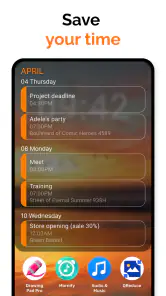
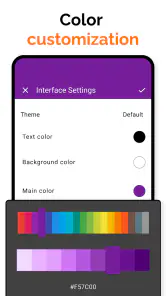
Another nifty feature is the widget support. I love having my calendar events right on my home screen, and the widget from Simple Calendar does just that without looking like a cluttered mess. Plus, if you’re a fan of themes, you’re in for a treat. The app lets you switch up the look with different color themes, which is a nice touch to match your mood or phone theme.
Using it when attention or movement is limited
A home-screen glance can help when I’m carrying groceries, walking between appointments, or trying to keep a conversation going while checking what comes next. In those moments, reducing the number of taps matters more than having an elaborate planning dashboard. The widget is especially useful for a quick look, while the full calendar is a better place to confirm details before I leave.
Motor and sensory needs vary, so I would not assume that one arrangement suits everyone. Themes can help make the display feel more comfortable, but I’d still check whether event colors and text are easy for me to tell apart in bright daylight and in a dim room. If tapping small controls is difficult, try the app with your usual device settings and see whether adding or changing an event feels manageable. Someone who needs extensive accessibility controls or a carefully guided workflow may prefer a calendar that explicitly provides those tools.
There is a useful trade-off here between a quick glance and a careful check. When I am outside or moving between places, the widget can help me remember what is next without opening a full schedule. But I would not rely on a tiny preview to verify a complicated appointment; I’d open the calendar and check the details when I have a moment. That is a realistic way to use a glanceable layout without confusing convenience with complete access to every detail.
Views, syncing, and the trade-offs
Let’s chat about the user experience, shall we? One word: seamless. Adding events is a breeze, and I appreciate how you can easily switch between different calendar views. Whether it’s day, week, or month view, it’s just a tap away. And guess what? No ads! It’s a rare find these days, an app that doesn’t bombard you with ads every two seconds.
For a realistic weekday routine, I might check the month view on Sunday to spot a crowded week, then switch to the day view each morning before heading out. If plans change, the week view gives a useful middle ground for seeing whether a new appointment clashes with nearby commitments. That simple sequence is easier to maintain than repeatedly opening separate notes for dates and times.
Moreover, the sync feature works like a charm. I synced it with my Google Calendar without any hiccups, ensuring I never miss a meeting or appointment. It’s these little things that make Simple Calendar a reliable companion for managing your schedule.
Syncing is important if I use more than one device, but I’d still confirm that a new event appears where I expect before relying on it for a time-sensitive commitment. Compared with a built-in calendar, this app’s appeal is its straightforward feel and widget; a built-in option may be a better fit if I want everything to stay within the phone’s existing tools. Compared with a feature-heavy planner, Simple Calendar is less suited to people who want project boards, task assignments, or a broad team workflow. Its value is keeping ordinary appointments readable and close at hand.
That quick confirmation is particularly sensible when I first connect a calendar or change how I manage events. I’d add a low-stakes appointment, then check that it shows up where I expect before treating the setup as dependable for something important. For someone who mostly uses one phone, a straightforward personal schedule may be enough; for someone who moves between devices or shares plans with others, the best choice depends on how well the existing calendar arrangement fits that routine.
Who will get the most from it
The app has an average rating of 4.6 from around 165,000 ratings, with about 5,000 written reviews and over 10 million installs. Those figures suggest it has found a broad audience, but the right choice still depends on how I use a calendar. I’d recommend trying it if I want a simple personal schedule, recurring reminders, and a widget without a lot of extra planning machinery. I’d skip it in favor of a more specialized tool if I need detailed collaboration, advanced task management, or accessibility options that I have not verified on my own device.
I can picture it working well for someone who wants to check a dentist appointment while getting ready, keep track of a regular class, or glance at the week before agreeing to another commitment. A parent managing personal appointments, a student keeping a straightforward timetable, or someone who prefers a visible home-screen schedule may appreciate the low-friction approach. The common thread is that the calendar is serving one person’s routine rather than acting as a shared command center.
It is less compelling for someone who needs a calendar to manage complicated projects, divide responsibilities across a group, or provide a specific accessibility workflow they depend on. In those cases, a more specialized planner or a built-in calendar already configured to work with the person’s device may be a better starting point. I would make that choice based on the actual tasks and access needs involved, not just on whether the interface looks simple.
A straightforward choice, with a sensible check first
All in all, if you’re searching for a calendar app that does its job without unnecessary bells and whistles, Simple Calendar might just be your new best friend. It’s easy to use, efficient, and gets the job done without any fuss. Give it a try, and you might find yourself wondering how you ever managed your schedule without it. Happy planning!
My practical advice is to begin with one real week: add a fixed appointment, set one recurring reminder, and place the widget where you can comfortably read it. That quick test will show whether its navigation, display, and routine fit your habits before you depend on it for everything. For a clean personal calendar, I find that a fair and useful way to decide.
I’d also use that first week to notice where the app helps and where I still reach for something else. If I can answer “what’s next?” from the widget but need another tool to coordinate a group, that is a useful boundary rather than a failure. A calendar does not need to handle every part of life to be worthwhile; it needs to make the dates I actually depend on easier to manage.
Simple Calendar Frequently Asked Questions
What is Simple Calendar designed to help me do?
Simple Calendar is a productivity app for organizing appointments and plans. Its calendar widget is aimed at Android users who want a schedule at a glance, while its planner and reminder features can help keep upcoming commitments visible. It may be useful if you want a dedicated calendar tool for everyday scheduling rather than a broader collection of productivity features.
How popular is Simple Calendar among users?
Simple Calendar has an average rating of 4.6 from around 165,000 ratings, with about 5,000 written reviews and over 10 million installs. Those figures suggest that many people have tried it, but ratings reflect individual experiences and may not predict whether it will suit your needs. Consider the features and device requirements that matter to you before downloading.
When was Simple Calendar released, and what is its current version?
Simple Calendar was released on June 5, 2016, and its current version is 6.1.1. Knowing the release and version can help you identify the app when comparing calendar tools or checking which edition you are installing. Before downloading, make sure the version offered for your device meets your expectations and that your Android system is compatible.
Is Simple Calendar free to download, and are there any optional purchases?
Simple Calendar is free to download, so you can try it without paying upfront. The app also offers in-app purchases, giving users the option to pay for additional items. If you prefer to keep your calendar use free, review any purchase prompts before confirming them and check the app’s current purchase details in the store.
What devices and Android version do I need to use Simple Calendar?
Simple Calendar is an Android calendar app and requires Android 6.0 or later. It is designed for phone and tablet use, making it a practical option if you want to manage appointments on an Android device. Check your device’s software version before downloading to make sure it meets the requirement.
Pros
- Intuitive and user-friendly interface.
- Customizable themes and colors.
- Syncs seamlessly with Google Calendar.
- Lightweight
- doesn't drain battery.
- No ads to disrupt user experience.
Cons
- Limited advanced features.
- No task management integration.
- Free version lacks some customization.
- No built-in weather forecast.
- Occasional sync delays.
- Category
- Productivity
- Version
- 6.1.1













