Simple Voice Recorder
- 548.00
- 4.4
- Installs
- 1.00M
- Price
- Free
Screenshots

Analysis by Reviewed
I reach for a voice recorder when typing would get in the way: a thought on a walk, a quick reminder between errands, or a detail I want to revisit later. Simple Voice Recorder is built around that small, practical job. It is a free music and audio app from Simple Mobile Tool, and its appeal is the short distance between opening it and capturing a sound. I find that focus useful when speed matters more than a long list of production tools.
From a quick thought to a usable recording
A low-friction start, with a little preparation
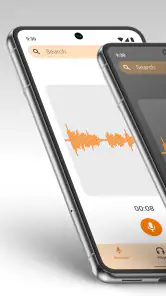
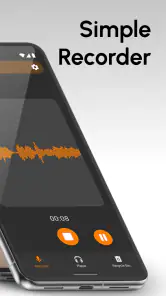
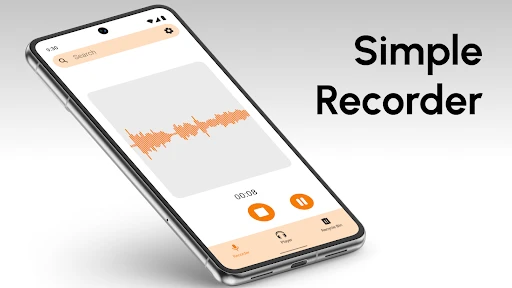
The moment you open the Simple Voice Recorder, you’re greeted with a minimalistic interface that screams simplicity. There’s no clutter, no complicated menus – just a big red button that beckons you to start recording. I love this because it eliminates any distraction and gets straight to the point. You press the button, and boom, you’re recording. It’s as simple as that!
That direct start suits a realistic everyday moment: I might be planning dinner, remember an idea for work, and want to say it aloud before it disappears. For a student, the same quick capture can preserve a reminder after class; for a musician, it can hold a tune before it slips away. I would still take a second to check the phone is ready and positioned sensibly. A recorder can only capture what its microphone picks up, so distance from the speaker and nearby noise matter more than a button can fix.
For a more deliberate capture, I would decide on a short label before I press record: “grocery list,” “lecture follow-up,” or “melody idea” is more useful later than a vague note to myself. If the thought takes several minutes, I would speak the subject plainly at the beginning, then get into the detail. That tiny bit of structure is especially valuable when I have several recordings to revisit, because it gives my future self a clue without needing a transcript.
Simple Voice Recorder has an average rating of 4.4 from around 40,000 ratings, and it has been installed over a million times. It is rated for everyone and works on Android 6.0 or later. The current version is 6.1.1. Those details make it approachable for a wide range of Android users, though the experience described here is about straightforward recording rather than studio production.
Making the recording easier to manage
Now, while the app is simple, it isn't lacking in useful features. One of my favorites is the ability to pause and resume recordings. This might seem trivial, but trust me, when you’re in the middle of a recording and need a quick break, it’s a lifesaver. Another neat feature is the ability to organize recordings into folders. This is super handy for keeping track of different projects or categories, ensuring everything is neat and tidy.
Pausing is especially helpful when a conversation or meeting stops briefly: I can avoid recording a long stretch of silence and keep the useful parts together. Folders pay off once voice notes start accumulating. I would use simple, consistent names for categories—such as errands, study, or music ideas—rather than create a new folder for every tiny task. That small habit makes later browsing less of a scavenger hunt.
More From Our News Desk

Clash of Clans Is Won Between the Battles

Android Auto Makes the Case for Quieter Car Software

MobiOffice: Transforming Mobile Productivity with Seamless Integration

EA SPORTS FC™ Mobile Soccer: Redefining Mobile Sports Gaming

How Microsoft OneDrive Became a Mobile Productivity Giant

How Google Translate Breaks Language Barriers Effortlessly
There is a useful judgment call between one continuous file and several short ones. For an idea that develops in one sitting, a single recording with pauses keeps the thought together. For a set of unrelated reminders, separate clips are easier to identify and share individually. I would split a longer session at natural topic changes instead of stopping every few seconds; too many small files create their own filing chore, while one very long file can make finding a particular detail tedious.
Another practical habit is to treat a recording as unfinished until I have checked it once. A quick playback can reveal that I began speaking too far from the phone, forgot to mention the subject, or captured more room noise than expected. If it is only a fleeting thought, I may not need that extra step. If I am relying on the audio for a class reminder or work detail, the short review is worth the time because it catches an unusable capture before I depend on it.
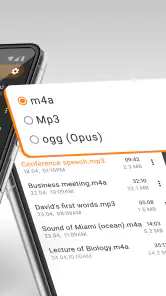
The app also offers different recording formats like MP3 and WAV, giving you flexibility depending on your needs. Whether you're recording a lecture or just a quick voice note, these options ensure you have the right quality and file size. Plus, with the ability to share recordings directly from the app, it’s never been easier to send your audio files to friends or colleagues.
That format choice is a useful trade-off, not a magic quality upgrade: a format cannot make a noisy room sound clean. I’d choose based on what happens next. A compact file is convenient for sending a short reminder, while a format suited to editing may be preferable if I plan to work with the audio elsewhere. Before recording something important, I would make a brief test and play it back, then check that the chosen format and microphone position fit the task.
For routine notes, I would settle on one format and leave it alone rather than reconsider the setting before every capture. Switching formats only makes sense when the destination changes: a quick clip intended for sharing has different priorities from audio I may later edit. If I am unsure, a short test recording is a safer way to judge whether the result is clear enough than assuming a larger or less compressed file will solve a poor recording environment.
Listening back and handing the file off
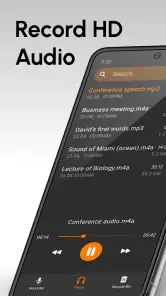
In terms of performance, the Simple Voice Recorder doesn’t disappoint. The recordings are clear, with minimal background noise, which is crucial for anyone using this app for professional purposes. The playback feature is smooth, and with the volume boost option, you won't miss any detail in your recordings.
Playback is where I would turn a rough capture into something useful. After recording a meeting note, I can listen once, identify the key point, and share the file with a colleague if they need the same context. For a class, I might keep the audio as a personal review aid rather than assume it replaces written notes. A spoken recording can be slower to search than text, so pausing to say a clear topic at the start—or recording separate sections—can save time when returning to it.
A realistic handoff might be a short project update recorded after a conversation. I would listen back, make sure the important point is audible, and then share the clip with the person who needs it. If they need to act on a specific detail, I would include a written message explaining what to listen for rather than sending an audio file without context. That small step avoids making the recipient hunt through a recording to discover why it was sent.
Sharing makes the handoff convenient, but it is worth deciding who should receive the audio before sending it. A voice memo can include names, private discussion, or background conversation. I’d listen through the beginning and end before sharing, and choose a suitable recipient rather than treating every recording as automatically ready to forward. For confidential or sensitive conversations, I would first make sure recording and sharing are appropriate.
Once a file has left the recorder, the next step depends on the recipient. Someone who only needs the gist may prefer a brief spoken summary; someone who needs exact wording may need to replay the relevant passage or receive a written note as well. I would not assume that a shared clip will be easy to search or edit in whatever app the other person uses. For a handoff that must be precise, I would name the topic clearly and keep the recording focused enough that its purpose is obvious.
Where a simple recorder reaches its limits
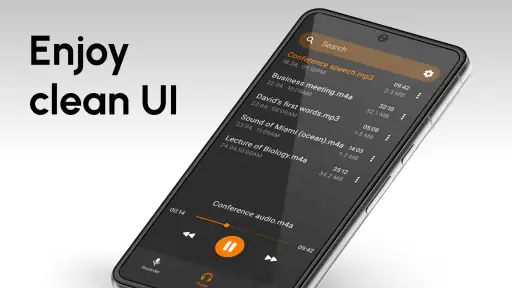
Usability is another area where this app shines. It’s intuitive and user-friendly, making it accessible for everyone, from tech newbies to seasoned pros. The interface is clean, and the settings are straightforward, meaning you spend less time figuring out how to use the app and more time actually recording.
That simplicity also suits people who do not want to learn an editing workflow just to save a reminder. I would recommend it to someone who records occasional thoughts, keeps spoken study prompts, or wants to capture a quick musical idea and listen later. It is less compelling for anyone who expects recordings to become searchable notes, polished interviews, or a shared archive that several people can manage together.
Its straightforward approach is also the key trade-off. If I wanted a transcript, searchable spoken words, multitrack editing, or detailed sound cleanup, I would choose a dedicated transcription or audio-editing tool instead. Those tools can make the next stage of work easier, while this recorder is better suited to capturing and replaying audio without turning a quick note into a production project. It is also not my first pick for a polished interview in a noisy space; careful microphone placement and a quieter setting would matter, and specialist recording equipment may be more appropriate.
Compared with a built-in recorder, the choice comes down to what happens after pressing record. A phone’s basic option may be enough if I only need one-off clips and do not care about sorting them. Here, folders, pause and resume, format choices, playback, and sharing give the recording a more manageable path from capture to reuse. On the other hand, a transcription-focused tool is a better fit when I need to find a sentence by searching words instead of listening through the audio.
It is also worth being realistic about recording other people. Capturing a lecture, interview, or meeting can raise consent and workplace or school rules, so I would check what is acceptable before relying on the app. The tool can save sound, but it cannot decide whether a recording is appropriate to make. For a personal reminder or a melody I am humming alone, that concern is simpler; for shared conversations, the human judgment comes first.
The app is free to install, with in-app purchases ranging from $0.99 to $99.99 per item. I would check the purchase details before confirming anything, especially if I only need basic recording. For someone who wants a simple audio notebook, that keeps the app easy to try; someone who needs advanced editing or a tightly integrated transcription workflow may be happier with a different kind of tool.
A practical fit for everyday audio
To wrap it up, the Simple Voice Recorder is exactly what its name implies – simple and efficient. It strips away the unnecessary complexities found in many other apps and focuses on what’s important: recording high-quality audio with ease. Whether you’re a student, a professional, or just someone who loves to capture audio snippets of life, this app is definitely worth a spot on your device.
For me, its best role is as a dependable first stop, not the whole journey. I can capture an idea, organize it, replay it, and pass it along without opening a more involved audio editor. If a clip grows into something important, I can move it into a specialist tool afterward. That division of labor is sensible: a quick recorder should make capturing easy, while deeper work can happen in software built for it.
Compared with a phone’s built-in recorder, the most useful difference here is the workflow described in the app: pause and resume, sort recordings into folders, choose between formats, play them back, and share them. If those steps match how I handle voice notes, this is a sensible alternative to a barebones recorder. If I mainly need automatic text, collaborative meeting notes, or editing controls, I would look elsewhere rather than expect this app to become a full audio workspace.
One question I would ask before choosing any recorder is whether I need the file to be useful months from now. If the answer is yes, I would make a folder for the subject, use a consistent naming habit, and say enough at the start to identify the clip. If I only need a reminder for the next hour, a quick recording is fine. Matching the amount of organization to the importance of the audio keeps the app convenient instead of turning it into another filing system to maintain.
It is a particularly good fit for someone who prefers speaking to typing, wants a straightforward way to keep audio in categories, and does not need advanced post-production. It is a weaker fit for a person who records long interviews every day, needs automatic transcripts, or expects powerful cleanup tools to rescue audio made in a loud place. In those cases, a more specialized recorder or transcription app is the better starting point, even if it takes more setup.
So next time you need to capture a moment, give the Simple Voice Recorder a try. You won’t be disappointed!
Simple Voice Recorder Frequently Asked Questions
Is Simple Voice Recorder suitable for recording voice memos and everyday audio?
Yes. Simple Voice Recorder is designed to record audio and create memos, making it a straightforward choice for capturing spoken reminders or other everyday sounds. Its focus is on simple recording rather than a full audio-production workflow. If you want an accessible way to save voice notes, its purpose is easy to understand before you begin.
Who develops Simple Voice Recorder, and what kind of app is it?
Simple Voice Recorder is a Music & Audio app developed by Simple Mobile Tool. It is intended for recording audio and creating memos, so it may suit users who want a dedicated recorder rather than a more complex production app. Its content rating is Everyone, making it suitable for a broad audience.
Can I use Simple Voice Recorder on an older Android device?
The app requires Android 6.0 or later. Before downloading, check your device’s Android version to make sure it meets that requirement. If it does, you can consider whether the app’s basic purpose—recording audio and creating memos—matches what you need. It is also sensible to have available storage for the recordings you plan to keep.
Is Simple Voice Recorder free to download, and are there in-app purchases?
Simple Voice Recorder is free to download, so you can try its basic voice-recording experience without paying upfront. The app also offers in-app purchases, with items ranging from $0.99 to $99.99. Check the purchase details shown in the app before confirming anything, especially if you plan to use it for regular recording or want access to additional options.
What is Simple Voice Recorder, and who is it best suited for?
Simple Voice Recorder is a Music & Audio app from Simple Mobile Tool for recording audio and creating memos. Its straightforward purpose makes it a practical option for people who want to capture spoken notes, conversations, or other audio without choosing a more complex production tool. It is rated for Everyone, and its simple focus should suit users looking for an accessible recorder.
Pros
- Easy-to-use interface for quick recordings.
- High-quality audio captures every detail.
- Lightweight app with minimal storage use.
- Supports multiple audio formats.
- Fast sharing options to social media.
Cons
- Lacks advanced editing features.
- No cloud backup for recordings.
- Limited organizational tools.
- Ads can be intrusive for free users.
- No support for stereo recording.

- Category
- Music & Audio
- Version
- 6.1.1