SAP Concur
- 18.59K
- 4.5
- Installs
- 5.00M
- Price
- Free

Screenshots


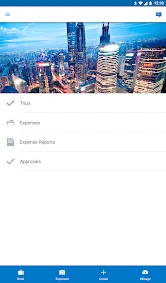
Analysis by Reviewed
My first impression of SAP Concur is that it makes the most sense when travel and expense tasks are already part of an organized workplace process. It is a free business app from SAP SE, and the basic download does not come with a purchase price. That makes it easy to try, but free access to the app is not the same as having every company service or booking arrangement available to every user; the practical value depends on how your organization uses it.
Free to download, but built for a workplace
I would think of the price as a low-friction starting point, not as a promise that the app works independently of an employer. For a work account, you may need company login details and an organization that has set up the relevant Concur services. If you are choosing a tool for yourself, that distinction matters: downloading it costs nothing, but it may not replace a personal trip-planning app or a standalone way to track household spending.
The app has a 4.5 average from around 118,000 ratings, and it has been installed over 5 million times. Those figures suggest that it is widely used, though they cannot tell you whether its workflows match your company’s rules. SAP Concur is rated for Everyone and has been available since 2010; version 10.26.2 is the current version. I would use those details as context, not as a substitute for checking whether your employer supports the features you need.
Where the value comes from in everyday use
For me, the strongest case is not simply that travel and expenses share an app. It is that the work can be kept together: trip planning, receipt capture, transactions, and reporting can sit within a company’s process rather than being scattered across email, camera photos, and a spreadsheet. When that process is configured well, the time saved comes from fewer handoffs and less reconstructing what happened after a trip.
A work trip is where the workflow earns its place
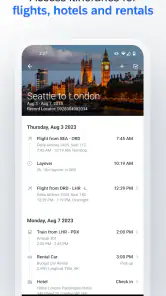
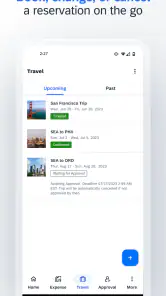
Picture a day with a morning train or flight, a hotel check-in, a meal with a client, and a taxi receipt tucked into a coat pocket. With a company account set up for travel, I can see the appeal of handling the itinerary and keeping expense evidence close to the trip itself. Capturing a receipt while the purchase is still fresh can also make it easier to remember who attended a meal or why a charge was work-related. That small timing habit is more useful than waiting until the end of the month and trying to identify a faded slip.
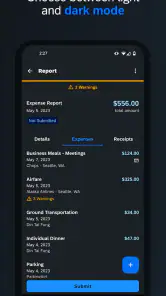
There is a practical trade-off here: an itinerary and an expense report serve different purposes. A booking record helps me understand where I need to be; a receipt or card transaction helps explain what I spent. I would not assume that a booked item automatically becomes a complete expense entry. I would check the report before submitting it, especially for mixed-purpose travel, a changed reservation, or a charge that needs a short business explanation.
Receipt capture rewards a quick review
Receipt scanning can reduce typing, but I would treat recognition as a first draft rather than an unquestionable record. A quick look at the merchant, date, currency, and total is sensible before moving on. This is especially worthwhile after a meal with several items or when a receipt is crumpled, dim, or printed in a format that is hard for a camera to read. Taking the photo soon after paying also helps prevent the common problem of having a transaction but no readable proof to attach.
More From Our News Desk

Weather by Xiaomi Review: Clear at a Glance, Less Clear Up Close

X Under Pressure: Can It Recover When Posting Goes Wrong?

Clash of Clans Is Won Between the Battles

Android Auto Makes the Case for Quieter Car Software

MobiOffice: Transforming Mobile Productivity with Seamless Integration

EA SPORTS FC™ Mobile Soccer: Redefining Mobile Sports Gaming
Card imports can make the workflow more convenient, but they do not remove the need to match charges to the right purpose. If a personal purchase lands near a business transaction, or one trip contains multiple kinds of expense, I would slow down and check each entry rather than assuming that an imported charge is ready to submit. The benefit is organization, not automatic judgment about what an employer will reimburse.
More useful for a team than for a solo traveler
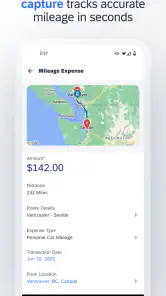
The mileage and invoice tools may matter to people whose jobs involve driving or processing supplier paperwork, while another employee may never need either one. Likewise, connections with business systems can help when a company already relies on SAP ERP, but integration only adds value when the workplace has put the pieces in place. I would ask an administrator which parts are enabled before building a routine around a feature that may not be part of a particular account.
That workplace dependence is also why I would not compare the app only with consumer travel-booking services. A consumer app can be simpler when the goal is to find a personal hotel or keep a private budget. A spreadsheet or notes app can be enough for an occasional receipt. Concur’s stronger argument is the joined-up path from business travel activity to expense reporting and company processes; its weaker argument is convenience for someone who has no organization behind the account.
Who should try it, and who may be happier elsewhere
I would recommend it to employees who travel for work and already have access through their organization, particularly if they submit expenses regularly or need to keep trip details and receipts together. It may also suit finance and operations staff who handle reports, mileage, or invoices as part of a larger workflow. For those users, even a few well-timed receipt captures can make the end-of-trip paperwork less of a memory test.
I would skip it as a personal expense tracker if you do not have a supported work setup, and I would not choose it solely because you want the simplest way to book a holiday. A dedicated consumer travel service may be a better fit for comparing personal plans, while a basic budget tool is likely easier for household spending. The right choice depends less on how many tools appear in the app and more on whether your employer’s process actually uses them.
Getting started without creating extra work
Before relying on it during a trip, I would sign in and check which functions are available to my account, then learn the company’s receipt and report expectations. A short test with an ordinary receipt can show whether the capture flow is comfortable and what details I need to verify. I would also make a habit of checking the report while the trip is still recent, rather than leaving every correction for the final submission.
If you are the person choosing a tool for a team, the questions I would settle first are practical: can employees sign in, which travel and expense steps are enabled, and how does the organization expect reports to be handled? Those answers determine whether the app saves time or merely adds another place to check. For an individual employee, the quickest route is usually to confirm access with the company before planning to use it for bookings or reimbursement paperwork.
My verdict on the value
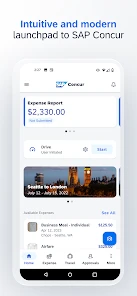
Setting up SAP Concur was a breeze. After downloading it from the app store, the installation process was straightforward. The app guided me through the initial setup with prompts that were easy to follow. You’ll need to have your company’s login details handy if it’s a work-related setup, but once you’re in, the dashboard welcomes you with open arms.
Travel Management on the Go
One of the standout features is the travel management tool. Booking flights, hotels, and even car rentals can all be done within the app. The integration with various service providers means you get a range of options and prices right at your fingertips. It’s like having a travel agency embedded in your phone! Plus, any itinerary changes are updated in real-time, which is a lifesaver during those hectic travel days.
Expense Tracking Made Simple
Now, let’s talk about the expense tracking feature. This is probably the superstar of the app. You can snap photos of receipts, and the app uses OCR technology to pull out the relevant details. It’s surprisingly accurate and saves you from the hassle of manual entry. You can also link your credit cards to import transactions directly, making it super convenient to keep everything organized. At the end of the trip, generating an expense report is as easy as pie.
Integration and Connectivity
The app doesn’t just stop at travel and expenses. It integrates with other tools and platforms, which is incredibly useful if you’re already using systems like SAP ERP. This connectivity ensures that all your data flows seamlessly across platforms, reducing the need for manual data entry and minimizing errors.
SAP Concur also offers a suite of additional features like mileage tracking and invoice management, which might come in handy depending on your role or business needs. The user interface is clean and intuitive, which makes navigation a breeze even for beginners.
Final Thoughts
In a nutshell, SAP Concur is a powerhouse for anyone looking to streamline their travel and expense processes. It’s packed with features that cater to the needs of frequent travelers and finance teams alike. The ability to manage everything from booking to reporting in one place is a game-changer. If managing travel and expenses is a part of your routine, this app is definitely worth checking out.
Whether you’re a road warrior or someone handling the financial ropes of your organization, SAP Concur offers the tools to make life a little easier. Trust me, once you try it, you’ll wonder how you ever managed without it!
SAP Concur Frequently Asked Questions
What is SAP Concur’s current version, and what should I check before installing it?
SAP Concur is a business app developed by SAP SE, and its current version is 10.26.2. Before installing, check that your phone or tablet meets the operating-system requirements for the version you plan to use. The app is intended for managing business travel and expenses, so it is worth checking that your organization uses SAP Concur and that you have a suitable account.
Is SAP Concur available for both Android and iOS?
Yes, SAP Concur is available as a mobile app for Android and iOS. The Android version requires Android 9 or later, so check your device’s software version before downloading. It is designed to help users manage work travel and expenses while away from a computer; access and available options can depend on how an employer has set up its SAP Concur service.
Is SAP Concur free to download, and what devices can run it?
SAP Concur is a free business app from SAP SE, available for Android and iOS. Before downloading, check that your device meets the platform’s minimum operating-system requirement; the Android version requires Android 9 or later. The app is intended to help users manage business travel and expenses while away from their desks, and it may be most useful when your organization already uses SAP Concur.
What is SAP Concur and how does it benefit businesses?
SAP Concur is a comprehensive expense management application that helps businesses automate and streamline their expense reporting, travel bookings, and invoice management processes. By using SAP Concur, companies can gain better visibility into their spending, reduce manual paperwork, improve compliance with company policies, and enhance overall financial efficiency. It also integrates easily with other enterprise systems, making it a versatile solution for any business size.
Is SAP Concur user-friendly for employees who are not tech-savvy?
Yes, SAP Concur is designed with user-friendliness in mind, featuring an intuitive interface that simplifies the process of managing expenses, booking travel, and submitting invoices. The app provides step-by-step guidance and support to users, ensuring that even employees with limited technical skills can easily navigate and utilize the platform effectively, minimizing the need for extensive training.
Pros
- Seamless expense tracking.
- User-friendly interface.
- Integrates with various apps.
- Real-time expense reporting.
- Mobile app for on-the-go use.
Cons
- Can be expensive for small businesses.
- Occasional sync issues.
- Limited customization options.
- Complex setup process.
- Customer support can be slow.
- Category
- Business
- Version
- 10.26.2











