Google’s Find Hub
- 39.45K
- 4.2
- Installs
- 1.00B
- Price
- Free

Screenshots
Analysis by Reviewed
In the first few days, Google Find My Device makes its purpose immediately clear: it gives me a way to look for an Android device when I cannot remember where I left it. That can turn a small, irritating search into a quick check, especially when the phone is nearby but out of sight. The usefulness is less about exploring an app every day and more about knowing where to go when something goes missing.
Where the quick reassurance comes from
One detail worth sorting out before you need it is whether the device is signed in to your Google account. I would check that while everything is calm, rather than waiting until a phone has vanished. It is also sensible to learn where the location and remote actions appear in the interface; a few moments of familiarity can make a stressful search less confusing.
The app is from Google LLC and sits in the tools category. It is free, rated for Everyone, and has been around since December 2013. Its 4.2 average comes from around 1.6 million ratings, while it has passed one billion installs. Those figures suggest broad use, but what matters to me is the practical job: helping a person act when a device is misplaced, not giving them another reason to check their phone all day.
The Latest on Google’s Find Hub
That first-week appeal is real, but it is also brief. Once I understand where to look and how to trigger the useful actions, there is little reason to browse the app for entertainment or routine updates. I see that as a good sign for a utility: it should be easy to understand quickly, then stay out of the way until I need it.
A Handy Tool for the Forgetful
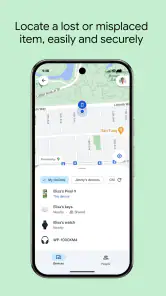
So, what exactly does Google Find My Device offer? In simple terms, this app helps you locate your Android devices in a jiffy. Whether it's hidden under your couch cushions or left at a café, this app's got your back. The setup is pretty straightforward. You just need to make sure your device is logged into your Google account, and voilà, you’re all set!
Before relying on it, I would test the workflow with a calm, practical check: make sure the account is accessible from another device and that I know how I would reach the finding tool if my phone were the missing one. This is not about repeatedly testing every button. It is about avoiding the awkward discovery, during an actual search, that I cannot remember the account details or where to begin.
Features That Stand Out
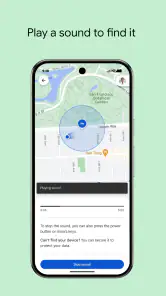
One of my favorite features is the real-time location tracking. Just hop onto the app, and it’ll show you your device's current location on a map. And if your phone's on silent mode (because who doesn't forget to switch it back?), you can remotely make it ring at full volume. It's like a digital game of Marco Polo!
More From Our News Desk

X Under Pressure: Can It Recover When Posting Goes Wrong?

Clash of Clans Is Won Between the Battles

Android Auto Makes the Case for Quieter Car Software

MobiOffice: Transforming Mobile Productivity with Seamless Integration

EA SPORTS FC™ Mobile Soccer: Redefining Mobile Sports Gaming

How Microsoft OneDrive Became a Mobile Productivity Giant
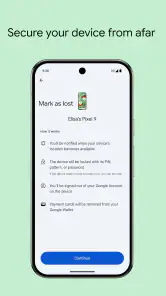
Another neat feature is the ability to lock your device remotely. If you're worried someone might get their hands on your personal data, just lock it up with a custom message and contact number. It's a nice touch that gives you some peace of mind.
A useful judgment call is choosing the action that fits the situation instead of treating the map as the whole solution. If I am still at home, ringing the phone may settle the search faster than studying a location marker. If I left it in a public place, I would think first about protecting access and then about contacting the venue or retracing my route. The app helps me decide what to try; it does not replace those real-world steps.
I would also avoid turning location checks into a reflex. A map can narrow down the search, but repeatedly refreshing it will not make an uncertain situation certain. I find the more useful habit is to check once, interpret what it can tell me, and act accordingly: search nearby, ask someone at the place, or secure the device when recovery feels less likely.
Ease of Use
The user interface is clean and intuitive. Even if you’re not tech-savvy, you’ll find your way around in no time. The app is designed to be user-friendly, so you won't be left scratching your head trying to figure out where to click. Plus, it's super lightweight, so it won't hog up your phone’s precious storage space.
The simplest way to make that ease count is to prepare before a stressful moment. I would make sure I can sign in to the relevant Google account from another device and keep the account recovery route in mind. That small piece of preparation matters more than memorizing every screen, because finding a lost phone is not much help if I cannot get into the account needed to begin the search.
When a map is not the whole answer
I treat the map as a clue, not a promise that a phone is exactly where the marker appears. If it points toward a café, I would first check the obvious places and ask staff rather than assuming the device is still sitting in view. And if the phone may be in someone else’s hands, locking it is a more useful first move than repeatedly refreshing the location.
That distinction also helps when deciding whether this is the right tool. For a phone lost at home, the ring action is often more practical than a map. For a device left behind outside, location and locking become more relevant, while physically retracing your steps or contacting the venue may still be necessary. The app can guide a response; it cannot retrieve the device for you.
There is an important limit to keep in mind: a location display should not be treated like a live view of the phone’s surroundings. It can help me choose an area to search, but I still need to judge whether that place makes sense and what is safe to do next. If a marker suggests a private or unfamiliar location, I would not confront anyone or enter somewhere I should not; I would use sensible local help instead.
For a phone that may have been stolen, the priority changes from “where is it?” to “how do I reduce risk?” In that situation, the remote lock is more useful than repeatedly trying to get closer to a location. I would also use ordinary precautions such as contacting the relevant venue or authorities when appropriate. Find My Device supports a response, but it is not a substitute for personal safety or a guarantee of recovery.
Who will keep it installed
This suits Android owners who want a straightforward recovery option ready before a bad moment, particularly people who carry their phone between home, work, and public places. A realistic routine is to notice the phone missing on the way out, borrow another device, check its location, then ring it if it seems nearby or lock it if the situation looks less safe. That is a useful workflow to understand in advance, not something I would want to learn while panicking.
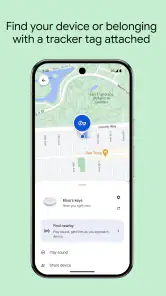
If you rarely misplace your phone and already rely on another established device-finding setup, a separate app may feel redundant. It is also not a general-purpose tracker for keeping tabs on people: its role is device recovery, and location sharing with friends and family is a distinct use. For a lost object that is not itself a supported device, a dedicated item-finding option may be a better fit.
There is a difference between finding a phone and keeping up with someone’s location over time. If my main need is coordinating with family, I would choose a service designed around ongoing location sharing rather than treating a lost-device tool as a family check-in app. Conversely, if I mostly lose keys or a bag, a small item tracker is usually the more suitable category. The right choice depends on what goes missing most often, not on which app has the broadest name.
It is also a better fit for people who are willing to keep their Google account usable and remember a few basic steps. Someone who does not want to depend on that account, or who needs one recovery system to cover a mixed collection of devices from different ecosystems, may prefer a platform-neutral approach. I would not install it expecting it to solve every device-recovery problem regardless of what the missing item is.
My Personal Take
In my opinion, this app is a must-have for anyone with an Android device. It’s reliable and does exactly what it promises. I’ve had my fair share of panic attacks thinking I lost my phone, and Google Find My Device has always come to the rescue. It's like having a trusty sidekick who’s always on duty.
That recommendation comes with a practical caveat: I would call it a sensible safety net, not an infallible recovery service. A phone can be somewhere awkward to reach, and a map cannot tell me whether it is under a pile of laundry, behind a counter, or in a place I should not approach. The value is in giving me a useful next step, not in removing every uncertainty.
Why it may fade into the background
Its lasting value comes from being prepared, not from opening it regularly. I would keep the account setup in order and remember the basic steps, then let the app stay quiet until a real need comes up. That low-maintenance role is a strength, although the app cannot eliminate the uncertainty of searching for something that may have been moved, switched off, or left somewhere inaccessible.
Compared with searching manually or using a phone’s ordinary calling function, a map and remote ring can save time when the device is out of sight or silent. For broader location sharing, a service built around ongoing contact with family may be more convenient; for a non-phone item, a dedicated tracker is more appropriate. I would not install this expecting a daily destination or a complete answer to every lost-property problem.
Maintenance is mostly about keeping the basics dependable rather than tending to the app every week. I would make sure I still know which Google account is connected to the phone and can access that account from somewhere else. If I change phones or accounts, that is a good moment to revisit the setup instead of assuming the old arrangement still applies. This is a small task, but it is the difference between a tool that is ready and one I merely think is ready.
The fatigue risk is low because the app does not need to become part of my daily routine. The more likely frustration is forgetting it exists until I am already stressed, or expecting it to locate something that is not a phone. I would not keep checking it to feel reassured when nothing is missing; that turns a quiet emergency tool into another source of needless attention.
Its recurring value is easiest to judge against ordinary alternatives. Calling my own phone works when it is nearby, powered on, and able to ring, but it is less helpful if I cannot reach it or it is silent. Searching by memory costs nothing, yet can become slow when I have moved through several places. A dedicated tracker can make more sense for keys or other belongings, while an ongoing location-sharing service is better for people. Find My Device earns its place in the narrower job of helping me respond to a missing Android device.
To wrap it up, if you often find yourself asking, "Where’s my phone?", this app is your answer. It’s efficient, straightforward, and a real stress-buster. So go ahead and give it a whirl. Trust me, you’ll wonder how you ever lived without it!
For me, the lasting verdict is simple: I would keep it available because the cost in attention is tiny and the potential usefulness at the right moment is high. It is not something I expect to open every month, and that is precisely why preparation matters more than frequent use. If you want a practical way to search for an Android phone and understand its limits, it deserves a quiet place in your toolkit. If your real need is tracking people or everyday objects, choose a tool built for that job instead.
Google’s Find Hub Frequently Asked Questions
Can I download Google Find Hub on iOS as well as Android?
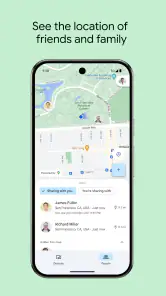
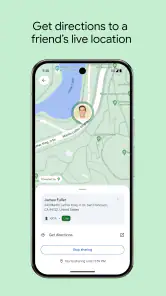
Google Find Hub is Google’s app for finding devices and other items, with location sharing for friends and family. Before downloading, check that the app is available for your device and that you can sign in to the Google account you plan to use. Its focus is Google’s device-finding and location-sharing features, so it may not replace services built into another mobile platform.
Who makes Google Find Hub, and what is it mainly designed to do?
Google LLC develops Find Hub, a tools app centered on finding devices and other items and sharing location with friends and family. That makes it useful for people who want a single place to access those functions through Google. It is not presented as a general phone-cleaning or performance-boosting app; its value depends on whether you need help locating things or sharing your location.
Can I use Google Find Hub to share my location with friends or family?
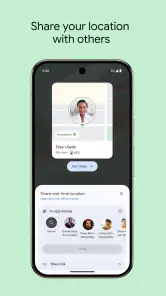
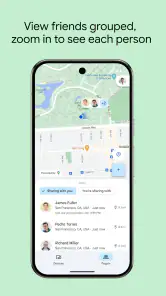
Yes. Google Find Hub supports location sharing with friends and family, in addition to helping you find devices and other items. It can be useful when you want people you trust to see your location, while the device-finding features address a different need. Before using either feature, make sure you are signed in to the Google account you intend to use.
What can I find with Google Find Hub besides my phone?
Google Find Hub is intended for finding devices and other items, as well as sharing location with friends and family. That makes it relevant not only when you misplace a phone, but also when you want to check on other items supported by the app. Its central purpose is locating things and managing location sharing, rather than serving as a general-purpose device maintenance tool.
Is Google Find Hub free, and what should I know before downloading it?
Google Find Hub is free to download and use. It is a tools app developed by Google LLC, and it is available for everyone. Its main purpose is to help find devices and other items and share location with friends and family, so consider whether those are the features you need before installing it. The app is also known as Google Find My Device.
Pros
- Helps locate lost devices quickly
- Remote device lock for security
- Erase device data remotely
- User-friendly interface
- Battery level tracking
Cons
- Requires internet connection
- Limited to Google account devices
- No offline tracking support
- Location accuracy varies
- Drains battery if constantly running
- Category
- Tools
- Version
- Varies with device









